Hi!
@allaboutapps > sign was converted to – http://i.imgur.com/IDXRZQ3.png in Quick CSS field. Fixed it and it works fine now. Please review your website
@anebang Please go to Enfold theme options > Header > Mobile Menu > Header Mobile Menu activation and choose 990px.
Cheers!
Yigit
Hey wieslander!
Have you tried adding the widget using Widget Area element in Advanced Layout Builder?
You can enable debugging mode to see shortcodes you have created in pages using Advanced Layout Builder – http://kriesi.at/documentation/enfold/enable-advanced-layout-builder-debug/
You can switch to Default Editor and click on Magic Wand to see full list of shortcodes http://i.imgur.com/n4KXkdm.jpg
then you can create any of them and copy/paste shortcode into any other content element or into text widget.
Cheers!
Yigit
Hi jansthh!
Please add following code to Quick CSS in Enfold theme options under General Styling tab
h1, h2, h3, h4, h5, h6 { text-decoration: inherit!important; }
Regards,
Yigit
Hey Prescott!
Can you post the link to your website please?
Also see – http://kriesi.at/documentation/enfold/change-icon-used-for-standard-theme-elements/
Best regards,
Yigit
Hi christianbak!
Please go to Appearance > Menus and check “Enfold main menu” under Menu Settings and search icon should be displayed. If not, please go to Enfold theme options > Header > Extra Elements and make sure that “Append search icon to main menu” is checked
Best regards,
Yigit
Hi!
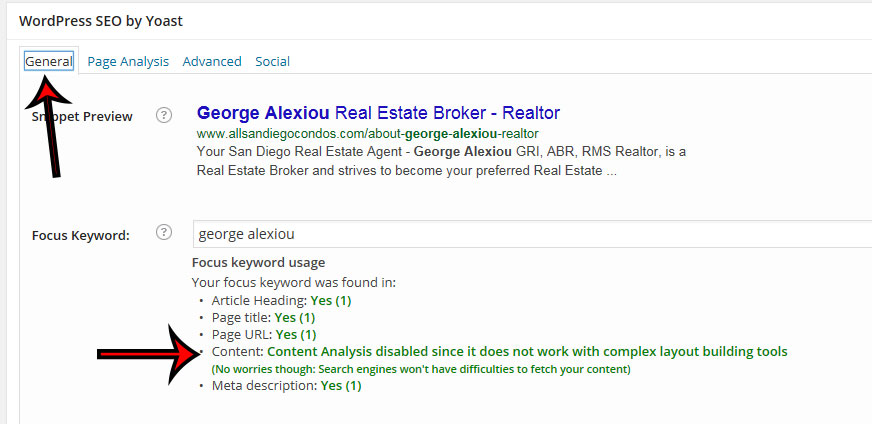
The warning occurs because I have added it to the template builder. The problem is that there is no way for the SEO plugin to properly fetch the content of the advanced layout builder. That does not mean that the plugin does not work with the theme. It just means that it can’t tell you right away in your backend about the content that has been used. Basically all that is disabled is counting the number of keywords in your backend and showing it to you.
It will work fine in the frontend and google will see every bit of content as well as the enhancements provided by the SEO plugin :)
Regards,
Kriesi
PS: If that wasn’t clear: thats a message we display on purpose. Its a feature not a bug. If we wouldn’t do that you would always see a zero.
-
This reply was modified 11 years, 6 months ago by
 Kriesi.
Hi,
I updated from version 2.72 version 3.02,
- Now an error message shows up on all pages (see below) except the home page,
- The advanced layout editor is still broken.
Fatal error:</strong> Call to undefined function kriesi_backlink() in /home/konak1/public_html/pancho/wp-content/themes/enfold/footer.php on line 82
This is a very straightforward and simple installation of enfold, only 2 plug-ins and no customization outside of the enfold admin area.Child theme is not in use.
Here is the update procedure I used
- Create a test copy of site installation
- download v3.02 WordPress only zip file from Envato
- unzip contents
- turn off all plug-ins and set WordPress theme to default
- upload entire new version 3.02, overlaying existing files and folders to destination folder via FTP
- reactivate plugins
- activate theme
The second problem of the Advanced Layout Editor (ALE) not working started when I updated WordPress to version 4.0.
I did not notice that Enfold 2.7 and WordPress 4.0 were not compatible until later.
The incompatibility is that the ALE will not load (spinning load icon) and if the page is in Default mode, none of the buttons or hyperlinks work (Screen options & Add media button for example)
Here is the live site: http://PanchosLeftys.com enfold 2.7 WP.4.0
Here is test site: http://konakiko.net/pancho enfold 3.02 WP.4.0
As it stands now, this site can not be modified via the text editor.
I can provide login credentials for both sites, if that will help
-
This topic was modified 11 years, 6 months ago by
 Bryan.
Enfold, fantastic theme. OK, I have created a Color Section with an image in it. Can someone please tell me how to make that color section and image a hyperlink to another page/website.
As a temporary workaround for issue #1 (updating existing images breaks page), I enabled debug mode for Advanced Layout Editor. Now when adding/updating images on existing pages, we simply remove any instances of [/av_image] before saving and all is well.
This a pretty ridiculous workaround to say the least, so hopefully the lovely Kriesi developers are able to offer a real fix shortly.
For anyone interested in the mentioned workaround, see this link: http://kriesi.at/documentation/enfold/enable-advanced-layout-builder-debug/
Hi!
Please add following code to Quick CSS in Enfold theme options under General Styling tab
@media only screen and (max-width: 1140px) {
.av-main-nav > li > a { padding: 0 7px; }}
Cheers!
Yigit
Hi Paul!
please update Enfold and WordPress to the newest version.
Regards,
Andy
Hi connect4consulting!
Please add following code to Quick CSS in Enfold theme options under General Styling tab
#header form#searchform { z-index: 999; }
Best regards,
Yigit
Hi,
I love your themes. Love the flexibility.
I put the search bar into the header area but it doesn’t seem to work – I can’t type in that area. I’ve done this on other child theme sites of Enfold. Can you help me? What am I doing wrong?
Thanks,
Gabe
Hey BetuwePC!
Yes, you can host your own videos and upload them in Media > Library and use them on Enfold
Best regards,
Yigit
Warning: session_start() [function.session-start]: open(/tmp/sess_f55b787ce61ac417bc196af7a0f25126, O_RDWR) failed: Permission denied (13) in /home/xxxx/public_html/wp-content/themes/enfold/config-templatebuilder/avia-shortcodes/masonry_entries.php on line 32
Warning: session_start() [function.session-start]: Cannot send session cache limiter – headers already sent (output started at /home/xxxx/public_html/wp-content/themes/enfold/config-templatebuilder/avia-shortcodes/masonry_entries.php:32) in /home/xxxxx/public_html/wp-content/themes/enfold/config-templatebuilder/avia-shortcodes/masonry_entries.php on line 32
If I try to log in, there are even more.
I have ZERO plug ins installed.
I have replaced both WordPress and Enfold via FTP.
I have not visited the site in about 5 days so have changed nothing.
Hey laurarabell!
Please go to Enfold theme options > General Layout and change the layout width as needed and flush browser cache. If issue remains, please post the link to your website.
Regards,
Yigit
Hey!
Please add following code to Quick CSS in Enfold theme options under General Styling tab
.main_menu ul:first-child > li a {
height: 95px;
}
Best regards,
Yigit
Does Enfold has an .mo file for Hebrew?
Ok, so I actually got it to work with a relative URL, as long as the files are — as you advise — in the wp-content folder, rather than within the themes/enfold-child/css/ folder, as it was just prior.
I’ve added this to styles.css in my child theme, rather than custom.css or quick.css. I suppose it doesn’t matter, but is one preferable to the other?
Here’s the code, which I suppose is FYI at this point:
@font-face {
	font-family: 'VerbCond Light Italic';
	src: url(/wp-content/webfonts/verbcond-light-italic.eot);
	src: url(/wp-content/webfonts/verbcond-light-italic.eot?#iefix) format('embedded-opentype'),
	     url(/wp-content/webfonts/verbcond-light-italic.woff) format('woff'),
	     url(/wp-content/webfonts/verbcond-light-italic.ttf) format('truetype'),
	     url(/wp-content/webfonts/verbcond-light-italic.svg#ywftsvg) format('svg');
	font-weight: normal;
	font-style: normal;	}
I tried to add a favicon to my site through the enfold uploader and the ico format won’t work. I tried a png (16×16) and it worked.
Is the ico format not working now?
I typically use http://www.favicon.cc/ or http://favicon-generator.org/ to create the favicon and have not had any troubles until now.
Thanks.
We use the theme internal on private server for training website.
Is it possible to host own .mp4 or .m4v documents and play them with enfold ?
Hi,
I’m wondering if it’s possible to use different blog layouts for different categories on Enfold?
For example, what I’d like to achieve is the same thing you can see on the Enfold demo here:
http://kriesi.at/themedemo/?theme=enfold
Main Menu > Blog > Masonry, Multi Author, Single Author, etc.
Each one of those entries has a different layout, how do I duplicate this and assign each layout to a category?
Thanks!
Hello.
I asked this question before, then solved it myself, but after upgrading Enfold + WordPress the changes I made were overwritten and I can’t figure out what I did before.
The main menu drop down is hanging too far below the main menu.
http://www.kairoscanada.org/test/who-we-are/
Thanks
Nik
Hi!
@fichtenelch: Thanks for confirming that the sidebar issue is non-existent. If possible, please stick to your own thread. :)
@brian7454: Please download the latest version 3.0.2 from your themeforest account then update the theme via FTP. Remove all sidebar customization including filter, hooks on functions.php and any column, grid, container css width modifications. Please refer to this link for more info: http://kriesi.at/documentation/enfold/updating-your-theme-files/
If you’re worried about messing up the site, you can create a test site first. Let us know if the pages with sidebar are broken.
Regards,
Ismael
Hey prayaga!
Thank you for using Enfold.
Can you please provide the link to the actual page? The previous and next events navigation is still there. You can find it on top of the calendar right below the events search field.
Cheers!
Ismael
Hi heufti65!
Thank you for using Enfold.
No, regretfully, this is not possible yet without major modification on the archive.php file. Unfortunately, this particular request or modification is more than what we can offer as a support team. For further modifications, please hire a freelance developer or visit Envato Studio or Werkpress. You can also vote or post a request on our Feature Requests page.
If you have any further questions about the theme, we are more than happy to provide you with assistance on these inquiries. Thank you for your understanding.
Best regards,
Ismael
Hy!
I am using Enfold for http://moldova.adventist.ro/ and I have a problem also with responsive layerslide. In desktop version the slideshow is working fine, but below 800px resolution, the slideshow is displaying a shrinked image – not all the surface of the slideshow. This makes not all the buttons to be visible.
If you can check and see what is causing this, many thanks.
Iostar DeSign