Hey,
I think it would be better to use Phone Info field in Enfold theme options > Header > Extra Elements instead of secondary menu. So you can make the phone number linked :)
Best regards,
Yigit
Hi,
I’m trying to customize the Tab section on a website using the instructions from the Enfold documentation at https://kriesi.at/documentation/enfold/tab-sections/#toggle-id-1
I would like the tab section to appear similar to what is shown on https://kriesi.at/themes/enfold-2017/elements/tab-section/ A screenshot of what I’m trying to achieve can be seen at https://snipboard.io/KrHgwW.jpg
The problem I’m having is when I use the CSS from the Tabs Section documentation (shown below) it doesn’t work for me. I’m using Enfold v 5.3 with PHP 8.0. and only a security plugin is enabled at this time. A link to the page is in the private content. Thank you.
/*—————————————-
// Tabs Element Styling
//————————————–*/
/* Tab icon size */
span.av-tab-section-icon:before {
font-size: 76px!important;
}
/* Tabs */
#top .tabcontainer .tab {
background: #27618d;
color: #eeeeee;
border: none!important;
}
#top .tabcontainer .tab:hover {
color: #ffffff!important;
}
/* Active tab */
#top .tabcontainer .active_tab {
background: #ffffff!important;
color: #000;
border: none!important;
}
/*Active tab on hover*/
#top .tabcontainer .tab.active_tab:hover {
color: inherit!important;
}
/* tab content */
#top .tabcontainer .tab_content.active_tab_content {
background: #ffffff!important;/*border:none!important;*/
}
Hi,
When I was checking console output for errors and warnings in on my Enfold page I could see that on page which has Google Maps enabled it throws following warning:
util.js:67 Google Maps JavaScript API warning: RetiredVersion https://developers.google.com/maps/documentation/javascript/error-messages#retired-version
lna @ util.js:67
Is this a bug in Enfold where you’re using old API?
Thanks
Hi,
When I did pagespeed today on my page (after upgrade to 5.3) following is reported to my report (Array.isArray + babel/plugin-transform-classes)
Avoid serving legacy JavaScript to modern browsers
Polyfills and transforms enable legacy browsers to use new JavaScript features. However, many aren't necessary for modern browsers. For your bundled JavaScript, adopt a modern script deployment strategy using module/nomodule feature detection to reduce the amount of code shipped to modern browsers, while retaining support for legacy browsers.

Potential Savings
…js/avia.min.js?ver=5.3 - 6.6 KiB - …js/avia.min.js?ver=5.3:1:16 = Array.isArray
…mediaelement/mediaelement-and-player.min.js?ver=4.2.17 - 0.1 KiB -…mediaelement/mediaelement-and-player.min.js?ver=4.2.17:12:12531 =
@babel/plugin-transform-classes
Can you please check if Enfold is using some legacy Javascript or why this would be reported?
Thanks
Hi,
If you use the Simple Image Sizes plugin you can change the size of the shop catalog images, there is no option to change this in the theme.
Your first screenshot is from WordPress ▸ Dashboard ▸ Settings ▸ Media ▸ Media Settings ▸ Image sizes, it is not a WooCommerce setting, you probably meant WordPress instead of WooCommerce, I just wanted to make sure we are talking about the same setting, and yes that is correct.
The default shop catalog image size is 450×450, when I check my Shop Demo with the latest Enfold and WooCommerce none of my images changed after the last update and the only difference I see in sizes are
woocommerce_thumbnail 300×300
woocommerce_single 600×0
and yours are:
woocommerce_thumbnail 600×0
woocommerce_single 800×0
So your woocommerce_thumbnail are twice the size as the default, try right-clicking on your shop images that look cropped and open the image in a new tab and see if the whole image shows or if the image is actually cropped.
I would think that even if the image is twice the size the image would scale down to show the whole image as the thumbnail, so I believe that your image is actually cropped and if so the only way to fixed it would be to regenerate the thumbnails again without cropping. Cropping is the default setting for woocommerce_thumbnail image.
Best regards,
Mike
Hello everyone,
For those who are interested, you can download the <u>latest version</u> of the Italian language
Download here
Translation: Italian language
Version: Enfold 5.3
Released on: 14th December 2022
Strings: 6062
All translations are synchronised with the source files
Regards
Luigi
Dear Enfold-Team,
in your documentation about the accordion element you are suggesting for reproducing your styles (e.g. accordion style-2) “to copy the shortcode and CSS”:
https://kriesi.at/documentation/enfold/accordion/#toggle-id-67
Unfortunately the CSS is not displayed in my browsers, I can only see the shortcode. See screenshot (link below).
What can I do to get the CSS for accordion style-2?
Many thanks and best regards,
Patrick
Hey,
Thanks for contacting us!
Have you referred to this post to generate your Personal Token – https://kriesi.at/documentation/enfold/theme-registration/#how-to-generate-a-envato-personal-token? If not, please create a new one and make sure to check all required permissions :)
Best regards,
Yigit
Hi,
You are welcome! :)
For your information, you can take a look at Enfold documentation here – https://kriesi.at/documentation/enfold/
If you have any other questions or issues, feel free to start a new thread under Enfold sub forum and we will gladly try to help you :)
Enjoy the rest of your day!
Best regards,
Yigit
Hi,
You are welcome, Harsh! :)
For your information, you can take a look at Enfold documentation here – https://kriesi.at/documentation/enfold/
If you have any other questions or issues, feel free to start a new thread under Enfold sub forum and we will gladly try to help you :)
Enjoy the rest of your day!
Best regards,
Yigit
Hi,
Thanks for contacting us!
Please add following code to Quick CSS field in Enfold theme options > General Styling tab
.main_color blockquote {
  border-color: green;
}
Best regards,
Yigit
Hi,
Thanks for contacting us!
Please add following code to Quick CSS field in Enfold theme options > General Styling tab
#top .alasveto .toggle_content {
  color: #000 !important;
}
Best regards,
Yigit
Hey,
Please go to Enfold theme options > Header and choose “Logo center, menu below” option and then add following code to bottom of Quick CSS
.html_header_top.html_logo_center .logo {
  left: 0;
  -webkit-transform: none;
  -ms-transform: none;
  transform: none;
}
Regards,
Yigit
Hi Marcus,
Thanks for contacting us!
I think in your case using “Phone Number Or Small Info Text” field to add your text and number would be better.
1- Please add following code to Quick CSS field in Enfold theme options > General Styling tab
.phone-info {
  font-size: 14px;
}
2- Please insert your phone number as following
<a href="tel:0412121212">tel:0412121212</a>
Regards,
Yigit
Hi,
In that case, you can go to Enfold theme options > Header > Transparency Options to change transparent menu colors :)
Regards,
Yigit
Hi,
You are welcome! :)
For your information, you can take a look at Enfold documentation here – https://kriesi.at/documentation/enfold/
If you have any other questions or issues, feel free to start a new thread under Enfold sub forum and we will gladly try to help you :)
Happy holidays!
Best regards,
Yigit
Hey Enfold
I’m trying to change the color of the buttons border, which is now white.
The color should be #af7e34, which is the color stated in the general styling under Main content and Alternate content, but this doesn’t help.
In the settings of the button I don’t see an option to change the color of the border, but maybe I’m overseeing is
Please tell where I can make the change.
Please see image with the button here.
https://imgur.com/PaDQAzy
Thx & Best regards
Lene
Hi Steffie,
Thanks for the information.
You are currently using a very old version of Enfold. Could you please refer to this post – https://kriesi.at/documentation/enfold/theme-update/ and update Enfold to the latest version 5.3?
Best regards,
Yigit
Hey,
Thanks for contacting us!
Please add following code to Quick CSS field in Enfold theme options > General Styling tab
@media only screen and (max-width: 480px) {
.responsive #top .avia-content-slider-element-container.av-lbn0b5he-07ee0683f0e575456fadb1c7c7649766 .slide-entry.flex_column {
  width: 100% !important;
  margin-left: 0 !important;
  margin-top: 10px !important;
}}
Best regards,
Yigit
Hey Enfold
I’m trying the change the font color of the main menu navigation.
In the advanced styling I picked “Main menu links” but this didn’t help.
Which element should be used?
Thx
&
Best regards
Lene Sachs
Hi,
Could you please firstly update Enfold to the latest version 5.3?
Best regards,
Yigit
Hi,
Glad we were able to help, if you have any further questions please create a new thread and we will gladly try to help you. Thank you for using Enfold.
Best regards,
Mike
Hi Rikard,
Just briefly to your info: you were (almost) right – the error was not due to ENFOLD, nor was it due to my website. When I switched from PHP 7 to 8, the hoster’s web server indicated that PHP 8 was set. However, the conversion did not work for the website, it was still running on PHP 7 and was therefore not configured… That’s why WooCommerce no longer worked.
Thanks anyway for your support!
Best regards,
Lutz
Hi,
I have set up a row with 3 columns. In the configuration i gave them the same height en vertical align to the bottom. Is it possible to align the first element (title and description) to the top of the column?
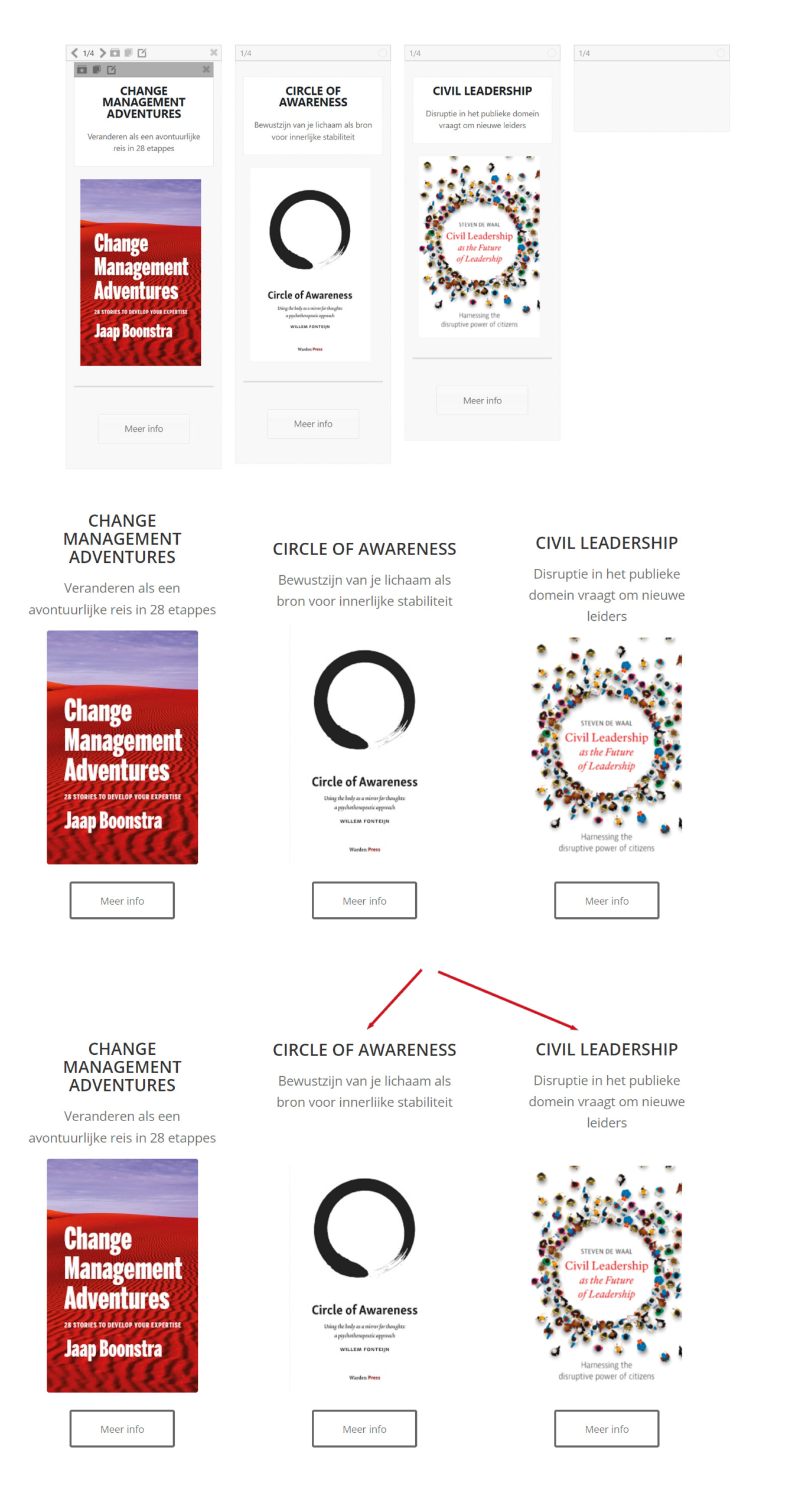
Thanks!
Best regards, Rogier
Hi Ismael, thank you for your answer. I just uploaded screenshot of the
-last working setup of the server
-debug log file
You will see: first I deactivated all plugins and switched to PHP 8. There was a fatal error, because of the enfold-child function.php
Then I disabled enfold child and switched to PHP 8. The website works without problems.
Then I enabled woocommerce and the website went wrong again.
Please tell me, if you´d need more information.
All best Gunnar
Hi,
I see that you are running an old version of the theme, could you try to update to the latest version (5.2.1) to see if that helps please? The update to 5.2.1 has to be done manually from the version you are running, please refer to my replies in this thread: https://kriesi.at/support/topic/enfold-4-5-theme-update-update-failed-download-failed-a-valid-url-was-not-pro/#post-1021541
You can either update manually via FTP: https://kriesi.at/documentation/enfold/how-to-install-enfold-theme/#theme-update, or use a plugin to upload the theme zip file: https://wordpress.org/plugins/update-theme-and-plugins-from-zip-file/
If that doesn’t work then please try to delete the whole theme folder, then replace it with the new version. Make sure that you have backups of the site before starting updating.
Also please read this after you have updated: https://kriesi.at/documentation/enfold/theme-registration/
Best regards,
Rikard
Hi there :)
On the Coming Soon page there is a white enfold logo, I have tried changing it to my logo in the default editor without success. It just keeps reverting back to the enfold white logo.
Please inform me how to change this to my own logo or remove it.
Great theme so far, Thank you!
CC
Hello there, awesome Enfold support team,
I’m having a small issue that I hope you could help with. I’ve built a single page website and use the menu to jump to specific spots on the page. However, as I scroll down (or up) the page, the menu items do not highlight to match the current page placement. Can you please take a look and tell me what I did wrong?
FYI I switched my site to the Cubit theme, which is why it is now visible: https://actfourscreenplays.com. But this is NOT how it should look. I want Enfold back! Can someone help me? Email me and quote me a rate for both 1) restoring my Enfold theme up to date and getting it back online, or 2) Migrating my whole site to a new provider/host and getting it up and running. I’m interested in paying for one of those options, depending on price. Thank you!
My site has gone from bad to worse over the past week as I’ve been tooling around in the backend and in my host’s File Manager trying to fix errors and my provider updated my PHP. The current mess can be found here: https://actfourscreenplays.com (it used to show a bunch of error messages, now I’m just seeing a blank white screen!)
My provider (asmallorange.com) told me they updated PHP last week to 7.4.32 (https://actfourscreenplays.com/phpinfo.php) but I may have screwed that up by replacing the config.php file today with Enfold’s latest file and deleting the old one?
At this point, unless someone here can offer an easy solution to get my site back online, I’d like to just pay someone to fix it for me. I think re-installing Enfold would be the best first step? I have a link to the Recovery admin page, hopefully you can do that from there.
PLEASE REFER ME TO A PROFESSIONAL asap — I’ve tried to contact Enfold support but they are backlogged. It’s been days now and no reply other than “we’re busy, have patience.”
Thank you!
Dan ( (Email address hidden if logged out) )
-
This topic was modified 3 years, 3 months ago by
 dinotheme99.



