
-
AuthorSearch Results
-
January 23, 2023 at 12:38 pm #1394772
In reply to: disable categories in breadcrumb navigation
Hi,
Glad we were able to help, if you have any further questions please create a new thread and we will gladly try to help you. Thank you for using Enfold.Best regards,
MikeJanuary 23, 2023 at 12:37 pm #1394770In reply to: table columns at the end on one line
Hi,
Glad we were able to help, if you have any further questions please create a new thread and we will gladly try to help you. Thank you for using Enfold.Best regards,
MikeJanuary 23, 2023 at 10:56 am #1394754In reply to: Layer Slider not working Version 5.3.1.1
Brilliant, thanks for your help, Mike. And this is why I have Enfold across almost all 50+ client accounts
January 23, 2023 at 7:43 am #1394737In reply to: Adjustment of the Portfolio Category page
Hi Ismael,
2) perfect, thank you
3) screenshot here: https://mtsakademie.cz/report/Enfold_Portfolio_Category_wrong-sorting.pdfBr,
ZdenekJanuary 22, 2023 at 10:47 pm #1394719In reply to: table columns at the end on one line
Hey rixi,
Thank you for the link to your site, to make the cells in all of your tables equal height for this one page only try adding this code to the end of your child theme functions.php file in Appearance ▸ Editor:function equal_height_table_cells() { ?> <script> window.addEventListener('DOMContentLoaded', function() { (function($){ $('#top.page-id-1292 .avia-pricing-table-container').each(function(){ var $columns = $('li',this); var maxHeight = Math.max.apply(Math, $columns.map(function(){ return $(this).height(); }).get()); $columns.height(maxHeight); }); })(jQuery); }); </script> <?php } add_action('wp_footer', 'equal_height_table_cells');and add this css to your Enfold Theme Options ▸ General Styling ▸ Quick CSS field to center the text in the cells:
#top.page-id-1292 .avia-pricing-table-container li {
   align-items: center;
   display: flex;
   justify-content: center;
}
After applying the css, please clear your browser cache and check.
Please ensure to copy the code from the forum and not an email notification so the symbols are not converted.
Please see the screenshot in the Private Content area of the expected results.Best regards,
MikeJanuary 22, 2023 at 10:19 pm #1394716In reply to: Button hover styles
Hi,
Glad we were able to help, if you have any further questions please create a new thread and we will gladly try to help you. Thank you for using Enfold.Best regards,
MikeJanuary 22, 2023 at 8:35 pm #1394714In reply to: Notification bar on top
Hi,
Thank you for your patience and the link to your site, I changed the function to show the widget in the header that was in your child theme functions.php to this:add_action( 'ava_main_header', 'enfold_customization_header_widget_area' ); function enfold_customization_header_widget_area() { dynamic_sidebar( 'header' ); }and then I added this function in your child theme functions.php to move the notification area above the top bar:
function add_top_notification_widget() { ?>
  <script>
window.addEventListener('DOMContentLoaded', function() {
(function($) {
     $('#header_main .widget').detach().insertBefore('#header_meta');
})(jQuery);
});
</script>
  <?php
}
add_action('wp_footer', 'add_top_notification_widget');
and I added this css to your child theme stylesheet:
/* Notification bar */
.responsive #top #header .widget>div {
    display: flex;
    justify-content: center;
    align-items: center;
    align-self: center;
    line-height: 14px;
    padding: 0 10px;
    background: gold;
    width: 100vw;
    position: relative;
    z-index: 1;
    left: 50%;
    transform: translateX(-50%);
}
.responsive #top #header .widget>div>p {
	margin: 0;
    padding: 7px;
}
.responsive #top #header .widget {
	padding:  0;
}
and after clearing your cache this is the result:

I was not sure if you wanted it to show because you had the widget hidden, so I hid it when I was done, so please un-hide to check.

Best regards,
MikeJanuary 22, 2023 at 8:28 pm #1394713That’s the URL I found:
https://help.market.envato.com/hc/en-us/requests
That is what I wrote:
Howdy,
the dropdown choose possibilty is not that what I’m looking for.
Here is the description of the problem:
I have bought the Enfold – Responsive Multi-Purpose Theme 13 times till yet, 3 times in 2022, all others before.
I use this theme to build websites for clients. All three Enfold licenses from 2022 cannot be updated, all those I bought before 2022 can still be updated (I know this because I still maintain some customer websites).
I compared the permissions I set for the personal tokens, I see no difference, I haven’t changed the settings on my Envato Accounts either. The contact to the support of the Enfold team did not yield any result so far.
I have no idea what can be wrong?
Thanks a lot for supporting me.January 22, 2023 at 7:37 pm #1394711Hi Ismael,
Sorry for the late reply. Now Corona had reached me too.
The problem is still not solved.
I don’t understand what’s wrong with my envato account, because I haven’t changed anything there. I also have service contracts with some of my clients and update their websites for them. All Enfold licenses from 2021 and earlier will work. The permissions are the same as for the 3 purchased licenses from 2022.
I compared that.
I have no more ideas.
StefanJanuary 22, 2023 at 7:14 pm #1394709In reply to: Button hover styles
Hi,
Please try adding this css to your Enfold Theme Options ▸ General Styling ▸ Quick CSS field:#top #main .small-button a:hover .avia-button.avia-color-light { border: none; opacity: 0; }After applying the css, please clear your browser cache and check.
Best regards,
MikeJanuary 22, 2023 at 5:10 pm #1394708In reply to: How to Bold Text in Tables
Hi,
Glad we were able to help, if you have any further questions please create a new thread and we will gladly try to help you. Thank you for using Enfold.Best regards,
MikeJanuary 22, 2023 at 5:09 pm #1394707Hi,
Glad we were able to help, if you have any further questions please create a new thread and we will gladly try to help you. Thank you for using Enfold.Best regards,
MikeJanuary 22, 2023 at 5:01 pm #1394706In reply to: TikTok Icon Social Media Buttons
Hey lauragrashoff,
The TikTok icon is not available on Fontello.com so you need to create it by finding an SVG and converting it on Fontello to create the icon font

The icon font will be black and white a colored SVG won’t work. But if you find a png with a transparent background then you can convert it here. For example I found a TikTok icon here and downloaded it as a SVG and then uploaded it to Fontello which converted it for me. This is the fontello-tiktok.zip file I’m using in this example.
Then to create the TikTok social profile follow the steps outlined here in our documentation.
For example, I added this code to the end of my child theme functions.php file in Appearance ▸ Editor, If you are not using a child theme I recommend the WPcode plugin this plugin supports PHP code snippets, JavaScript code snippets, & CSS code snippets and allows you to export and import your custom code snippets to other sites that you may have or as a backup.function avia_add_custom_icon($icons) { $icons['tiktok'] = array( 'font' =>'fontello', 'icon' => 'ue800'); return $icons; } add_filter('avf_default_icons','avia_add_custom_icon', 10, 1); function avia_add_custom_social_icon($icons) { $icons['TikTok'] = 'tiktok'; return $icons; } add_filter('avf_social_icons_options','avia_add_custom_social_icon', 10, 1); add_filter('avia_social_share_link_arguments', 'avia_add_social_share_link_arguments', 10, 1); function avia_add_social_share_link_arguments($args){ $tiktok = array('tiktok' => array("encode"=>true, "encode_urls"=>false, "pattern" => "https://www.tiktok.com/", 'label' => __("Share on TikTok",'avia_framework'))); $args = array_merge($tiktok, $args); return $args; }Then I enabled it at Enfold Theme Options ▸ Social Profiles ▸ Your social profiles
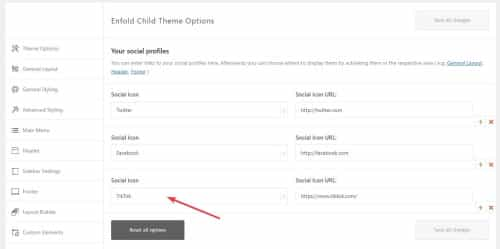
Now it shows on the frontend:

Now to add the on mouse-over color add this css to your Enfold Theme Options ▸ General Styling ▸ Quick CSS field:#top #wrap_all .av-social-link-tiktok:hover a{ color:#fff; background-color:#00f2ea; }Now go to the theme options Enfold Theme Options ▸ Blog Layout ▸ Profile Links At The Bottom Of Your Blog Post and enable the TikTok item:

and now on blog posts when the share box shows TikTok will be included:

Best regards,
MikeJanuary 22, 2023 at 3:26 pm #1394702In reply to: Souci version PHP
Hey jetsaveurs.com,
Thank you for the link to your site, the errors above are from WordPress files and not the theme, I’m not sure why you would see these errors but I’m running Enfold on PHP v8.1 with no issues or warnings. I also don’t see any warning on your site in the source code, so I don’t know why you would see these in the dashboard.
Try disabling your plugins. If that resolves the issue, reactivate each one individually until you find the cause.Best regards,
MikeJanuary 22, 2023 at 3:04 pm #1394700Hey Vera,
Thanks for your patience and the link to your site I have checked with my browser Dev Tools and my Android device and the solution seems to be working, please see the screenshot in the Private Content area. You could try changing the wait time for the script to work, it was set to 300 milliseconds

try changing it to 500, or 700, or 900 all of which is still less than a second.
If this doesn’t help addconsole.log("click");to it so we can see if it is consistently clicking, it will add a message to the browser console log.
This is how you would add it:function custom_portfolio_tab_click() { ?> <script> window.addEventListener('DOMContentLoaded', function() { (function($) { if ($(window).width() < 768) { setTimeout(function(){ $("#top.single-portfolio #av-tab-section-1").find('a.av-active-tab-title').trigger("click"); console.log("click"); },500); } else {} }(jQuery)); }); </script> <?php } add_action('wp_footer', 'custom_portfolio_tab_click');Best regards,
MikeJanuary 22, 2023 at 2:38 pm #1394699In reply to: How to Bold Text in Tables
Hi,
Thank you for your question, according to our documentation the Special Character Translation plugin only supports:###lt### => < ###gt### => > ###91### => [ ###93### =>']If you want to add the amp you can edit the plugin and add this code after the others after line 45:
'###amp###' => '&'
or uninstall and delete the plugin from your site and install this custom one instead.
If this doesn’t change your amp please link to it so we can help with some css.Best regards,
MikeJanuary 22, 2023 at 2:09 pm #1394698In reply to: Open modal on button click stopped working
Hi,
Glad Guenni007 could help, thank you Guenni007, if you have any further questions please create a new thread and we will gladly try to help you. Thank you for using Enfold.Best regards,
MikeJanuary 22, 2023 at 11:46 am #1394693In reply to: format tables
Hi,
Great, I’m glad that Mike could help you out. I’ll close this thread for now then, please open a new thread if you should have any further questions or problems.
Best regards,
RikardJanuary 22, 2023 at 11:45 am #1394692Hi,
Thanks for that. Please try the following in Quick CSS under Enfold->General Styling:
.av_header_transparency nav.main_menu li:hover {
  background-color: #8ad3f2;
}
Best regards,
RikardJanuary 22, 2023 at 8:42 am #1394683In reply to: Please contribute and translate Enfold
January 22, 2023 at 4:36 am #1394682In reply to: Enfold Shop Template on Mobile – No filter options
Hey Jason,
Thanks for your question, on our demo site I don’t see any shop filters in the mobile menu, only links to pages, the filters are in the shop page below the header:

This is the basic woocommerce shop page, there are no elements added to this page, the filters are automatic and the page is set at WooCommerce ▸ Products ▸ Shop pagesBest regards,
MikeJanuary 22, 2023 at 4:03 am #1394681In reply to: disable categories in breadcrumb navigation
Hey annevoelkel,
To remove that category from the breadcrumbs please use code to the end of your child theme functions.php file in Appearance ▸ Editor:add_filter( 'avia_breadcrumbs_trail', 'remove_category_from_breadcrumb', 50, 2, ); function remove_category_from_breadcrumb( $trail, $args ) { if ( is_single() ) { unset ($trail[2]); } return $trail; }Without this function the breadcrumbs will show the category:

With the function the category is removed:

Best regards,
MikeJanuary 22, 2023 at 3:53 am #1394680In reply to: Team members name above image?
Hi,
Thanks Chris but it would be better to open a new thread since your site is in maintenance mode and we will need a login to view you page and the layout. Since this is not your thread posting your login here will not be private and you will not see anything we write in the Private Content area. Thanks for understanding.Best regards,
MikeJanuary 22, 2023 at 3:45 am #1394677In reply to: Open modal on button click stopped working
Hi,
Thanks for helping Guenni007, elsmore01 if you have any further questions about this please let us know.
Otherwise, if you what to open a new topic we will gladly try to help you.Best regards,
MikeJanuary 22, 2023 at 3:37 am #1394676In reply to: Font Awesome on Enfold
Hi,
I have summited this as a feature request, if you have any further questions please create a new thread and we will gladly try to help you. Thank you for using Enfold.Best regards,
MikeJanuary 22, 2023 at 3:20 am #1394671In reply to: Icon List Colors not changing
Hi,
To update your version of Enfold you will need to download the latest installable WP version from your Theme Forest account and upload it to your WordPress ▸ Appearance ▸ Themes ▸ Add Themes ▸ Add New

after you choose the zip file and click install, you will see a This theme is already installed message because you are updating, you can continue

then you will see the Theme updated successfully message.

After you update you will need to go to your Theme Forest account and create a new Token for future updates.Best regards,
MikeJanuary 22, 2023 at 3:08 am #1394670In reply to: Make portfolio grid the same height
Hey engage24,
Thanks for your patience and the link to your site, to make all of the titles in the portfolio grids the same height I added this code to the end of your child theme functions.php file in Appearance ▸ Editor:function equal_height_portfolio_grid_titles() { ?> <script> window.addEventListener('DOMContentLoaded', function() { (function($){ $('#av-sc-portfolio-1 .grid-sort-container').each(function(){ var $columns = $('.grid-entry-title',this); var maxHeight = Math.max.apply(Math, $columns.map(function(){ return $(this).height(); }).get()); $columns.height(maxHeight); }); })(jQuery); }); </script> <?php } add_action('wp_footer', 'equal_height_portfolio_grid_titles');and this css in your Enfold Theme Options ▸ General Styling ▸ Quick CSS field to center the titles:
.grid-entry-title {
   align-items: center;
   display: flex;
   justify-content: center;
}
This is the result:

Please clear your browser cache and check.Best regards,
MikeJanuary 21, 2023 at 10:41 pm #1394662In reply to: Flipbox – minimum height not work
Hi,
Glad Ismael could help, if you have any further questions please create a new thread and we will gladly try to help you. Thank you for using Enfold.Best regards,
MikeJanuary 21, 2023 at 10:39 pm #1394661In reply to: Flip Box Grid
Hi,
@sarthakchoudhary I tried to create a 3 flip box row as an example to understand what you want to achieve in regrades to “space” between the flip boxes, I used the Inverse Layout to show the backsides and due to the padding they seem to have space between them.

If I add a background color it then seems like there is no space:.avia-icongrid-flipback { background-color: lightgray; }
To give it some space in this situation change the margin like this:.avia-icongrid-numrow-3 .av-icon-cell-item { flex: 0 1 32%; }
If this doesn’t help please explain with more detail and link to a test page and perhaps a screenshot would help.Best regards,
MikeJanuary 21, 2023 at 10:04 pm #1394660Hi,
If the Revolution Slider is set to Full-Screen it will be full height even if you pick a different height, so choose Full-Width and set 600px height for it to work, I did this for you.

If you don’t want the boxes to move then don’t use the Parallax Rules setting, I see that you are not using this on your new set of boxes, but to have it over your slider you still need to your the negative margin in the Rows Margin in the first column like we explained above, I did this for you and hide the original columns that you are not using.

Please clear your browser cache and check.Best regards,
Mike -
AuthorSearch Results


