Hello Enfold Team,
I have three videos that automatically play on my home page. The controls for these also pop up immediately and don’t disappear until I hover over them. I would like this to be the opposite: the controls are hidden until I hover over them.
Any help you can provide is greatly appreciated.
-James
these rules here are added after the quick css entries :
remove please the last rule in your quick css:
.responsive .container {
  max-width: 1130px;
}
this is better done on Enfold – General Layout – Dimensions done:

but on some reasons the grid.css rule and layout.css rules for container width do not take effect.
There must be an error on a rule concerning to @media only screen and (min-width: 768px) and (max-width: 989px) {
Guess a mod hat o login to your page to see where it comes from.
Hi,
This is the Enfold Advertising Area widget

Best regards,
Mike
Hi,
Glad Guenni007 could help, thank you Guenni007, if you have any further questions please create a new thread and we will gladly try to help you. Thank you for using Enfold.
Best regards,
Mike
Hi,
Glad we were able to help, if you have any further questions please create a new thread and we will gladly try to help you. Thank you for using Enfold.
Best regards,
Mike
Hi,
Thank you for sharing the solution.
I added it to our compatibility class Avia_Relevanssi for next release 5.5
In case you want to check it please replace enfold\config-relevanssi\class-avia-relevanssi.php with
https://github.com/KriesiMedia/enfold-library/blob/master/temp_fixes/Enfold_5_4_1/config-relevanssi/class-avia-relevanssi.php
Best regards,
Günter
so maybe he has a customisation to get frontside background-image. On former times i do have a script for that too.
so now i know that this is the fact. – Remove your custom script – And those extraimages on the flipbox content. All is now possible in the ALB itself.
You can even change the order of showing. You can decide to show first backside and on hover the front is shown.
here are some possibilities – very nice is the tooltip now: https://enfold.webers-webdesign.de/gridflip/
Ok – i use for generating the webfonts the transfonter: https://transfonter.org/
Fontsquirrel downloaded zip is not the one to upload ( inside that zip there is a folder specimen_files ) etc. pp.
you had to open that zip – and extract only the needed fonts ( woff, woff2, ttf etc. pp.) and nothing else ( no folders nor css ) – put them in a meaningfull folder ( see nomenklatura hint above ) and zip that folder for uploading it to enfold.
Guess you are working on Mac Devices – and zip files with the system integrated option or a third party app.
First to mention is – compress without those little extra files OSX provides with meta data on desktop etc.
Better Zip f.e. got an option called zip for PC.
But apart from that, if you had prepared the fonts correctly, only one more glyphic font would have been included – (Enfold just tries to interpret these extra files).
Next Info: The naming in that Enfold Font Manger is the name of the folder before zip it. ( green underline )
The font-family name is independent on that – and will be generated by the font-file names ( red underline )
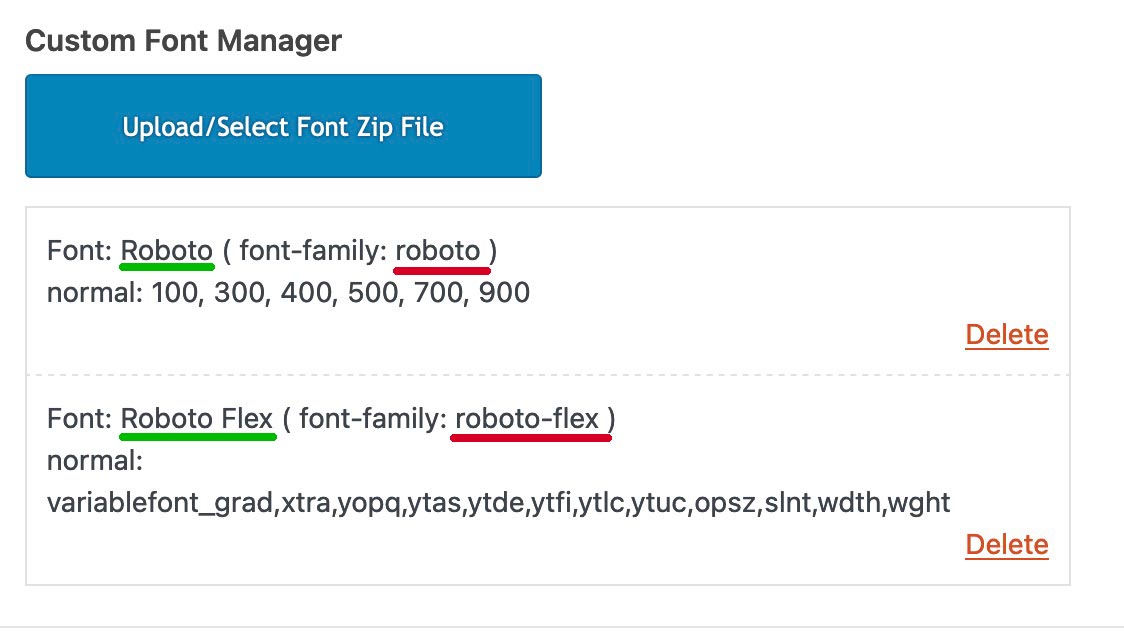
So my assumption is that you did something wrong when preparing the folder and zipping it.
Hi Stefan,
I’m glad that Yigit could help you :)
Thanks for using Enfold and have a great day!
Best regards,
Nikko
Hi jsharpripple,
I have disabled Javascript File Merging And Compression in Enfold > Performance and that seems to have fixed the issue.
Please review your site.
Best regards,
Nikko
Hi tonyiatridis,
Please add this CSS code in Enfold > General Styling > Quick CSS:
#top #js_sort_items a.active_sort {
    font-weight: bold;
}
Hope it helps.
Best regards,
Nikko
Hi Jonathon,
Thanks for contacting us!
We only provide support to our registered users.
Please register to our support forum first– https://kriesi.at/support/register/ and start new threads under Enfold sub forum.
Best regards,
Nikko
Hi Eve,
I have added those three fonts you mentioned.
You can verify it is added in Enfold > Import/Export > Custom Font Manager.
Also, you can see those three fonts mentioned in General Styling, Advanced Styling and other options that shows a font family dropdown.
Best regards,
Nikko
Hi markmade,
I’m glad that we could help you :)
Thanks for using Enfold and have a great day!
Best regards,
Nikko
Hey yifatcohen,
Thank you for the inquiry.
We cannot make them the whole image fit inside the cell without distorting them, but we can adjust the position of the images in the container so that the people in the images are still visible on smaller screens. Please add this css code.
@media only screen and (max-width: 767px) {
  /* Add your Mobile Styles here */
  .flex_cell.av-le91a6f2-cd0064c34a2eb0c0e4fb89716913af3d {
    background-position: 80% 50%;
  }

  .flex_cell.av-le91fnk5-3cbf18b8d7d0e7a627d01cc3162d2670 {
    background-position: 80% 50%;
  }
}
You may need to toggle or temporarily disable the Enfold > Performance > File Compression settings afterwards.
Best regards,
Ismael
Hi Alex,
I’m glad that Mike could help you :)
Thanks for using Enfold and have a great day!
Best regards,
Nikko
Hi silvia,
Please try to add this CSS code in Enfold > General Styling > Quick CSS:
#top #header.av_header_sticky .av-hamburger-inner,
#top #header.av_header_sticky .av-hamburger-inner:before,
#top #header.av_header_sticky .av-hamburger-inner:after {
    background-color: #999;
}
Let us know if it helps.
Best regards,
Nikko
Hi markmade,
Please add this CSS code in Enfold > General Styling > Quick CSS:
#top .avia-content-slider .slide-content .slide-entry-excerpt {
    border-top: 1px solid white;
    padding-top: 16px;
    max-width: 400px;
    margin-left: auto;
    margin-right: auto;
}
Best regards,
Nikko
Hi mvi,
Thanks for providing the login link, it seems the reason for the issue you are having on your site is this code:
#top #desktop-header .av-section-video-bg iframe, #top #desktop-header .av-section-video-bg embed, #top #desktop-header .av-section-video-bg object, #top #desktop-header .av-section-video-bg video {
    height: 1070.4375px;
    top: -282.71875px;
}
I could not find it in common location for custom CSS.
Clearing cache does not seem to fix it nor disabling plugins and switching themes.
To fix it, I have added this CSS code in Enfold > General Styling > Quick CSS:
#top #desktop-header .av-section-video-bg video {
    top: 0 !important;
}
Please review your site.
Best regards,
Nikko
Hi JannyPolak,
I’m glad that Mike could help you :)
Thanks for using Enfold and have a great day!
Best regards,
Nikko
 Jonathon Parris
Guest
Hi,
My enfold theme seems to be adding quotes around my code block div css names. Can you help?
This is the code I originally used:
<div class=”sc1_wrapper”>
<div class=“sc1_load-btn-wrapper”>
<div class=“sc1_load-btn”>
Load Demo #1
</div>
</div>
<div class=”sc1_bg-wrapper”>
<div class=”sc1_glass-wrapper”>
<div class=”sc1_attck-wrapper”>
<div class=”sc1_title-wrapper”>
</div>
</div>
</div>
</div>
</div>
This is the code that works:
<div class=sc1_wrapper>
<div class=sc1_load-btn-wrapper>
<div class=sc1_load-btn>
Load Demo #1
</div>
</div>
<div class=sc1_bg-wrapper>
<div class=sc1_glass-wrapper>
<div class=sc1_attck-wrapper>
<div class=sc1_title-wrapper>
</div>
</div>
</div>
</div>
</div>
You’ll notice in the second code there are no quotes after class declaration.
Can you help?
you are welcome. by the way Günter main developer here on enfold is planing an input field for shrink amount.
So it will be easier on future versions.
Hello Enfold support team,
First and foremost, thank you for all your help.
I want to customize the accordion functionality on one of my websites. Specifically, I want to remove the line between the header and the content when the item is expanded. I searched through your documentation and tried looking for direction on this but came up short. Can you please point me in the right direction?
I provided an admin username, password, and the website URL in the private content box.
-James
Hi,
Thanks for the link to your page, when I check the cell items are horizontally centered:

so i assume that you wanted them also vertically centered, if so please add this css:
#main .avia-table td {
vertical-align: middle;
}
This is the expected results:

After applying the css, please clear your browser cache and check.
Best regards,
Mike
Hey kisys,
Thanks for the link to your site, I’m not able to reproduce this error on my test site, I see you are using a plugin: woo-variation-gallery
does the error occur when you disable the plugin, or any of your other plugins?
Have you tried changing to the WooCommerce 3.0 product gallery at Enfold Theme Options ▸ Shop Options ▸ Product gallery perhaps the plugin requires it.
Best regards,
Mike
Hi,
Glad Rikard could help, if you have any further questions please create a new thread and we will gladly try to help you. Thank you for using Enfold.
Best regards,
Mike
Hi,
Thanks for the login, I found in the /enfold/functions.php there was a custom function added to the end with curly quotes instead of straight quotes, I corrected for you.
I also found that you are gettings a CORS error because your font is called from http://www.bopart.com to http://bopart.com, so to correct I removed the font Jura from your Enfold Theme Options ▸ Import/Export ▸ Custom Font Manager and then added it back.
Now the error is not showing and the font is, please clear your browser cache and check.
Best regards,
Mike
Hey James,
You will very likely run into problems. The theme, WordPress and PHP versions are all very old.
Please try to update WordPress first of all, then your PHP version to 8.x. Then please follow this:
The update to 5.4.1 has to be done manually from the version you are running, please refer to my replies in this thread: https://kriesi.at/support/topic/enfold-4-5-theme-update-update-failed-download-failed-a-valid-url-was-not-pro/#post-1021541
You can either update manually via FTP: https://kriesi.at/documentation/enfold/how-to-install-enfold-theme/#theme-update, or use a plugin to upload the theme zip file: https://wordpress.org/plugins/update-theme-and-plugins-from-zip-file/
If that doesn’t work then please try to delete the whole theme folder, then replace it with the new version. Make sure that you have backups of the site before starting updating.
Also please read this after you have updated: https://kriesi.at/documentation/enfold/theme-registration/
Best regards,
Rikard



