Hey tom_on_wheels,
According to Events Calendar documentation Creating Venue and Organizer Pages you must use the Events Calendar Pro for Venues and Organizers to have their own pages.

This is why you can not view your Venues and Organizers pages directly and why they can’t be linked to.
Best regards,
Mike
Hi,
Thanks for the link to your page, as I understand the issue on mobile the 3 grid row cells with only background images for the columns Communicate, Reach, & Convert
are very small and don’t show the full background image, this is because background images don’t have a height to add to the element.
Try adding a separator/whitespace element to the empty cells with the background image and set a height you wish for mobile.

Best regards,
Mike
Hi,
Perhaps I’m not understanding how to recreate the issue, I added a grid element with no borders to a page with 3 cells, in each cell I added a column with a column link, and in each column, I added a text element:

I added background colors to the grid cells and columns to highlight any borders, but I see none:

My test page
Best regards,
Mike
Hi,
Glad Ismael could help, if you have any further questions please create a new thread and we will gladly try to help you. Thank you for using Enfold.
Best regards,
Mike
Hey areaoperativa,
Thanks for your question, are you seeing the language switcher menu option?
You should see the option for the flags:

If not please include an admin login in the Private Content area so we can be of more assistance.
Best regards,
Mike
Hi,
Thanks for the link to your page, it looks like you are using the Masonry Gallery with 4 columns, you should be able to choose 1 column like this:

if not please include an admin login in the Private Content area so we can be of more assistance.
Best regards,
Mike
Hi,
Thanks for the login and your patience, I found that your contact form was inside a column element on your iframe page, I removed this and added this css to remove the top & bottom padding from the iframe page and make the popup 100vh to remove the scroll bar.
Please note that if your screen size is smaller than the content the scrollbar will show, for example some of your screenshots look like a mobile device in landscape mode and the whole contact form doesn’t show, in this case the scrollbar is needed so the user can see the whole form.
#top.page-id-1870 .template-page {
padding: 0;
}
div.mfp-iframe-scaler  {
  height: 100vh !important;
  width: 100vw !important;
  }
.mfp-iframe-scaler iframe {
    width: 90% !important;
    height: 81% !important;
}

Best regards,
Mike
Hi,
Glad we were able to help, if you have any further questions please create a new thread and we will gladly try to help you. Thank you for using Enfold.
Best regards,
Mike
Thanks Guenni007, yes I use Enfold’s built-in post slider.
Rikard please look at the page and the problem
Hi,
Thank you for your patience and the login, for better control of the sliders I changed the visibility of the layers in both the mobile and desktop versions so the layers are visible on all sizes.
To control which slider will show I adjusted the LayerSlider ▸ Project Settings ▸ Mobile ▸ Hide Over / Hide Under, looking at your previous settings it seemed like you wanted the mobile version to also be the tablet version, so for the mobile slider I set it to Hide Over 1439px:

and for the desktop slider I set it to Hide Under 1439px:

Now there are no empty spaces where one or the other slider should show, please clear your browser cache and check.
Best regards,
Mike
i’m participant as you – so i do not see private content messages.
But you can inspect your page in developer tools of your browser – if on html tag the languages are present for each of your translated pages

then the enfold lang files will be taken to this corresponding setting. I work with WPML a long time – and i do know that they will place it in that manner.
And you are shure that this read more link comes from enfold – and not from a third party plugin?
So sorry – then you had to wait til a mod looks into your page.
if you do not declare a menu as “enfold main menu” or for using a child theme : “enfold child main menu” – the automatically generated WordPress menu will be shown. And this is a menu with ( i hope only ) first level pages. – never tested it.
So to have influence on the menu items – you had to make your own menu.
Create a new menu – name it as you like and declare it as main menu.
Adding items to that menu – you can drag and drop those items to a position. If you pull them under a different page and a little more to the right – there will be shown a place where you can drop them. From now on this will be a second-level item in your menu. etc. pp.
Drag them back to the left side will set them as 1st level Menu-item.
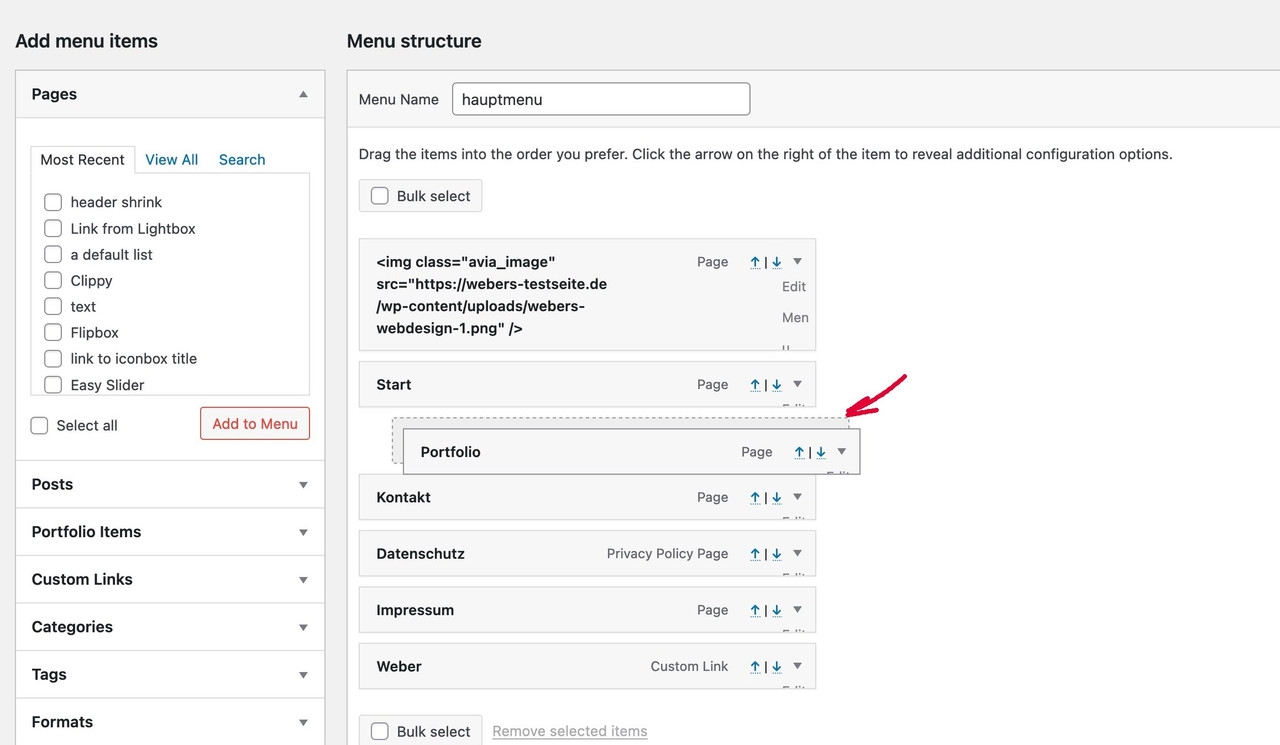
Enfold got another option – this is called “use as mega menu” – you can see that – if you are opening the menu-item on the right side by clicking that littel triangle.
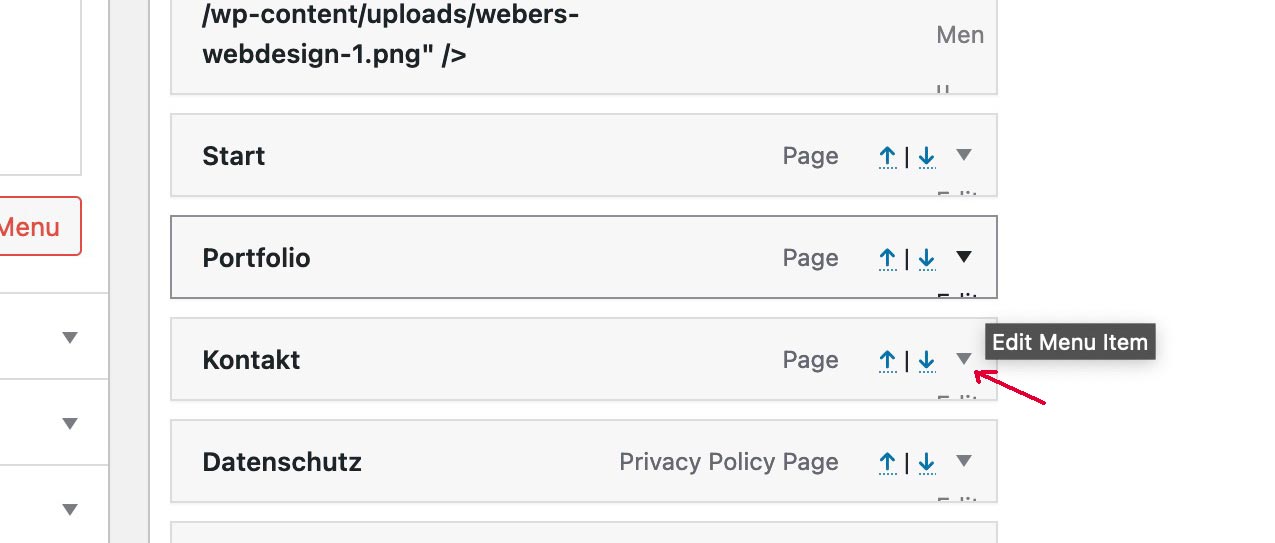
All info to that menu-item is here – BUT
on top-right of that menu options page there is a fly-out menu
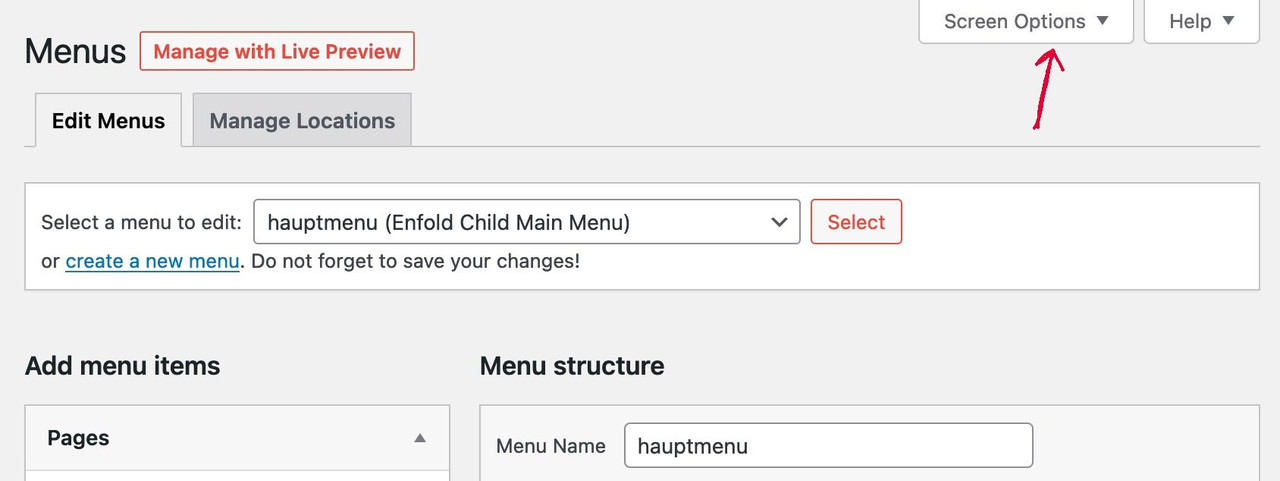
this flyout window will offer you all possiblilities to set for menu options page –
including the items you can add to menu – and for menu-items f.e. to give each item a class – and f.e. a target
I put enfold child facebook widget in the 3rd column nothing is displayed: see link in private content
What do you mean by: can’t find in the post slider.
the place in postslider.php is set as : __( 'Read more', 'avia_framework' )
and this indicates that the string is translatable via lang files.
All translations are in the lang files (po/mo) in enfold/lang/ folder – on German there are two versions one with formal “Sie” the other informal “Du”
I know the WPML is setting the lang attribute on html the correct way. So – if you change the language there is on html the lang mentioned:
lang=”en-US” or lang=”en-GB” – lang=”de-DE” etc.
if these are set – Enfold will use the corresponding lang file from lang folder.
Hey Lene,
Thanks for the login details. Could you try the suggestions listed here first of all please? https://kriesi.at/documentation/enfold/contact-form/#my-contact-form-is-not-sending-emails-
Best regards,
Rikard
Hi,
Please try the following in Quick CSS under Enfold->General Styling:
@media only screen and (min-width: 768px) and (max-width: 1024px) {
.avia-button.avia-size-x-large {
    min-width: auto;
}
}
Best regards,
Rikard
Hi dmwesq,
To add dummy data, you can import our demo first so you don’t need to start from scratch.
Go to Enfold > Demo Import, then find the demo you want to use and import it.
With regards to your first comment, you can use these steps:
1. Login to ThemeForest and download the Enfold theme, right-click over the downloaded zip file and extract/unzip it.
2. It should generate a new folder, open it and look for the enfold folder
3. Right-click the enfold folder then zip it, here’s a tutorial on how to create a zip file in windows: https://www.howtogeek.com/668409/how-to-zip-and-unzip-files-on-windows-10/ (this should create enfold.zip)
Best regards,
Nikko
Hi areaoperativa,
Thanks for contacting us!
Yes, Enfold theme is compatible with Polylang plugin.
Best regards,
Nikko
Hi jelle,
I’m glad that Mike could help you :)
Thanks for using Enfold and have a great day!
Best regards,
Nikko
Hi Mauro,
I’m glad that Ismael could help you :)
Thanks for using Enfold and have a great day!
Best regards,
Nikko
Hi Silvio,
Can you try to disable Javascript File Merging And Compression in Enfold > Performance? and see if it helps.
Best regards,
Nikko
Hi tonyiatridis,
We’re glad that we could help you :)
Thanks for using Enfold and enjoy your weekend!
Best regards,
Nikko
Hi Silvia,
We’re glad that we could help you :)
Thanks for using Enfold and have a great day!
Best regards,
Nikko
ich kann es nicht finden. Eventuell solltest du mal schauen, erstmal alle plugin zu deaktivieren – in Enfold dann die Cache/Merging geschichten zu resetten.
Dann schauen ob sich das Problem zwischen 768 und 989 px löst. ( denn selbst der Hamburger ist in der Spanne nicht zu sehen)
Falls ja – dann mal ein Plugin nach dem Anderen wieder reaktivieren und schauen ob es an einem der Plugins liegt.
Hi
I have a form that I want to be able to send to clients for them to complete.
I have created the form on a page but I don’t want this page to show on my home page menu but it seems to automatically display even though it is not showing on my menu list.
The only way I can remove it is if I check the ‘Enfold main menu’ box but then the menu displays as a drop down and I would like it to display individually across the header
Many Thanks
Cally
I have never had a theme that couldn’t install, but now I do. If this is an indication of how things are going to work with this theme I think I will need to move to another theme. I will give this one try but I am a bit pessimistic at this point.
Installing theme from uploaded file: themeforest-y9PX3F8H-enfold-responsive-multipurpose-theme.zip
Unpacking the package…
Installing the theme…
The package could not be installed. The theme is missing the style.css stylesheet.
Theme installation failed.
Hi, I have an old web site and need to renew the theme. It has Polylang installed.
My question is:
Can I change Theme and use Enfold theme? Is Compatible with Polylang?
Im Editor sehen die Links so aus wie ich es möchte: Schriftfarbe blau und unterstrichen
Doch im Frontend fehlt die Farbe und die Unterstreichung.
Ich finde in den Enfold-Einstellungen nicht den Punkt, wo ich das ändern kann.
Hi Yigit,
Thank you so much! Everything is perfect now.
I have no other questions for now ;-)
Our website became so beautiful and so much better than we expected as non web developers when starting to work with Enfold.
Your support is outstanding! We are happy customers!
Best regards,
Tom
Hello Enfold team,
I was also experiencing this issue, and the CSS provided by i9design did fix it. However, I wanted to point out that this is still an issue. I have the “no borders” option selected for my grid row, and everything is styled correctly until I add a link to the entire column. As soon as I do, I get two vertical borders.
Again i9design’s CSS fixes it, but the bug still exists.
-James



