Hey Nik Doosl,
I’m not sure if the plugin will work with Enfold. We don’t have experience with the plugin.
When I check the archive, I only fine one post about the plugin and had a conflict, it was not your issue and it was from 2020, I’m sure a lot has changed since then.
While we are limited in supporting third party plugins, we try to help were we can, but we can not guarantee Enfold will work with your plugin.
Best regards,
Mike
 Matthias Gruhn
Guest
Guten Tag,
wir haben die Version 4.5.5 für unseren kleinen Waldkindergarten am laufen. Leider ist kein Update auf PHP 8.0 möglich, es kommen folgende Fehler:
—————————————————————
Deprecated: Optional parameter $condition declared before required parameter $handle is implicitly treated as a required parameter in /var/www/vhosts/wald-igel.de/httpdocs/wp-content/themes/enfold/framework/php/function-set-avia-frontend.php on line 1559
Deprecated: Optional parameter $condition declared before required parameter $handle is implicitly treated as a required parameter in /var/www/vhosts/wald-igel.de/httpdocs/wp-content/themes/enfold/framework/php/function-set-avia-frontend.php on line 1582
Notice: Die Funktion _load_textdomain_just_in_time wurde fehlerhaft aufgerufen. Das Laden der Übersetzung für die Domain avia_framework wurde zu früh ausgelöst. Das ist normalerweise ein Hinweis auf Code im Plugin oder Theme, der zu früh läuft. Übersetzungen sollten mit der Aktion init oder später geladen werden. Weitere Informationen: Debugging in WordPress (engl.). (Diese Meldung wurde in Version 6.7.0 hinzugefügt.) in /var/www/vhosts/wald-igel.de/httpdocs/wp-includes/functions.php on line 6121
Deprecated: Creation of dynamic property avia_sidebar::$title is deprecated in /var/www/vhosts/wald-igel.de/httpdocs/wp-content/themes/enfold/framework/php/class-sidebar-generator.php on line 34
Deprecated: Optional parameter $params declared before required parameter $overwrite_value is implicitly treated as a required parameter in /var/www/vhosts/wald-igel.de/httpdocs/wp-content/themes/enfold/config-woocommerce/config.php on line 1427
Fatal error: Unparenthesized a ? b : c ? d : e is not supported. Use either (a ? b : c) ? d : e or a ? b : (c ? d : e) in /var/www/vhosts/wald-igel.de/httpdocs/wp-content/themes/enfold/functions-enfold.php on line 324
——————————————————————
Würden Sie uns für etwas Geld ein Update ermöglichen, damit wir endlich wieder eine sichere Website haben können?
Mit freundlichen Grüßen,
Matthias Gruhn (Admin des Waldkindergartens)
Hi,
Thanks for letting us know. Please open a new thread if you should have any further questions or problems.
Best regards,
Rikard
Hi,
Thanks for the update. Please open a new thread if you should have any further questions or problems.
Best regards,
Rikard
Hi,
Great, I’m glad that Mike could help you out. Please open a new thread if you should have any further questions or problems.
Best regards,
Rikard
Hi,
Thanks for the update. Please open a new thread if you should have any further questions or problems.
Best regards,
Rikard
Hi,
Thanks for the update. Please open a new thread if you should have any further questions or problems.
Best regards,
Rikard
Hi,
Thanks for the update, we’ll close this thread for now then. Please open a new thread if you should have any further questions or problems.
Best regards,
Rikard
 Nik Doosl
Guest
Hello Team,
i am working on a WP project which offers Clubmembers to publish classified listings based on the DIRECTORIST plugin. But Payment will be a recurring member fee so that no Commerce/ Shopping addons are needed.
But contrary to all typical classifieds market i don’t want a Frontpage looking just like ebay etc… but an individual looking Frontpage with lots of User info/ FAQ/ testimonial/ e.g. with Iconboxes, Infoboxes (resp./ parallex).
All themes which i checked thru until now (that cooperate nicely with the DIR plugin pages and which are not PageBuilder focused) they all look the same on the Frontpage.
So my Question is:
Will ENFOLD cooperate with DIRECTORIST plugin and still let me build an individual Frontpage from your Demos?
Thanks a lot for your feedback
Nik
 Annelies Versteeg-Hazekamp
Guest
I asked this morning about this, but the answer is not unambiguous. We have paid for the version 3.x. in the past. Does it mean that the upgrade costs $59,=? Is there a discount on this purchase?
Hey Annelies,
The update to 7.1.1 has to be done manually from the version you are running, please refer to my replies in this thread: https://kriesi.at/support/topic/enfold-4-5-theme-update-update-failed-download-failed-a-valid-url-was-not-pro/#post-1021541
You can either update manually via FTP: https://kriesi.at/documentation/enfold/how-to-install-enfold-theme/#theme-update, or upload the theme as if it was new under Appearance->Themes->Add New Theme.
If that doesn’t work then please try to delete the whole theme folder, then replace it with the new version. Make sure that you have backups of the site before starting updating.
Also please read this after you have updated: https://kriesi.at/documentation/enfold/theme-registration/
Best regards,
Rikard
Annelies Versteeg-HazekampGuest
Hello,
We previously built the website http://www.jouwkans.com in this theme version 3.x. We just made a change of provider and we found out that we need to upgrade to version 7.x. Can you provide me with this upgrade and let me know how to install this?
Hope to hear from you soon.
Greetings Annelies
Hey Caitlin,
Thank you for the inquiry.
Before proceeding, we kindly ask you to register on the forum using the purchase code associated with your theme license. Please use the following link: https://kriesi.at/support/register/
Once registered, you can open a new thread using the form here: https://kriesi.at/support/forum/enfold/#new-post
To add a button to the header widget area, you can use the Text widget, then add this shortcode:
[av_button label=' (Email address hidden if logged out) ' icon_select='yes' icon='mail' font='svg_entypo-fontello' title_attr='' button_type='' link='manually,mailto: (Email address hidden if logged out) ' link_dynamic='' link_target='' download_file='https://' attachment='' attachment_size='' downloaded_file_name='' size='small' position='center' label_display='' size-text='' av-desktop-font-size-text='' av-medium-font-size-text='' av-small-font-size-text='' av-mini-font-size-text='' margin='' margin_sync='true' padding='' padding_sync='true' av-desktop-margin='' av-desktop-margin_sync='true' av-desktop-padding='' av-desktop-padding_sync='true' av-medium-margin='' av-medium-margin_sync='true' av-medium-padding='' av-medium-padding_sync='true' av-small-margin='' av-small-margin_sync='true' av-small-padding='' av-small-padding_sync='true' av-mini-margin='' av-mini-margin_sync='true' av-mini-padding='' av-mini-padding_sync='true' color_options='' color='theme-color' custom_bg='#444444' custom_font='#ffffff' btn_color_bg='theme-color' btn_custom_grad_direction='vertical' btn_custom_grad_1='#000000' btn_custom_grad_2='#ffffff' btn_custom_grad_3='' btn_custom_grad_opacity='0.7' btn_custom_bg='#444444' btn_color_bg_hover='theme-color-highlight' btn_custom_bg_hover='#444444' btn_color_font='theme-color' btn_custom_font='#ffffff' btn_color_font_hover='white' btn_custom_font_hover='#ffffff' border='' border_width='' border_width_sync='true' border_color='' border_radius='' border_radius_sync='true' box_shadow='' box_shadow_style='0px,0px,0px,0px' box_shadow_color='' animation='' animation_duration='' animation_custom_bg_color='' animation_z_index_curtain='100' hover_opacity='' sonar_effect_effect='' sonar_effect_color='' sonar_effect_duration='1' sonar_effect_scale='' sonar_effect_opac='0.5' css_position='' css_position_location=',,,' css_position_z_index='' av-desktop-css_position='' av-desktop-css_position_location=',,,' av-desktop-css_position_z_index='' av-medium-css_position='' av-medium-css_position_location=',,,' av-medium-css_position_z_index='' av-small-css_position='' av-small-css_position_location=',,,' av-small-css_position_z_index='' av-mini-css_position='' av-mini-css_position_location=',,,' av-mini-css_position_z_index='' id='' custom_class='' template_class='' av_uid='av-me0reo0x' sc_version='1.0' admin_preview_bg='']
You can also use this html:
<div class="avia-button-wrap av-me0reo0x-af6ff2d8373030c9c60f62b386b56008-wrap avia-button-center  avia-builder-el-0  el_before_av_slideshow_accordion  avia-builder-el-no-sibling "><a href="mailto: (Email address hidden if logged out) " class="avia-button av-me0reo0x-af6ff2d8373030c9c60f62b386b56008 av-link-btn avia-icon_select-yes-left-icon avia-size-small avia-position-center avia-color-theme-color" aria-label=" (Email address hidden if logged out) "><span class="avia_button_icon avia_button_icon_left avia-svg-icon avia-font-svg_entypo-fontello" data-av_svg_icon="mail" data-av_iconset="svg_entypo-fontello"><svg version="1.1" xmlns="http://www.w3.org/2000/svg" width="29" height="32" viewBox="0 0 29 32" preserveAspectRatio="xMidYMid meet" aria-labelledby="av-svg-title-4" aria-describedby="av-svg-desc-4" role="graphics-symbol">
<title id="av-svg-title-4">Mail</title>
<desc id="av-svg-desc-4">Mail</desc>
<path d="M0.96 8.448q-1.024-0.576-0.896-1.28 0.064-0.448 0.832-0.448h27.072q1.216 0 0.64 1.024-0.256 0.448-0.768 0.704-0.448 0.192-6.144 3.264t-5.824 3.136q-0.512 0.32-1.472 0.32-0.896 0-1.472-0.32-0.128-0.064-5.824-3.136t-6.144-3.264zM28.16 11.648q0.64-0.32 0.64 0.32v11.776q0 0.512-0.544 1.024t-1.056 0.512h-25.6q-0.512 0-1.056-0.512t-0.544-1.024v-11.776q0-0.64 0.64-0.32l12.288 6.4q0.576 0.32 1.472 0.32t1.472-0.32z"></path>
</svg></span><span class="avia_iconbox_title"> (Email address hidden if logged out) </span></a></div>
Best regards,
Ismael
Hey vrhgmt744p,
Thank you for the inquiry.
You can use the following css code to adjust the size of the icon inside the iconbox.
.iconbox_icon.avia-svg-icon img[is-svg-img=true], .iconbox_icon.avia-svg-icon svg:first-child {
    height: 0.5em;
    width: 0.5em;
    top: -8px;
    position: relative;
}

#top .avia-font-entypo-fontello, body .avia-font-entypo-fontello, html body [data-av_iconfont='entypo-fontello']:before {
    font-family: 'entypo-fontello';
    line-height: 1.5em;
    display: block;
    top: 0;
    position: relative;
    font-size: 0.6em;
}
If you need this applied to specific icons, try adding a custom css class to the element. Please refer to the documentation below.
— https://kriesi.at/documentation/enfold/add-custom-css/#enable-custom-css-class-name-support
Best regards,
Ismael
Hi,
Glad Guenni007 could help, thank you Guenni007, if you have any further questions please create a new thread and we will gladly try to help you. Thank you for using Enfold.
Best regards,
Mike
Dear Kriesi,
I have infinite loading with 403 (ajax.php) error in console, when try to switch to block editor, but this error is only on Welcome page of Enfold Gym. This page is full of av shortcodes. The other pages works well, when I switch to block editor.
Please help me!
Thanks,
András
Hey Heather,
The update to 7.1.1 has to be done manually from the version you are running, please refer to my replies in this thread: https://kriesi.at/support/topic/enfold-4-5-theme-update-update-failed-download-failed-a-valid-url-was-not-pro/#post-1021541
You can either update manually via FTP: https://kriesi.at/documentation/enfold/how-to-install-enfold-theme/#theme-update, or upload the theme as if it was new under Appearance->Themes->Add New Theme.
If that doesn’t work then please try to delete the whole theme folder, then replace it with the new version. Make sure that you have backups of the site before starting updating.
Also please read this after you have updated: https://kriesi.at/documentation/enfold/theme-registration/
Best regards,
Rikard
Hi, I’m running into an issue where certain page builder elements aren’t loading when clicked. Some fields like Text, Images, and Blog Posts function as normal, but others such as Special Headings, and Animated Numbers fail to load and get stuck on the loading circle or display a plain white screen instead of options. I’ve tried disabling all plugins and enabling parent Enfold, upping the memory limit, etc.
 Heather Young
Guest
Hello,
I am currently using an Enfold Theme listed as version 4.4.1. I need to update to the most up-to-date version. Could you please guide me as to the correct version to purchase so that the site will automatically update?
Thank you for your time.
I look forward to hearing from you soon.
Hey I’m working on a multilingual site using Enfold together with WPML, and I’ve run into a frustrating issue regarding translated content not showing up properly.
Here’s the situation:
– I created a page using the Avia Layout Builder (default language: Dutch).
– I translated the page using WPML’s Classic Translation Editor (CTE) to German
However, when I visit the translated page on the front-end, it still shows the original Dutch text — the translated strings aren’t displayed.
Also, when I try to edit the translated page, I don’t see the translated content in the Avia Builder at all — it’s either empty or still shows the original language.
What I’ve already tried:
– Re-saving the translation
– Completing the translation again
– Deleting the translation and recreating it
– Clearing all caches (browser, WP, server)
No luck so far.
Is this a known limitation when using Avia + WPML?
Is there any way to make Avia load the translated package strings, either in the builder or at least on the front-end?
Would really appreciate any insight or tips from other users or the support team. It’s a bit of a blocker at the moment.
Thanks a lot.
Hey saskia68,
Did you register your licenses? https://kriesi.at/documentation/enfold/theme-registration/
If the updates should still not come through after that, then please try using this plugin instead: https://envato.com/market-plugin/
Best regards,
Rikard
but you have activated that option on enfold settings:
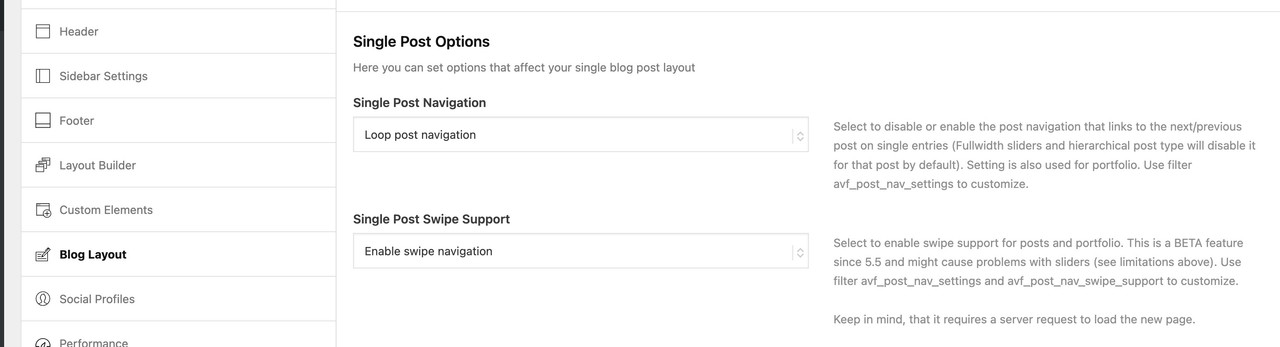
I have three sites running Enfold – all with separate valid licences. Unfortunately they are all Enfold 4.7.6.4 and I am needing to update them so that I can update the PHP. When I try to update I get the following message:
>>
Last time we checked the token we were not able to connected to Envato:
Purchases could not be accessed
Username could not be accessed (needed for your information only)
E-Mail could not be accessed (needed for your information only)
Following errors occurred:
Purchases: Envato Rate Limit exceeded – Requests are blocked for 139 seconds. We are unable to get the download URL for your products.
username Envato Rate Limit exceeded – Requests are blocked for 139 seconds. We are unable to get the download URL for your products.
email Envato Rate Limit exceeded – Requests are blocked for 139 seconds. We are unable to get the download URL for your products.
Purchases: A problem occurred accessing your purchases. Unable to check for updates.
<<
And now i don;t even get the update option….
PS I have just bought six mnths support via Themeforest – I am unsure which licence i bought the support for…
Hi,
Thank you for the update.
Did you try the second set of css rules without the UID av-4hiz9z-633b1e0ab579d3c11a88073322c9de8f?
You can also apply a unique css class name to the Grid Row element where the modification is needed, for example “av-custom-grid-eq-height”, and then use the following css code.
.responsive #top #wrap_all .av-layout-grid-container.av-custom-grid-eq-height {
    display: flex;
}

.responsive #top #wrap_all .av-custom-grid-eq-height .flex_cell.av_one_half .flex_cell_inner,
.responsive #top #wrap_all .av-custom-grid-eq-height .flex_cell.av_one_half .flex_cell_inner .avia-image-container,
.responsive #top #wrap_all .av-custom-grid-eq-height .flex_cell.av_one_half .flex_cell_inner .avia-image-container div,
.responsive #top #wrap_all .av-custom-grid-eq-height .flex_cell.av_one_half .flex_cell_inner .avia-image-container div div,
.responsive #top #wrap_all .av-custom-grid-eq-height .flex_cell.av_one_half .flex_cell_inner .avia-image-container div div img {
    width: 100%;
    height: 100%;
    display: block;
    object-fit: cover;
}
— https://kriesi.at/documentation/enfold/add-custom-css/#enable-custom-css-class-name-support
Best regards,
Ismael
Hello support, on my website http://www.trackwizard.eu I would like the background color of the payment form fields to be the color you see in the attached screenshot
Of course, if I set it from enfold / general styling / main content / alternate background color, this change applies to the entire site, but I would like it only for the purchase and payment form fields.
Could you please help me? Thanks, Gianluca.
i switched that installation right now tol WP6.8.2 and Enfold 7.1.1
everything works well.
PS: you had to switch earlier to the burger menu.
in this case change it to new media query option:
@media only screen and (max-width: 1070px) {
    #top #header .av-main-nav > li.menu-item  {
        display: none!important;
    }
    #top #header .av-burger-menu-main {
        cursor: pointer;
        display: block!important;
    }
}
you had to synchronise it with the media query above:
@media only screen and (min-width: 1070px) {
  #top .av-logo-container .logo {
    opacity: 0;
  }
  #top .main_menu {
    left: 0;
    width: 100%;
  }
  #top .main_menu .avia-menu.av-main-nav-wrap {
    position: relative;
    left: 50%;
    -webkit-transform: translateX(-50%);
    transform: translateX(-50%);
  }
  #top #menu-item-logo svg,
  #top #menu-item-logo img {
    max-height: 120px;   /**** depends on your choosen header height - on shrinking headers it will be set by that enfold shrink script ******/
    width: auto;
    position: relative;
    top: 50%;
    -webkit-transform: translateY(-50%);
    transform: translateY(-50%);
  }
}

#av-burger-menu-ul .menu-item-logo {
	display: none
}
Hi Guenni007
Thanks!
It works fine!
You have been a great help!
I will put the codes in the newest enfold and see if there are things to change…
Kind regards
Karin Leloux
by the way i will update that installation now to newest enfold – to check if there are things to change …






