
-
AuthorSearch Results
-
August 29, 2025 at 7:34 pm #1488756
Topic: ENFOLD SUPPORT
in forum Pre Sale QuestionsNicolas
GuestHello,
I’ve just purchased a 6-month support plan for the Enfold theme. However, when I access the Support page, it doesn’t allow me to create a new topic.
Could you please advise on how I should proceed to submit my inquiry?
My question is as follows:
I’m writing to you to resolve an issue with the website http://www.luisbustamante.com
, which uses the Enfold theme.
I’m having trouble integrating the Redsys credit card payment gateway on my website that uses the Enfold theme.
Despite having the plugin properly installed, activated, and configured, when placing an order as a guest user (without registering), only one payment method appears: bank transfer.
However, if I place an order while logged in as an admin, I do get both payment options: bank transfer and Redsys credit card payment.Thank you!
Nicolás SieberAugust 29, 2025 at 6:24 pm #1488749In reply to: Change anchors of scroll down link buttons
Hi,
Glad this helps, your icons are not showing because of this css you had in your Enfold Theme Options ▸ General Styling ▸ Quick CSS field:/*Modification de l'affichage de l'icône des cookies (cadenas)*/ #top .avia-svg-icon.avia-font-svg_entypo-fontello svg:first-child { display: none !important; }I disabled it for you.
As for your timeline question, please open a new thread as we ask that each thread sticks to one topic. Thanks for you understanding.Best regards,
MikeAugust 29, 2025 at 5:09 pm #1488741(Update)
I’ve done several tests on other sites where I use Enfold, and I get the same error :( 😳
I always get the error when I save changes to the “Team Member” Custom Element.Best regards,
OrianoAugust 29, 2025 at 1:50 pm #1488733In reply to: Flux checkout styling problem
Hi,
The “JavaScript errors” you mentioned aren’t actually caused by Flux Checkout itself. The issue is that Enfold is loading its own checkout-specific scripts and CSS which override or interfere with Flux Checkout’s design and functionality.
I’ve confirmed with the plugin developers that Flux works fine with WooCommerce’s default Storefront theme. The issues only occur when Enfold is active.
Specifically, Enfold is:
– Injecting custom checkout styling that breaks the field layout and button styles in Flux Checkout.
– Loading checkout-related scripts which cause conflicts and make some buttons unclickable.Could you please provide a way to disable Enfold’s checkout styling and scripts so that Flux Checkout can render properly? Ideally, Enfold should allow me to opt out of its custom checkout modifications so that third-party checkout plugins like Flux Checkout can function as intended.
Thank you for your help!
-
This reply was modified 6 months, 3 weeks ago by
napsteris.
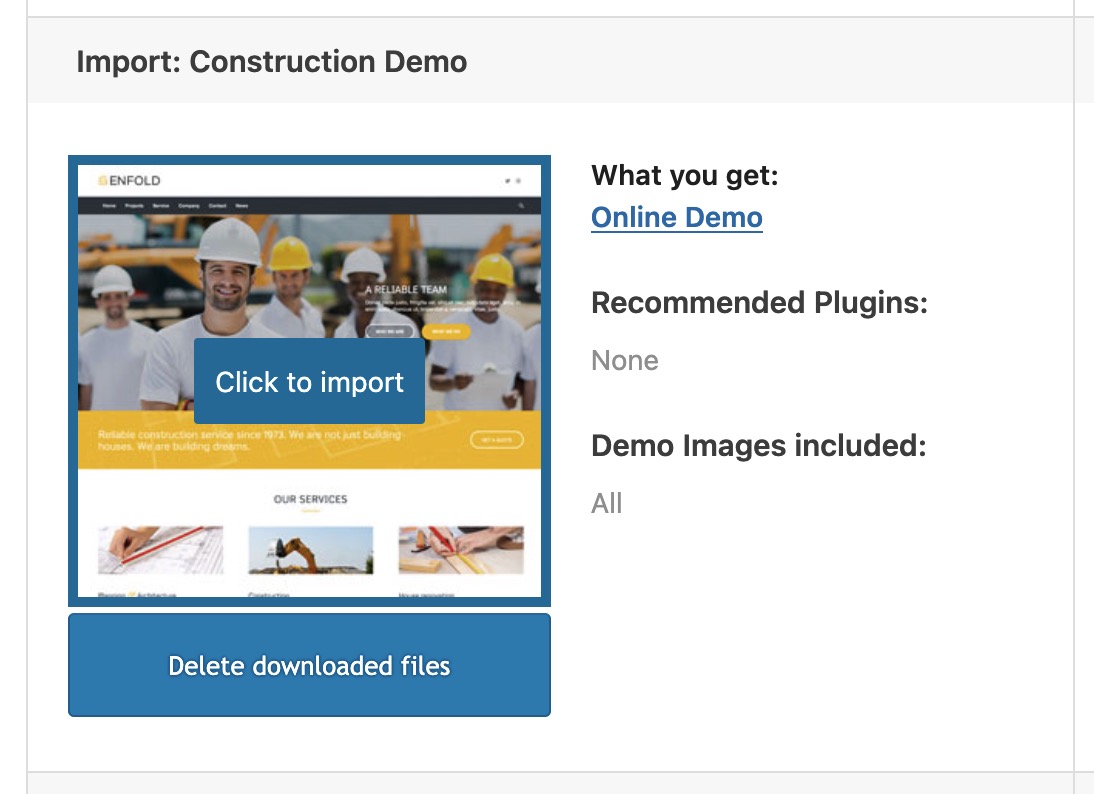
August 29, 2025 at 11:48 am #1488724On inserting this snippet to your child-theme functions.php:
add_theme_support( 'avia_demo_store_downloaded_files' );the Enfold Import Page will not show an install Button – but a download button.
After the Download – there will be a caption under the downloaded demos and on hovering again they got now a “click to import” button.
 August 29, 2025 at 11:29 am #1488723
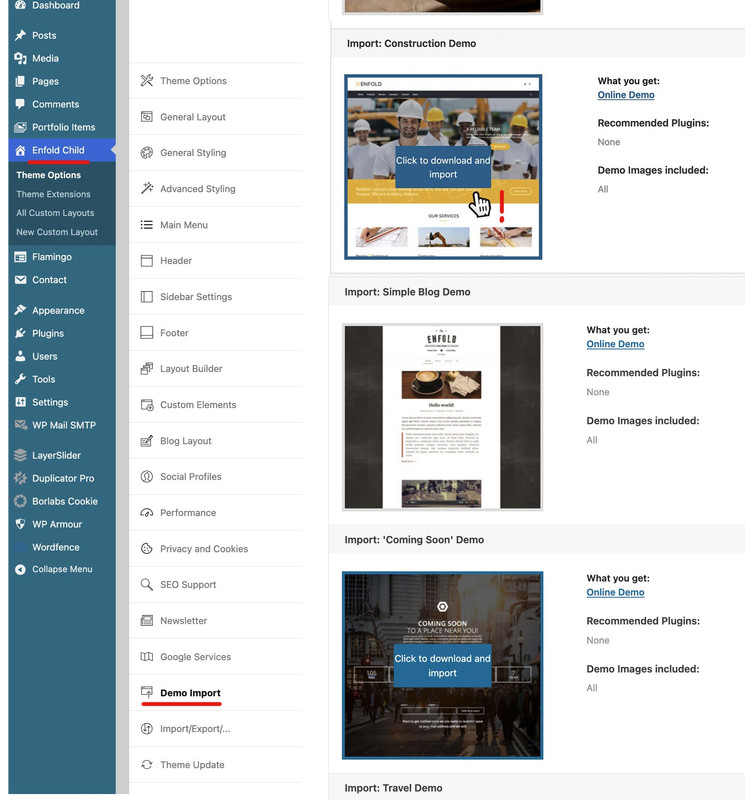
First, I would like to ask whether you can see these demos in the Enfold options and whether you see a download option when hovering over the images (or, if plugins are required for the demo, a note in red); and why you don’t want to go down this way.
 August 29, 2025 at 9:30 am #1488719
The question is: On which page can I hover over the demo with the mouse to display the “Download and install” button?
Under the link: https://kriesi.at/documentation/enfold/import-demos/#how-to-manually-import-a-theme-demo , I only find an overview of all demos. When I click on one, I see a preview, but no download option.I have already installed the Enfold template in my WordPress environment. To see the options, I have to activate the theme, which will cause me to lose my current layout and all of its content.
However, the main problem is that I don’t have the necessary installation files to import a demo (“Construction”).
(By the way, I’m thrilled with how quickly you respond here. Great support!)
August 29, 2025 at 9:24 am #1488717In reply to: 2 menu’s, 2 tokens?
Hi,
No, that doesn’t tell us anything unfortunately. A child theme is used to override the parent theme, and the parent theme is what you update. Do you have a theme installed called Enfold? If so, then click on that.
Best regards,
RikardAugust 29, 2025 at 7:21 am #1488708As Rikard said – hover the image of the demo – then an info will show if you can import or not. Some of the demos need Plugins befor import – but Construction Demo is not that way.
Have you already created pages/posts?
Although Rikard has the jump mark in the link, you sometimes still have to scroll to the relevant places.
Only necessary if you have already made settings; in this case, you must first save your design settings, for example.
As described in the docu.
Export/ Import theme settings.- First, export the theme settings from Enfold > Import/Export tab.
- Import the demo theme of your choice.
- Overwrite the new settings with your old setting by importing back the settings file we saved in step 1.
August 28, 2025 at 7:26 pm #1488681In reply to: 2 menu’s, 2 tokens?
Hi Kitty,
That is correct. We would offer to help you out, but we cannot login to your Envato account since it will ask for a one time pin or code if we login from a different location. That pin or code will be sent to your email if I’m not mistaken.
I had a look at your site, but I couldn’t see which version is installed. It’s very likely not 1.0, I’m guessing that it’s a child theme that you have active? If you look under Apperance->Themes, then click on Enfold, then you can see the actual version. You could also give us access details in private if you would like to have a look for you.
Best regards,
RikardAugust 28, 2025 at 7:22 pm #1488680In reply to: font is not showing
Hi,
Thanks for the update, we’ll close this thread for now then. Please open a new thread if you should have any further questions or problems.
Best regards,
RikardAugust 28, 2025 at 3:18 pm #1488676Yes, I did.
It is described as “The demo sites can be imported from Enfold > Import Demo.” and “You can simply hover on the demo you would like to import and click “Click to download and import” button and demo will be imported within a few minutes.But I can’t see the “download and import” button anywhere.
Kind regards.
MarioAugust 28, 2025 at 3:00 pm #1488675I don’t see where this is happening. In my Enfold > General Layout > Dimensions > Maximum Container Width, it’s already set to 1310px? Is that other figure somewhere within the code you’re displaying in that screenshot?
August 28, 2025 at 2:56 pm #1488674In reply to: 2 menu’s, 2 tokens?
Hello Rikard
I’m starting to understand why you keeps referring me to Envato Market, because so far it’s only been about selling your license, and this falls under jurisdiction of Envato Market.
If I have any questions about the functionality after installing Enfold, I can contact you.
And than is my next question:
The company that built my website went bankrupt. At one point, I kept getting a message that I had an outdated version of Enfold. The Enfold license was held by the company that went bankrupt. Since I could no longer reach the creator of my webshop, I started looking into this myself. I don’t have much experience in this area.
The currently installed version is still version 1.0. Can I now install the latest version 7.1.2 without any problems?
Best regards
KittyAugust 28, 2025 at 1:15 pm #1488672In reply to: A text field opens in the browser.
Hi,
Thanks for the update. Please open a new thread if you should have any further questions or problems.
Best regards,
RikardAugust 28, 2025 at 1:12 pm #1488670In reply to: Dateien für Demo herunterladen
Hey Mario,
All demos can be installed under Enfold->Demo Import.
Best regards,
RikardAugust 28, 2025 at 12:52 pm #1488667In reply to: Flux checkout styling problem
Hi,
Thanks for the update. What fixes are you referring to exactly? I see that there are Javascript errors coming from the plugin when trying to move to the next step. See screenshot in private. Fixing problems like that is unfortunately out of scope of theme support. I could report this to our developers though, to see if they can find a solution. You could also submit a feature request here: https://github.com/KriesiMedia/Enfold-Feature-Requests/issues
Best regards,
RikardAugust 28, 2025 at 12:37 pm #1488666In reply to: Support – Enfold
Hey Vaida,
Did you check out our documentation? If you have further questions, then please register on the support forum, and open a new thread there.
Best regards,
RikardAugust 28, 2025 at 11:58 am #1488664Topic: Support – Enfold
in forum Pre Sale QuestionsVaida
GuestHallo, eine Frage, ich habe Enfold im Frühjahr gekauft. Ich habe meine Website im Gröbsten aufgebaut. Ich habe einige Fragen, wo kann ich Infos bekommen. Mit wem kann ich austauschen? Viele Grüße Vaida
August 28, 2025 at 11:33 am #1488661Topic: Dateien für Demo herunterladen
in forum Pre Sale QuestionsMario Schubert
GuestHello,
I have already purchased the “Enfold” theme, but now I have noticed that although I can view various demo previews, I cannot find any installation files to download.
Where can I find the demo files that I can then import into WordPress?
Best regards,
MarioAugust 28, 2025 at 10:32 am #1488659In reply to: Social media icon sizes and page placement
you like to place a social share button on those pages?
– i can not confirm that the element from enfold : “Social Buttons”
only works on articles – on my test installation it works for pages too.or do you like to link to your social media pages only ?
August 28, 2025 at 9:46 am #1488656In reply to: Flux checkout styling problem
Hi,
I’ve already written this several times over the past month that we’ve been dealing with this. It’s not a plugin issue. Here’s the response from Flux support:
“Unfortunately, the fixes would need to be implemented on Enfold’s side. As shown in my recording above, when using Storefront (WooCommerce’s official theme), the issues do not occur.
As a next step, I’d recommend reaching out to the Enfold theme developers with these details so they can provide a fix.”
One more time:
Screencast: https://www.loom.com/share/22b9643dd75a48b8aa11c852694c5ad3?sid=0cc1a042-e9ea-4cdc-a84c-a161fd793418
Password: in private contentAugust 28, 2025 at 9:37 am #1488655enderku
ParticipantHi, I’m trying to change description under the menu links at Consulting Demo (Enfold). Unfortunately I can’t find any place with description to change.
to see what I want to change: https://freeimage.host/i/K3Kjq4R
August 28, 2025 at 8:47 am #1488651In reply to: accordion element
Hi,
Please refer to this documentation to learn more on how to properly insert templates into the Advanced Layout Builder: https://kriesi.at/documentation/enfold/intro-to-layout-builder/#templates
Look for the template named “4 Column Special Heading BG” and adjust it as needed.
Best regards,
IsmaelAugust 28, 2025 at 8:41 am #1488648In reply to: Text Overlay Size
Hi,
Thank you for the update.
You may need to toggle or temporarily disable the Enfold > Performance > File Compression settings to make sure that the changes take effect. Let us know the result.
Best regards,
IsmaelAugust 28, 2025 at 8:28 am #1488645In reply to: A text field opens in the browser.
Hey schweg33,
Thank you for the inquiry.
Would you mind providing a screenshot of the issue? You can use platforms like Savvyify, Imgur or Dropbox to share the image.
The log points to a modification or feature in the enfold-child/at-audio-libraries/lib/audio/AtAudioLibraryManager.php file. Have you tried temporarily disabling this file or feature? You may need to ask the developer to review the modification.
Best regards,
IsmaelAugust 28, 2025 at 8:12 am #1488642Hi,
Thank you for the update.
originally had the four buttons in one line – now they break onto a second line.
Have you tried increasing the value in Enfold > General Layout > Dimensions > Maximum Container Width? It’s currently set to 1010px. Increasing it to the default value of 1310px should help.
Best regards,
IsmaelAugust 28, 2025 at 7:41 am #1488638In reply to: WooCommerce Gallery Lightbox – No modal popup
Hey jkorsower,
Thank you for the inquiry.
The gallery is currently set to use zoom instead of the lightbox, which is the default behavior for the Woocommerce gallery. To use the default lightbox, please look for the Enfold > Shop Options > Product Gallery settings and select Default Enfold product gallery, as shown in the screenshot below.
Best regards,
IsmaelAugust 27, 2025 at 8:14 pm #1488623Mike, still no bueno. The ‘shift’ from correct to incorrect sizing is now fixed. However, the individual columns still do not seem as they used to be. For instance, this unlisted page (https://historictoxaway.org/broadleaf/faq/) originally had the four buttons in one line – now they break onto a second line.
The issue has been happening prior to this but in case relevant, just letting you know we have recently shifted our servers from Bluehost shared hosting to a local agency server/hosting. Also I had Jetpack active but canceled it as a part of this shift.
At any rate, I have done this:
To disable the Enfold theme cache in WordPress, navigate to the Enfold Theme Options within your WordPress dashboard.
Go to Enfold Theme Options > Performance.
Locate the sections for CSS file merging and compression and JavaScript file merging and compression.
Disable: the “Merging and Compression” options for both CSS and JS files.
This action effectively disables Enfold’s built-in caching and optimization features for these files. If you have any other caching plugins installed, you may also need to clear their caches or temporarily deactivate them for testing purposes. Additionally, performing a hard refresh in your browser (e.g., Ctrl + Shift + F5 on Windows or Cmd + Shift + R on macOS) can help ensure you are viewing the latest, uncached version of your site.And I have cleared the cache in a new plugin, WP Rocket. What can I do to correct this?
August 27, 2025 at 4:04 pm #1488616Hi,
Great, I’m glad that we could help you out. Please open a new thread if you should have any further questions or problems.
Best regards,
Rikard -
This reply was modified 6 months, 3 weeks ago by
-
AuthorSearch Results
-
Search Results
-
Topic: ENFOLD SUPPORT
Hello,
I’ve just purchased a 6-month support plan for the Enfold theme. However, when I access the Support page, it doesn’t allow me to create a new topic.
Could you please advise on how I should proceed to submit my inquiry?
My question is as follows:
I’m writing to you to resolve an issue with the website http://www.luisbustamante.com
, which uses the Enfold theme.
I’m having trouble integrating the Redsys credit card payment gateway on my website that uses the Enfold theme.
Despite having the plugin properly installed, activated, and configured, when placing an order as a guest user (without registering), only one payment method appears: bank transfer.
However, if I place an order while logged in as an admin, I do get both payment options: bank transfer and Redsys credit card payment.Thank you!
Nicolás SieberTopic: Support – Enfold
Hallo, eine Frage, ich habe Enfold im Frühjahr gekauft. Ich habe meine Website im Gröbsten aufgebaut. Ich habe einige Fragen, wo kann ich Infos bekommen. Mit wem kann ich austauschen? Viele Grüße Vaida
Hello,
I have already purchased the “Enfold” theme, but now I have noticed that although I can view various demo previews, I cannot find any installation files to download.
Where can I find the demo files that I can then import into WordPress?
Best regards,
MarioHi, I’m trying to change description under the menu links at Consulting Demo (Enfold). Unfortunately I can’t find any place with description to change.
to see what I want to change: https://freeimage.host/i/K3Kjq4R


