Hi Escendio,
Please refer to our documentation: https://kriesi.at/documentation/enfold/theme-registration/#how-to-generate-a-envato-personal-token and generate a new Personal Token.
Please make sure to check all required permissions:
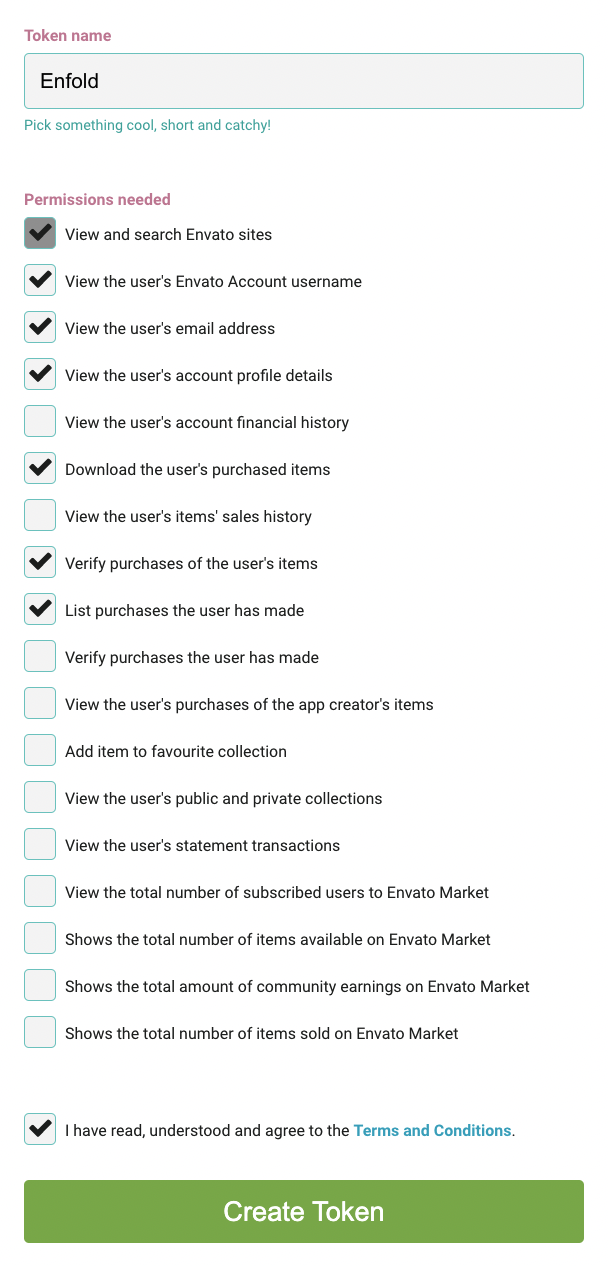
Best regards,
Nikko
Hi James,
We’ll close this thread then.
Thanks for using Enfold and have a great day!
Best regards,
Nikko
Hi Kate,
I’m glad that we could help you :)
Thanks for using Enfold and have a great day!
Best regards,
Nikko
Hi Francisco,
You’re welcome :)
We’re glad that we could help you.
Thanks for using Enfold and have a great day!
Best regards,
Nikko
Hi MacKenzie,
On mobile it shows like an input field, but when the field is focused the keys showing on mobile will just be numbers.
As for fixing it, the problem is conflict with the WooCommerce Composite Products and Enfold theme which prevents that feature of Enfold from working properly takes to time to identify the cause of the issue, fix and test, so the only workable solution at the moment is to disable the feature and use the original behavior the plugin provides.
Best regards,
Nikko
Hello Enfold Team,
I have edited my menu font color on hover setting, but for whatever reason, it isn’t working. Can you please take a look and let me know what the problem is?

Thanks
-James
If you’ll look at https://asiantradeassociation.com/
It’s just a playing around site.
When it loads, the custom logo looks jerky.
Thanks for looking at it. I see the effect on other sites and like having the image move a little.
This is css I used…any suggestions?
Or a suggestion on a different Enfold animation?
Would longer animation time be better?
#top div.av-siteloader-cell {
//box-shadow: 0 0 0 rgba(44, 44, 44, 0.6) !important;
//animation: pulse 2s infinite !important;
//animation: sonarEffect 2s infinite !important;
animation: av_pulsate 2s infinite !important;
}
I inherited a website that is running 4.7.6.3 so I’m wanting to updated to 5.6.4. TO do this, I created a stage website to make sure my Prod doesn’t break with this update but I’m getting an error. Could it be this error is because the license is registered under a different domain? Thanks
Errors occurred checking on 2023/07/20 20:35:
Download Package URL: Errorcode 403 returned by Envato: Forbidden:
– response_code: 403
– reason: scope-missing
Download Package URL: A problem occurred accessing your download link. Unable to perform update.
Following Envato package errors occurred:
Enfold – Request for Download URL failed.
Hey Kate,
Thanks for your question, I see that you are using Enfold v5.2.1, Mail Chimp has updated their API.
Please update your theme to v5.6.4 and then resave the Mail Chimp option in Enfold Theme Options ▸ Newsletter ▸ Mailchimp and then open your Mail Chimp element on the page and resave and check again.
Best regards,
Mike
Hey karinkropik,
You can use our official Child Theme and install it into your WordPress. So this is free and should take you only a couple of minutes. But if your current theme has any customizations such as code added to any files then this could take a little while to move to the child theme, but if the only customizations are in the theme settings then there would be nothing extra to do.
Please read all of the steps in our Child Theme documentation and download a backup of your theme settings file before installing the child theme at Enfold Theme Options ▸ Import/Export ▸ Export Theme Settings File.
If you didn’t customize any of the theme files and would like help installing the child theme, please include an admin login in the Private Content area so we can help.
Best regards,
Mike
Hi,
Can you link to your page so we can see your page? If I was correct that you are refuring to the masonry “sort” which shows the list of categories above the items, then there is not a css solution that would show all of the categories if you want them to be clickable and sort the masonry items, neither would sorting the categories work if added to a sidebar element.
But if you just want to add the categories widget to the sidebar, then you could do that easily, I’m just not sure if you expect them to “sort” the masonry element.
If you want to add a sidebar to your page with the masonry element, you would set the sidebar in the page layout, for example this demo page has a sidebar with the masonry element. This is what the backend looks like:

To have a grid layout that is order by date try setting your theme settings to Enfold Theme Options ▸ Blog Layout ▸ Blog Layout ▸ Use the advance layout editor to build your own blog layout (simply edit the page you have chosen in Enfold->Theme Options as a blog page)

then edit your blog page to have a sidbar and add the blog posts element to the page and choose the grid layout:

Best regards,
Mike
Hi Mike,
I understood the problem.
A month ago on the site in question I started using GravityForms instead of the Contact Form Enfold. But instead of deleting the Contact Form Enfold I hid it using the “Advanced / Responsive / Element Visibility”.
In this way the Contact Form Enfold while not visible from the front end, but the Enfold Contact Form that I had hidden, kept receiving messages and sending notifications :(
Now I have eliminated the Contact Form Enfold, and the problem of spam emails sent from the site is solved.
Are you aware of this situation? I have been using Enfold for many years and in many sites, but I had never noticed this strange behavior. :(
Best regards
Oriano
When editing an element, I cannot add a space in any options. I have tried new Browers and Incognito browsers to no avail.
Your current Enfold Theme Version Number is 5.6.4
Your PHP version: 7.4.33
Here is a video on our YT channel with more details and a example.
https://youtu.be/_Bx5fOXzQgU
Thanks,
Jesse
Hi, Does Enfold have a function that show a page snapshot when sending a text message? Attached is a sample from homedepot.
Hey Thomas,
Thanks for reporting this – and sorry for the problem.
I think I found the problem.
Can you please replace
enfold\config-woocommerce\config.php
with the content of
https://github.com/KriesiMedia/enfold-library/blob/master/temp_fixes/Enfold_5_6_4/woocommerce/config.php
Do not forget to clear server and browser cache and make a backup of the original file for a fallback.
Best regards,
Günter
 Greg
GregGuest
Good morning. One of our company’s sites uses the Enfold theme. I didn’t build the site, and all of the people who might have been involved in building it no longer work here, so this was just dropped in my lap.
I was informed today that the site is not functioning. WP Admin can only be accessed in recovery mode. The Enfold version is shown as 4.4.1. In the company’s WPEngine account, that Enfold version Status is severe security risk, and the instructions say to upgrade to 4.8.4. But there is no additional help to do this.
I am unable to register on the forum because I do not have the theme’s purchase code, and nobody here knows where it is or who even made the purchase. Is there some other way to obtain it? Is there something within the theme’s files that can help us out?
This is a serious problem for our company right now because one of our major websites is now completely broken, and I’m the guy everybody is looking at to get it fixed.
What can I do?
Hey Enfold
I’d like to change the boxes in the contact form, I’d like to lose the frames around
Name
E-mail
Subject
Instead I like to get a horizontal line below these fields
Name
E-mail
Subject
Thanks ;)
Hello, I’m encountering two issues in BBPress that we’ve determined are Enfold related:
1. How do I add a custom menu to bbpress pages? I created a new menu location called bbpress and registered it in functions.php file. What is the code I add in the header.php to get it to replace the primary menu
2. Avia builder does not load when creating/editing any forums or topics created by bbpress.
-
This topic was modified 2 years, 9 months ago by
 dbtpath.
Hi I recently moved a website from one server to a new one.
After moving the site and making a few tweaks – The CSS load order seems to have changed.
woocommerce-mod.css from the parent theme seems to have a higher priority than the child theme styles.css and the quick css/dynamic avia css in the child theme.
On the site I have inherited and updated frmo Enfold 4.8.4 to the latest version – This is causing a lot of styling modifications in the child theme to be ignored.
Any ideas what could cause woocommerce-mod.css to have a higher priority than the quick css box or the child theme style sheet?
See link in private content to test server.
-
This topic was modified 2 years, 9 months ago by
 thinkjarvis.
Enfold Child > functions.php
add these lines and change the GTM-Code to your Code.
/**
* Google Tag Manager Head Script
*/
function add_custom_gtm(){
?>
<!– Google Tag Manager –>
<script>(function(w,d,s,l,i){w[l]=w[l]||[];w[l].push({‘gtm.start’:
new Date().getTime(),event:’gtm.js’});var f=d.getElementsByTagName(s)[0],
j=d.createElement(s),dl=l!=’dataLayer’?’&l=’+l:”;j.async=true;j.src=
‘https://www.googletagmanager.com/gtm.js?id=’+i+dl;f.parentNode.insertBefore(j,f);
})(window,document,’script’,’dataLayer’,’GTM-XXXXXXX’);</script>
<!– End Google Tag Manager –>
<?php
}
add_action(‘wp_head’, ‘add_custom_gtm’);
/**
* Google Tag Manager Body Script
*/
function google_tag_manager_body_code() { ?>
<!– Google Tag Manager (noscript) –>
<noscript><iframe src=”https://www.googletagmanager.com/ns.html?id=GTM-XXXXXXX”
height=”0″ width=”0″ style=”display:none;visibility:hidden”></iframe></noscript>
<!– End Google Tag Manager (noscript) –>
<?php }
add_action( ‘ava_after_body_opening_tag’, ‘google_tag_manager_body_code’, 1);
Hi,
I want to change the dimention of the main image of the products, but it remains stuck at 450×450. I wanted to modify the values via the database, but they are not taken into account on the site after having regenerated the images.
Here is what I get as a value for the “shop_single” variable : https://pecheleurres.ae2agence.ovh/uploads/2023/07/image.png
does the enfold theme itself use parameters on its side?
Because I have no option to modify the values from the back office. Whether from the media menu or woocomemrce.
Best regards.
Guillaume
Hi,
Glad to hear that you have this sorted out with Günter’s help, if you have any further questions please create a new thread and we will gladly try to help you. Thank you for using Enfold.
Best regards,
Mike
Hi,
Glad we were able to help, if you have any further questions please create a new thread and we will gladly try to help you. Thank you for using Enfold.
Best regards,
Mike
Hey Enfold
Im building a site where flowcharts are used, but the ones I got from the client are images, so they get too small and unreadable on mobile.
Is there a way around this, a tool or a plugin.
Thanks ;)
Hey Neil,
Please refer to this post https://kriesi.at/documentation/enfold/import-demos/#how-to-manually-import-a-theme-demo and try importing the demo manually.
Our host only blocks IPs when their security software detects multiple brute-force like attempts from certain IPs.
Best regards,
Yigit
Hello. On our website we use a plugin for filtering motorboats. The filter is embedded in the Sidebar Pages widget. Now the problem is that not all options of this filter are visible. It seems that it is embedded inside a “HTML window”, so unfortunately you have to scroll down to see all the options. Why? The plugin maker meant that this appearance has nothing to do with the plugin, but is due to the CSS settings by Enfold. If this is true, how can I change them and what elements should such a customization of CSS contain? Of course we understand that you will not be available to write CSS code for us, but at least some hints how such a code could look like would be great. Thank you very much and best regards.
Hey Ben,
Thank you for the inquiry.
To modify the style of the portfolio categories, please include the following CSS code. This will arrange the sorting items vertically and position the sort container beside the portfolio items, creating a sidebar.
@media only screen and (min-width: 767px) {
    #top .avia-fullwidth-portfolio .sort_width_container {
        float: left;
        width: 20%;
    }

    #top .grid-sort-container {
        width: 80%;
        float: left;
        clear: none;
    }

    #top .avia-fullwidth-portfolio #js_sort_items a {
        display: block;
        text-align: left;
    }

    #top .avia-fullwidth-portfolio #js_sort_items .text-sep {
        display: none;
    }
}
Please toggle or temporarily disable the Enfold > Performance > File Compression settings in order to ensure that the changes take effect. By disabling the file compression settings, you will be able to make the necessary adjustments and updates without any conflicts. Once you have made the required modifications, you can re-enable the file compression settings to optimize the performance of your website.
Thank you for using the theme and for the kind words.
Best regards,
Ismael
Hi, thanks for the answer. The Mulish Font is the static font – I have downloaded the font family from Google Fonts and uploaded the exact same zip file onto Enfold.
View post on imgur.com
Best regards,
Stefan



