Hi,
Glad we were able to help, if you have any further questions please create a new thread and we will gladly try to help you. Thank you for using Enfold.
Best regards,
Mike
OK, thanks anyway. I much prefer the way Enfold handles the headers and navigation, but when a client’s already using Elementor I feel pressured to stick with it, especially since Elementor does have some clear advantages. But I still believe Enfold is a smarter system, on the whole (including better support!), and I still recommend Enfold for clients who aren’t already familiar with Elementor. Anyway, thanks again, and thanks for so many years of good support and a great theme!
Hello,
starting from today I noticed some problems with the images on my website http://www.rimedical.it, it doesn’t display all the full width slider images in the frontend as you can see on the home page, it doesn’t display the posts in masonry (always on the home page, latest section news, all empty) and neither the posts based on the element as you can see on the page https://www.rimedical.it/promozioni-del-mese -> where there is a full width slide element and then always an element underneath masonry.
Strange thing is that all elements are correctly visible in backend mode,
The site has been active for many years and has never had any problems, the Enfold version is the latest available as well as that of WP. I’ve already tried disabling all plugins but nothing changes.
Can you help me please?
Tks Gianluca from Italy
Hi bopartkunsttransporte,
I’m glad that Rikard could help you :)
Thanks for using Enfold and have a great day!
Best regards,
Nikko
Hi Quinto,
Thanks for contacting us!
The website link you gave is using our Enfold theme: https://themeforest.net/item/enfold-responsive-multipurpose-theme/4519990
Best regards,
Nikko
This is the error in PHP8:
{
“installName”: “dsdcad”,
“environment”: “PROD”,
“type”: “error”,
“date”: “2023-08-05T10:40:35.048Z”,
“severity”: null,
“client”: null,
“message”: “PHP Fatal error: Uncaught Error: Call to undefined method avia_slideshow::default_args() in /nas/content/live/dsdcad/wp-content/themes/enfold/config-templatebuilder/avia-shortcodes/slideshow_fullscreen/slideshow_fullscreen.php:1068#012Stack trace:#012#0 /nas/content/live/dsdcad/wp-content/themes/enfold/config-templatebuilder/avia-template-builder/php/class-shortcode-template.php(368): avia_sc_slider_fullscreen->get_element_styles(Array)#012#1 /nas/content/live/dsdcad/wp-content/themes/enfold/config-templatebuilder/avia-template-builder/php/class-post-css-management.php(951): aviaShortcodeTemplate->create_header_styles(Array, false)#012#2 /nas/content/live/dsdcad/wp-content/themes/enfold/config-templatebuilder/avia-template-builder/php/class-post-css-management.php(885): aviaPostCssManagement->css_rules_from_shortcodes(Array, ‘file’)#012#3 /nas/content/live/dsdcad/wp-content/themes/enfold/config-templatebuilder/avia-template-builder/php/class-post-css-management.php(840): aviaPostCssManagement->get_css_rules_from_content(‘[av_fullscreen …’, 8237, ‘file’)#012#4 /nas/content/live/dsdcad/wp-content/themes/enfold/config-templatebuilder/avia-template-builder/php/class-post-css-management.php(249): aviaPostCssManagement->get_css_rules_from_post(8237)#012#5 /nas/content/live/dsdcad/wp-content/themes/enfold/config-templatebuilder/avia-template-builder/php/class-post-css-management.php(205): aviaPostCssManagement->check_create_file(8237)#012#6 /nas/content/live/dsdcad/wp-includes/class-wp-hook.php(308): aviaPostCssManagement->handler_enqueue_post_styles(”)#012#7 /nas/content/live/dsdcad/wp-includes/class-wp-hook.php(332): WP_Hook->apply_filters(NULL, Array)#012#8 /nas/content/live/dsdcad/wp-includes/plugin.php(517): WP_Hook->do_action(Array)#012#9 /nas/content/live/dsdcad/wp-includes/script-loader.php(2194): do_action(‘wp_enqueue_scri…’)#012#10 /nas/content/live/dsdcad/wp-includes/class-wp-hook.php(308): wp_enqueue_scripts(”)#012#11 /nas/content/live/dsdcad/wp-includes/class-wp-hook.php(332): WP_Hook->apply_filters(”, Array)#012#12 /nas/content/live/dsdcad/wp-includes/plugin.php(517): WP_Hook->do_action(Array)#012#13 /nas/content/live/dsdcad/wp-includes/general-template.php(3049): do_action(‘wp_head’)#012#14 /nas/content/live/dsdcad/wp-content/themes/enfold-child/header.php(77): wp_head()#012#15 /nas/content/live/dsdcad/wp-includes/template.php(783): require_once(‘/nas/content/li…’)#012#16 /nas/content/live/dsdcad/wp-includes/template.php(718): load_template(‘/nas/content/li…’, true, Array)#012#17 /nas/content/live/dsdcad/wp-includes/general-template.php(48): locate_template(Array, true, true, Array)#012#18 /nas/content/live/dsdcad/wp-content/themes/enfold/template-builder.php(15): get_header()#012#19 /nas/content/live/dsdcad/wp-includes/template-loader.php(106): include(‘/nas/content/li…’)#012#20 /nas/content/live/dsdcad/wp-blog-header.php(19): require_once(‘/nas/content/li…’)#012#21 /nas/content/live/dsdcad/index.php(17): require(‘/nas/content/li…’)#012#22 {main}#012 thrown in /nas/content/live/dsdcad/wp-content/themes/enfold/config-templatebuilder/avia-shortcodes/slideshow_fullscreen/slideshow_fullscreen.php on line 1068″,
“uuid”: “efb54c81-cd9c-4d44-962b-296e0bd4001b”
}
-
This reply was modified 2 years, 8 months ago by
 rebecca306.
Hey charl,
I’m not sure that we are aware of the Swiss Federal Act on Data Protection, at least I have seen nothing about this. Please create a feature request for this feature for the Dev Team in our new Github Feature Request for users to place requests and follow them as the Dev Team reviews them.
Please include any links that you have for the Swiss Federal Act on Data Protection requirements and point out the changes that you would like to see in the theme. Thank you.
Best regards,
Mike
Hey sky19er,
Thank you for your patience, I see you have a couple of threads about Elementor, but unfortunately Enfold is not designed to work with Elementor.
Enfold has it’s own built-in builder and most builder plugins clash with Enfold.
The Enfold builder, Advanced Layout Builder, can not be removed or disabled so that a builder plugin can be used in it’s place.
Unfortunately we are limited to providing support for third-party plugin.
If you would like to request that the Dev Team build in support for Elementor, the Dev Team has opened a new Github Feature Request for users to place requests and follow them as the Dev Team reviews them.
I recommend creating one feature request GitHub thread and include all of the issues with Elementor they can be reviewed at the same time.
Thank you for your understanding.
Best regards,
Mike
Hey sky19er,
Thank you for your patience but unfortunately Enfold is not designed to work with Elementor.
Enfold has it’s own built-in builder and most builder plugins clash with Enfold.
The Enfold builder, Advanced Layout Builder, can not be removed or disabled so that a builder plugin can be used in it’s place.
Unfortunately we are limited to providing support for third-party plugin.
If you would like to request that the Dev Team build in support for Elementor, the Dev Team has opened a new Github Feature Request for users to place requests and follow them as the Dev Team reviews them.
Thank you for your understanding.
Best regards,
Mike
Hi steveorrmedia,
I’m glad that you were able to resolve the issue. :)
Thanks for using Enfold and have a splendid weekend!
Best regards,
Nikko
Hi dbtpath,
I’m glad that Rikard could help you :)
Thanks for using Enfold and have a great day!
Best regards,
Nikko
Hi sarthakchoudhary,
Please check our troubleshooting steps and see if it helps: https://kriesi.at/documentation/enfold/contact-form/#troubleshoot
As for changing the font of the contact form, please try to add this CSS code:
#top .avia_ajax_form .text_input,
#top .avia_ajax_form .select,
#top .avia_ajax_form .text_area {
    font-family: inherit;
}
Best regards,
Nikko
Hi Goodchild007,
I’m glad that Mike could help you :)
Thanks for using Enfold and have a great weekend!
Best regards,
Nikko
Hi Cloud Construct,
You’re welcome. :)
Thanks for using Enfold and have a great weekend!
Best regards,
Nikko
Hi,
Glad we were able to help, if you have any further questions please create a new thread and we will gladly try to help you. Thank you for using Enfold.
Best regards,
Mike
Hi,
Yes this works for classic editor posts:


But not for ALB posts that have a manual excerpt:
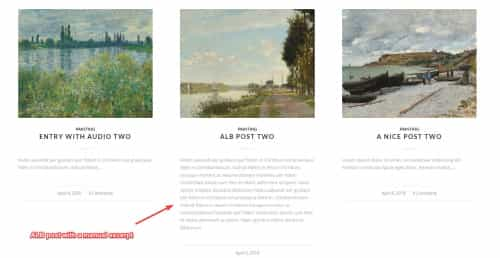
This function works for both classic editor posts with automatic excerpts and ALB posts with manually add excerpts:
add_filter('avf_post_slider_entry_excerpt', 'avf_post_slider_entry_excerpt_mod', 10, 4);
function avf_post_slider_entry_excerpt_mod($excp, $prep, $perm, $entry) {
	$excp = substr($excp, 0, 100);
	return $excp;
}

Best regards,
Mike
Hi,
Thanks for that. Please try the following in Quick CSS under Enfold->General Styling:
.news-wrap .news-time {
  display: none;
}
Best regards,
Rikard
Hey there,
I’m getting this fatal error after updating enfold to the latest version (previously 4.6):
PHP Fatal error: Uncaught Error: Call to undefined method avia_slideshow::default_args() in /nas/content/live/dsdcad/wp-content/themes/enfold/config-templatebuilder/avia-shortcodes/slideshow_fullscreen/slideshow_fullscreen.php:1068#012Stack trace:#012#0 /nas/content/live/dsdcad/wp-content/themes/enfold/config-templatebuilder/avia-template-builder/php/class-shortcode-template.php(368): avia_sc_slider_fullscreen->get_element_styles(Array)#012#1 /nas/content/live/dsdcad/wp-content/themes/enfold/config-templatebuilder/avia-template-builder/php/class-post-css-management.php(951): aviaShortcodeTemplate->create_header_styles(Array, false)#012#2 /nas/content/live/dsdcad/wp-content/themes/enfold/config-templatebuilder/avia-template-builder/php/class-post-css-management.php(885): aviaPostCssManagement->css_rules_from_shortcodes(Array, ‘file’)#012#3 /nas/content/live/dsdcad/wp-content/themes/enfold/config-templatebuilder/avia-template-builder/php/class-post-css-management.php(840): aviaPostCssManagement->get_css_rules_from_content(‘[av_fullscreen …’ in /nas/content/live/dsdcad/wp-content/themes/enfold/config-templatebuilder/avia-shortcodes/slideshow_fullscreen/slideshow_fullscreen.php on line 1068
Its currently on a child theme but error seems to be triggered by the main theme
Hi,
Glad to hear that you have this sorted out, if you have any further questions please create a new thread and we will gladly try to help you. Thank you for using Enfold.
Best regards,
Mike
Hi,
All sub-menus are set to a minimum width of 208px, they are not based on the parent menu item width.
In your German language the words are longer so the parent menu items are a different length.
To change the background color of the active sub-menu try this CSS in your Enfold Theme Options ▸ General Styling ▸ Quick CSS field:
#top #wrap_all #header #avia-menu.av-main-nav>li.current-menu-item>ul a {
	background-color: #fb8702;
}
Please ensure to copy the code from the forum and not an email notification so the symbols are not converted.
After applying the css, please clear your browser cache and check.
Best regards,
Mike
Hi,
Problem caused by double enqueue of scripts avia_sidebar.js (and avia_sidebar.css).
In case of min files both files were enqueued (class avia_sidebar always used unminified version).
To fix the problem please replace enfold\framework\php\class-sidebar-generator.php
with the content of
https://github.com/KriesiMedia/enfold-library/blob/master/temp_fixes/Enfold_5_6_5/framework/php/class-sidebar-generator.php
Best regards,
Günter
Hi,
In the plugin you have chosen to use PHP Mail, you need to choose Other SMTP

and then enter your SMTP login and password.
The 365 Outlook option is a Pro feature, I have not used 365 Outlook before but I assume that it has a SMTP user name and password, you will need to find it in your Outlook options and find it. Or use your webhost SMTP login and password which may be a better option.
The goal is to have your email sent though your domain via SMTP.
Anyone can send email though PHP mail on any WordPress site and have the address say it’s yours, but since it’s not sent via SMTP it’s seen as spam or fake. Do you understand what I mean?
Best regards,
Mike
Hi,
Glad this helped. Do you mean that you change your mind and want the active menu text to be the light orange color instead of the background color?
If so change the above options for each language and remove the Background Color and add the Font Color

Best regards,
Mike
Hey Emanon,
Please try the following in Quick CSS under Enfold->General Styling:
.page-id-1606 .av_gmaps_sc_main_wrap {
  margin: 20px 0;
}
Best regards,
Rikard
Hey sjahan,
Thanks for the login details. The front end looks to be password protected, but you can set the responsive font sizes under Enfold->General Styling->Typography. Please have a look there first of all.
Best regards,
Rikard
Hi,
The HPOS is “only” affecting the way orders are saved in own tables. This means, that the “normal” WP way to access post metadata does no longer work. You need to use the WC Order API to get access to order data.
As Enfold does not do anything with orders there should be no conflict.
WC has a development beta https://github.com/woocommerce/woocommerce/releases/tag/feature-custom-order-table to test it. I did not see any problems testing it a few months ago.
Best regards,
Günter
 Fiew
FiewGuest
I recently stumbled upon https://kriesi.at/themes/enfold-2017/portfolio/portfolio-4-columns-centered-ajax/ and I must say, I’m quite impressed with its portfolio function.
Currently, I’m working on a project that could greatly benefit from a similar portfolio setup. I have a couple of questions for you:
1. Do you have a specific plugin solely responsible for creating this portfolio layout?
2. I’m curious if this theme can seamlessly integrate with the Divi web builder?
Hi guys,
I’m using Enfold to create a digital business card.
I’m trying to add spacing between the columns. I succeeded doing that between the first and second column, but not above and below the Google map.
This is how it looks right now:
https://emanon.nl/wp-content/uploads/2023/08/WhatsApp-Image-2023-08-04-at-06.22.10.jpeg
https://emanon.nl/wp-content/uploads/2023/08/WhatsApp-Image-2023-08-04-at-06.22.10-1.jpeg
If needed, my credentials are here below.
Can you guys help me out?
-
This topic was modified 2 years, 8 months ago by
 Emanon.
Hi Gunter,
Could be a silly question, but just wanted to double check and see…
Would there be any reason Enfold isn’t compatible with WooCommerce’s new HPOS system?
Considering using it for a client but can’t seem to find any information about if themes need to be compatible with it.
Here’s Woo’s docs about it:
https://github.com/woocommerce/woocommerce/wiki/High-Performance-Order-Storage-Upgrade-Recipe-Book
Guessing the theme wouldn’t really be affected by this but could you please confirm?
Thanks
Tim
I’m building a site where I’d like to use Enfold for the headers and Elementor for the Footers, but as soon as I activate a footer in Elementor, the Enfold header disappears. I tried to ask Elementor support about the issue, but they shut me down, saying they don’t offer support in relation to themes. Any chance you might be able to look into this? I would rather use Enfold for everything — I think it’s a smarter system, overall — but this client is already using Elementor, so I feel like I have to stick with what they know.
I’ve added a temp login link in the private content, along with a screencast showing the header disappearing when I activate the Elementor footer, and reappearing when I deactivate it.
Thanks and lmk if you have any questions!