
-
AuthorSearch Results
-
August 7, 2023 at 11:31 am #1415696
Hey petr99,
Could you try updating the theme to the latest version (5.6.5) to see if that helps please? https://kriesi.at/documentation/enfold/how-to-install-enfold-theme/#theme-update.
Best regards,
RikardAugust 7, 2023 at 10:51 am #1415692Topic: Warning: Creating default object from empty value in …..
in forum Enfoldpetr99
ParticipantHi Kriesi,
I receive this message in the header part of my website and I don’t know what to do. Can you support me please? Thanks Petr.
Warning: Creating default object from empty value in /www/kubikdesign.cz/kubikdesign.cz/wp-content/themes/enfold/config-templatebuilder/avia-template-builder/php/asset-manager.class.php on line 897
Please, help me to remove and help me what to do to dont show it in the future.
August 7, 2023 at 10:01 am #1415688In reply to: Problem with partner/logo element
Okay, from what I see, the last version of enfold is bugged. When I uploaded it, I lost enfold and it made my theme administration crash. Now when I upload a theme, enfold is there but not visible…..
August 7, 2023 at 9:55 am #1415686In reply to: Best Place to Start
Hi Ryan-Michael,
You can install the Construction demo under Enfold->Demo Import.
Best regards,
RikardAugust 7, 2023 at 8:58 am #1415682In reply to: WooCommerce HPOS
Hey Gunter,
Excellent, thanks for confirming that, I figured Enfold wouldn’t need to interact directly with those changes but just wanted to confirm.
Thanks for taking the time to respond.
Regards
Tim
August 7, 2023 at 8:13 am #1415680In reply to: how to adjust the excerpt length in ENFOLD
Some thoughts on excerpt:
I think it would be generally better to remove the read more link from the excerpts and put it in the entry-footer before the meta information. For this you would only have to change the postslider.php in some places.
In the ALB element is queried, as should be displayed – about the ID “contents” the value will then decide later, via switch and case contribute to how the output looks.So if we take the decisions whether to set read-more out of the excerpts and then put them in entry-footer, that should then give us the ability to limit the excerpts according to the above filter set by Mike without cutting the read-more link.
see here in the DOM where the read-more link is : https://webers-testseite.de/blog/
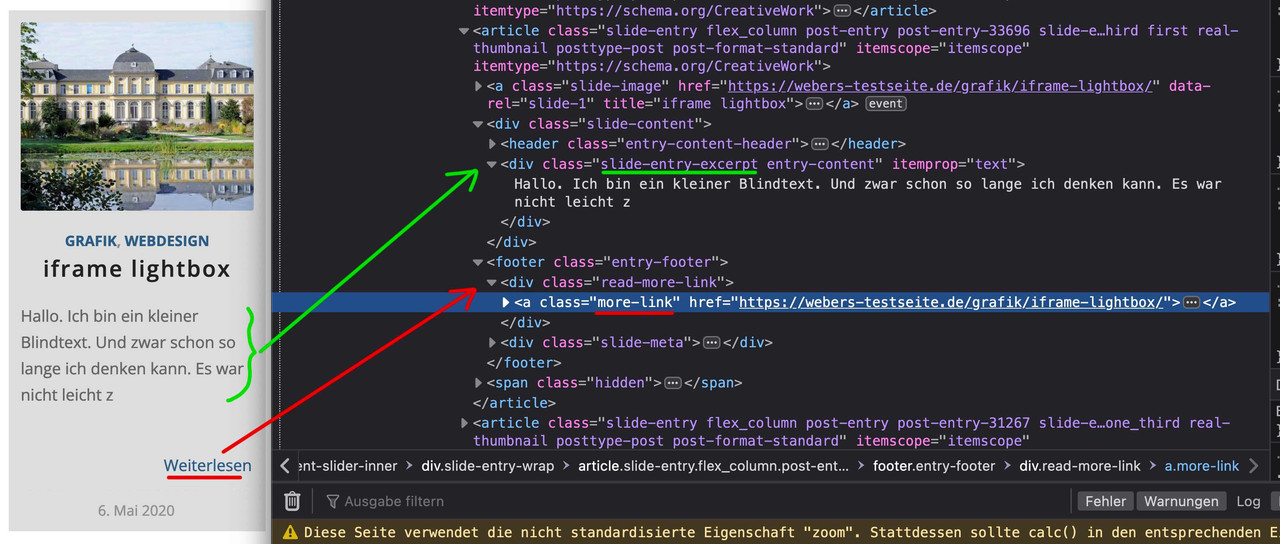
see here the edited postslider.php on pastebin: https://pastebin.com/PL15U0NN since lines 893-917 and for the entry-footer: 1227-1243
i hope that this will go to the next update of enfold – because it makes sense to limit excerpt length but to preserve read-more link!
August 7, 2023 at 6:57 am #1415678In reply to: Best Place to Start
Hello, I’ve just purchased Enfold. I thought I was purchasing the construction theme but it looks nothing like your demo? What am I doing wrong? I’ve created a staging page so I don’t interrupt the current website. I’m really lost. Please help.
Thank youAugust 7, 2023 at 3:42 am #1415672In reply to: Remove header height
Hey marsh1984,
Thank you for the inquiry.
The additional space is caused by the container of the first color section. You can adjust it by including this CSS code.
.html_header_transparency #top .av-7owuvs-9515cfe4018d7b5b88cf6181443191a6 .container {
    padding-top: 0 !important;
}
– OR –
.html_header_transparency #top .avia-builder-el-0 .container {
    padding-top: 0 !important;
}
You may need to toggle or temporarily disable the Enfold > Performance > File Compression settings in order to ensure that the changes take effect. By disabling the file compression settings, you will be able to make the necessary adjustments and updates without any conflicts. Once you have made the required modifications, you can re-enable the file compression settings to optimize the performance of your website.
Best regards,
IsmaelAugust 6, 2023 at 11:08 pm #1415669In reply to: Issue with Google reCaptcha while submitting form
Hi,
When I test after logging in it works correctly:

but when I am logged out I get a 500 server error on admin-ajax.php
Try checking your server error log for clues to the error.Best regards,
MikeAugust 6, 2023 at 10:10 pm #1415666In reply to: Filter search by category using ALB aearch form
Hi,
Thank you for your patience, Try adding this code to the end of your child theme functions.php file in Appearance ▸ Editor:if ( ! function_exists( 'bb_filter_search_results' ) ) { add_action( 'pre_get_posts', 'bb_filter_search_results' ); function bb_filter_search_results( $query ) { if ( ! $query->is_admin && $query->is_search ) { $query->set( 'post_type', array( 'post', 'portfolio', 'page' ) ); $query->set( 'cat', array(43,44) ); } return $query; } } if ( ! function_exists( 'bb_filter_ajax_search_results' ) ) { add_filter('avf_ajax_search_query', 'bb_filter_ajax_search_results', 10, 1); function bb_filter_ajax_search_results( $search_parameters ) { $defaults = array('numberposts' => 5, 'post_type' => array( 'post', 'portfolio', 'page' ), 'cat' => array(43,44), 'post_status' => 'publish', 'post_password' => '', 'suppress_filters' => false); $_REQUEST['s'] = apply_filters( 'get_search_query', $_REQUEST['s']); $search_parameters = array_merge( $defaults, $_REQUEST ); return $search_parameters; } }it will limit the search to an array of categories, in the code look for ‘cat’ => array(43,44) and change the numbers to your categories.
Please note there are two places to make this change.
I tested this with the search element filter Post Types set to All, and with the filter set to Posts

and it only gave me results from the two categories in the code.Best regards,
MikeAugust 6, 2023 at 8:56 pm #1415665Hey Saccollc,
Thanks for your patience, when I check your slider it looks like the min height is set to 56px, please double check. If the backend shows 200px please include an admin login in the Private Content area so we can investigate.
I checked the fullwidth easy slider in my demo and it respects the min height set in the slider options.
Are these the images you are having trouble with:

I see they are PNG but I don’t see a background color, I assume that you have already solved this.Best regards,
MikeAugust 6, 2023 at 7:54 pm #1415664In reply to: Move Mobile Menu to the top
Hi,
Glad we were able to help, if you have any further questions please create a new thread and we will gladly try to help you. Thank you for using Enfold.Best regards,
MikeAugust 6, 2023 at 6:55 pm #1415658In reply to: Move Mobile Menu to the top
Hi,
Try this CSS in your Enfold Theme Options ▸ General Styling ▸ Quick CSS field:#top #header_main #av-burger-menu-ul { vertical-align: top; }After applying the css, please clear your browser cache and check.
Best regards,
MikeAugust 6, 2023 at 6:51 pm #1415657In reply to: Logo Font Color
Hey steveorrmedia,
Try going to Enfold Theme Options ▸ General Styling ▸ Logo Area ▸ Logo Area Font Color

If this doesn’t help please include the url to the page in question so we can take a closer look.Best regards,
MikeAugust 6, 2023 at 6:46 pm #1415656Hi,
Thanks for your patience and the link to your site, I see that the tag portrait is correct on the German translation: tag-portrait
But in the English translation it has been changed to tag-portrait-en
Perhaps in your plugin there is a way to remove the added -en but I don’t have experience with it.
I looked at your tags and tried to remove it, but couldn’t because your German language is already using portrait and two tags can’t be the same

Best regards,
MikeAugust 6, 2023 at 2:52 pm #1415647In reply to: how to adjust the excerpt length in ENFOLD
Hi,
Glad we were able to help, if you have any further questions please create a new thread and we will gladly try to help you. Thank you for using Enfold.Best regards,
MikeAugust 6, 2023 at 2:51 pm #1415646In reply to: Massive gap above Grid Row in Parallax template
Hi,
I have added the IP to my host file but I can’t load your site, I get this error: Error establishing a database connection
I also get an error that your site uses an unsupported protocol ERR_SSL_VERSION_OR_CIPHER_MISMATCH
Please try to resolve this so we can examine the elements, I can’t offer a solution based on a screenshot.
You could also try Enabling the Avia Layout Builder Debugger and copy the page to another install on a test site so we can see the page with the issue.Best regards,
MikeAugust 6, 2023 at 2:10 pm #1415643In reply to: how to adjust the excerpt length in ENFOLD
Hi,
The original function Yigit posted works correctly for classic editor posts:add_filter('avf_postgrid_excerpt_length','avia_change_postgrid_excerpt_length', 10, 1); function avia_change_postgrid_excerpt_length($length) { $length = 100; return $length; }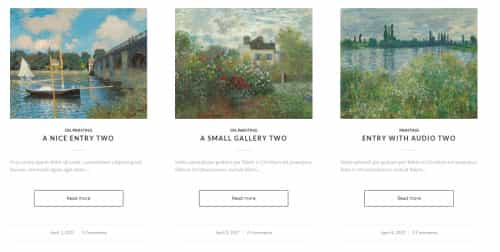
But since this doesn’t seem to be working for you I assume that you have created the posts with the Advanced Layout Builder (ALB) and have manually added the excerpts:

In this case try this function:add_filter('avf_post_slider_entry_excerpt', 'avf_post_slider_entry_excerpt_mod', 10, 4); function avf_post_slider_entry_excerpt_mod($excp, $prep, $perm, $entry) { $the_id = $entry->ID; $permalink = '<div class="read-more-link"><a href="' . get_permalink( $the_id ) . '" class="more-link">' . __( 'Read more', 'avia_framework' ) . '<span class="more-link-arrow"></span></a></div>'; $excp = substr($excp, 0, 100).'...'.$permalink; return $excp; }
Best regards,
MikeAugust 6, 2023 at 1:04 pm #1415642In reply to: WordPress Beitragsbild automatisch in Post anzeigen
Hi,
To display the featured image for a Advanced Layout Builder post, add the image to the Featured Image in the WordPress editor sidebar, in the Classic Editor it looks like this:

In the Block Editor it looks like this:

and then you can use Guenni007’s shortcode [thumbnail] in a code block element on the page where you want the featured image to show after adding this code to the end of your child theme functions.php file in Appearance ▸ Editor:function thumbnail_in_content($atts) { global $post; return get_the_post_thumbnail($post->ID); } add_shortcode('thumbnail', 'thumbnail_in_content');

This is the thread the Guenni007 shaired the function in.
Thanks Guenni007Best regards,
MikeAugust 6, 2023 at 12:40 pm #1415640In reply to: Issues with Roboto slab font
Hi,
Glad Nikko was able to help, if you have any further questions please create a new thread and we will gladly try to help you. Thank you for using Enfold.Best regards,
MikeAugust 6, 2023 at 12:11 pm #1415639In reply to: Problem with images
Hi,
Glad we were able to help, if you have any further questions please create a new thread and we will gladly try to help you. Thank you for using Enfold.Best regards,
MikeAugust 6, 2023 at 3:26 am #1415631Topic: Advanced Layout Builder not working
in forum Enfolddoomi
ParticipantHi, I suddenly have that Advanced Layout Builder is not working. I’m out of options. I can still edit the existing one but add nothing.
-Wordpress reinstalled.
-Enfold reinstalled. Last version
– all plugins deactivatedStill it doesn’t work.
August 6, 2023 at 3:01 am #1415630OK, I’ll try to get to that ;). Meanwhile, I seem to have narrowed this particular issue down to the footer options — as long as I don’t select a page to replace the footer in the Enfold options, the popups in Elementor still work; setting that footer page is what seems to break them. Anyway, thanks again!
August 6, 2023 at 12:44 am #1415629In reply to: Reduce Cumulative Layout Shift (CLS) by 0
Hey daves1997,
Thanks for your patience when I test your page on pagespeed for mobile the CLS is zero, but the desktop is 0.209 and these are the elements causing the issue:

so to correct you could add css to make the size of the elements the same on page load as when it is done loading.
The css I would recommend is this:@media only screen and (min-width: 1350px) { #top.home #after_section_1 .flex_column.avia-builder-el-4 { min-height: 504px; height: 504px; } #top.home #after_section_1 .flex_column.avia-builder-el-6 { min-height: 596px; height: 596px; } #top.home #after_section_1 .flex_column.avia-builder-el-8 { min-height: 320px; height: 320px; } #top.home #after_section_1 .flex_column.avia-builder-el-10 { min-height: 388px; height: 388px; } #top.home #after_section_1 .flex_column.avia-builder-el-12 { min-height: 342px; height: 342px; } #top.home #after_section_1 { min-height: 5316px; height: 5316px; } #top.home #av_section_1 { min-height: 524px; height: 524px; } #top.home #av_section_1 .av-special-heading.avia-builder-el-1{ min-height: 120px; height: 120px; } }It is important that your WP Rocket plugin doesn’t delay this css, so please add it to your WordPress ▸ Customize ▸ Additional CSS

Best regards,
MikeAugust 5, 2023 at 10:10 pm #1415625In reply to: Change colour of social icons in footer.
Hi,
Thank you for the link to your site, the mail icon is not showing because you have not added it to your Enfold Theme Options ▸ Social Profiles ▸ Your social profiles

I have added this for you but you should change the email address to the one you want to use.
To have the social icons in the footer show the background colors all of the time I added this css to your Enfold Theme Options ▸ General Styling ▸ Quick CSS field#top #wrap_all .av-share-box .av-social-link-mail a{color:#fff; background-color:#9fae37; } #top #wrap_all .av-share-box .av-social-link-twitter a{color:#fff; background-color:#46d4fe; } #top #wrap_all .av-share-box .av-social-link-linkedin a{color:#fff; background-color:#419cca; } #top #wrap_all .av-share-box .av-social-link-instagram a{color:#fff; background-color:#a67658; }
please clear your browser cache and check.Best regards,
MikeAugust 5, 2023 at 9:41 pm #1415623Hey Eleina,
Thank you for the link to your site, to center the popup I removed the 1/5 empty columns on each side of your popup columns:

then I added this css to your WordPress ▸ Customize ▸ Additional CSS:.mfp-content #yolanda.flex_column, .mfp-content #keaver.flex_column, .mfp-content #kenita.flex_column { float: none; margin: auto; }To stop the page from scrolling with the popup shows I adjusted your script to add the class no-scroll to the popup.
Please clear your browser cache and check.Best regards,
MikeAugust 5, 2023 at 9:39 pm #1415622In reply to: Footer Help
insert on that copyright input fiield – f.e. at the end :
[nolink]see: https://kriesi.at/documentation/enfold/footer/#copyrights-info
August 5, 2023 at 9:28 pm #1415621Topic: Footer Help
in forum EnfoldKerstincouch
ParticipantI need to remove the Enfold Theme by Kriesi and the terms of service on the footer area. I can’t seem to find where to do this.
August 5, 2023 at 8:52 pm #1415619In reply to: Problem with images
Hey Gianluca,
Thank you for the link to your site, I see you have an error Uncaught SyntaxError: Unexpected token ‘var’
Please disable Enfold Theme Options ▸ Performance ▸ JS & CSS file merging and compression
and enable Enfold Theme Options ▸ Performance ▸ Delete old CSS and JS files
and if you are using a cache plugin please disable it and if your webhost is caching please clear it.
Then clear your browser cache and check again.
If this doesn’t help please include an admin login in the Private Content area so we can be of more assistance.Best regards,
MikeAugust 5, 2023 at 8:30 pm #1415618In reply to: Mobile menu style
Hey enfold,
Try this CSS in your Enfold Theme Options ▸ General Styling ▸ Quick CSS field:#top #header #av-burger-menu-ul .av-active-burger-items > a > span.avia-menu-text { font-family: 'Arapey',serif !important; text-transform: uppercase !important; font-size: 18px; font-weight: 900; color: #0251CC; }Please ensure to copy the code from the forum and not an email notification so the symbols are not converted.
After applying the css, please clear your browser cache and check.Best regards,
Mike -
AuthorSearch Results
Viewing 30 results - 14,311 through 14,340 (of 244,617 total)
-
Search Results
-
Hi Kriesi,
I receive this message in the header part of my website and I don’t know what to do. Can you support me please? Thanks Petr.
Warning: Creating default object from empty value in /www/kubikdesign.cz/kubikdesign.cz/wp-content/themes/enfold/config-templatebuilder/avia-template-builder/php/asset-manager.class.php on line 897
Please, help me to remove and help me what to do to dont show it in the future.
Hi, I suddenly have that Advanced Layout Builder is not working. I’m out of options. I can still edit the existing one but add nothing.
-Wordpress reinstalled.
-Enfold reinstalled. Last version
– all plugins deactivatedStill it doesn’t work.
Topic: Footer Help


