Hi,
Glad we were able to help, if you have any further questions please create a new thread and we will gladly try to help you. Thank you for using Enfold.
Best regards,
Mike
Hey stephaniebLOS,
In your footer I see this:

Try changing ypur iconlist_icon line-height to 20px like this:
.horizontalicons .iconlist_icon {
    margin-right: 10px;
    height: 30px;
    width: 30px;
    line-height: 20px;
}
and the center icons will be centered:

To center the icons in the footer try adding this css:
.horizontalicons {
	display: flex;
	justify-content: center;
}
After applying the css, please clear your browser cache and check.
Best regards,
Mike
Hi,
When I check your page I see Yigit’s solution above loading:

Please remove this css and disable Enfold Theme Options ▸ Performance ▸ JS & CSS file merging and compression and enable Enfold Theme Options ▸ Performance ▸ Delete old CSS and JS files then add this css to your WordPress ▸ Customize ▸ Additional CSS or Enfold Theme Options ▸ General Styling ▸ Quick CSS field and Then clear your browser cache and any cache plugin, and check.
#top .special_amp {
font-family: inherit;
font-style: inherit;
font-size: inherit;
line-height: inherit;
font-weight: inherit;
color: inherit!important;
}
This is the results I see when I test on your page:

Best regards,
Mike
Hi,
Thanks for the feedback, I don’t have an iPhone but I believe that I see the issue on Android in landscape mode, please see the screenshot in the Private Content area.
So I recommend removing your border from the column and use this css to add a border around the image, try this CSS in your Enfold Theme Options ▸ General Styling ▸ Quick CSS field:
.avia-image-container .avia-image-container-inner {
    border-width: 6px;
    border-color: #ffffff;
    border-style: solid;
}
If you would like to ensure that this border is only applied to specific images, try adding a custom class to the image such as image-border and then add your custom class to the css like this:
.image-border.avia-image-container .avia-image-container-inner {
    border-width: 6px;
    border-color: #ffffff;
    border-style: solid;
}
After applying the css, please clear your browser cache and check.
Best regards,
Mike
Hi Enfold-Team
I have created an animated GIF, exported it to play once and placed it on my homepage. It works fine when opening the site for the first time. However, on reload or when returning to the homepage, the GIF does not play anymore and stays on the last frame. I suppose that this is due to the fact that the browser caches the GIF file. Is there a work-around for this?
I have found an article here https://www.computerhilfen.de/english/restart-a-gif-animation-let-the-browser-play-it-again-from-start.html but I’m not sure how to incorporate the solution into enfold.
Thank you very much,
Dominic
Bonjour,
je souhaiterais savoir si nous pouvons avoir accès à la bibliothèque d’images ENFOLD car j’ai téléchargé la démo par default “one page portfolio” mais j’aimerais changer la photo header par la vidéo header qui est dans la démo “startup business”?
Est-ce possible?
Bien cordialement
Thanks, Ismael, but I’m sorry, I misread what they (Elementor support) said and therefore described it wrong to you. They said “[Enfold] opens several div tags in the header template and then closes them in the footer template.” — plus, I missed that they had actually included screenshots (linked below) — does that make more sense, now? Thanks again and lmk if you have any other questions.
header opening tags: https://capture.dropbox.com/oYrHiQf977skxIW4
footer closing tags: https://capture.dropbox.com/Dp4mXtmqwdaJ4JnL
Hey sky19er,
Thank you for the inquiry.
Sounds like, if I could just get the closing div out of the footer,
We’re not really sure how that would resolve the issue, but it’s worth noting that the closing tag of the header is located in the enfold/includes/helper-main-menu.php file, specifically at the very bottom of it around line 368.
<!-- end header -->
</header>
If you need to modify the footer, it could be worthwhile to check the footer.php file.
Best regards,
Ismael
Hi,
Glad Rikard could help, typically Enfold ▸ Advanced Styling has precedence, unless there is anything else we can help with on this issue, shall we close this then?
Best regards,
Mike
Hey Gabriele-Marie,
Thank you for your patience, unfortunately I don’t see a way to do this with the Enfold elements and contact form, I recommend using a contact form like Contact Form 7 and one of it’s addon plugins like: Multi Step for Contact Form 7 or perhaps Extensions For CF7
There are many other addons for Contact Form 7 and I imagine one would work for you.
I don’t have any specific experience to help you create this, but I think this would be your best option.
Best regards,
Mike
Hey Martin,
Thanks for your question, there is not a option to make the header sticky on mobile, but you could try this CSS in your Enfold Theme Options ▸ General Styling ▸ Quick CSS field:
@media only screen and (max-width: 767px) {
  .responsive #top #wrap_all #header {
    position: fixed !important;
  }
  .responsive #top #wrap_all #main {
  	padding-top: 110px !important;
  }
}
After applying the css, please clear your browser cache and check.
Best regards,
Mike
Hi,
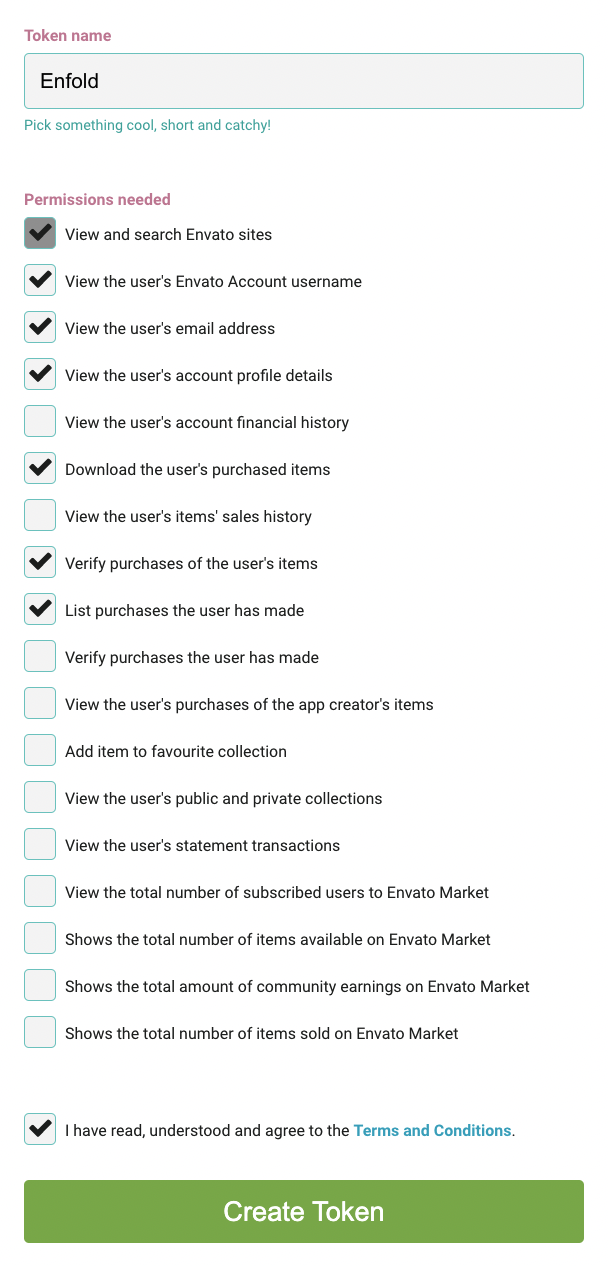
You must create a token in your Envato Theme Forest account, we can not create it for you, please see our documentation How to generate a Envato Personal Token
Step One: To generate your personal token, go to Envato create a token page. If not logged in please use your Envato credentials.
Step Two: Your Token needs specific permissions to verify the purchase and link your Envato account to the theme. 7 permissions are necessary to display user information on Enfold theme options ▸ https://kriesi.at/documentation/enfold/wp-content/uploads/sites/22/2018/12/token-permissions.png
Step Three: After selecting the required permissions, read the Terms and Conditions and agree to create your new token. Copy and save your token on your local system.
After completing the steps above, you are now ready to register your Enfold theme. Go to Enfold > Theme Update > Enter a valid Envato private token and enter your token.
If you still have trouble try using the Envato market plugin
Another option is to update the theme via FTP, or though the WordPress theme page.
Download the latest installable WP version from your Theme Forest account and upload it to your WordPress ▸ Appearance ▸ Themes ▸ Add Themes ▸ Add New

after you choose the zip file and click install, you will see a This theme is already installed message because you are updating, you can continue

then you will see the Theme updated successfully message.

Best regards,
Mike
Hey gatehealing,
Thanks for your question, the reason the Advanced Layout Builder (ALB) is not recommended for posts is because some features are not automatically added to these posts, such as the featured image, the social share box, the related posts, and the comment form, also the excerpt must be manually added in the manual excerpt field.

This is by design so that you would have full control of the layout, you can manually add these with the ALB elements, so if you don’t mind adding these manually using the ALB for posts is fine.
Best regards,
Mike
Hey ballindigital,
Thank you for the link to your site, I see that you are using v5.6.2, please update to v5.6.5
The MailChimp API has changed, after you update the setting at Enfold Theme Options ▸ Newsletter ▸ Mailchimp needs to be reverified and then each mailchimp element on your pages needs to be opened and resaved.
Best regards,
Mike
Hi,
Thank you for your patience and for pointing this out, I have reported it to the Dev Team for their review.
In my tests I found setting the row layout to equal height allows the row margin to work correctly, please try this for now.

Best regards,
Mike
Hi,
You are welcome!
For your information, you can take a look at Enfold documentation at https://kriesi.at/documentation/enfold/.
If you have any other questions or issues, feel free to start a new thread under Enfold sub forum and we will gladly try to help you.
Best regards,
Yigit
Hi,
I’m using Enfold Child Theme. I created a custom post type called ‘Press’ (slug = ‘press’). I want to enable the Avia layout builder on this post type.
1) What is the code?
2) Can I add it to functions.php in the child theme?
Hi,
Yes, you should include the child theme when you copy the files and database from the staging site to the live site.
To move the menu text in line with the bottom of the logo, try this CSS in your Enfold Theme Options ▸ General Styling ▸ Quick CSS field:
@media only screen and (min-width: 990px) {
#top .main_menu .menu li a {
padding-top: 50px;
}
}
After applying the css, please clear your browser cache and check.
Best regards,
Mike
Hi Mike,
I have added some margin in the first column however it doesn’t effect all the other columns only the first column. see image. I just want to add some top margin for it to effect all three columns. I have found that changing the column to a Equal Height Columns it does apply the margin to all three columns but not on individual height columns should this work on individual heights. I have test this with another enfold site which is a different version but this too is the same with only the first column working.
Kind regards
Dave
Hi,
Glad we were able to help, if you have any further questions please create a new thread and we will gladly try to help you. Thank you for using Enfold.
Best regards,
Mike
Hey,
Please use the code as the following:
#top .special_amp {
    font-size: 1em;
    line-height: 1;
    font-style: normal;
    font-family: inherit;
    font-weight: 300;
}
After that, please go to Enfold theme options > Performance and disable CSS file merging, save theme options, clear cache, and enable CSS file merging once again.
If that doesn’t work, please create temporary admin logins and share them with us in the private content field.
Regards,
Yigit
I have tried to add a button with a link and image with a link but the option for the link is grayed out. I have disabled all plugins and enfold is up to date. Please advise.
Hi,
Thanks for the update. Did you register your licenses? If not, then please refer to this: https://kriesi.at/documentation/enfold/theme-registration/. I would suggest that you generate a separate token for each license you own.
Best regards,
Rikard
Hi,
Thanks for that. Please try the following in Quick CSS under Enfold->General Styling:
.special_amp {
  font-family: inherit;
  color: inherit;
  font-style: inherit;
}
Best regards,
Rikard
Hello,
Our client has a multisite where the following error appeared on the German and Italian versions:
Deprecated: Function create_function() is deprecated in /srv/www/dia/dia.aau.at/html/staging1/wp-content/themes/enfold-child_de/functions.php on line 135
As a precaution, we generated a staging page and updated the entire pages. After the theme was finished and WordPress was also updated to 6.3, the aforementioned error message remained and another one appeared on every page and also in the backend:
Deprecated: Function Class avia_style_generator was called with an argument that is deprecated since version 5.3! Trying to set protected/private property: avia_style_generator::print_extra_output – will become unavailable in a future release. Check for a set method or a filter. in /srv/www/dia/dia.aau.at/html/staging1/wp-includes/functions.php on line 5737
How can you fix these errors?
Thank you in advance.
Hi,
When the child theme is active the setting Enfold Theme Options > Import/Export > Import Settings From Your Parent Theme doesn’t ask for a file to upload, it automatically gets the file from the parent theme.
I added a child theme for you and imported the parent theme, please review the documentation so you can apply this to your live site.
The Logo left and menu centered on the same line is not and option, but I adding this css to achieve it:
@media only screen and (min-width: 990px) {
#top .main_menu {
    display: flex;
    justify-content: center;
    width: 100%;
}
}
please clear your browser cache and check.
Best regards,
Mike
Hi,
Try this CSS in your Enfold Theme Options ▸ General Styling ▸ Quick CSS field:
#top .avia-button-wrap .avia-button {
	border-radius: 50px;
}
#top .avia-button .avia_button_background {
    bottom: -3px;
}
#top .form_element .button[type="submit"] {
	border-radius: 50px;
}
After applying the css, please clear your browser cache and check.
Best regards,
Mike
Hey,
You are using an old version of Enfold. Updating Enfold to the latest version 5.6.5 would fix this issue.
Please update Enfold: https://kriesi.at/documentation/enfold/theme-update/.
Regards,
Yigit
Hey, I have some new information on this (per my previous post #1415389 https://tinyurl.com/284ddper ) — I’m hoping I can convince you to help me solve this issue where my Enfold header disappears if I activate an Elementor Footer. Elementor support said it might have to do with the fact that the header div is closed in the footer. Sounds like, if I could just get the closing div out of the footer, I could use Elementor’s footer without losing my beloved Enfold headers. Any chance you could steer me in the right direction for that kind of modification? I already have a child theme in place, and I’ve copied the site url, a screencast showing the issue, and a temp login link in the private content. Thanks so much and lmk if you have any questions!