i don’t know how your plugin react on this. My solution above is only for working with snippets inside your child-theme functions.php.
i do not know how those regenerate Plugins do their job. – F.e. if they remove allready existing recalculated images.
There is one Plugin from : Shortpixel Group: https://wordpress.org/plugins/regenerate-thumbnails-advanced/
if this plugin recalculates the images – you can have under advanced options to erase non recalculated images from the uploaded folder.
(click to enlarge:)
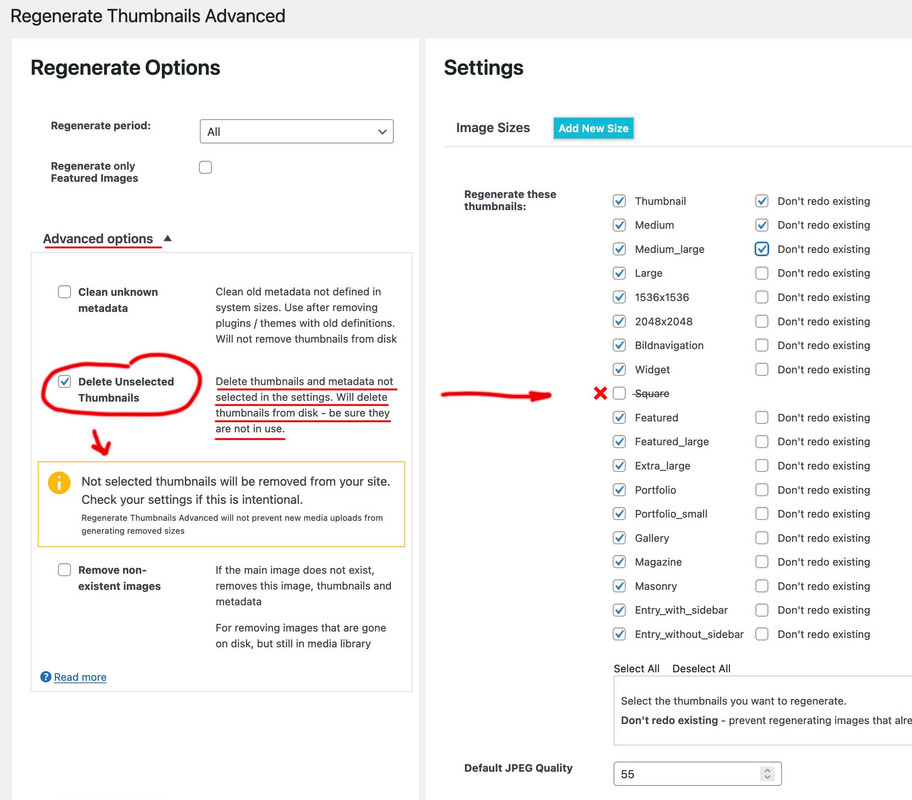
btw.: this plugin also can create new image sizes.The only thing I notice is that the compression level does not work for Enfold formats.
But you can set that beforehand by f.e:
add_filter("avf_jpeg_quality", "avf_set_quality_mod", 9999, 1);
add_filter("avf_wp_editor_set_quality", "avf_set_quality_mod", 9999, 1);
function avf_set_quality_mod($quality) { $quality = 55; return $quality;}
Hi,
I modified your css and I think it’s the way you wanted it.
Please clear your browser cache and check.

Best regards,
Mike
Hello,
After updating the Enfold theme on my website, I encountered the following error:
Warning: require_once(zip://#template): failed to open stream: operation failed in /nas/content/live/arcnmstg/wp-includes/template.php on line 785
Fatal error: require_once(): Failed opening required ‘zip://#template’ (include_path=’.:/usr/share/pear/php:/usr/share/php’) in /nas/content/live/arcnmstg/wp-includes/template.php on line 785
Temporary Resolution:
To ensure my website remains operational, I resorted to making a temporary modification in the wp-includes/template.php file. Here’s the check I added in the load_template function:
php
if ($_template_file != “zip://#template”) {
if ($load_once) {
require_once $_template_file;
} else {
require $_template_file;
}}
This modification allowed me to make my website functional. However, I believe there might be an underlying issue that needs proper investigation and resolution.
I’m uncertain why WordPress attempted to load a template with the name “zip://#template,” as this behavior is unexpected. I’m creating this Topic here for the permanent solution from the support team.
I understand the importance of not modifying core files directly, and I am eager to restore my website to its standard configuration as soon as possible.
Thank you for your help!
-
This topic was modified 2 years, 7 months ago by
 Qasim1991.
I am running the latest version of Enfold – 5.6.6 and when I went to mobile optimize the site and shut off some of the elements using screen options, they are not working. I have an entire color section set to hide on all screen sizes and it is still appearing on all screens. I have cleared out all CSS and tried it and it is still not hiding the element. Thank you.
This is how the first video on the page is done:

Is there anything I can add to get the enfold video element to do the same thing?
Thank you!
Guenni,
So, I am trying to do this step-by-step, removing the default Enfold-based image sizes first. I kept the bulk of your framework, but made a few little changes. I applied the code below to my child themes functions file, and then did a full regeneration of the images, and removed any images that did not have sizes anymore.
// Start Removing Image Sizes - Rev 20230907-3 //

// Remove or unregister unused WordPress Image Sizes (via Enfold)

// Disable loads of Enfold & WP image sizes upon upload
// do image sizes manually, double-size with high compression for retina screens
// use Photoshop to set exact double size and quality between Q30 and Q40
add_action('init', 'remove_enfold_image_sizes');
function remove_enfold_image_sizes() {
  remove_image_size('square');
  remove_image_size('featured');
  remove_image_size('featured_large');
  remove_image_size('portfolio');
  remove_image_size('portfolio_small');
  remove_image_size('gallery');
  remove_image_size('magazine');
  remove_image_size('masonry');
  remove_image_size('entry_without_sidebar');
  remove_image_size('entry_with_sidebar');
  remove_image_size('shop_thumbnail');
  remove_image_size('shop_catalog');
  remove_image_size('shop_single');
  remove_image_size('shop_gallery_thumbnail');
}
// Remove unneeded WP image sizes
add_filter( 'intermediate_image_sizes_advanced', 'prefix_remove_default_images' );
// Remove default image sizes here.
function prefix_remove_default_images( $sizes ) {
// do NOT remove small and medium sizes, they are used in backend Media Library!
// unset( $sizes['small']); // 150px
// unset( $sizes['medium']); // 300px
 unset( $sizes['large']); // 1024px
 unset( $sizes['medium_large']); // 768px
 unset( $sizes['1536*1536']); // 1536x1536px
 unset( $sizes['2048*2048']); // 2048x2048px
 return $sizes;
}

// Moduly Image Sizes
add_image_size('Moduly-Square', 1080, 1080, false);
add_image_size('Moduly-Horizontal', 1920, 1080, false);
This is the result (on Performance Tab > Responsive Images Overview section), after the above adjustments.
I do see the couple added image sizes, but unless I am a complete idiot, it still looks like the image sizes above are still being injected.
Images aspect ratio: 1 : 1
36*36 – Widget (added by theme)
108*108 – thumbnail (WP default size)
180*180 – Square (added by theme)
540*540 – medium (WP default size)
705*705 – Masonry (added by theme)
1080*1080 – large (WP default size)
1080*1080 – Moduly-Square (added by a plugin)
1500*1500 – Fullscreen Sections/Sliders (added by theme)
1536*1536 – 1536×1536 (WP default size)
2048*2048 – 2048×2048 (WP default size)
Images aspect ratio: 52 : 37
260*185 – Portfolio small (added by theme)
Images aspect ratio: 99 : 80
495*400 – Portfolio (added by theme)
845*684 – Gallery (added by theme)
Images aspect ratio: 142 : 75
710*375 – Magazine (added by theme)
Images keeping original aspect ratio
768*0 – medium_large (WP default size)
Images aspect ratio: 845 : 321
845*321 – Entry with Sidebar (added by theme)
Images aspect ratio: 1210 : 423
1210*423 – Entry without Sidebar (added by theme)
Images aspect ratio: 150 : 43
1500*430 – Featured Thin (added by theme)
Images aspect ratio: 50 : 21
1500*630 – Featured Large (added by theme)
Images aspect ratio: 16 : 9
1920*1080 – Moduly-Horizontal (added by a plugin)
Guenni,
I feel like an idiot on this, because it seems like I am doing it right, but am just not getting it to do what it would appear it should be doing. Any ideas where I have gone wrong?
Thank you for this, but please have a look at the link I sent:
https://adoptionvoicesthebook.com/video-test/
I was able to prevent the recommended videos by pasting the link into the page with ?rel=0 at the end.
That is the first video on the page and it does NOT show related videos at the end.
The enfold video element with the same url DOES show related videos at the end.
I would like to use the enfold element because I can use a cover image.
So it is indeed something that can be prevented with normal embeds but not with the enfold element
Thanks again
David
Try this and for changing the direct next post:
https://kriesi.at/support/topic/enfold-image-sizes-3/#post-1108904
https://kriesi.at/support/topic/enfold-image-sizes-3/#post-1109028
But : after erasing some of those image-sizes – you had to regenerate your thumbnails : there are some good plugins to do so.
f.e.: https://wordpress.org/plugins/force-regenerate-thumbnails/
// Disable loads of Enfold & WP image sizes upon upload
// do image sizes manually, double-size with high compression for retina screens
// use Photoshop to set exact double size and quality between Q30 and Q40
add_action('init', 'remove_enfold_image_sizes');
function remove_enfold_image_sizes() {
// do NOT remove widget size, is used in backend portfolio items!
// remove_image_size('widget');
  remove_image_size('square');
  remove_image_size('featured');
  remove_image_size('featured_large');
  remove_image_size('portfolio');
  remove_image_size('portfolio_small');
  remove_image_size('gallery');
  remove_image_size('magazine');
  remove_image_size('masonry');
  remove_image_size('entry_without_sidebar');
  remove_image_size('entry_with_sidebar');
  remove_image_size('shop_thumbnail');
  remove_image_size('shop_catalog');
  remove_image_size('shop_single');
    remove_image_size('shop_gallery_thumbnail');
}
// Remove unneeded WP image sizes
add_filter( 'intermediate_image_sizes_advanced', 'prefix_remove_default_images' );
// Remove default image sizes here.
function prefix_remove_default_images( $sizes ) {
// do NOT remove small and medium sizes, they are used in backend Media Library!
// unset( $sizes['small']); // 150px
// unset( $sizes['medium']); // 300px
 unset( $sizes['large']); // 1024px
 unset( $sizes['medium_large']); // 768px
 return $sizes;
}
Hey Abel,
I see that you are running an old version of the theme, could you try to update to the latest version (5.6.6) to see if that helps please? The update to 5.6.6 has to be done manually from the version you are running, please refer to my replies in this thread: https://kriesi.at/support/topic/enfold-4-5-theme-update-update-failed-download-failed-a-valid-url-was-not-pro/#post-1021541
You can either update manually via FTP: https://kriesi.at/documentation/enfold/how-to-install-enfold-theme/#theme-update, or use a plugin to upload the theme zip file: https://wordpress.org/plugins/update-theme-and-plugins-from-zip-file/
If that doesn’t work then please try to delete the whole theme folder, then replace it with the new version. Make sure that you have backups of the site before starting updating.
Also please read this after you have updated: https://kriesi.at/documentation/enfold/theme-registration/
Best regards,
Rikard
I have tried lots of different techniques, but am still running into issues doing the following tasks:
- Removing unused image sizes set by Enfold
- Changing Enfold-defined sizes
Desired Outcomes:
Biggest picture: Really streamline the image resources to allow for large library without so many image size variations to create massive filesystem bloat.
- Determine where Enfold-based Widget image size is used.
- Remove (or redefine them to other sizes, if possible) the following Enfold-created image sizes: Masonry, Magazine, Fullscreen Sections/Sliders, Portfolio small, Entry with Sidebar, Entry without Sidebar
- Change the default size for the following Enfold-based sizes: Featured Large (1920×1080)
- Viability of removing other WP-default sizes: 108×108 (thumbnail), 1536×1536, 2048×2048
Methods Attempted
I have tried a ton of different directions, including Simple Image Options (recommended on the theme Performance tab), Enfold code snippet library (https://github.com/KriesiMedia/enfold-library/blob/master/actions%20and%20filters/Layout/avf_modify_thumb_size.php), WordPress Docs (https://developer.wordpress.org/reference/functions/remove_image_size/).
No matter which tool or how I apply the code, those registered image sizes continue to appear, both in the plugin display, but also in that Image section on the Performance tab. I can manually add image sizes, but without being able to get that snippet code to work, they are not selectable within any Avia panels.
Environment:
WP: 6.3.1
Enfold: 5.6.6 (with child-theme)
Hi,
As I wrote earlier; you cannot run two themes at the same time. So creating different themes for different screen widths would make no sense, since it wouldn’t work. Maybe the adjustments were done using CSS or some other styling method? You could reach out to your developer to check what he or she has done specifically. Also please make sure that you have copied the theme settings from your old theme into the new one, you can do that under Enfold->Import/Export.
Best regards,
Rikard
Hi
I see there are a lot of threads around creating clickable hotspots rather than rollover ones. However, none do exactly what I need them to do or work in more recent versions of Enfold. So I wonder if anyone can help.
This is how I’d like it to work:
1 A Hotspot activates a tooltip onclick (rather than rollover) and stays activated (to enable users to click for more information on that tooltip)
2 The tooltip closes when the user clicks on the corresponding hotspot OR selects a new hotspot by clicking on it.
I appreciate that Show on mouse hover – hide on click does something similar but it is confusing users in testing.
Please see https://owe.brother.design/discover/ for the map. Password below in private content
Can anyone help?
-
This topic was modified 2 years, 7 months ago by
 domchocolate.
-
This topic was modified 2 years, 7 months ago by domchocolate.
Hi
I see there are a lot of threads kike this one around creating clickable hotspots rather than rollover ones. However, none do exactly what I need them to do or work in more recent versions of Enfold. So I wonder if anyone can help.
This is how I’d like it to work:
1 A Hotspot activates a tooltip onclick (rather than rollover) and stays activated (to enable users to click for more information on that tooltip)
2 The tooltip closes when the user clicks on the corresponding hotspot OR selects a new hotspot by clicking on it.
I appreciate that Show on mouse hover – hide on click does something similar but it is confusing users in testing.
Can anyone help?
-
This reply was modified 2 years, 7 months ago by domchocolate.
Hi. The client wish to use a new Flaticon set and she have uploaded it in the Media Library for the English Language.. When she try to Import in Enfold from Import/Export-> Iconfont Manager she get the error Message “Could’nt add the fon because the server did not respond, reload the page and try again”..
The file is 4385860-design-thinking.zip file contains different folders of icons sets in png, eps, font, svg, psd
WordPress 6.3.1
PHP 8.1.22
Enfold 5.6.6 with Enfold Child
Login and Error Log details in private..
Thank You very much for Your Help
Hi Bianca,
Sure, we can help!
Please register to our support forum ( https://kriesi.at/support/register/ ) using your purchase code ( https://kriesi.at/wp-content/uploads/2013/09/registration_steps.jpg ).
Then, start a new thread in https://kriesi.at/support/forum/enfold#new-post, and share WordPress admin logins and FTP logins in the private content field so we can install Enfold for you.
Regards,
Yigit
 bianca
Guest
Hi team Enfold,
If the masonry element contains no entries, other entries (like for example pages) will be displayed.
Is there a way to just let the masonry element empty, if there are no results?
We found this but it seems incomplete.
add_filter('avf_masonry_query_no_entries_fallback', true, $terms, $valid_terms );
Kind regards,
Team VDLP
This reply has been marked as private.
Hi Mike,
Sorry for my late response. I just had to jump on another project urgently.
In principle, you had already implemented it quite well. However, unfortunately it still doesn’t fit.
I have now set the correct font sizes and spacing. What remains, however, is the problem with the background. The title can sometimes be 2 lines long. In this case, however, the area in the background would have to be higher (including responsivity). I have made a layout for this so that you know what I mean.
https://www.dropbox.com/scl/fi/3opy015nz91xmvuy48rc0/enfold-help-2.jpg?rlkey=1ve9bxk9hf5r6xsyfhvdjcflb&dl=0
Would you look at it again? Thank you very much.
KR – Marc
Hi,
after Updating Enfold to the newest Version (5.6.6), we encountered a fatal error on our xml sitemaps.
Uncaught TypeError: …. /wordpressinstallation/wp-content/themes/enfold/config-wordpress-seo/config.php on line 353
PHP 8.1.21
Wordpress 6.3.1
Yoast 21.1
Thanks for looking into it!
-
This topic was modified 2 years, 7 months ago by
 DUALWERK.
I don’t think this is just a problem with Enfold but maybe you can help me fix it.
Sometime in the past few months or year (?) neither of the browsers (Firefox, Safari) on my iphone 6 will open hamburger menus on seemingly any site including the new Enfold site I just made. I thought maybe it’s because the iOS is so old (iphone 6 can only go up to version 12.5.7). But in searching on this problem it turns out a zillion people are having this problem on very new iphones with much later iOS..
On my new Enfold site, when I touch the hamburger menu the screen in that corner blinks but the menu doesn’t open.
jeffersonbaroque.org
I noticed that after I touch the hamburger, the address line changes from the address above to
jeffersonbaroque.org/# as if the code is directing the browser to an anchor on the same page. But my menu items are separate pages from the home page.
On other sites where the hamburger menu also doesn’t work (most of them), the # doesn’t appear in the address after touching the menu.
I did a soft reset of the phone and I cleared the cache in both browsers. Nothing changed.
In trying to find help by searching the web, I turned up this:
https://developer.apple.com/library/archive/documentation/AppleApplications/Reference/SafariWebContent/HandlingEvents/HandlingEvents.html
and this:
https://stackoverflow.com/questions/54236221/responsive-hamburger-menu-not-working-on-mobile-safari/54290816#54290816
but I am not a programmer so it all means nothing to me.
Has anyone else had this problem?
Hey Antonio,
Thank you for the inquiry.
You can place the embed code within a Color Section and adjust the section’s container to full width. For more information, please refer to this documentation.
// https://kriesi.at/documentation/enfold/color-section/#color-section-with-100-content-width
Best regards,
Ismael
Hey Lene,
Thank you for the inquiry.
You can adjust the height of the current menu indicator using the following css code.
.avia-menu-fx {
    height: 4px;
    width: 100%;
}
And to add a custom social icon to the theme, please check the following documentation.
// https://kriesi.at/documentation/enfold/social-share-buttons/#how-to-add-custom-social-icons-to-enfold-options
Best regards,
Ismael
Dear Enfold team,
I have just cloned my site to create a translation, and after modifying the italian version of page “Conditions générales d’affaires” (in italian Condizioni generali di contratto) none of them is showing any more. A message comes saying I don’t have permission to preview drafts. The pages are published, though.
I tried to translate the slug in Italian but nothing changes.
Could you please have a look ?
Thank you
Regards,
Natacha
Hi Support,
We recently purchased a new license from Envato. However, we currently have the Enfold Child theme installed, which was originally obtained through our designer/developer’s Biz account.
To ensure we have our own valid license, we acquired a separate Enfold Child theme license. I have already updated the Envato private token through the theme update. Now, I’m uncertain about the next steps to ensure that our theme is properly licensed under our own account.
Could you please provide guidance on the next steps?
Thank you very much,
Gee
Hi,
Glad we were able to help, if you have any further questions please create a new thread and we will gladly try to help you. Thank you for using Enfold.
Best regards,
Mike
Hi,
Thanks for the feedback, I have not seen any issues with MySQL from other users, typically if WordPress has no issues with the database then Enfold would not as Enfold only stores info in the database though WordPress, but I have asked the rest of the team if they are using MySQL 8.0 currently. I will reply when I hear back from the rest of the team.
Perhaps the best way to test is to setup a staging site with MySQL 8.0, unfortunately my server only offers Maria.
Best regards,
Mike
Hi there,
I have tried the css code from https://kriesi.at/documentation/enfold/comments/#input-fields-on-the-same-line but did not work.
I copied it at the General Styling Quick CSS, could you help?
Thank you
-
This topic was modified 2 years, 7 months ago by
 Xiscoj.
Hello,
I need to add the following page, created externally by a service provider to my own website done with Enfold:
This is the page: VRWS2023 Accommodation map
They provide me with the following instructions:
——————————————————————————————————————–
Steps to embed the code into your event website
STEP 1: Create a new page on the event website titled “HOTELS for <event name>” and place it in the top-level navigation.
STEP 2: Paste the snippet of code into the body of your content management system where you want the content piece to be positioned and click save.
Tips when embedding:
The uploader iframe is not compatible with our JavaScript codes.
Embed into a full width column (full screen width), sometimes referred to a “fluid” column, in the page layout. Most page builders (if not all of them) allow for this. If width is constrained, this may affect how the map is displayed.
VRWS 2023: https://HotelMap.com/M8E5J
<script async type=”text/javascript” id=”hotelmap_script” src=”https://hotelmap.com/api/html/v2/listing?m=M8E5J&t=Vacation+Rental+World+Summit”>
</script>
————————————————————————————————————-
I have done Step 1 and created a page called “Accommodation”
As for Step 2 I added a code block content element and inside it I pasted the script above.
The issue is that our page doesn’t display the map full screen and with the scrollable hotels list on the right as in the original page they created.
How can I have the same look on our page? It’s important because it is way more user friendly than the result on our page.
Thank you for your help.




