Hey bemodesign,
Please try a plugin like WP Mail Logging, there is a very old plugin Contact Form DB for Enfold but I don’t know if it still works.
Best regards,
Mike
bei Enfold 5.6.6 ist die Option direkt unterhalb des Logos zu sehen: : Theme Optionen – Transparency Logo Options –
wähl das mal aus, dann gib das Logo an, welches du im Transparenz Modus nutzen möchtest.
Das andere Logo ist für die nicht Transparenzen zuständig.
Bessere Ratschläge könnte ich nur geben, wenn ich die Seite sehen könnte.
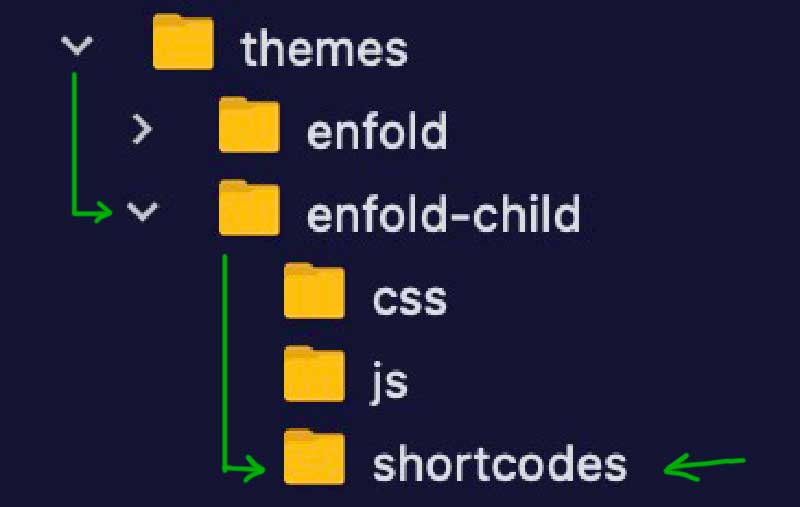
put this to your child-theme functions.php:
(see on docu: https://kriesi.at/documentation/enfold/intro-to-layout-builder/#customization )
function avia_include_shortcode_template($paths){
  $template_url = get_stylesheet_directory();
      array_unshift($paths, $template_url.'/shortcodes/');
  return $paths;
}
add_filter('avia_load_shortcodes', 'avia_include_shortcode_template', 15, 1);
and copy that edited video.php to that folder : shortcodes
Is there a way, like Contact Forms or Ninja Forms, to collect the emails from the Enfold contact forms? I have a lot of customers asking about this when sometimes the Enfold email forms don’t work or they go to junk mail. At least they could look back and see all the collected emails they got. Let me know and if there are options.
Thanks
Hello!
We started running into issues with some elements on our homepage after updating Enfold to 5.6.5.
Some of our content blocks are set to appear with an animation, but these animations aren’t loading in the specified time—instead, they’re very delayed. The logo slider is rendering, but the individual logo images aren’t showing up.
Do you have any tips on how we can best resolve these issues?
Hi!
Could you please tell me the CSS Code for that the LOGO “ENFOLD HEALTH” disappears on the HOME Page.
Hi Support,
We recently purchased a new license from Envato. However, we currently have the Enfold Child theme installed, which was originally obtained through our designer/developer’s Biz account.
To ensure we have our own valid license, we acquired a separate Enfold Child theme license. I have already updated the Envato private token through the theme update. Now, I’m uncertain about the next steps to ensure that our theme is properly licensed under our own account.
Could you please provide guidance on the next steps?
Thank you very much,
Gee
Hi,
Glad we were able to help, if you have any further questions please create a new thread and we will gladly try to help you. Thank you for using Enfold.
Best regards,
Mike
Hello!
We are upgrading Enfold (using a child theme) from 4.5.2 to 5.6.6. I have gotten most things worked out so far, but on our “Process” page, our elements are not aligning correctly, and I cannot quite figure out how to adjust.
Old Version:
New Version:
https://totalitdev.wpenginepowered.com/process/
Thanks in advance for your help!
Hi,
Yes, it’s the same element.
We are working on new demos all the time, I’m not sure when they will be released though.
I’m not sure which requirements you have for your new site, but you can check all the available demos here: https://kriesi.at/themes/enfold-overview/
Best regards,
Rikard
Hi,
Thank you for the update.
This is possible but you may have to modify the enfold/config-templatebuilder/avia-shortcodes/video/video.php file directly. The query parameters for Youtube videos are located around line 651.
$params[] = 'autoplay=' . $video_attributes['autoplay'];
					$params[] = 'loop=' . $video_attributes['loop'];
					$params[] = 'controls=' . $video_attributes['controls'];
					$params[] = $youtube ? 'mute=' . $video_attributes['muted'] : 'muted=' . $video_attributes['muted'];
You can append the rel parameter by adding this line.
$params[] = 'rel=0';
Best regards,
Ismael
Hi,
Did you register a custom social icon using the filters as described in the documentation? If you want to adjust the style of the social icons, please check the documentation below.
// https://kriesi.at/documentation/enfold/social-share-buttons/#custom-styled-social-icons
Best regards,
Ismael
Hi @Ismael, the Icon set was downloaded from Flaticon but probably the archive contains too much sets not compatible with Enfold or WordPress.. I’ll refer to the client and she decides what to do..
Tahnk You very much, please leave the thread open..
Hey newmediologo,
Thank you for the inquiry.
Please note that only monocolored icon sets from Flaticon are allowed in the Iconfont Manager, and the downloaded file should not be modified in any way. It seems that, according to your description, your client manually organized the icons and compressed them into an archive file. For more information, please check the documentation provided below.
// https://kriesi.at/documentation/enfold/icon/#adding-your-own-fontello-or-flaticon-icons-
Best regards,
Ismael
Hi,
Glad we were able to help, if you have any further questions please create a new thread and we will gladly try to help you. Thank you for using Enfold.
Best regards,
Mike
Hi,
Glad we were able to help, if you have any further questions please create a new thread and we will gladly try to help you. Thank you for using Enfold.
Best regards,
Mike
 Carl
CarlGuest
I I would like to create a website where the header at the top and the footer at the bottom are always fixed regardless of the content of the content area. For longer texts, the content should be scrolled between the fixed header and fixed footer. How complicated will it be with Enfold?
 Henrik Primdal
Guest
Hello Kriesi.at,
We’re using Enfold in conjunction with WooCommerce and are currently working on integrating WooCommerce with our BC (sync of products). However, we’ve encountered some challenges that we’re unable to tackle ourselves. The primary issue is creating a new product template that retains the look and functionality we’ve established on our manually built product pages.
Is it possible to purchase your services to resolve this issue, or could you recommend someone who can assist us?
This page have some CTA’s, table with data and products a alike – that is manually build – and therefor “outside” of the WooCommerce data (as it is today).
ok i see:
the lightbox script got his titles from the img tag not the anchor !
so on line 784 (enfold 5.6.6) and on line 806:
Guess title should be:
title="{$lightbox_title}"
i do not know how to handle the $prev_img_tag if we had to change that too.
i don’t know how your plugin react on this. My solution above is only for working with snippets inside your child-theme functions.php.
i do not know how those regenerate Plugins do their job. – F.e. if they remove allready existing recalculated images.
There is one Plugin from : Shortpixel Group: https://wordpress.org/plugins/regenerate-thumbnails-advanced/
if this plugin recalculates the images – you can have under advanced options to erase non recalculated images from the uploaded folder.
(click to enlarge:)
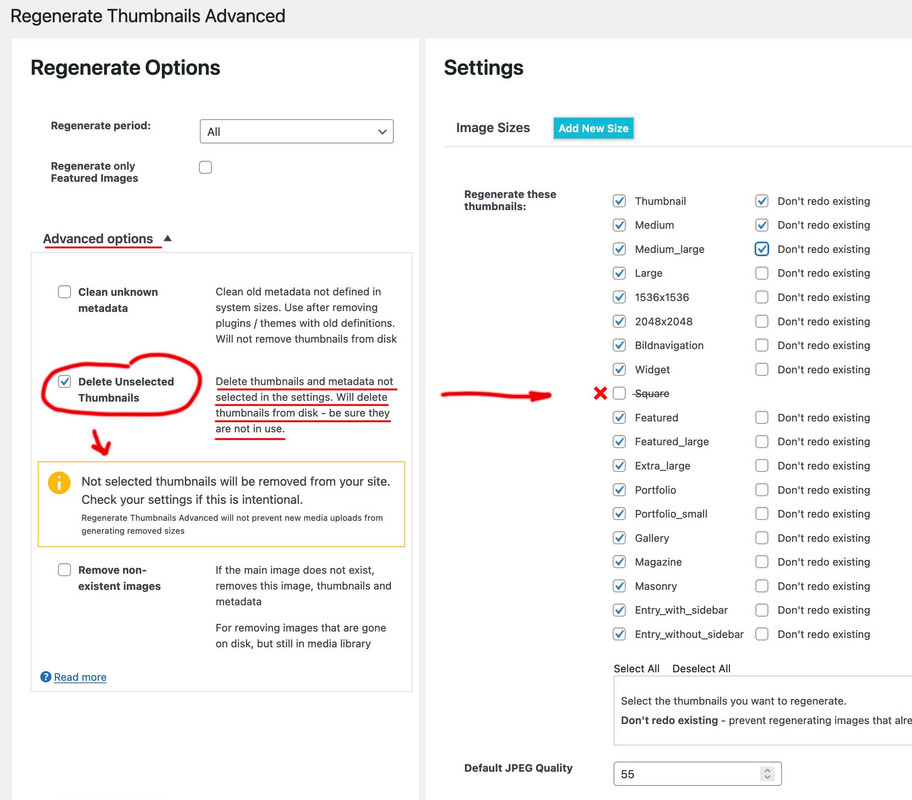
btw.: this plugin also can create new image sizes.The only thing I notice is that the compression level does not work for Enfold formats.
But you can set that beforehand by f.e:
add_filter("avf_jpeg_quality", "avf_set_quality_mod", 9999, 1);
add_filter("avf_wp_editor_set_quality", "avf_set_quality_mod", 9999, 1);
function avf_set_quality_mod($quality) { $quality = 55; return $quality;}
Hi,
I modified your css and I think it’s the way you wanted it.
Please clear your browser cache and check.

Best regards,
Mike
Hello,
After updating the Enfold theme on my website, I encountered the following error:
Warning: require_once(zip://#template): failed to open stream: operation failed in /nas/content/live/arcnmstg/wp-includes/template.php on line 785
Fatal error: require_once(): Failed opening required ‘zip://#template’ (include_path=’.:/usr/share/pear/php:/usr/share/php’) in /nas/content/live/arcnmstg/wp-includes/template.php on line 785
Temporary Resolution:
To ensure my website remains operational, I resorted to making a temporary modification in the wp-includes/template.php file. Here’s the check I added in the load_template function:
php
if ($_template_file != “zip://#template”) {
if ($load_once) {
require_once $_template_file;
} else {
require $_template_file;
}}
This modification allowed me to make my website functional. However, I believe there might be an underlying issue that needs proper investigation and resolution.
I’m uncertain why WordPress attempted to load a template with the name “zip://#template,” as this behavior is unexpected. I’m creating this Topic here for the permanent solution from the support team.
I understand the importance of not modifying core files directly, and I am eager to restore my website to its standard configuration as soon as possible.
Thank you for your help!
-
This topic was modified 2 years, 7 months ago by
 Qasim1991.
I am running the latest version of Enfold – 5.6.6 and when I went to mobile optimize the site and shut off some of the elements using screen options, they are not working. I have an entire color section set to hide on all screen sizes and it is still appearing on all screens. I have cleared out all CSS and tried it and it is still not hiding the element. Thank you.
This is how the first video on the page is done:

Is there anything I can add to get the enfold video element to do the same thing?
Thank you!
Guenni,
So, I am trying to do this step-by-step, removing the default Enfold-based image sizes first. I kept the bulk of your framework, but made a few little changes. I applied the code below to my child themes functions file, and then did a full regeneration of the images, and removed any images that did not have sizes anymore.
// Start Removing Image Sizes - Rev 20230907-3 //

// Remove or unregister unused WordPress Image Sizes (via Enfold)

// Disable loads of Enfold & WP image sizes upon upload
// do image sizes manually, double-size with high compression for retina screens
// use Photoshop to set exact double size and quality between Q30 and Q40
add_action('init', 'remove_enfold_image_sizes');
function remove_enfold_image_sizes() {
  remove_image_size('square');
  remove_image_size('featured');
  remove_image_size('featured_large');
  remove_image_size('portfolio');
  remove_image_size('portfolio_small');
  remove_image_size('gallery');
  remove_image_size('magazine');
  remove_image_size('masonry');
  remove_image_size('entry_without_sidebar');
  remove_image_size('entry_with_sidebar');
  remove_image_size('shop_thumbnail');
  remove_image_size('shop_catalog');
  remove_image_size('shop_single');
  remove_image_size('shop_gallery_thumbnail');
}
// Remove unneeded WP image sizes
add_filter( 'intermediate_image_sizes_advanced', 'prefix_remove_default_images' );
// Remove default image sizes here.
function prefix_remove_default_images( $sizes ) {
// do NOT remove small and medium sizes, they are used in backend Media Library!
// unset( $sizes['small']); // 150px
// unset( $sizes['medium']); // 300px
 unset( $sizes['large']); // 1024px
 unset( $sizes['medium_large']); // 768px
 unset( $sizes['1536*1536']); // 1536x1536px
 unset( $sizes['2048*2048']); // 2048x2048px
 return $sizes;
}

// Moduly Image Sizes
add_image_size('Moduly-Square', 1080, 1080, false);
add_image_size('Moduly-Horizontal', 1920, 1080, false);
This is the result (on Performance Tab > Responsive Images Overview section), after the above adjustments.
I do see the couple added image sizes, but unless I am a complete idiot, it still looks like the image sizes above are still being injected.
Images aspect ratio: 1 : 1
36*36 – Widget (added by theme)
108*108 – thumbnail (WP default size)
180*180 – Square (added by theme)
540*540 – medium (WP default size)
705*705 – Masonry (added by theme)
1080*1080 – large (WP default size)
1080*1080 – Moduly-Square (added by a plugin)
1500*1500 – Fullscreen Sections/Sliders (added by theme)
1536*1536 – 1536×1536 (WP default size)
2048*2048 – 2048×2048 (WP default size)
Images aspect ratio: 52 : 37
260*185 – Portfolio small (added by theme)
Images aspect ratio: 99 : 80
495*400 – Portfolio (added by theme)
845*684 – Gallery (added by theme)
Images aspect ratio: 142 : 75
710*375 – Magazine (added by theme)
Images keeping original aspect ratio
768*0 – medium_large (WP default size)
Images aspect ratio: 845 : 321
845*321 – Entry with Sidebar (added by theme)
Images aspect ratio: 1210 : 423
1210*423 – Entry without Sidebar (added by theme)
Images aspect ratio: 150 : 43
1500*430 – Featured Thin (added by theme)
Images aspect ratio: 50 : 21
1500*630 – Featured Large (added by theme)
Images aspect ratio: 16 : 9
1920*1080 – Moduly-Horizontal (added by a plugin)
Guenni,
I feel like an idiot on this, because it seems like I am doing it right, but am just not getting it to do what it would appear it should be doing. Any ideas where I have gone wrong?
Thank you for this, but please have a look at the link I sent:
https://adoptionvoicesthebook.com/video-test/
I was able to prevent the recommended videos by pasting the link into the page with ?rel=0 at the end.
That is the first video on the page and it does NOT show related videos at the end.
The enfold video element with the same url DOES show related videos at the end.
I would like to use the enfold element because I can use a cover image.
So it is indeed something that can be prevented with normal embeds but not with the enfold element
Thanks again
David
Try this and for changing the direct next post:
https://kriesi.at/support/topic/enfold-image-sizes-3/#post-1108904
https://kriesi.at/support/topic/enfold-image-sizes-3/#post-1109028
But : after erasing some of those image-sizes – you had to regenerate your thumbnails : there are some good plugins to do so.
f.e.: https://wordpress.org/plugins/force-regenerate-thumbnails/
// Disable loads of Enfold & WP image sizes upon upload
// do image sizes manually, double-size with high compression for retina screens
// use Photoshop to set exact double size and quality between Q30 and Q40
add_action('init', 'remove_enfold_image_sizes');
function remove_enfold_image_sizes() {
// do NOT remove widget size, is used in backend portfolio items!
// remove_image_size('widget');
  remove_image_size('square');
  remove_image_size('featured');
  remove_image_size('featured_large');
  remove_image_size('portfolio');
  remove_image_size('portfolio_small');
  remove_image_size('gallery');
  remove_image_size('magazine');
  remove_image_size('masonry');
  remove_image_size('entry_without_sidebar');
  remove_image_size('entry_with_sidebar');
  remove_image_size('shop_thumbnail');
  remove_image_size('shop_catalog');
  remove_image_size('shop_single');
    remove_image_size('shop_gallery_thumbnail');
}
// Remove unneeded WP image sizes
add_filter( 'intermediate_image_sizes_advanced', 'prefix_remove_default_images' );
// Remove default image sizes here.
function prefix_remove_default_images( $sizes ) {
// do NOT remove small and medium sizes, they are used in backend Media Library!
// unset( $sizes['small']); // 150px
// unset( $sizes['medium']); // 300px
 unset( $sizes['large']); // 1024px
 unset( $sizes['medium_large']); // 768px
 return $sizes;
}
Hey Abel,
I see that you are running an old version of the theme, could you try to update to the latest version (5.6.6) to see if that helps please? The update to 5.6.6 has to be done manually from the version you are running, please refer to my replies in this thread: https://kriesi.at/support/topic/enfold-4-5-theme-update-update-failed-download-failed-a-valid-url-was-not-pro/#post-1021541
You can either update manually via FTP: https://kriesi.at/documentation/enfold/how-to-install-enfold-theme/#theme-update, or use a plugin to upload the theme zip file: https://wordpress.org/plugins/update-theme-and-plugins-from-zip-file/
If that doesn’t work then please try to delete the whole theme folder, then replace it with the new version. Make sure that you have backups of the site before starting updating.
Also please read this after you have updated: https://kriesi.at/documentation/enfold/theme-registration/
Best regards,
Rikard
I have tried lots of different techniques, but am still running into issues doing the following tasks:
- Removing unused image sizes set by Enfold
- Changing Enfold-defined sizes
Desired Outcomes:
Biggest picture: Really streamline the image resources to allow for large library without so many image size variations to create massive filesystem bloat.
- Determine where Enfold-based Widget image size is used.
- Remove (or redefine them to other sizes, if possible) the following Enfold-created image sizes: Masonry, Magazine, Fullscreen Sections/Sliders, Portfolio small, Entry with Sidebar, Entry without Sidebar
- Change the default size for the following Enfold-based sizes: Featured Large (1920×1080)
- Viability of removing other WP-default sizes: 108×108 (thumbnail), 1536×1536, 2048×2048
Methods Attempted
I have tried a ton of different directions, including Simple Image Options (recommended on the theme Performance tab), Enfold code snippet library (https://github.com/KriesiMedia/enfold-library/blob/master/actions%20and%20filters/Layout/avf_modify_thumb_size.php), WordPress Docs (https://developer.wordpress.org/reference/functions/remove_image_size/).
No matter which tool or how I apply the code, those registered image sizes continue to appear, both in the plugin display, but also in that Image section on the Performance tab. I can manually add image sizes, but without being able to get that snippet code to work, they are not selectable within any Avia panels.
Environment:
WP: 6.3.1
Enfold: 5.6.6 (with child-theme)
Hi,
As I wrote earlier; you cannot run two themes at the same time. So creating different themes for different screen widths would make no sense, since it wouldn’t work. Maybe the adjustments were done using CSS or some other styling method? You could reach out to your developer to check what he or she has done specifically. Also please make sure that you have copied the theme settings from your old theme into the new one, you can do that under Enfold->Import/Export.
Best regards,
Rikard



