Hi Jed,
Please try to go to Enfold > Theme Options > Performance, then enable Show Advanced Options and try to set it to Disable adding unique timestamps only.
Hope it helps.
Best regards,
Nikko
Hi Nathan Fromstein,
Thanks for contacting us!
And yes, you will need to repurchase Enfold again so you can update Enfold on your live site.
The current version you are using is still using the old API (username and API key) which envato has already deprecated therefore you can’t update it with the usual method.
You can do the following process instead:
First make a backup:
– Site Backup: https://kriesi.at/documentation/enfold/backup-wordpress-site/
– Theme Settings Backup: https://kriesi.at/documentation/enfold/backup-theme-settings/
Option 1: Use Envato Market to update your site
– link: https://envato.com/market-plugin/
Option 2: Update manually
1. Login to ThemeForest and download the Enfold theme, right-click over the downloaded zip file and extract/unzip it.
2. It should generate a new folder, open it and look for the enfold folder
3. Right-click the enfold folder then zip it, here’s a tutorial on how to create a zip file in windows: https://www.howtogeek.com/668409/how-to-zip-and-unzip-files-on-windows-10/ (this should create enfold.zip
4. Log in to WordPress as and Admin.
5. Install and activate a maintenance plugin and put your site in Maintenance mode.
6. Go to Appearance > Themes, switch to a default WordPress theme like TwentyTwenty then delete Enfold.
7. Click on the ADD NEW button.
8. Click on the UPLOAD THEME button.
9. Click BROWSE and choose enfold.zip file
10. Click the INSTALL NOW button and switch to Enfold or your child theme.
11. Remove the maintenance mode then deactivate and remove the maintenance plugin.
Then register the theme by following the instructions in https://kriesi.at/documentation/enfold/theme-registration/
Once this is done, the next time you update, you’ll only need to go to Enfold > Theme Updates and click on the Update button.
Hope it helps.
Best regards,
Nikko
Hi Monika,
Should I put a Backup from Duplicator or Migration on an other server?
It depends on what is more convenient for you.
There I make the Changes and after that, I clear the current server and put the new Site there?
If there are no changes on the live site then yes you can do that but if there are some changes on your live site, then before you clear the live site, export it’s data first to your development site: https://www.inmotionhosting.com/support/edu/wordpress/export-your-database-with-wp-migrate-db/ and then proceed with clearing and putting the site site there.
Is the license from Enfold still ok then or do I get trouble with that?
If it’s just a staging site for your live site then there should be no issues, also it would be better if it’s a subdomain of the live site.
Best regards,
Nikko
Hi,
Thanks for your patience, when I checked your boats the captions were disabled and there was no caption:

so I added one for you but you should change it to something you want, now the captions show on the boats always:

Best regards,
Mike
Hi,
Thanks for your patience, to change your product layout I change the setting at Enfold Theme Options ▸ Shop Options ▸ Product gallery to default.
Please check.
Best regards,
Mike
Hello. Can you please give me the steps and code (PHP, CSS) to achieve this in the most current iteration of Enfold? I would like to put it next to SHOP & ORDER NOW to it’s left. Thanks!
Hello Enfold Rep, Is there a way to remove all the empty space in the tab sections? Each tab has a different amount of content and seems to provide blank space in the shorter tabs.
Hi,
I have multiple sites using the Enfold theme. As they should, all of them produce files in the /site/wwwroot/wp-content/uploads/dynamic_avia folder. A few of the site produce 10s of thousands of files, of the type “avia-merged-styles-…”, “avia-footer-scripts…”, and “avia-head-scripts…”. The sites that don’t do this only create these files for the current usage day and seem to delete the past ones. For the sites that are creating 10s of thousands of files, can you please let me know why this may be happening and how I can stop if from happening?
Thanks,
Jed
 Nathan Fromstein
Guest
Hello we are currently using Enfold theme for our church at lifesc.org
I am trying to update it, however WordPress says it is updated even though it is still on version 4.1.2
We lost the login to our theme forest account and are unable to recover it so I am not sure if I need to repurchase Enfold again under a new account and then upload updated version to website or what. I do not want to lose any of the work we have done to the site over the years so I am wondering what you suggest?
Hey there,
my client needs a lot of Changes on the Website and wants me to build the Changes on an other invisible clone site so he first sees everything before going live on the current one.
Now I would like to know what you would recomment to do.
Should I put a Backup from Duplicator or Migration on an other server?
There I make the Changes and after that, I clear the current server and put the new Site there?
Is the license from Enfold still ok then or do I get trouble with that?
thank you for your help!
Monika
Hi,
Try this CSS in your Enfold Theme Options ▸ General Styling ▸ Quick CSS field:
#top.post-type-archive-product .template-shop.content.av-content-full.alpha.units  {
	display: none;
}
After applying the css, please clear your browser cache and check.
Best regards,
Mike
Hi,
Try this CSS in your Enfold Theme Options ▸ General Styling ▸ Quick CSS field:
@media only screen and (max-width: 767px) {
	.responsive #top #wrap_all #main {
		padding-top: 90px !important;
	}
	.responsive #top.home #fullslider {
		margin-top: 90px;
	}
}
After applying the css, please clear your browser cache and check.
Best regards,
Mike
Hi,
Glad we were able to help, if you have any further questions please create a new thread and we will gladly try to help you. Thank you for using Enfold.
Best regards,
Mike
Hi,
Glad we were able to help, if you have any further questions please create a new thread and we will gladly try to help you. Thank you for using Enfold.
Best regards,
Mike
Hi “Enfold”,
recently a customer asked me if he could have the Dark/Light Mode switch on his site.
Could you tell me if I can hope that one of the next versions of Enfold will include the Dark/Light Mode switch?
While waiting for Enfold to add the native Dark/Light Mode switch, could you tell me if you know of a “Dark/Light Mode” plugin compatible with Enfold?
Best regards,
Oriano
Hi,
Great, I’m glad that Ismael could help you out. We’ll close this thread for now then, please open a new thread if you should have any further questions or problems.
Best regards,
Rikard
Hi,
It’s ok to use the token for a development site as well, or you could simply update manually via FTP: https://kriesi.at/documentation/enfold/install-enfold-theme/#ftp-install
Best regards,
Rikard
Hey Martin,
Please try the following in Quick CSS under Enfold->General Styling:
@media only screen and (max-width: 767px) {
.responsive #top #header .social_bookmarks {
    display: block !important;
}
}
Best regards,
Rikard
Hey joshuati,
Please try the following in Quick CSS under Enfold->General Styling:
.page-id-52 .slide-meta-time {
  display: none;
}
Best regards,
Rikard
Hi,
Glad we were able to help, if you have any further questions please create a new thread and we will gladly try to help you. Thank you for using Enfold.
Best regards,
Mike
Hi,
I see that you have placed the code that is causing problems in your WordPress ▸ Customize ▸ Additional CSS

This should not be there, please remove.
I also see that you have the same code in your WordPress ▸ Appearance ▸ Theme File Editor ▸ Enfold ▸ functions.php
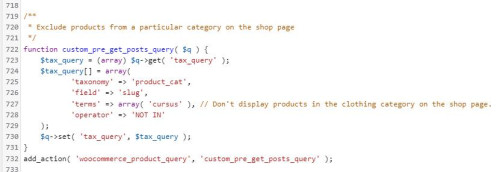
please also remove this and then check again.
If you are not using a child theme I recommend the WPcode plugin this plugin supports PHP code snippets, JavaScript code snippets, & CSS code snippets, because you will lose the custom code that you add to the enfold ▸ functions.php when you update next time.
Best regards,
Mike
Hi,
a while ago I asked how we can change the size of the thumbnails on our blog archive pages. We need to do this because we have text on our images which is cut off with the predefined images size. You gave me a reply which I have understood (see below) – but can I implement this change in the child theme? I´ve tried adding this code but it isn´t making any difference, which suggests that I am doing something wrong ;) I have to add that I don´t know much about php. I re-uploaded one of the thumbnails after adding the code but that also made no difference.
/* Resize portfolio thumbnails on archive/category pages in the blog */
$avia_config[‘imgSize’][‘portfolio’] = array( ‘width’ => 710, ‘height’ => 375 ); // images for portfolio entries (2,3 column)
You replied:
Hi,
Thank you for your patience and the links to your site, the portfolio size images on the archive pages is set by line 190 in the enfold/functions.php file
I didn’t find an easy way to adjust the image size on the archive page so I would recommend changing the portfolio size from array(‘width’=>495, ‘height’=>400 ); to mmatch the magazine size array(‘width’=>710, ‘height’=>375 ); and then you will need to regenerate your thumbnails and then check.
This would also change any other use of the portfolio thumbnails on your site, but it doesn’t look like this would be an issue for you.
Best regards,
Mike
Post Link: https://kriesi.at/support/topic/change-layout-number-of-columns-on-blog-category-pages/#post-1310490
Dear Folks and Support Team!
This is my Enfold code:
function misi_pdf_preview()
    {
echo "Hello Word - by content";

}
    add_filter("ava_after_content", "misi_pdf_preview", 10, 0);
I don’t know what happened because… it worked a few months ago… but not today…
Rendering was fine with wp debug, no errors displayed…
So, I had to changed the original Enfold code to the native WP method, this method works:
 function misi_pdf_preview2($content )
    {

         $before = '';
  after = "Hello Word - after the content";
  //modify the incoming content
  content = $before . content . after;

  return $content;
}
add_filter( 'the_content', 'misi_pdf_preview2' );
Do you have any suggestion to find out why the original Enfold method is not working?
Thanks for your help,
Mihály Földesi
I’m so sorry… it still does not work.
I placed in in the Appearance Editor. But still this “Not found field”.
There was already some info in the editor. Could that be the reason? Or could it be this text: “Don’t display products in the clothing category on the shop page.”
This is al the info there is in there:
@media only screen and (max-width: 768px) {
/* Add your Desktop Styles here */
.responsive #top .products .product:nth-child(odd) {
clear: none !important;
}
}
post-type-archive .woocommerce-no-products-found {
display: none;
}
function custom_pre_get_posts_query( $q ) {
$tax_query = (array) $q->get( ‘tax_query’ );
$tax_query[] = array(
‘taxonomy’ => ‘product_cat’,
‘field’ => ‘slug’,
‘terms’ => array( ‘cursus’ ), // Don’t display products in the clothing category on the shop page.
‘operator’ => ‘NOT IN’
);
$q->set( ‘tax_query’, $tax_query );
}
add_action( ‘woocommerce_product_query’, ‘custom_pre_get_posts_query’ );
For your information: This is in the Enfold Quick CSS. Could that be interfering?
.single-product-main-image {width: 66% !important;}
#top .product div.images img {
width: auto;
margin: 0 auto;
}
#top.archive .thumbnail_container img {
height: 324px;
}
@media only screen and (max-width:767px) {
.responsive #top #main .sidebar {
display: block !important;
width: 100% !important;
border: 0 !important;
}
.responsive #top #main .sidebar .inner_sidebar {
margin-left: 0 !important;
}
}
.avia-button {
background-color:gold!important;
}
.product_cat-cursus .single-product-main-image{
width: 30%!important;
}
add_action( ‘woocommerce_product_query’, ‘custom_pre_get_posts_query’ );
Hey Jables,
Thank you for the inquiry.
We have found a script error in the console which might be causing the issue with the events calendar. Please disable the cache and compression plugin temporarily, then upgrade the theme to version 5.6.6. Once the theme is updated, please temporarily disable the Enfold > Performance > File Compression settings to refresh the scripts and stylesheets.
This is the error.
Uncaught ReferenceError: AviaDatepickerTranslation is not defined
    at HTMLDocument.<anonymous> ((index):1833:16)
    at e (jquery.min.js?ver=3.7.0:2:26990)
    at t (jquery.min.js?ver=3.7.0:2:27292)
Best regards,
Ismael
Hey Michael F,
Thank you for the inquiry.
You can use the following css code to adjust the size of the product image.
.single-product-main-image {
    width: 50%;
    float: left;
    margin-right: 50px;
    overflow: hidden;
    padding-bottom: 50px;
}
Please make sure to toggle or temporarily disable the Enfold > Performance > File Compression settings to make sure that the changes take effect. By disabling the file compression settings, you will be able to make the necessary adjustments and updates without any conflicts. Once you have made the required modifications, you can re-enable the file compression settings to optimize the performance of your website.
Best regards,
Ismael
Hi,
Glad we were able to help, if you have any further questions please create a new thread and we will gladly try to help you. Thank you for using Enfold.
Best regards,
Mike
Hi,
Thank you for your patience, to make the header sticky on mobile try this CSS in your Enfold Theme Options ▸ General Styling ▸ Quick CSS field:
@media only screen and (max-width: 767px) {
  .responsive #top #wrap_all #header {
    position: fixed;
  }
}
For the mobile menu fonts try this css:
@media only screen and (max-width: 767px) {
	#av-burger-menu-ul a {
	font-family: kalam;
}
}
After applying the css, please clear your browser cache and check.
Best regards,
Mike
Hey mediafacto,
Thanks for the link to your site, in the popup the blue one was not correct, try this CSS in your Enfold Theme Options ▸ General Styling ▸ Quick CSS field to correct:
#top .mfp-content .avia-button.av-4pqcoe-31648334b4896fbdfea9d05f47606f6f,
#top .mfp-content .avia-button.av-eh4dwu-7ff5582dbec01723c9e3c0eb24a72468{
    background-color: #0e76a8;
    border-color: #0e76a8;
    color: #ffffff;
}
After applying the css, please clear your browser cache and check.
To stop your page from scrolling try adjusting your script to this solution.
Best regards,
Mike



