
-
AuthorSearch Results
-
September 16, 2023 at 10:49 pm #1419360
In reply to: Enfold – Gutenberg – Crazy code
Hi,


Please ensure to copy the code from the forum and not an email notification so the symbols are not converted.Best regards,
MikeSeptember 16, 2023 at 10:12 pm #1419355In reply to: How to create floating menu from existing one?
Hi,
When I check it seems to have a border radius, perhaps you have solved this?

Best regards,
MikeSeptember 16, 2023 at 9:57 pm #1419354In reply to: Add Amazon style search bar in top menu
Hi,
Thank you for your patience and the password to your site but I don’t see a user name, please include.
I see the [avia_search] shortcode in your topbar, it looks like you have not added the code to the end of your child theme functions.php file in Appearance ▸ Editor:add_shortcode('avia_search', 'get_search_form');or if you did the symbols may be converted, please ensure to copy the code from the forum and not an email notification so the symbols are not converted. You said that you are using SearchWP, did you add the code for it to be the search for your site? And doesn’t it have it’s own shortcode, this page explains how to adjust the SearchWP shortcode for the options you want, you should end up with something like this:[searchwp_search_form engine="default" var="searchvar" button_text="Find Results"](this code may not work on your site, follow the instructions)
Your asking for a Amazon search bar, have you thought about adding a larger one like in our Knowledge Base Demo below your menu? We have a search bar element:
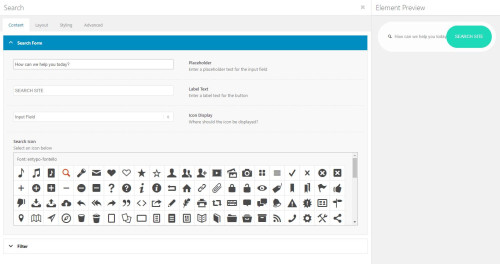
that will allow you to adjust the style better it you want a big search bar like on Amazon.Best regards,
MikeSeptember 16, 2023 at 9:16 pm #1419353In reply to: Number of social media icons
Hey ijnavas,
To add nine social media icons per team member you will need to make the social icons smaller like this:.team-social a { text-decoration: none; position: relative; border-radius: 30px; padding: 0; background: #fff; margin: 3px; display: inline-block; height: 17px; line-height: 17px; width: 15px; } .avia-team-member .team-social { font-size: 10px; }the expected results

Best regards,
MikeSeptember 16, 2023 at 8:59 pm #1419352In reply to: ‘Read more’ under the member team name
Hey ijnavas,
If you are placing each team member element in a column then you could add a button under it, otherwise you could install our Special Character Translation plugin, please see our documentation: Using special characters to allow shortcode in the Team Member Description and the use the shortcode wand to create a button and add it ensuring to replace the brackets in the shortcode with ###91### and ###93###Best regards,
MikeSeptember 16, 2023 at 8:05 pm #1419347Hi,
yas28 I see that there is a empty space under your sliders, this is from the smushit plugin, please disable the lazy load option in the plugin or disable the plugin and this should correct itself.
It gets confusing when we are working on more than one site per thread, so please open a new thread so we can assist, Thanks for understanding.Best regards,
MikeSeptember 16, 2023 at 7:56 pm #1419346Hi,
Thank you for your patience, I checked your site for mobile and found that your Time-To-First-Byte is almost 3s:

this is not good, everything after that loods well, for desktop the TTFB is under a second so your whole site loads in about 2 seconds.
I found in your WP-Optimize cache settings a setting for mobile was Generate separate files for mobile devices, but this didn’t help, so I don’t see any other difference in your site between mobile and desktop, typically the TTFB is based on your server response to the page request and often that will be fast and the bottle neck is after that, for example my demo site has a TTFB .991

and there is no difference between the desktop & mobile.
I recommend checking your Cloudflare CDN if you are still using it and see if there is some mobile setting, and also check your server for any settings, it seems that somewhere a mobile request is treated differently but I’m not sure where.Best regards,
MikeSeptember 16, 2023 at 6:51 pm #1419343Hey CJGVD,
Thank you for your patience, in your grid row element example it look like to have added an image element inside of the grid element, instead try adding the image as a background image to the grid and set the Background Image Position as center center

on my test page I set each grid row element as 50% of the height and the image fills the cell size:

the only issue is the when the grid becomes a single column at mobile the cells with the background image have no content so the height doesn’t match as the equal height is not applied:

To correct I added the custom class equal-height-mobile-grid to the grid row elements, my test page has three:

and added this code to the end of my child theme functions.php file in Appearance ▸ Editor:function grid_row_elements_equal_height_for_mobile() { ?> <script> window.addEventListener('DOMContentLoaded', function() { (function($){ var width = $(window).width(); if (width < 767) { $('.equal-height-mobile-grid').each(function(){ var $columns = $('.flex_cell .flex_cell_inner',this); var maxHeight = Math.max.apply(Math, $columns.map(function(){ return $(this).height(); }).get()); $columns.attr('style', 'height: '+ maxHeight +'px !important'); }); } else {} })(jQuery); }); </script> <?php } add_action('wp_footer', 'grid_row_elements_equal_height_for_mobile', 99);and now on mobile the image cell is equal height:

Please give this a try.Best regards,
MikeSeptember 16, 2023 at 5:55 pm #1419338Topic: Need old theme Enfold Version 4.7.5
in forum EnfoldDaveEdwardsPara
ParticipantHello,
My website is developed on Enfold Version 4.7.5.
When using the latest version, the website design is breaking and causing me a lot of issues.
Please provide me Enfold Version 4.7.5September 16, 2023 at 12:24 pm #1419330In reply to: Web Core Vitals Failing
Hello,
Our website is powerdmarc.com and yes we are using enfold.
You checked another website?September 16, 2023 at 11:33 am #1419329In reply to: MediaElement loading on every page
Hi,
Here is the fixed file enfold\includes\helper-assets.php:
See functions av_video_assets_required and av_slideshow_required.
Best regards,
GünterSeptember 16, 2023 at 11:23 am #1419327In reply to: Mobile menu items different from normal menu
Hi,
Great, I’m glad that we could help you out. We’ll close this thread for now then, please open a new thread if you should have any further questions or problems.
Best regards,
RikardSeptember 16, 2023 at 11:01 am #1419324In reply to: Theme styling
September 16, 2023 at 10:55 am #1419322In reply to: Streched width Layout – limit to a maximum of 1600px
Hey IconicD,
You can set the container width under Enfold->General Layout->Dimensions.
Best regards,
RikardSeptember 16, 2023 at 10:25 am #1419320In reply to: Web Core Vitals Failing
Do you belong to your website?
You are still on enfold 4.2 ?
Think of your images on uploading. First do you realy need png files overall? f.e. – your content-slider Mena-Info as png 437kb as jpeg : 53kb.
etc. pp. – if your Partners do offer svg files for their logos ( Global Cyber Aliance) use them instead.You haven’t activated gzip for your homepage!
Ask your provider if modules are installed ( f.e. mod_deflate) if so – we can activate the compression by a htaccess fileSeptember 15, 2023 at 7:46 pm #1419308In reply to: Mailchimp error
could you test the pop up again?
it’s now made with the html directly from mailchimp from the sign up form there.
The enfold mailchimp element did not work for me.
thanks
NancySeptember 15, 2023 at 6:31 pm #1419307In reply to: Font is loaded from old url
Hi,
I assume that your font was installed at Enfold Theme Options ▸ Import/Export ▸ Custom Font Manager, so to delete click the x next to the font, and also check your media library for the font zip file and delete it, just in case, and then reupload it again.Best regards,
MikeSeptember 15, 2023 at 6:21 pm #1419305Hi,
Glad Ismael could help, if you have any further questions please create a new thread and we will gladly try to help you. Thank you for using Enfold.Best regards,
MikeSeptember 15, 2023 at 6:19 pm #1419304In reply to: Table is not updated correctly in Firefox
Hi,
Sorry I was not more help, if you have any further questions please create a new thread and we will gladly try to help you. Thank you for using Enfold.Best regards,
MikeSeptember 15, 2023 at 4:20 pm #1419294In reply to: Font is loaded from old url
We actually used duplicator ;) but yes, agree.
How do I delete the uploaded font? I just chose it from Enfold setting…September 15, 2023 at 4:06 pm #1419293Topic: Theme styling
in forum Enfoldwoogie07
ParticipantHi
I am looking to use the theme to emulate pages used in the demo (private)
Is Enfold capable of creating a similar site with the dynamic and moving elements/intercutting blocks, content and imagery?
Thanks
MarcusSeptember 15, 2023 at 2:38 pm #1419287In reply to: burger menu sooner
Hey whdsolutions,
Please try the following in Quick CSS under Enfold->General Styling:
@media only screen and (max-width: 1200px) {
  nav.main_menu {
    display: block !important;
  }
  #avia-menu .menu-item {
    display: none;
  }
  .av-burger-menu-main.menu-item-avia-special {
    display: block;
  }
}
Best regards,
RikardSeptember 15, 2023 at 2:33 pm #1419285In reply to: how to open a conatct form in a Lightbox Popup
Hi,
Great, I’m glad that you found a solution. We’ll close this thread for now then, please open a new thread if you should have any further questions or problems.
Best regards,
RikardSeptember 15, 2023 at 2:31 pm #1419284In reply to: Transparent header settings non existant
Hi,
Please try the following in Quick CSS under Enfold->General Styling:
@media only screen and (max-width: 1200px) {
  nav.main_menu {
    display: block !important;
  }
  #avia-menu .menu-item {
    display: none;
  }
  .av-burger-menu-main.menu-item-avia-special {
    display: block;
  }
}
Best regards,
RikardSeptember 15, 2023 at 10:59 am #1419259In reply to: include social media icons in text area
Hey rixi,
Thank you for the inquiry.
Have you tried using the Icon element in the Advance Layout Builder (ALB)? You can also insert the Icon using the shortcode wand if you’re using the classic editor.
If you don’t like the look of the default email icon, you can upload additional font icons in the Iconfont Manager. Please check the documentation below for more info.
// https://kriesi.at/documentation/enfold/icon/#adding-your-own-fontello-or-flaticon-icons-
Best regards,
IsmaelSeptember 15, 2023 at 10:57 am #1419258In reply to: Mobile menu items different from normal menu
Hi,
Thanks for that. You have selected to show an alternate menu for mobile under Enfold->Main menu->General. Please check your settings there.
Best regards,
RikardSeptember 15, 2023 at 10:31 am #1419254In reply to: Mailchimp error
September 15, 2023 at 8:27 am #1419243Topic: include social media icons in text area
in forum Enfoldrixi
ParticipantHi,
I just put in my wordpress side an adress in a textfield and under there i would like to have a typical email icon beside the emailadress. But i can`t find something in enfold. The icons which are included have no email sign and the ones who have i could just put in header or footer. Now i made a graphic by myself but that is way to small on my mobile phone.
Is there a way beside loading a plugin?Many greetings rixi
September 15, 2023 at 4:06 am #1419231In reply to: H3 Font weight
Hey stephaniebLOS,
Thank you for the inquiry.
Did you modify the “All Headings (H1-H6)” element in the Advanced Styling panel as well? The current modification is overriding the custom styles for the H3 element. To apply the font-weight changes correctly to H3, consider removing the “All Headings (H1-H6)” modification or adding this code in the Quick CSS field.
#top #wrap_all .all_colors h3 {
    font-weight: 900 !important;
}
Please make sure to toggle or temporarily disable the Enfold > Performance > File Compression settings afterward.
Best regards,
IsmaelSeptember 15, 2023 at 3:48 am #1419229In reply to: Add Amazon style search bar in top menu
Hi,
Put PHP in a functions snippet.
Did you place the custom shortcode in the functions.php file? We may need to access the site in order to properly implement the modification. Please provide the login details in the private field.
Your CSS doesn’t seem to change anything.
Have you tried to temporarily disable the Enfold > Performance > File Compression settings?
Best regards,
Ismael -
AuthorSearch Results
-
Search Results
-
Hello,
My website is developed on Enfold Version 4.7.5.
When using the latest version, the website design is breaking and causing me a lot of issues.
Please provide me Enfold Version 4.7.5Topic: Theme styling
Hi
I am looking to use the theme to emulate pages used in the demo (private)
Is Enfold capable of creating a similar site with the dynamic and moving elements/intercutting blocks, content and imagery?
Thanks
MarcusHi,
I just put in my wordpress side an adress in a textfield and under there i would like to have a typical email icon beside the emailadress. But i can`t find something in enfold. The icons which are included have no email sign and the ones who have i could just put in header or footer. Now i made a graphic by myself but that is way to small on my mobile phone.
Is there a way beside loading a plugin?Many greetings rixi


