Hey,
Please add the following code to the Quick CSS field in Enfold theme options > General Styling tab:
#scroll-top-link:hover {
  color: white;
}
Cheers!
Yigit
Hi,
Glad we were able to help, if you have any further questions please create a new thread and we will gladly try to help you. Thank you for using Enfold.
Best regards,
Mike
Hi,
OK, good. I understand that you want the Pro version, I was thinking that if the Free version works with Enfold than there is a good chance that the Pro version would also work.
I recommend testing the free version while tou wait to hear back from them. I would also ask them if you can get a refund for the Pro version if you have trouble with it.
Best regards,
Mike
Hi, is it possible to use different widths for different elements on pages?
I’d like to have a width of approx. 960px for my website in general. So I’ve set this in the Enfold’s layout settings. This width is usable for:
– Menu’s (primary, secondary)
– Featured image (in case it’s visible at the top of a single post)
– Grid elements (like post grids etc)
– Footer
However, for the text content I’d like to have a more readable width of approx. 720px. This width is more suitable for:
– Content, text
– Forms
So: what is the best/easiest way of playing with different widths for certain parts of a page?
PS For static pages I use Enfold’s Page Builder. However, for single blog posts I use the default editor (not the Enfold’s Page Builder).
-
This topic was modified 2 years, 6 months ago by
 Marc Bijl.
Hello Mike,
I contacted MotoPress support, to ask if I can use their plugin Hotel Booking Pro (I need the PRO version services 😳 ) on Enfold.
I hope to have a positive response.
Best regards
Oriano
Hi,
Thank you for the update.
Did you purge the cache before testing the page? You may have to toggle or temporarily disable the Enfold > Performance > File Compression settings as well. Please make sure to perform a hard refresh before testing the page.
The code above should adjust the size of the h1 element. If you want to change the size of the h2 element manually, just copy the css rule above, then replace all instances of the h1 selector.
  #top #wrap_all .header_color h2,
  #top #wrap_all .main_color h2,
  #top #wrap_all .alternate_color h2 {
    font-size: 24px;
  }
Or as suggested above, you can adjust the font size settings in the Enfold > General Styling > Typography panel.
Best regards,
Ismael
Enfold hat für mobile Endgeräte im html oben explizit Klassen eingeführt.
Wenn du mit einem Mobile Phone die Seite öffnest, dann ist automatisch avia_mobile als Klasse an html also als Selector z.B. dann:
.responsive.avia_mobile …
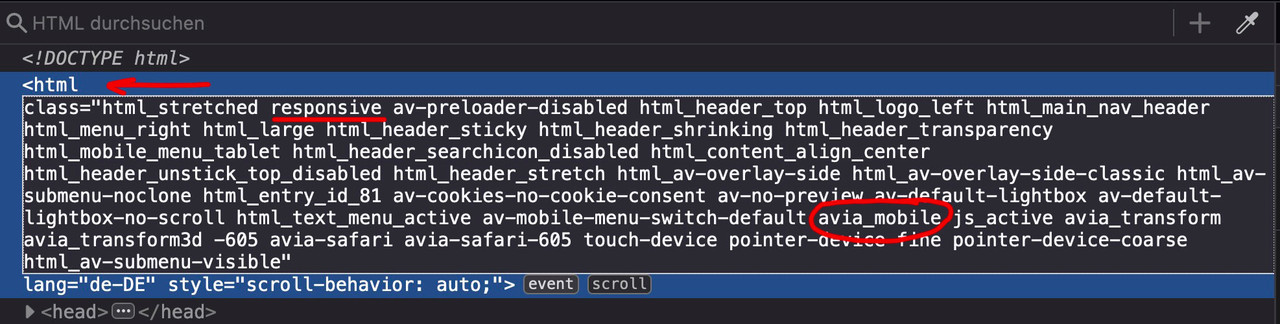
das kannst du dann also nutzen um die Elemente explizit für Handy und Co zu stylen. Problem: der hover style ist on touch aktiv.
Hey ThorstenFB,
Thank you for the inquiry.
There is no option for this out of the box. You only can lock the builder elements for non-admins by enabling the Lock Advanced Layout Builder option in the Enfold > Layout Builder panel, but this will also affect the custom elements.
Best regards,
Ismael
As for the other margin and padding issues I solved them more or less, as i worked the whole night.
I don’t know if Enfold has instability problems with this, but I need to read a clear explanation on how one can control margins and paddings.
Thanks.
Hi Henning,
I’m glad that you sorted out the issue.
Thanks for using Enfold and have a great day!
Best regards,
Nikko
Hi cocoamande,
I’m glad that Rikard could help you :)
Thanks for using Enfold and have a great day!
Best regards,
Nikko
Hi Marc,
I understand that you prefer not to use code however, to remove sizes that has been defined by Enfold you’ll need to add this code and insert in functions.php (preferably a child theme, or via some plugin that allows inserting of codes like WPCode):
add_action('init', 'remove_enfold_image_sizes');

function remove_enfold_image_sizes() {
  remove_image_size('square');
  remove_image_size('featured');
  remove_image_size('featured_large');
  remove_image_size('portfolio');
  remove_image_size('portfolio_small');
  remove_image_size('gallery');
  remove_image_size('magazine');
  remove_image_size('masonry');
  remove_image_size('entry_without_sidebar');
  remove_image_size('entry_with_sidebar');
  remove_image_size('shop_thumbnail');
  remove_image_size('shop_catalog');
  remove_image_size('shop_single');
  remove_image_size('shop_gallery_thumbnail');
}
As for removing unused images, here are some articles that you can check out:
Hope this helps.
Best regards,
Nikko
 Javier
Guest
Hi,
A few weeks ago, I bought a ENFOLD theme via themeforest and I would like to access to your support page and make questions about os to delete some widgets or questions about the theme.
Thanks
Hey amanda-mdllc,
Thank you for the link to your site, to add the background image to the header try this CSS in your Enfold Theme Options ▸ General Styling ▸ Quick CSS field:
#header_main {
height: 170px;
    background: url(https://campfire-sunshine.org/wp-content/themes/CampFireCouncilTheme/images/header-small.jpg) no-repeat center top;
    background-size: cover;
}
After applying the css, please clear your browser cache and check.
Please ensure to copy the code from the forum and not an email notification so the symbols are not converted.
Best regards,
Mike
Hi,
Glad we were able to help, if you have any further questions please create a new thread and we will gladly try to help you. Thank you for using Enfold.
Best regards,
Mike
Hi,
Glad Yigit could help, if you have any further questions please create a new thread and we will gladly try to help you. Thank you for using Enfold.
Best regards,
Mike
Hey gfriend70,
Thanks for the link to your site, but I was not able to login, it seems the password is not correct.
Try going to Enfold Theme Options ▸ Sidebar Settings ▸ Page Sidebar navigation and disable this option.
Best regards,
Mike
Hey Oriano,
I tried searching for Motopress Hotel Booking Plugin but I didn’t find any results for using it with Enfold, I did find that they offer a free version: Hotel Booking Lite so assuming that it is built the same way, perhaps you can test with it and ask the plugin author if it works in the same way.
Best regards,
Mike
Hey webba,
Unfortunately we don’t have a radio option, but you could use the checkbox option and try this CSS in your Enfold Theme Options ▸ General Styling ▸ Quick CSS field:
input[type="checkbox"]{
  visibility: hidden;
  position: absolute;
}
input[type="checkbox"] + label:before{
  height:12px;
  width:12px;
  margin-right: 2px;
  content: " ";
  display:inline-block;
  vertical-align: baseline;
  border:1px solid #777;
}
input[type="checkbox"]:checked + label:before{
  background-color: black;
}
input[type="checkbox"] + label:before{
  border-radius:50%;
}
to make it look like a radio button. If you are also using checkboxes and this causes a conflict, please link to your form and tell us which ones should be a radio button and we can adjust this css to help.
Best regards,
Mike
Hi Henning,
Please add the following code to the Quick CSS field in Enfold theme options > General Styling tab:
@media only screen and (max-width: 480px) {
.avia-slideshow-dots {
  display: none;
}
}
If this doesn’t help, please send us a screenshot showing the changes you’d like to make.
Best regards,
Yigit
One of our sites is continually getting the below error. Any ideas what’s going on with the term_id? Could it have something to do with Woo Commerce also being installed?
Error message:
Attempt to read property “term_id” on int
Error:
in require called at /nas/content/live/mywtenfold/wp-includes/template.php (787)
in load_template called at /nas/content/live/mywtenfold/wp-includes/template.php (720)
in locate_template called at /nas/content/live/mywtenfold/wp-includes/general-template.php (206)
in get_template_part called at /nas/content/live/mywtenfold/wp-content/themes/enfold/single.php (51)
in include called at /nas/content/live/mywtenfold/wp-includes/template-loader.php (106)
in require_once called at /nas/content/live/mywtenfold/wp-blog-header.php (19)
in require called at /nas/content/live/mywtenfold/index.php (17)
Hi Henning,
Please add the following code to the Quick CSS field in Enfold theme options > General Styling tab:
#top .special_amp {
    font-size: inherit;
    line-height: 1;
    font-style: normal;
    font-family: inherit;
    font-weight: inherit;
}
Best regards,
Yigit
Hey,
Please refer to this post: https://kriesi.at/documentation/enfold/footer/#display-scroll-to-top-button-mobile
If this doesn’t work for you, please check if you have any errors in your custom CSS. You can use this website to do that http://csslint.net/.
Regards,
Yigit
Yes I did, downloaded them and imported in the Enfold settings / Icon Font import!! Thanks!!!
ok – the page with version 4.5.2. does not have this option (so it has all these -webkit- prefixes included).
The default on 5.6.6 is: modern browsers only. – So the missing vendor prefixes could have been a reason.
Isn’t the most logical explanation that something changed in the Enfold code between those two versions? Probably something having to do with either burger menu or with logo/menu settings or with mobile settings.
see here an excerpt of legacy-enfold.css :
/*
	Contains vendor prefixed CSS rules that have been removed from core files because no longer needed
	Cannot be minified because old rules are removed !!!!
	@source			enfold/css
	@since 5.6.3
*/

…
.av-burger-menu-main{
	-webkit-transition: padding 0.3s ease-out;
}

.av-hamburger--spin-r .av-hamburger-inner::after {
	transition: bottom 0.1s 0.34s ease-in, -webkit-transform 0.3s cubic-bezier(0.55, 0.055, 0.675, 0.19);
}

.av-hamburger--spin-r.is-active .av-hamburger-inner {
	-webkit-transform: rotate(-225deg);
}

.av-hamburger--spin-r.is-active .av-hamburger-inner::after {
	-webkit-transform: rotate(-90deg);
	-webkit-transition: bottom 0.1s ease-out, -webkit-transform 0.3s 0.14s cubic-bezier(0.215, 0.61, 0.355, 1);
}

#av-burger-menu-ul li a{
	-webkit-transition: none;
}

#top #wrap_all #av-burger-menu-ul > li{
	-webkit-transition: opacity 0.3s ease-out, top 0.3s ease-out, left 0.3s ease-out;
	-webkit-transform: translate3d(0,0,0); /*fixes disapearing in ios*/
}

.avia_desktop.avia-safari #top #wrap_all #av-burger-menu-ul > li {
	-webkit-transform: none;
}

.html_av-overlay-side .av-burger-overlay-scroll{
	-webkit-transform: translateX(350px); transform: translateX(350px);
	-webkit-transition: all 0.5s cubic-bezier(0.75, 0, 0.25, 1);
}
etc. etc. …
these are all concerning to hamburger – and a lot more
___________
What happend if you use not the smaller hamburger icon?
-
This reply was modified 2 years, 6 months ago by
 Guenni007.
Hi. How can I put a radio selection on contact form?
I can’t find this option on enfold contact form
Thanks
Hello. I’m not permitted to give you s/ftp access to the site (I don’t own access to the server).
However, I tried an experiment on another Enfold site I manage:
-
created a post with link format. used THE EXACT SAME POST CONTENT as I shared above (I copy and pasted from the text tab of the standard WP post editor)
- created a test page, enabled ALB
- added a Blog Posts element from ALB to test page
- published and viewed
Result
I get the same error message on this site.
So, I played around a bit more. The issue seems to be with the link itself:
Online Merch from Lowest of the Low!
If this link is the first line in the post, then it produces the error message.
If any non-space character precedes the link, (I tried an entity), then the error doesn’t happen. So, if I wrap the link in a <p> element it’s fine.
I think your regex musn’t be happy with the starting < character it encounters as the first line of the string.
If I get a chance I’ll try this on a clean install, but perhaps you could test at your end?
-
This reply was modified 2 years, 6 months ago by
 ilowelife.
Hi, yesterday I noticed that on my site danielemercurio.it the images are strangely not visible from the front-end while obviously they are there and are very visible from the back-end
This in all pages, I have everything updated (php/wp/enfold/plugin) and currently all plugins are disabled.
Can you help me please?
Thanks Gianluca
For a client I needed to restyle their website. So I started to create a manual backup. In the backup folder I noticed that the daily backups (created automatically) had sizes larger than 2GB. I was in kind of shock, since it’s only a small website.
Doing some research I found out that Enfold created huge amounts of images (thumbnails) for each image that has been uploaded. And even more strange: a lot of image files are way larger than the originals.
I don’t need all these images and their sizes. I create my own images in Photoshop, crop them in the right aspect ratio and save them compressed. These are the only images I want to use.
Searching at this forum I see a lot of people are struggling with this issue. It’s hard to find out the best solution.
What is the best and easiest way anno 2023 to get rid of all the images/thumbnails I don’t need? Preferably I don’t want to code, don’t want to delete them manually through FTP and don’t want to install several external plugins…
Hi,
I#m looking for a possibility to change the main menu at some special sites (via functions.php or directly within Enfolds Options or….?). How can I manage this?
Thanks for quick reply
Tim



