Dear Enfold-Support,
I checked the forum but I could not find any hint.
I have a problem when I try to animate pictures on my page. No animation works fine, set to any animation and the picture disappears (white empty space, since background is white I suppose no picture there). I played around with the lazy load and compress items, without success.
What is my problem?
Thanks in advance
Klaus-Peter
Hi,
Glad we were able to help, if you have any further questions please create a new thread and we will gladly try to help you. Thank you for using Enfold.
Best regards,
Mike
Hi,
Glad we were able to help, if you have any further questions please create a new thread and we will gladly try to help you. Thank you for using Enfold.
Best regards,
Mike
Hi Rikard,
I have not changed any CSS. I just noticed that I don’t have the latest version of Enfold and that I need to install the update manually. Could you please do that? I just uploaded it but did not activate it bc I have never done it before. I think this is the problem. The thing is, with the help of your colleague I had changed all of the warnings with the proper code and your plugin for that purpose, but now everything went back by itself and it shows the old code and the warnings and all the other changes we already did are gone. I don’t want having to change everything again from scratch. Also, the headings are not shown correctly.
Here is an old version of how they are supposed to look like:
https://img.savvyify.com/image/9fYbu
But it looks like this – way too small and not the Layout it should have:
https://img.savvyify.com/image/9fYbu
As well, it keeps showing the circles and the lower menu should actually also be in the light orange and not red:
https://img.savvyify.com/image/9fdyO
hm – I have never attached any particular importance to it. But you are indeed right. It seems that the base.css (line 470ff) setting of the font is used there. It’s listed as HelveticaNeue, Helvetica etc. Since Enfold stores the fonts you set in options as a variable, you can set here:
#top .input-text,
#top input[type="text"],
#top input[type="input"],
#top input[type="password"],
#top input[type="email"],
#top input[type="number"],
#top input[type="url"],
#top input[type="tel"],
#top input[type="search"],
#top textarea,
#top select {
	font-family: var(--enfold-font-family-body) !important
}
or if you like to change it only for that input field:
#top #s {
  font-family: var(--enfold-font-family-body) !important
}
maybe this should be changed on default to inherit the font like all the other settings ( line 20ff)
(html, body, div, span, applet, object, iframe, h1, h2, h3, h4, h5, h6, p, etc. )
Hi,
Thanks for the login, I see that you have many plugins that are reporting updates available. On my test site Enfold is working correctly with PHP v8.2 with no errors.
On your staging site please try disabling all of your plugin and then update the PHP to v8.2 and see if this works for you.
If not check your PHP extensions and compare the v7.4 & v8.2 enabled extensions, some servers don’t have all of the extension needed enabled in v8.2 suce as the “zip” extension, so perhaps there is one that you need to enable, this is an example of the panel in a cPanel host, yours may be different.

If this doesn’t help perhaps a screenshot of the error that you see would help.
Best regards,
Mike
Two questions:
1. I am starting from the Enfold Gym demo and noticed that the Main Menu search box does not following my font settings. Is there a way to force the search box to use the Body Text Font?
2. I noticed in the demo that hovering on the Main Menu items turns the button background a different color (red)? That does not work for my site no matter how I configure the Logo Area colors. How can I make this work on my site?
Thank you.
-
This topic was modified 2 years, 6 months ago by
 kaneljeff.
-
This topic was modified 2 years, 6 months ago by kaneljeff.
-
This topic was modified 2 years, 6 months ago by kaneljeff.
Hi,
Sometimes this is caused by the PHP ZipArchive Extension not enabled on the server, other times it is due to the WebHost has blocked our IP so the install can’t get the files (OVH) unfortunately OVH has told users they will not whitelist our IP.
If you are using OVH try installing the demo on a localhost and then use the Duplicator plugin to move to your webhost.
If the is not your case try following our documentation to manually install the demo, but please note that this still gets the files via the WordPress import xml file from our IP, so if your webhost has blocked our IP this won’t help.
Best regards,
Mike
Hey CJG1979,
The extra div’s are in a text block element, perhaps they were added with the [Enter] key or if you pasted text into the element, try switching to the “text” tab and manually remove them:

When I check your site now I see a large white space after your slider, this looks the error caused by the Smush plugin, if you have this plugin installed try disabling the “lazy load” option or disable the plugin and check if this helps.
If this doesn’t help please include an admin login in the Private Content area so we can be of more assistance.
Best regards,
Mike
Hi,
Glad we were able to help, if you have any further questions please create a new thread and we will gladly try to help you. Thank you for using Enfold.
Best regards,
Mike
Hi,
Thanks for the login, I’m not sure about this so I have asked the Dev Team for advice and will reply when I hear from them.
For now I recommend disabling the fullscreen mode and the ALB toolbar will then not block your view:

Thank you for your patience.
Best regards,
Mike
Hi, since updating the theme on one of our sites, we notice a large white space has appeared on our homepage.
On the ALB, I checked and there is no extra elements or spacings/margins etc added in. When I inspect the dev tools, there seems to be a few empty divs outputted in this area causing the space, and I don’t know where they are coming from. Also weird, once inspected via dev tools, the space reduces back to normal, until you refresh it again.
Please can you advise
Link to screenshot (https://ibb.co/D15RZ5p)
Hi,
Please note that your shortcode is using single quote marks:

so you need to use a double quote marks after echo do_shortcode( that wrap the inner shortcode:

and you can’t have any line breaks, try this code:
function ava_woocommerce_before_main_content() {
if ( is_product() ) {
echo do_shortcode("[av_submenu which_menu='' menu='49' position='left' sticky='aviaTBsticky' color='alternate_color' mobile='disabled' mobile_switch='av-switch-768' alb_description='' id='' custom_class='' template_class='' av_uid='av-lnbxc8ss' sc_version='1.0'][av_submenu_item title='Menu Item 1' button_style='' link='' linktarget='' av_uid='av-fdyw7' sc_version='1.0'][av_submenu_item title='Menu Item 2' button_style='' link='' linktarget='' av_uid='av-70t2n' sc_version='1.0']");
}
}
add_action( 'woocommerce_before_main_content', 'ava_woocommerce_before_main_content', 10 );
Please ensure to copy the code from the forum and not an email notification so the symbols are not converted.
Best regards,
Mike
Hi,
Glad Ismael could help, if you have any further questions please create a new thread and we will gladly try to help you. Thank you for using Enfold.
Best regards,
Mike
Import: Agency – Enfold Parallax Demo , I’m getting demo installation error
Hi,
Try this CSS in your Enfold Theme Options ▸ General Styling ▸ Quick CSS field:
@media only screen and (max-width: 767px) {
	#header_main {
		display: none;
	}
}
After applying the css, please clear your browser cache and check.
Best regards,
Mike
Hi,
I didn’t realize that I should look in the /en/ site, thanks, the icon file included many unsupported file types, I removed them and put the icon font files in the root of the zip file and then uploaded again and then it worked:

please check.
On both sites you have no items with tags, you have no portfolio items, please try adding some with tags for them to show.
Best regards,
Mike
Hi Enfold
I’m looking to make to containers overlap, I made on screen view using white pace with negative number, but for some reason I can’t do on iPad/medium size.
Please help
Thank ;)
The Avaia Layout Builder conceals WordPress settings bar (on the right), if creating a new page.
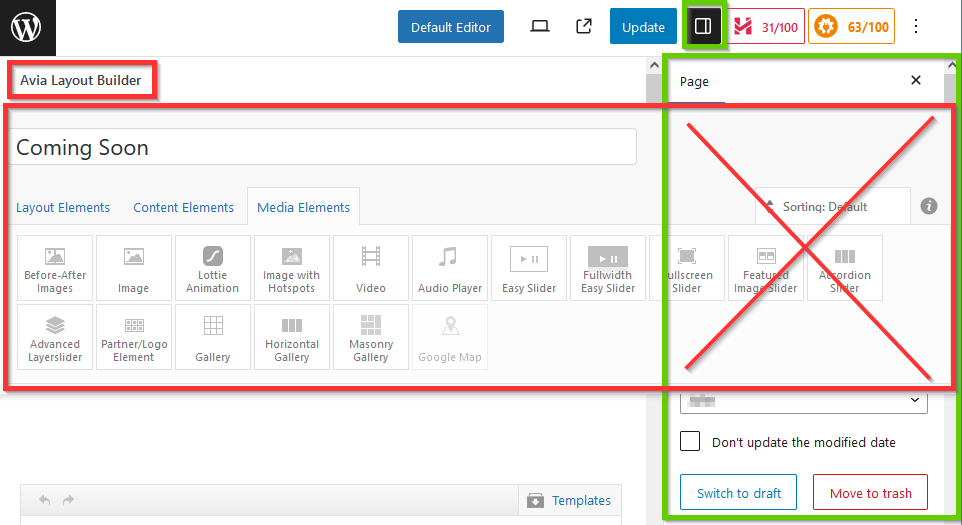
The issue appers since two days. I just recently installed Enfold and in the first days I didn’t have that issue.
Wordpress 6.3.2
Tested in Chrome and Firefox.
I can switch to default editor to “uncover” the settings bar, but it’s a little annoying.
Does anyone know how to fix it?
Thank you in advance.
-
This topic was modified 2 years, 6 months ago by
 yaoyai.
-
This topic was modified 2 years, 6 months ago by yaoyai.
-
This topic was modified 2 years, 6 months ago by yaoyai.
Hi,
I bought the Enfold theme recently; I have a token and everything – but suddenly the layout (certain headings) went back to the previous problems when I did not have the latest version of Enfold. As I understood, I don’t need to make an update as it should be done automatically with the token??! Although I put the correct code to show the headings they are not showing the way they are supposed to. Also, the circle/button is shown again in my main menu. All of this has been solved with your help but now everything came back without me touching anything except changing the date of a heading. This is really very annoying, please help.
Hallo, ich habe plötzlich Probleme mit dem Layout/den Überschriften, ebenso wird wieder der Kreis der aktiven oben auf der Leiste im Hauptmenü angezeigt. All diese Probleme hatte ich vor einiger Zeit mit eurer Hilfe gelöst, jetzt ist wieder alles wie vorher, ohne dass ich etwas verändert hätte (außer, ein neues Datum in die bestehende Überschrift eingetragen.) Ich war der Meinung, ich müsste Enfold nicht mehr updaten, da das über das Token automatisch passieren soll. Das ist sehr ärgerlich, bitte um Hilfe.
https://img.savvyify.com/image/9fsQ5
https://img.savvyify.com/image/9fHyf
Hi,
If you want it to work on every page except home, try this CSS in your Enfold Theme Options ▸ General Styling ▸ Quick CSS field instead:
#top:not(.home) #header_main {
height: 170px;
    background: url(https://campfire-sunshine.org/wp-content/themes/CampFireCouncilTheme/images/header-small.jpg) no-repeat center top;
    background-size: cover;
}
It looks like you have added some custom css to add 65px margin-top to the menu items, please remove this:

The same css is also adding 65px margin-top to the logo, but you should remove your css and use this instead:
.logo a img {
    border: none;
    margin-top: 46px !important;
    margin: 0;
    display: inline-block;
    max-width: 100%;
}
#menu-item-8170 {
     margin-top: 20px;
}
After applying the css, please clear your browser cache and check.
Best regards,
Mike
Hi Rikard,
i mean the medical icons/symbols from this design
https://kriesi.at/themes/enfold-medical/.
Many greetings rixi
Hi,
Glad Guenni007 could help, thank you Guenni007, if you have any further questions please create a new thread and we will gladly try to help you. Thank you for using Enfold.
Best regards,
Mike
Hey Kelly,
You can always download the latest version of the theme from your Themeforest account.
The update to 5.6.6 has to be done manually from the version you are running, please refer to my replies in this thread: https://kriesi.at/support/topic/enfold-4-5-theme-update-update-failed-download-failed-a-valid-url-was-not-pro/#post-1021541
You can either update manually via FTP: https://kriesi.at/documentation/enfold/how-to-install-enfold-theme/#theme-update, or upload the new theme files via Appearance->Themes->Add New, and select to overwrite the old theme files after the upload has finished.
Best regards,
Rikard
Good day, I am using the most recent version of Enfold and the most recent version of WordPress and all my plugins are up to date.
I just received an email from Google Search Console saying there’s a new reason preventing my videos from being indexed. When I log into my Google Search Console and investigate further, it says there’s a problem on my website with the “Video outside the viewport.”
The description Google gives on its website is:
“The video must appear in the viewport when loading the page to be considered for indexing. Move the video so that the entire video is inside the renderable area of the page and seen when the page loads. The videos on these pages aren’t indexed or served on Google as video results.”
I’m using your Avia Layout Builder and just basic layout options for 1 column or 2 columns, and your basic video media element for a video I have on my YouTube channel. On some pages I have videos in one column, and on some pages, I have videos in a 1/2 column. Both pages where I have a video in either 1 column or in a 1/2 column are getting flagged by Google saying that the video is outside the viewport, and as a result, Google is not indexing the video, which is very important to my client.
What should I do to ensure the videos are not outside the viewport to ensure Google indexes them properly? Like I said, I’m using very basic elements of your Avia Layout Builder. I’m not doing anything complex or using any custom code, I’m using 1 or 2 column layouts and just dragging the video media element inside them.
I included a few pages that Google said have the “video outside the viewport” in the private section of this message.
Any help would be greatly appreciated.
Hi Schmidtgrafisk,
I’m glad that @Guenni007 has helped you :)
Thanks for using Enfold and have a great weekend!
@Guenni007 thanks for helping out :)
Best regards,
Nikko
Hi slikslok,
I’m glad that Ismael could help you :)
Thanks for using Enfold and have a great weekend!
Best regards,
Nikko
Hi Lene,
Please go to Enfold (Theme Options) > Performance > CSS File Merging And Compression and select Disable – no CSS file merging and compression and save.
Let us know if it helps.
Best regards,
Nikko
Hi GB,
I’m glad that we could help you :)
Thanks for using Enfold and have a great day!
Best regards,
Nikko



