Sorry to jump on the thread, but I can’t find the “upcoming events content element” in ALB. I can see the code under avia-shortcodes but there’s nothing about events in Enfold documentation either. What is this element and how do I see/try/use it?
I did not see on your page why the toggles looses their focus – on click all moves to the top. – this is not standard behavior!
Can you try to deactivte the total cache – refresh all cachings and merging of enfold.
The accordion does not work in Google Chrome in the current version, even after updating to 5.6.7. After opening, it does not close properly. We have the same effect on all our Enfold sites. See link in private for testing on the bottom of the page.
Thanks for your help!
Good morning. I was able to update to the latest version on 9 sites this a.m. Three have failed. The error message is as follows:
An error occurred while updating Enfold: Could not move the old version to the upgrade-temp-backup directory.
I cannot find a great solution to the fix. This happened once before to one site and I had to reinstall the entire theme – which also affected my site. Is there some type of fix to this error without having to go through a complete reinstall?
I have also tried this plug in the past which did not work. https://www.envato.com/lp/market-plugin/
Hi planttilesseo,
If you need further help with this, then please open a new thread and include WordPress admin login details in private, so that we can have a closer look at your site.
Best regards,
Rikard
Well with your Alias name and a little search i found your page ;)
and on FAQ everything works fine here in OSX Chrome
Edit : . You are right. I see – if you open the 5th or 6th toggle there are again this behavior.
Can you please remove the interims solution with toggle_wrap set to display: none
and refresh all cachings and merging please after that.
I had to inspect where we can correct this. – on the enfold page https://kriesi.at/themes/enfold-2017/elements/accordion/ it works as i said as expected.
Hi planttilesseo,
This has been fixed in Enfold 5.6.7, please try updating to that. If you need further help on the topic, then please open a new thread and include WordPress admin login details in private, so that we can have a closer look at your site.
Best regards,
Rikard
Hi @planttilesseo,
Please make sure you’ve cleared any server-side, plugin-based, and browser caches. If you enabled the CSS file merging and compression option in the Enfold theme options > Performance tab, please disable it, save theme options, enable it, and save theme options again.
If that doesn’t fix the issue, please start a new thread and send us a link to your site and admin login credentials in the private content field so we can look into it.
Best regards,
Yigit
Only the code below works for me
.toggle_wrap {
  display: none;
}
Updated enfold and tried the other code with behavior set to multiple toggles open and opening and closing a few different toggles causes it to bug out
Hello,
i need to rebuild a webpage to which i have complete access. The webpage uses the enfold theme and i want to know which demo was originally selected to build the page. Is there a possibility to do so?
Hi
As I saw, you implemented this now in the newest Enfold version 5.6.7.
What ist the difference between avf_obfuscate_email_link and avf_obfuscate_email_link_hex_encoding ?
Best regards
Mike
Hi,
Thanks for letting us know, we’ll close this thread for now then. Please open a new thread if you should have any further questions or problems.
Best regards,
Rikard
Hi,
Thanks for the update.
Did you install the Layer Slider as a plugin? You may need to set the Enfold > Layout Builder > Integrated (Bundled) LayerSlider Plugin settings to the second option to disable the default layer slider.
Best regards,
Ismael
Hi,
Thank you for the info.
We were able to reproduce the issue on Firefox, but it got fixed once we disabled WP Rocket’s file optimization options. You may want to consider installing a different compression plugin or using the Enfold > Performance > File Compression settings instead.
Best regards,
Ismael
Hi,
Did you purge the cache and perform a hard refresh? Please try to re-toggle the Enfold > Performance > File Compression settings or disable it completely.
Best regards,
Ismael
Dear Mike,
I can confirm that the solution you indicated in your response solved the problem. :-)
You are a superstar. Thank you.
(And, of course, Yigit is a superstar… and you too, Ismael!)
There is another error I’m getting when I try to create a gallery in Memberpress, but I don’t think this is an Enfold problem. I’m putting the error in the private section, in case you might be familiar with it or have any thoughts on how to fix it. If not, no worries.
Thanks again!
Tim
if you download the font from google there is the variable font inside too. The static fonts are in an extra folder. Did you upload the whole zip to enfold?
In this static folder there are condensed styles too!
_______
But one piece of advice from me is: don’t install too many fonts. The performance of the website will suffer.
As I mentioned in another topic, you should think carefully about whether you should include italic font styles at all. Especially with sans-serif fonts, the slanting of the font on the browser side is often almost identical to the italic font style.
If you can do without the support of older browsers, then the variable font might be the better alternative anyway. There, all font styles would be included, and the memory usage is much lower. ( 1,1Mb versus 4,8MB ) .
Next offer modern font style types as woff2. The Google download do offer only ttf. You can upload it with the zip too – but the woff2 will be loaded.
Try this zip ( with only light, regular and bold style (woff2 and ttf) ) – this would be a good way for the most of the websites:
https://webers-webdesign.de/Open-Sans.zip
Delete your uploaded font and use it instead.
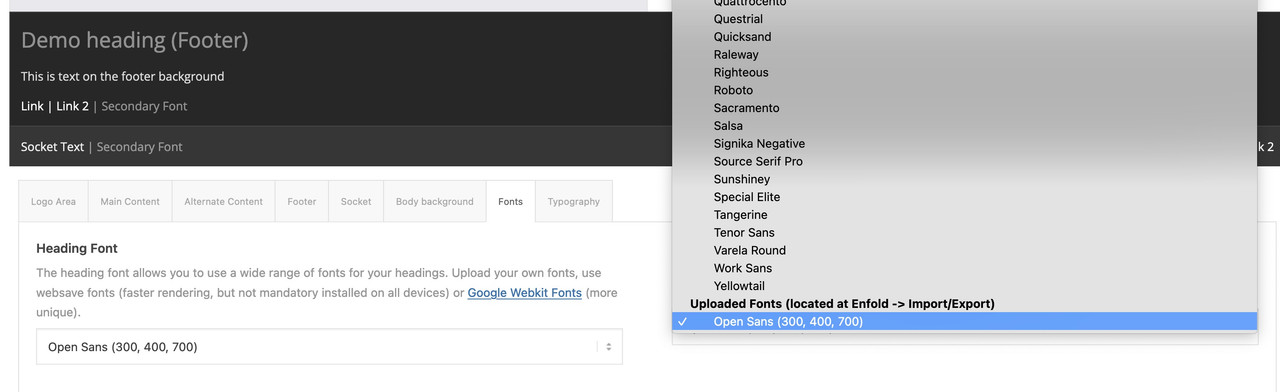
think of to use them – these uploaded fonts are at the end of the dropdown list on font setting options
Hi,
@Guenni007
You are the greatest – adding this at bottom of enfold\config-templatebuilder\avia-shortcodes\toggles\toggles.css does the trick.
Thanks a lot for your help !!!!!
Until next release also adding it to Quick-CSS in theme options helps.
Best regards,
Günter
Dear Support,
i imported the google font “open sans” to enfold. But the font looks much more condensed now. If i switch to “Open sans” imported live from google the font looks much different. Do you know why? Please see the link to the staging-site below.
Thanks fr any help!
I switched to a different layerslider and I get this
b>Warning</b>: Undefined array key “url” in <b>/home/csmlugoj/public_html/wp-content/themes/enfold/config-templatebuilder/avia-shortcodes/postslider/postslider.php</b> on line <b>890</b><br />
Is it possible to place an image slider next to the logo?
The current site https://www.schultebv.nl/ has this and they would like it also to have in their new enfold website.
This is what is in Enfold Child: Theme Functions (functions.php)
<?php
function masonry_links () {
?>
<script>
window.addEventListener(‘DOMContentLoaded’, function() {
(function ($) {
$(document).ready (function () {
var url = new RegExp(location.host);
$(‘.av-masonry-entry’).each(function () {
if( ! url.test($(this).attr(‘href’)) ) {
$(this).attr(‘target’, ‘_blank’);
}
});
});
}) (jQuery);
});
</script>
<?php
}
add_action (‘wp_footer’, ‘masonry_links’);
/*
* Add your own functions here. You can also copy some of the theme functions into this file.
* WordPress will use those functions instead of the original functions then.
*/
-
This reply was modified 2 years, 5 months ago by
 whdsolutions.
 John
JohnGuest
Hello,
I’m interested in buying your domain windaily.com that you have a demo theme on for enfold gym on. Can you please let me know the price you want for it. If you are not the right person for this request please forward to the correct party so we may discuss it further.
thanks,
John
Hey appnetdesign,
Thank you for the inquiry.
Have you overridden any template files in the child theme? These files might also need updating. Remember to disable the Enfold > Performance > File Compression settings after the update and make sure to clear the cache.
Best regards,
Ismael
This reply has been marked as private.
Hello,
Enfold is overriding some of our templates provided by The Events Calendar and preventing some options from being selected in the admin dashboard. Can you kindly tell me how to fix these issue?
In Event Settings, we’re unable to select the Default Events Template and save changes, it does not allow us to select and use this template. We’re trying to remove the sidebar.
example: https://ncuih.org/event/vax-chat-2023-paths-to-equity/
The Event Series template is the one that seems to be overridden by Enfold. You can see the duplicate upcoming events block in the footer. We’re trying to remove the sidebar and remove the footer events section on this page here:
example: https://ncuih.org/series/ncuih-uio-focus-groups-setting-policy-priorities-for-2024/
We are using the Enfold child theme with these plugins:
The Events Calendar
The Events Calendar Pro
The Events Calendar: Filter Bar
The Events Calendar: Virtual Events
Screenshot of the page as-is (broken, extra event listing in footer) https://my.theeventscalendar.com/wp/index.php?gf-download=2023%2F08%2Fncuih.org_series_ncuih-uio-focus-groups-setting-policy-priorities-for-2024.png&form-id=48&field-id=4&hash=5b0ab2f0a742e6b7324e9ad2231be885e53f74c3ccc97d4fc499771000ac0555
Hi,
Glad to hear that you have this sorted out, with Nikko’s help, if you have any further questions please create a new thread and we will gladly try to help you. Thank you for using Enfold.
Best regards,
Mike
Hey abix,
I believe that you have uploaded the Enfold Theme and documentation zip file, please either check your Theme Forest account for the Installable WordPress file only zip file, or extract your current zip file and file the “enfold.zip” inside and installthat file.
Also ensure that your cPanel have the PHP ZipArchive Extension enabled so the zip file can be extracted, it seems some cPanels with PHP v8, don’t have this enabled by default.
Best regards,
Mike
Hi,
Glad we were able to help, if you have any further questions please create a new thread and we will gladly try to help you. Thank you for using Enfold.
Best regards,
Mike
Hi,
Glad we were able to help, and thank you for the kind words, if you have any further questions please create a new thread and we will gladly try to help you. Thank you for using Enfold.
Best regards,
Mike



