Hi,
Glad to hear that you have this sorted out, if you have any further questions please create a new thread and we will gladly try to help you. Thank you for using Enfold.
Best regards,
Mike
Hi,
Perhaps, what you are trying to ask for is that on desktop you want the text and the buttons to be in one line, and you want the text to also be in a single line, like this:

If this is what you are asking, then please add this css:
@media only screen and (min-width: 1520px) {
.responsive .avia-cookie-consent.avia-cookiemessage-bottom .container {
    max-width: 1520px;
}
}
Please note that with the amount of text you have this can only occur for desktops above 1520px, otherwise there is not enough room for the text to be in a single line and next to the buttons.
Best regards,
Mike
 alimirkan
 Guest
“WordPress’te tema yüklerken ‘style.css dosyası bulunamadı’ hatası alıyoruz. Destek ekibine ulaşamıyoruz; bize yardım için e-posta yoluyla foruma başvurmayı öneriyorlar. Temanın zip klasöründe ‘enfold.zip’ ve ‘psd.zip’ adında iki dosya bulunuyor ve ‘enfold.zip’ dosyasını yalnızca kurduğumuzda bir demo kurulum işlemi başlatıyor. Lütfen yardım edin.”
Hi,
Glad we were able to help, if you have any further questions please create a new thread and we will gladly try to help you. Thank you for using Enfold.
Best regards,
Mike
Hi Rikard,
Ismael gave me temporary access to the forum because I had an unrelated technical question about the Enfold theme. So from my end I have no way to know if it is working due to the temporary access provided or if the issue is resolved.
 Andy
AndyGuest
hello
i have a customer’s wordpress (v.6.3.2) website here, which is using your “enfold” theme.
currently version v.4.4.1 is installed, but no update is available. however, as it looks like, your current version is v.5.6. what do i (or the customer) have to do, to get the latest version of your theme, actually?
best regards,
andy
Hey Beth,
You can use this link to open a new thread, or click the big blue bottom at the top of the page here: https://kriesi.at/support/forum/enfold/
Best regards,
Rikard
Hi Ismael,
1. As for the CSS code, I added it to the Enfold´s Child Theme General Styling Quick CSS section, but I don´t see it working yet.
2. Since I didn´t know how to attach a picture, here is a link to the problem with formatted words getting too close to each other, as the first sentence shows: https://abogadonotarioonline.com/en/cancelacion-de-hipoteca/. The same issue can be seen throughout the entire site.
Regards,
Ramon
das war ja auch gedacht um den Title vom Breadcrumb in etwas anderes zu transformieren als ein h1.
Dann würde das ja die Doppelt h1 Problematik lösen.
Wie gesagt – besser wäre es das Plugin , welches für den Shortcode zuständig ist zu betrachten.
der wird wohl das h1 setzen.
Denn das: <h1 class=”the_input_element” data-math-equation=”” data-original-math-equation=”” data-decimal-places=”0″>Angebot für eine PV-Anlage</h1>
ist nicht von Enfold seite aus gesetzt worden.
Kann ich deine Seite mal sehen?
 Beth Carter
Guest
If I have a question involving a user issue and I have a purchase code and took the time to set up a Kriesl account how do I contact someone to help with the issue? I’ve looked everywhere. I’m trying to watch this simple tutorial to learn how to put the full width easy slider at the top but it says private content and will not allow me to see it.
It seems it wouldn’t be hard to figure out how to do it.
Thank you for your help.
Beth
Hi,
Please try going to Enfold Theme Options ▸ Theme Options ▸ Frontpage Settings and ensure it is “frontpage”, then in the “blog” setting under it ensure it says: “choose page” and not “frontpage”
If you imported the demo three times you may now have three “frontpages” and menuss, if you do try installing the WP Reset plugin and reset your set and then try to install the demo once. If you still have trouble then please include an admin login in the Private Content area so we can review the settings, and perhaps allow us to also “reset” and import the demo.
Best regards,
Mike
Hi,
When I check gruetter-innenausbau.ch the mobile looks as you wish right now:

So if you only want the text and buttons to be side-by-side on desktop, like this:

then you would use this css:
@media only screen and (min-width: 1920px) {
.avia-cookie-consent .container {
  display: flex;
  flex-wrap: wrap;
  align-items: center;
  justify-content: space-between;
}

.avia-cookie-consent .avia_cookie_text {
  flex: 1;
  white-space: normal;
  margin: 0;
}

.avia-cookie-consent .avia-button {
  display: inline-block;
}
}
Please note that the css only begins at min-width: 1920px, if you want it to begin earlier then please adjust. I tested this on gruetter-innenausbau.ch, see the above screenshots, if you are still having problems perhaps you have an error in your other css like a missing bracket, try adding this css to the WordPress ▸ Customize ▸ Additional CSS, assuming you have no other css there, otherwise please examine and test your other css for errors.
Best regards,
Mike
Hi,
Thanks for letting us know, we’ll close this thread for now then. Please open a new thread if you should have any further questions or problems.
Best regards,
Rikard
Thank you for your help!
I am including FTP access in the private area.
Btw
There is also a problem moving around and/or performing various actions in the Labhuset WordPress backend as often it jumps to an error screen (looks like fatal errors). Example a product or moving to all products and then a product. I have to refresh the browser window to return to the regular backend WordPress. It happens seemingly on random. There is a mix of WooCommerce errors happening. I made this issue at the WooCommerce Github repo: https://github.com/woocommerce/woocommerce/issues/41255
I do not know how this is related to Enfold though.
-
This reply was modified 2 years, 5 months ago by
 SHR Design. Reason: Additional information
Hi,
Great, I’m glad to hear that your problem is solved. We’ll close this thread for now then, please open a new thread if you should have any further questions or problems.
Best regards,
Rikard
Hallo zusammen,
wir haben auf unserem Server eine Webseite entwickelt und wollten sie jetzt auf das Produktivsystem des Kunden spielen und stellen fest, dass es die gesamten Farb- und Schrifteinstellungen nicht übernimmt. Das Childtheme und alle Pfade sind entsprechend angepasst, die Inhalte und die Datenbanken wurden 1:1 kopiert, die URLs geändert und dennoch fehlt die Hälfte aller Einstellungen.
Das ist jetzt das Dritte mal, dass ich eine Webseite mehr oder weniger komplett neu einrichten muss, nachdem ein Domainwechsl vollzogen wurde.
Geht das nicht mit Enfold, bzw. worauf muss ich achten?
Herzlichen Dank!
try this instead in child-theme functions.php:
function replace_tag_for_breadcrumb_title($args,$id){
		$args['heading'] = 'div';
		return $args;
}
add_filter('avf_title_args', 'replace_tag_for_breadcrumb_title', 10, 2);
( you can find the args on enfold-functions.php on line 593ff )
_________________
just for info
by the way – woocommerce uses that filter to change the title on single product pages to “strong”
in this case it is in an if clause:
if(is_single() && is_product()){
	$args['heading'] = "strong";
}
“did you make sure to select it as both the heading and body font”
Yes, I did, as I wrote in my initial posting.
I think I set all elements in (Enfold > General Styling and) Enfold > Advanced Styling to the uploaded font.
But as every element needs to be picked individually for editing it is not straight forward to stay on top of things. Therefore could you please let me know where to find the respective css files which are modified by these two UI configurations? It would be easier to search for the font names in an editor.
Best Regards,
ABIX
Hi,
I’m Joan and yesterday I purchase a enfold license. I import the demo parallax, 3 times, and always don’t loads the content, text and images. Only loads the menu.
How can I get it, please.
Thanks in advance.
Joan
… sorry – soon there will be something more informing …
edit. a quick way is to replace that enfold h1 tag with jQuery in your child-theme functions.php:
or – maybe better try to change the heading in your shortcode of the plugin.
function breadcrumb_change_tag(){
?>
<script type = "text/javascript">
window.addEventListener("DOMContentLoaded", function () {
	(function($) {
	  $("#top #main .title_container .main-title").contents().unwrap().wrapAll('<div />');
	})(jQuery);
});
</script>
<?php
}
add_action('wp_footer', 'breadcrumb_change_tag');
but i guess we can influence the heading via filter : avf_title_args – …
if there is a possiblility to influence the building of an element – it is alway better than to change it afterwards – so use the next solution instead.
btw – you can insert to page-scroll-to-id to offset a selector f.e. #header – so this will react on the current header height.

Next: on the input field for excluded selectors – add behind the given selectors : a.no-scroll
( ps avoid a comma behind the last excluded selector ! )
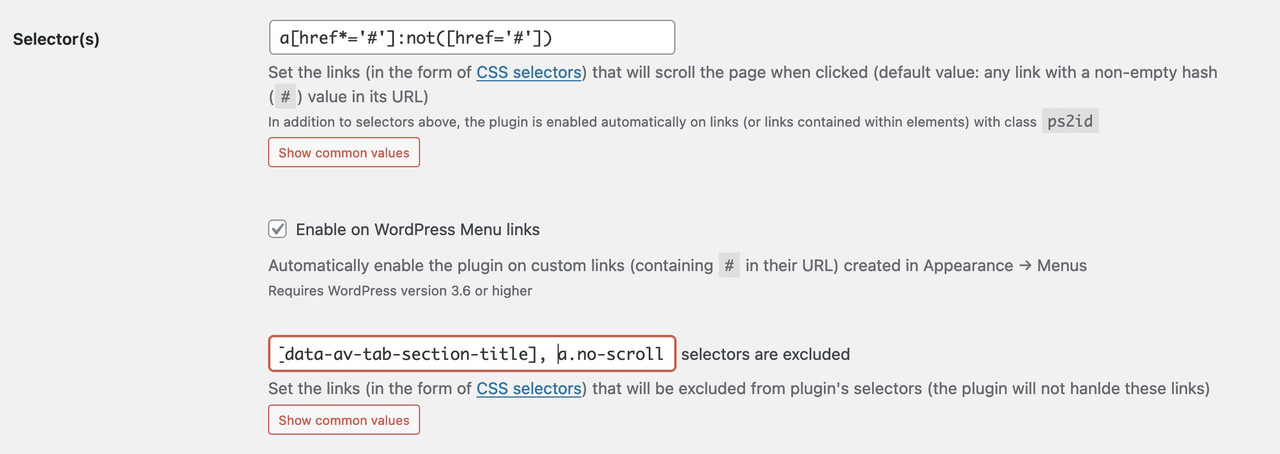
the no-scroll class is used on enfold for click events that do not need a scroll to ID. F.e. an inline popup. A link to a hidden container should only open in lightbox and not open the lightbox and scroll to that hidden container.
Hi,
Thank you for the update.
Looks like the theme is already uploaded to the site but it’s not active yet. Please create a site backup or restore point, then try to manually activate the Enfold theme in the Appearance > Themes panel.
Best regards,
Ismael
Hi jnightingale,
I’m glad that we could help you :)
Thanks for using Enfold and have a great day!
Best regards,
Nikko
 Gregory
Guest
Hello,
We use your theme on our site https://centredesmusiciensdumonde.com/ and we have this error : PHP Warning: Undefined array key “HTTP_ACCEPT_LANGUAGE” in /home/centredesmusicie/public_html/wp-content/themes/enfold-child/functions.php on line 27
All the site is up to date, php 8.1.
When you google :PHP Warning: Undefined array key “HTTP_ACCEPT_LANGUAGE”, lot of site has this problem? could you help use
Hi,
Thank you for the update.
We can’t access the staging site because the password is incorrect. Have you tried disabling the Enfold > Performance > File Compression settings after updating the theme? You may need to purge the cache as well and do a hard refresh just to make sure that the updated resources are loaded.
Best regards,
Ismael
Hi,
Thank you for the inquiry.
there applies the font style BUT it results in referencing the font on the Google server instead of using the already uploaded, local, and otherwise working Roboto font.
What do you mean? When you uploaded the Roboto font, did you make sure to select it as both the heading and body font? It’s possible that the default Roboto font is still selected, or there might be an element in the Enfold > Advanced Styling panel that is still using the default font. Please note that the uploaded font will not override the default font and the entry appears at the very bottom of the dropdown, so it is quite easy to miss.
Best regards,
Ismael
Hey Highlander-2013,
Thank you for the inquiry.
The other h1 element might be coming from the default title and breadcrumb container, which can be toggled in the Enfold > Header Layout > Header Title and Breadcrumbs settings. Please provide a link to the page containing the shortcode so that we can check it properly.
Best regards,
Ismael
Hi,
In the backend, my home page says the following at the top: This page is selected to be displayed as maintenance mode page but is not active at the moment. (Set in Enfold » Theme Options). (Change)
The problem is is that the page isn’t set to maintenance mode, and it is active, because you can see it at Wichitagym.com.
Can you please advise? Am I missing something?
Thanks!
Justine
Hi BenjaminSpeedtsberg,
It’s possible, you can add this in Enfold > General Styling > Quick CSS:
#top #header:not(.av_header_transparency) {
    position: absolute;
    padding-top: 15px;
}

#top :not(.av_header_transparency) .header_bg {
    background-color: transparent;
    opacity: 0;
}

#top :not(.av_header_transparency) li a .avia-menu-text {
    color: black;
}
As for the logo, we can’t change the color of the image but we can add a background color to it:
#top #header:not(.av_header_transparency) .logo {
    background-color: black;
    border-radius: 10px;
}
Hope it helps.
Best regards,
Nikko
Hi GB,
The post page is set to use either one of the image sizes: entry_with_sidebar or entry_without_sidebar.
In your case it’s entry_without_sidebar which is using 1210px width and 423px height, to make the height adjust based on the width, please try to add this code in your child theme’s functions.php file:
function enfold_customization_modify_thumb_size( $size ) {
  $size['entry_without_sidebar'] = array( 'width' => 1210 );
  return $size;
}

add_filter( 'avf_modify_thumb_size', 'enfold_customization_modify_thumb_size', 10, 1 );
And re-upload the image or regenerate images (using a plugin).
Hope it helps.
Best regards,
Nikko



