Hi meanster99,
I checked your site and it’s black for burger icon for every page, to make it white for transparent pages, just add this CSS code in Enfold > General Styling > Quick CSS:
#top #header.av_header_transparency .av-hamburger .av-hamburger-inner,
#top #header.av_header_transparency .av-hamburger .av-hamburger-inner:after,
#top #header.av_header_transparency .av-hamburger .av-hamburger-inner:before {
    background-color: white;
}
Best regards,
Nikko
Hi Tim,
Thanks for giving us admin access.
Is there any modifications made on the Enfold theme? it seems when it is set to display All, pagination appears but when you set pagination to specific number the pagination disappears on the frontend, which is the exact opposite of how it works.
Best regards,
Nikko
Hi informatie1,
You cannot update the theme anymore using API key, you’ll need to use a personal token for that, in order to generate it, please follow the instructions in our documentation: https://kriesi.at/documentation/enfold/theme-registration/#how-to-generate-a-envato-personal-token
For updating the theme on your site, please do the following process:
First make a backup:
– Site Backup: https://kriesi.at/documentation/enfold/backup-wordpress-site/
– Theme Settings Backup: https://kriesi.at/documentation/enfold/backup-theme-settings/
Option 1: Use Envato Market to update your site
– link: https://envato.com/market-plugin/
Option 2: Update manually
1. Login to ThemeForest and download the Enfold theme, right-click over the downloaded zip file and extract/unzip it.
2. It should generate a new folder, open it and look for the enfold folder
3. Right-click the enfold folder then zip it, here’s a tutorial on how to create a zip file in windows: https://www.howtogeek.com/668409/how-to-zip-and-unzip-files-on-windows-10/ (this should create enfold.zip
4. Log in to WordPress as and Admin.
5. Install and activate a maintenance plugin and put your site in Maintenance mode.
6. Go to Appearance > Themes, switch to a default WordPress theme like TwentyTwenty then delete Enfold.
7. Click on the ADD NEW button.
8. Click on the UPLOAD THEME button.
9. Click BROWSE and choose enfold.zip file
10. Click the INSTALL NOW button and switch to Enfold or your child theme.
11. Remove the maintenance mode then deactivate and remove the maintenance plugin.
Then register the theme by following the instructions in https://kriesi.at/documentation/enfold/theme-registration/
Once this is done, the next time you update, you’ll only need to go to Enfold > Theme Updates and click on the Update button.
Hope it helps.
Best regards,
Nikko
Hi woogie07,
Please try to add this CSS code in Enfold > General Styling > Quick CSS:
#top #wrap_all #footer .social_bookmarks li a {
    color: white;
    font-size: 20px;
}
Hope it helps.
Best regards,
Nikko
Hi Carsten,
Try to add this CSS code in Enfold > General Styling > Quick CSS:
#top .avia-data-table tr > th:first-child,
#top .avia-data-table tr > td:first-child {
    width: 300px;
}
Just adjust the width value as you see fit.
The code will affect all tables, if you want to make to affect only a single page then you can give us a link to the page and we’ll modify the code to a more customized one.
Best regards,
Nikko
Hi SHR Design,
I think the impact Enfold has for it is related only to memory since it requires a high amount of memory like any other page builders but it should have no bearing in switching to PHP 8.0
Best regards,
Nikko
Hi nasrullah2,
Try to go to Enfold > Performance > CSS File Merging And Compression set it to Disable – no CSS file merging and compression
Let us know if this helps.
Best regards,
Nikko
I made a new video today. Link also shared in the wp org WooCommerce issue seen in the above link.
It shows the impact of switching from PHP 8.1 to PHP 8.0. WooCommerce and Solid Security plugins are impacted.
I have emailed Solid Security plugin support and I have added on to the above issue for WooCommerce.
I do not know if Enfold has an impact on these things.
-
This reply was modified 2 years, 4 months ago by
 SHR Design. Reason: Adding info
Hey Enfold support
How can I adjust the width of the left description column of a table?
Longer words just overflow the next column – pls. refer to dropbox image in private.
It would be ok for all the data colums to be much smaller if that helps…?
Standard design of table, tabular data, made scrollable.
Actually works on mobile but not on pc screen size?
Best regards
Hey Yvonne,
Thanks for reaching out to us.
We can’t give out trial versions unfortunately. Yes you can chose a boxed layout, but you might need custom CSS if you want to add a border. Example of a boxed layout: https://kriesi.at/themes/enfold-blog/
Best regards,
Rikard
Hi,
Thanks for the update. Did you activate the option to delete old CSS and JS files on the bottom of the same page? If not, then please try to activate that, then enable file compression again to see what happens then.
About updates; did you register your theme license? If not, then please refer to this: https://kriesi.at/documentation/enfold/theme-registration/. If the updates are still not coming through after that, then please try using this plugin: https://envato.com/market-plugin/
Best regards,
Rikard
thanks for the link :
First: you had the wrong language defintiton on your page – for a good hyphenation you should have your lang set for the main language on your page.
guess it is:lang="da-DK"
(alway click to enlarge the images)
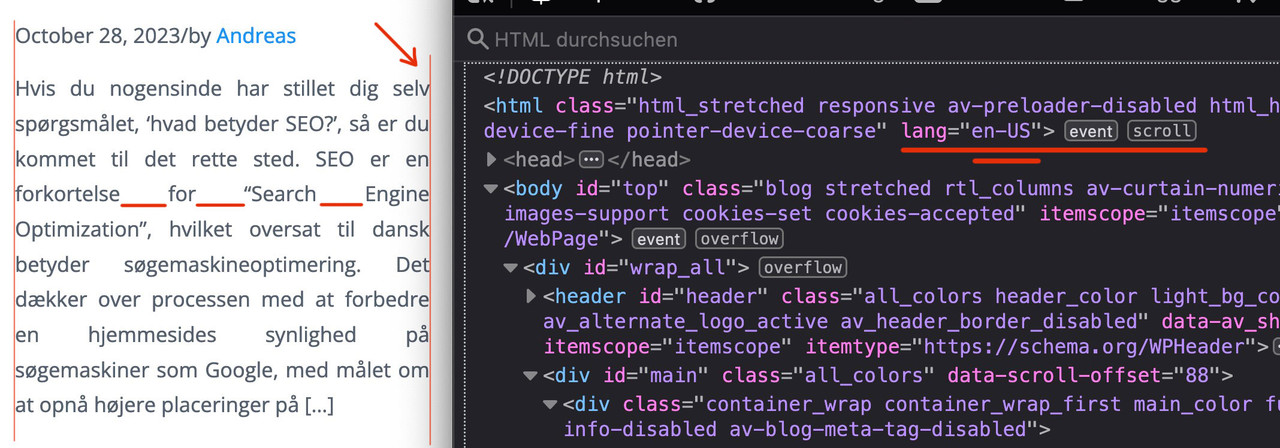
Next: this is justified text layout ! – you can see the rule for it here:
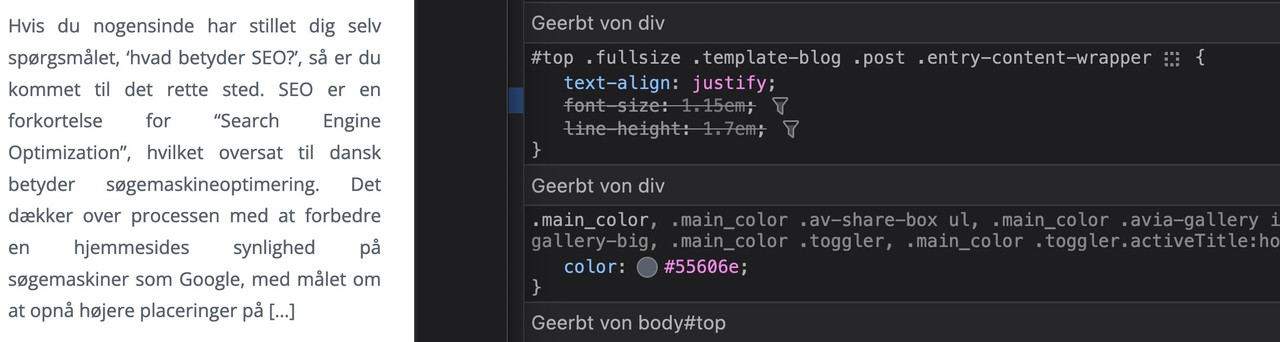
i told you in the other topic that it is alway difficult to have a nice word distance without breaking the words on justified text.
if you do not like to justify the text get rid of that part inside:
#top .fullsize .template-blog .post .entry-content-wrapper {
  text-align: left;   /****** this part is set to justify in your css *****/
  font-size: 1.15em;
  line-height: 1.7em;
  max-width: 800px;  /****** see comment under this codeblock *****/
  margin: 0 auto;
}
the 800px ( or 40em ) max-width is a default setting from enfold – if this is what you mean in your e-mail talking about:
it’s stuck in the center regardless of the CSS I apply
then you can avoid that by:
#top #wrap_all .fullsize .template-blog .post .entry-content-wrapper,
#top #wrap_all .fullsize .template-blog .post .entry-content-wrapper > * ,
#top #wrap_all .fullsize .template-blog .post-title {
  max-width: unset !important;
  margin: 0;
}
if you like to preserve the justification of your paragraph texts – then a hyphens: auto will mainly solve that issue:
(those ugly underlined spaces inside block : “for______Search_____Engine”)
#top #wrap_all .fullsize .template-blog .post .entry-content-wrapper p {
  text-align: justify;
  -webkit-hyphens: auto;
  hyphens: auto !important;
  text-justify:  distribute;
  word-spacing: -0.05em !important;
  text-align-last: left;
}
but: as mentioned above the hyphenation only works well if the lang attribute on html is set to the language of your texts.
F.e. the word “Søgemaskineoptimering” does not hyphen on small screens.
Hi Kriesi-Team,
The Appearance > Widgets panel on our page is not loading/working correct. The complete right side of the panel, where the widgets content should appear, remains empty.
This error is already a year old, but it hasn’t bothered me so far since the frontend is not affected. I searched your support page but was not lucky this time.
Please find the Error message below:
WordPress version 6.4.1
Active theme: Enfold 5.6.8 child
PHP version 8.0.30
————–
An error of type E_ERROR was caused in line 368 of the file /XXX/wordpress/wp-content/themes/enfold/framework/php/widgets/widget-classes/class-avia-newsbox.php. Error message: Uncaught TypeError: strip_tags(): Argument #1 ($string) must be of type string, array given in /XXX/wordpress/wp-content/themes/enfold/framework/php/widgets/widget-classes/class-avia-newsbox.php:368
Stack trace:
#0 /XXX/wordpress/wp-content/themes/enfold/framework/php/widgets/widget-classes/class-avia-newsbox.php(368): strip_tags()
#1 /XXX/wordpress/wp-includes/class-wp-widget.php(535): aviaFramework\widgets\avia_newsbox->form()
#2 /XXX/wordpress/wp-admin/includes/widgets.php(276): WP_Widget->form_callback()
#3 /XXX/wordpress/wp-includes/widgets.php(837): wp_widget_control()
#4 /XXX/wordpress/wp-admin/includes/widgets.php(119): dynamic_sidebar()
#5 /XXX/wordpress/wp-admin/widgets-form.php(477): wp_list_widget_controls()
#6 /XXX/wordpress/wp-admin/widgets.php(34): require(‘…’)
#7 {main}
thrown
——————–
I’ve added link and login in private
Thanks for your help.
Thomas
Hi,
Try this CSS in your Enfold Theme Options ▸ General Styling ▸ Quick CSS field:
@media only screen and (max-width: 1534px) {
	#top #wrap_all .avia-builder-el-0 .av-element-cover video {
    height: 100%;
    width: 190vh;
}
}
After applying the css, please clear your browser cache and check.
Best regards,
Mike
Hi,
Since last week we have a cookie problem on one of our customer websites. Before the update, the cookie banner appeared on every page. If you accepted it, you could also add a product to the shopping cart and it would stay there until you completed the order.
After updating the theme, the cookie banner will only appear on the product-page, when you add a product to the shopping cart. If you navigate to the shopping cart, it will be empty. If you accept the cookie banner, it works as intended. But the strange thing is that the cookie banner only appears when you add a product to the shopping cart.
We have two test versions of the website. One with the older Enfold 5.5 and the other with Enfold 5.6.8. See Private Content for details.
Regards
Bernd
-
This topic was modified 2 years, 4 months ago by
 Bernd.
Hi Nikko,
thank you so much. The website is diplayed correctly after I disabled the CSS compression, as you advised me. Small measure, big impact. Should I keep this setting permanently? It certainly had a use, but I don’t know it (anymore). If it’s not too complicated: Is there an article about what to consider when updating enfold? I always have to do it via FTP because the dashboard shows that the theme is up to date. Which is often not true. I only find out about an update through your email. Thanks for that!
Best regards, Stephan
Hi Highlander,
Thanks for giving us admin access.
It seems you have set it as well in Settings > Reading, when using Enfold, you need to set it to default then in Enfold > Theme Options, you set the homepage there.
I have set it as I have mentioned on your site, please review your site.
Best regards,
Nikko
Hi navindesigns,
No worries, please try to add this CSS code in Enfold > General Styling > Quick CSS:
.html_av-overlay-side #top #wrap_all div .av-burger-overlay-scroll #av-burger-menu-ul a:hover {
    background-color: black;
}
Best regards,
Nikko
Hi!
Thank you for the update.
Is there in enfold something like a model Element like it is in avada?
What do you mean by “model” element? You might be referring to the Custom Elements Templates (CET). Please check the documentation below for more info about CETs.
// https://kriesi.at/documentation/enfold/custom-element-templates/
Best regards,
Ismael
Dear Rikard,
thank you my mistake – I was confused- Looking for Modern not for “2017”.
But lat me ask another question, Is there in enfold something like a model Element like it is in avada?
Thanks for an answer
Kind Regards
Gerd
Hey bconc1,
Thank you for the inquiry.
Did you select a main menu (Enfold Main Menu) in the Appearance > Editor panel? If you haven’t created a main menu yet, please check the documentation below for more info.
// https://codex.wordpress.org/WordPress_Menu_User_Guide#Adding_Your_Menu_to_Your_Site
// https://wordpress.com/support/menus/create-a-menu/#menu-locations
Best regards,
Ismael
Hi Mike
Thanks for the update.
So, now i can use also subject and body in the button without using mailto?
I will wait for the official Enfold version with this change. Do you already know when this will be released?
What’s about the social links of a team member?
There we have to use mailto: when we want to add an email address so the anti spam does not work.
Best regards
Mike
Hi Rikard,
I believe I have updated Enfold, please tell me if otherwise. Thanks
Hey Martin,
Thank you for the inquiry.
You can use this css code to adjust the height of the submenu items and increase the space around them.
#top #wrap_all .av-main-nav ul > li > a {
    line-height: 1.4em;
    min-height: 33px;
    padding: 10px 16px;
}
Please toggle or temporarily disable the Enfold > Performance > File Compression settings in order to ensure that the changes take effect.
Best regards,
Ismael
Hi,
Thank you for the update.
If you need to append privacy policy message to the contact form with a checkbox, you can do so in the Enfold > Privacy & Cookies > Privacy Policy panel. Look for the “Append a privacy policy message to template builder contact forms?” option and enable it. You don’t need to add the Custom HTML field.
Best regards,
Ismael
Hello
I’m using the Enfold one page template. I’m using the welcome page as my front page. I added 2 new pages, but the menu bar on the new page does not allow me to return to the main page. I can go from the main page (one page) to the new page, but once on the new page I cannot not return to the main page using the menu bar; the menu bar on the new page is not functioning (welcome, services, about etc ). Can you help?
-
This topic was modified 2 years, 4 months ago by
 bconc1. Reason: clarify the topic title
Hi,
Thank you for the screenshot.
We also provided a screenshot of the site in the private field. Please toggle or temporarily disable the Enfold > Performance > File Compression settings to regenerate the scripts and stylesheets. You can re-enable the file compression settings once you’re done with the modifications.
Best regards,
Ismael
Hi pelgrimrat,
I’m glad that you were able to figure it out. :)
Thanks for posting the solution that worked for you and thanks as well for using Enfold.
Have a great day!
Best regards,
Nikko
Hi Tim,
I’m glad that you figured it out :)
Thanks as well for using Enfold and have a great day!
Best regards,
Nikko
Hi web4698,
You’re welcome :)
1) How do I change the colour of the social media icons in the footer?
Please try to add this CSS code in Enfold > General Styling > Quick CSS:
#top #socket .social_bookmarks li a {
    color: yellow !important;
}
Just adjust the color value as you see fit.
2) The blog posts don’t contain /blog/ in the urls. Why is this?
The blog posts are using category instead /blog in the urls, you can change this in Settings > Permalink, and set the Custom Structure in there.
You can just add blog in there however, it affects other post types as well such as portfolio so it’s not really a good solution, I found this article but haven’t tested it out yet, you might want to check it: https://www.goldenoakwebdesign.com/blog/how-to-force-wordpress-urls-to-use-blog-in-posts-permalink-structure
Hope this helps.
Best regards,
Nikko



