Hi,
Glad we were able to help, if you have any further questions please create a new thread and we will gladly try to help you. Thank you for using Enfold.
Best regards,
Mike
Hi Mike
Thanks veryr much, it works like a charm.
But what I do not understand is, why you put this css code under Design – Customizer – Additional CSS and not under Enfold Child – General Styling – Quick CSS.
Thanks very much.
Best regards
Mike
Hi,
unfortunately, I can’t set the appropriate colors in the general styling in the Enfold Theme settings.
I have created a new color scheme for our shop, which I would now like to add.
For example, if I want to customize the buttons differently, I only find the global setting. For example, I want to change the color of the “Add to Cart” button, but then other areas with the button for offer prices also change…
I also looked at the theme options with “extended styling”, but unfortunately I can’t find exactly what I’m looking for there. I can adjust some things, but not everything.
How can I assign different colors to each area on my website?
I would like to take this opportunity to thank you again for your help. I booked support specifically and am very satisfied so far. I currently have more to renovate and so far I have been able to help with every request, thank you very much for that.
Best regards
Christian
by the way – here is the metropolis with its italic font-styles. because the little “e” is in italic not only a slanted regulare “e”
https://webers-testseite.de/Metropolis.zip
PS: Enfold supports the variable fonts too. But i would upload them as a separate font-file. And you should know if you realy do need it.
in the variable font – you got all those options of all static fonts – and more. But at least it is f.e. for nunitio 537kb big. if you only need the 300,400,700 Styles it will be 295kb.
Less options but better performance.
First – i think you have uploaded the whole downloaded archive from google to enfold. Because only the static font-styles are seen – and they are registered as “static” font.
Next: do you really need all those font-weights ? form 200 to 900 and italic too?
for most websites it is sufficient to offer only 300, 400 and 700.
Hint: as you can see here on a post of mine for a lot of fonts it is o.k. to use the browser way to render italic fonts.
https://kriesi.at/support/topic/host-web-font-yourself-some-info/#post-1364066. – ( that topic is in many ways old and obsolete – because a lot of those features are now included to enfold – but f.e. the transfonter tool is still good to use)
You can see that only a few serif fonts show significant differences between browser-rendered italic fonts and real italic fonts.
Next: if you look inside the downloaded static folder – you see some expanded, condensed, semicondensed etc. font-styles-
This is what you mean by squished. Only upload those fonts you like to use.
Next: the nunito font is separated on google to a 7pt and a 10pt style ( i believe it is a kind of kerning they use. optical or metric kerning)
i think the 7pt will be the most used.
Conclusion: Long story short – I have put together the 7pt version as ttf and woff2 ( for modern browsers this is best) font in an uploadable zip.
Delete your uploaded file from the font manager and upload this zip here instead: https://webers-testseite.de/NunitoSans.zip
by the way – activating it for enfold : the fontmanager fonts will be at the end of the dropdown list.
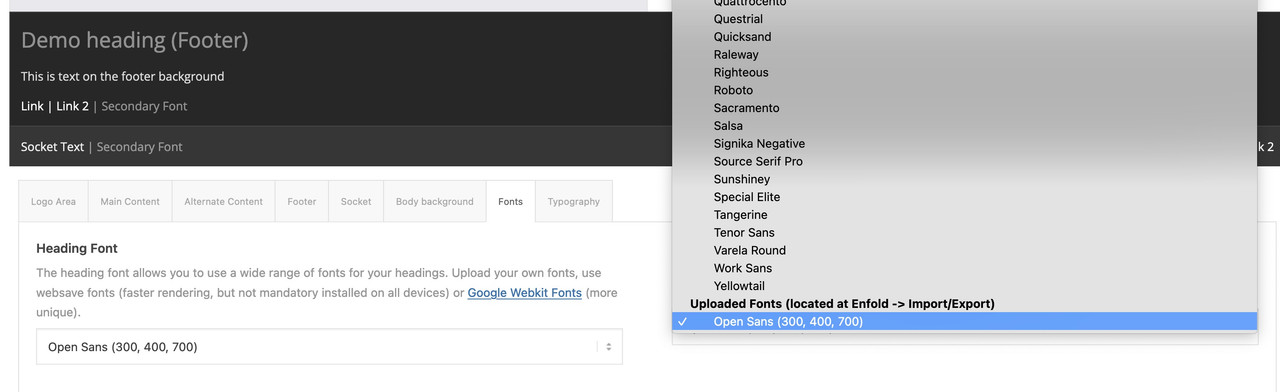
Any idea why this Nunito Sans Google Font — https://fonts.google.com/specimen/Nunito+Sans — is showing up squished? I’m trying to use it as the body font on https://centuryhousdev.wpengine.com/ and I think you can see it’s clearly looking shorter, vertically, than it does on the Google Fonts site, right (see https://capture.dropbox.com/GP5HWWgm0JNDiW4e)? I know it’s showing up as “static” in the css — I’m guessing you’re familiar with that issue (it seems enfold picks up that name from the name of the folder within the font zip file). Thanks and lmk if you have any questions or need access.
Hey nicolaskrasinski,
Try using FTP or your cPanel file manager to edit the \enfold\config-templatebuilder\avia-shortcodes\masonry_entries\masonry_entries.php about line 540 find:
'subtype' => AviaHtmlHelper::number_array( 1, 100, 1, array( 'All' => '-1' ) ) and change the “100” to what you wish and then save and check.
Best regards,
Mike
Hi,
Glad we were able to help, if you have any further questions please create a new thread and we will gladly try to help you. Thank you for using Enfold.
Best regards,
Mike
Hi,
For the post in your screenshot there are two widths, the first is the layout width which is set to 1310px on your site at Enfold Theme Options ▸ General Layout ▸ Dimensions ▸ Maximum Container width, so if this is what you mean please adjust this setting.

The second is the blog template which on your site is 800px:

which you can change to 100% with this css in your Enfold Theme Options ▸ General Styling ▸ Quick CSS field
#top.single .fullsize .template-blog .post .entry-content-wrapper,
#top.single .fullsize .template-blog .post .entry-content-wrapper>* {
    max-width: 100%;
}
This is the expected results:

Please ensure to copy the code from the forum and not an email notification so the symbols are not converted.
After applying the css, please clear your browser cache and check.
Best regards,
Mike
Hey artVantage,
Thank you for your patience, but unfortunately we don’t have a carousel option with the exact same look as the classic gallery. Try reviewing the WordPress plugins for a carousel plugin.
For your second question, please review the column margin, current the columns with the images have a negative top margin (-220px), and the columns with the text also has a negative top of -180px, so use the mobile icon to remove this for mobile.

Since the animation doesn’t have a mobile setting and you are currently hiding these item on mobile, you could clone the columns for mobile and remove the animation and negative position to achieve this.
If you have trouble with this, try cloning your page as a test page and include a admin login in the Private Content area so we can help and then you can review the settings for your live page.
Best regards,
Mike
Hi,
Thank you for your patience, the Parallax demo only has one page, the “frontpage”. If it is not showing correctly try going to Enfold Theme Options ▸ Theme Options ▸ Frontpage Settings and ensure it is “frontpage”, then in the “blog” setting under it ensure it says: “choose page” and not “frontpage”
Best regards,
Mike
Hi,
Glad Günter could help, we will close as you asked. Thank you for using Enfold.
Best regards,
Mike
Hey sarawh,
Thanks for your patience, the global setting at Enfold Theme Options ▸ Performance ▸ Lazy Loading is to globaly manage lazy loading of WP images but not for each ALB element separately.

the lazy load option in the image element (since v5.5) is disabled by default as it may not be compatible with animations in the element, please note the explanation in the image element:

If you are not using the animations like fade in or slide in on your images then it will be safe to enable this for each element. Hopefully this helps explains.
Best regards,
Mike
Hey Michael,
Thank you for your patience, but the site you linked to is not working, but I believe that I found the correct site in one of your other threads.
When I checked your three columns, all of them were set to “position 1”:

please note that this will only work when “Column Behaviour” set to individual:

One way around this limitation is to add custom IDs the elements:

and then this css, which I added to your WordPress ▸ Customize ▸ Additional CSS
@media only screen and (max-width: 767px) {
  #changeorder,#changeorder .entry-content-wrapper,#changeorder .flex_column_table {
  display: flex !important;
  flex-wrap: wrap !important;
  }
  #placeone {
      order: 1 !important;
  }
  #placetwo {
      order: 2 !important;
  }
  #placethree {
      order: 3 !important;
  }
}
and this works for your DE site, but your EN & FR pages don’t update correctly, I’m not sure if it is your caching or your WPML. To correct I added this css:
@media only screen and (max-width: 767px) {
  #top.home #av_section_1,#top.home #av_section_1 .entry-content-wrapper {
  display: flex !important;
  flex-wrap: wrap !important;
  }
  #top.home #av_section_1 .av_one_fourth.first {
      order: 1 !important;
  }
  #top.home #av_section_1 .av_one_fourth.last {
      order: 2 !important;
  }
  #top.home #av_section_1 .av_one_half {
      order: 3 !important;
  }
}
Now it is working for all three languages, please clear your browser cache and check.
Best regards,
Mike
I´m a little desperate and have not much fun anymore , creating 5th website with Enfold. This all never happened to me. :(
1) MEDIA ELEMENTS:
it started with the media elements reproducing themselves, so I had them 4 or 5 times in the library.
I cleared it. But now some of them are showing just a blue question mark instead. But not from the beginning on and not within the last two weeks. Now the started again with this vanishing and leaving a question mark. As it was already working I am running out of ideas …..
2) SITE CRUSHES before saving changes:
really annoying .. you do a lot of changes or even just a little color change, but before the change is saved the site crushes and I can start from scratch.
I asked my IT man who does hosting etc, he sees no problem.
As I never had these problems before, I guess there is something really wrong on this new website and it is very, very difficult for me to set it up.
Hope you can help!!
Hi,
Glad we were able to help, if you have any further questions please create a new thread and we will gladly try to help you. Thank you for using Enfold.
Best regards,
Mike
Hey Bernd,
Thank you for the links to your sites, and your patience. I have tested the cookie banner on my test site with woocommerce and was not able to reproduce this error, I see that you have a couple of jQuery errors on your site and perhaps this is related. Try disabling Enfold Theme Options ▸ Performance ▸ JS & CSS file merging and compression and enable Enfold Theme Options ▸ Performance ▸ Delete old CSS and JS files and then disable WP Rocket and your other plugins except woocommerce and then check again. If this solves then enable your other plugins one at a time until you see the error again, which will point to the conflict.
If this doesn’t help please include an admin login to your staging site in the Private Content area so we can be of more assistance.
Best regards,
Mike
i can give you pleskcredentials
if you need ftp let me know i wil ask for them
best regards, jelle
ps: is it a php thing, wrong version?
NB: Beveiligde verbinding kan niet tot stand worden gebracht
got some warning which says: cant make secure connection (https)
nb2: by the way , normally you can see Enfold in the left margin in wordpress, but its not there….
-
This reply was modified 2 years, 4 months ago by
 jeel147.
-
This reply was modified 2 years, 4 months ago by jeel147.
Hi,
Thanks for the update, we’ll close this thread for now then. Please open a new thread if you should have any further questions or problems.
Best regards,
Rikard
Hi Eckhard,
Thanks for reaching out to us. We don’t actually sell Enfold, that is done via the Themeforest/Envato platform, and they handle all payments. Could you try reaching out directly to them to see if you can be invoiced instead of paying online? https://help.market.envato.com/hc/en-us
Best regards,
Rikard
Hi Nikko,
Thanks for your answer. My problem is to capture an event when the form is sent, the page containing the form is not important. I’ve seen on Google that usually when you send a form, the browser fires an event: “form_submit” so you can track it with Tag Manager.
Do you know how to do it with Enfold forms?
Thanks,
Regards,
Karim
Hi Ismael,
I followed your new instructions:
1. I created a back up / restore point
2. I Disabled CSS file merging and compression (Enfold > Performance > File Compression settings)
3. I added the code provided to functions.php file (At the bottom)
4. I Deactivated to speed optimiser plug-in provided by SiteGround
5. I manually deleted the whole dynamic_avia folder & contents (bc time-consuming selecting 1000’s of individual files)
6. I changed one of the theme options (in this case blog post layout – from elegant to modern)
7. I saved changes
8. It looks like it worked! I can see the dynamic_avia folder has been recreated & contains 3 new files
Thank you for your support and for what I think is possibly the best theme on the available
I thought it appropriate to post this here as others may find it useful
Sincerely
Philip
Hi,
Thanks for the update, we’ll close this thread for now then. Please open a new thread if you should have any further questions or problems.
Best regards,
Rikard
Hey Thomas,
Please try the following in Quick CSS under Enfold->General Styling:
.search-results .extra-mini-title {
  display: none;
}
Best regards,
Rikard
Bonjour,
j’ai installé le plugin YOAST SEO pour mon site, les titres, les méta description, slug tout est complétés mais je constate que lorsque la balise apparait sur la page google, les méta descriptions…, rien ne correspond ?
Avez vous une solution, il doit y avoir un conflit avec le SEO enfold ?
Cordialement
Sébastien
 Eckhard Heinicke
Guest
Sehr geehrte Damen und Herren,
wir würden Enfold gern für unsere Schulhomepage einsetzen (und verfügen auch über die nötigen Kompetenzen und Ressourcen) und wären ein einem sehr kurzfristigen Erwerb interessiert. Allerdings sieht unser Schulträger – die Landeshauptstadt Dresden – keine Online-Zahlungen vor. Vielmehr benötigen wir eine Rechnung mit EU-USt.-ID. Auch in der Hoffnung, dass wir nicht die ersten aus dem ÖD sind mit einem so gelagerten Anliegen, erlaube ich mir anzufragen, ob es für dieses Verfahren eine Möglichkeit gibt.
Mit freundlichen Grüßen
Eckhard Heinicke
hello, i got this mail see below
seems to be some enfold problem
lost my site
how to get it back?
best regards, jelle
Hallo!
Sinds WordPress 5.2 is er een ingebouwde functie die herkent wanneer een plugin of thema een fatale fout veroorzaakt op je site en die je op de hoogte stelt met deze automatische e-mail.
In dit geval heeft WordPress een probleem gevonden in je thema,Enfold.
Bezoek eerst je site (https://bloembollenvoorbijen.nl/) en kijk of er zichtbare problemen zijn. Bezoek daarna de pagina waar de fout was gevonden (https://bloembollenvoorbijen.nl/wp-login.php) en kijk of er zichtbare problemen zijn.
Neem contact op met je host voor hulp bij het verder onderzoeken van dit probleem.
In het geval dat je site kapot lijkt te zijn, en je het dashboard niet op de normale manier kunt benaderen, heeft WordPress nu een speciale “herstelmodus”. Deze laat je op een veilige manier op je dashboard inloggen om het probleem verder te onderzoeken.
https://bloembollenvoorbijen.nl/wp-login.php?action=enter_recovery_mode&rm_token=wLPSyMtoMQsA0FA3esL8e0&rm_key=mK6MgN51VCBJSY8ozzJXza
Om je site veilig te houden verloopt deze link over 1 dag. Maak je daar maar niet druk om, er wordt een nieuwe link naar je gestuurd wanneer het probleem zich weer voordoet nadat de link is verlopen.
Als je hulp nodig hebt met dit probleem, kan je gevraagd worden om de volgende informatie:
WordPress versie 6.0.6
Actief thema: Enfold Child (versie 1.0)
Huidige plugin: (versie )
PHP versie 8.2.12
Hi SHR Design,
I see, Enfold should be working just fine on 256M memory, however, I would still point to these issues here: https://kriesi.at/support/topic/e_error-in-enfold-functions-file-as-well-as-in-other-files/#post-1425305
Also, these errors are all CRITICAL Uncaught Error: Failed opening required pointing that files are missing which you can easily verify if it’s there or not by following the directory and checking if the file is there.
Best regards,
Nikko
Hi keifygeorge,
Please try to add this in Enfold > General Styling > Quick CSS:
#top #header_main .dropdown_widget_cart .woocommerce-mini-cart__buttons {
    background-color: black;
    border-top: 1px solid white;
}
Hope it helps.
Best regards,
Nikko
Hi muratsuedan,
I’m glad that it’s all good now.
Thanks for using Enfold and have a great weekend!
Best regards,
Nikko



