Hi,
Glad to hear that you have this sorted out, if you have any further questions please create a new thread and we will gladly try to help you. Thank you for using Enfold.
Best regards,
Mike
Hi,
Glad to hear that you have this sorted out, if you have any further questions please create a new thread and we will gladly try to help you. Thank you for using Enfold.
Best regards,
Mike
Hi dondela,
I’m glad that we could help you :)
Thanks for using Enfold and have a great weekend!
Best regards,
Nikko
Hi NicomIT,
Thanks for using Enfold and have a great weekend!
Best regards,
Nikko
Hey ausgesonnen,
Try this CSS in your Enfold Theme Options ▸ General Styling ▸ Quick CSS field:
#top #wrap_all .av-video-slide .avia-slide-wrap, #top #wrap_all .av-video-slide iframe {
	background: #fff;
}
After applying the css, please clear your browser cache and check.
Best regards,
Mike
We have about 20 sites where this will be an issue.
The shortcodes for plugins are not working. In the installation I will point you to their is a plugin called US Maps and the shortcode is not working. This is the page to look at http://jasonb470.sg-host.com/florida/. There are developers working on this installation this weekend. I’ve posted this question at least 3 times and haven’t gotten anyone from the company to actually look at the problem. Any assistance would be appreciated as we are under a deadline and the Enfold install is not supposed to have this turned off.
If you could provide me with the code on where to turn on short codes, I can access the theme files and fix it on our installations.
This is definitely something that needs to be patched. Login details are pasted in the private content box.
Hi,
It looks like you miss the step in the documentation where you choose the CET element:
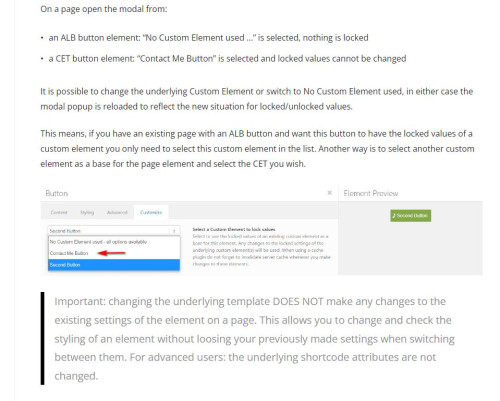
when you see that screen you need to click the “customize” tab and then choose your element in the dropdown like in the screenshot.
If you have further trouble please create a test page and include a admin logon.
Best regards,
Mike
Hi,
Could you try updating the theme to the latest version (5.6.9) to see if that helps please? https://kriesi.at/documentation/enfold/how-to-install-enfold-theme/#theme-update.
Best regards,
Rikard
Hi,
Thanks for letting us know, we’ll close this thread for now then. Please open a new thread if you should have any further questions or problems.
Best regards,
Rikard
Hey ballindigital,
Please try the following in Quick CSS under Enfold->General Styling:
@media only screen and (max-width: 767px) {
.flex_column.av-lq5kontt-b93720ee146922b54d90445ebb9a5d41 {
    bottom: 0px;
}
}
Best regards,
Rikard
Hi Diana,
I’m glad that we could help you :)
Thanks for using Enfold and have a great weekend!
Best regards,
Nikko
Hi Stefan,
I’m glad that we could help you :)
Thanks for using Enfold and have a great weekend!
Best regards,
Nikko
Hi,
Thanks for the update. You can activate debug mode under Enfold->Layout Builder->Show advanced options.
Best regards,
Rikard
Hi,
Thanks for that. Could you try updating the theme to the latest version (5.6.9) to see if that helps please? https://kriesi.at/documentation/enfold/how-to-install-enfold-theme/#theme-update.
Best regards,
Rikard
Hi dondela,
Please try to add this CSS code in Enfold > General Styling > Quick CSS:
.responsive #top #header #header_main .inner-container .logo,
.responsive #top #header .logo a {
    height: 148px;
    overflow: visible;
}

.responsive #top #header .logo img {
    width: 300px;
    max-width: 300px;
    height: 222px;
    max-height: 222px;
}
Hope it helps.
Best regards,
Nikko
Hi nebuddlho,
I’m glad you fixed it :)
Thanks for using Enfold and have a great day!
Best regards,
Nikko
Hi Matt,
I’m glad that we could help you :)
Thanks for using Enfold and have a great day!
Best regards,
Nikko
Hi NicomIT,
Please add this CSS code in Enfold > General Styling > Quick CSS:
@media only screen and (max-width:767px) {
  #top .avia-gallery-thumb {
    display: grid;
    grid-template-columns: repeat(2, 1fr);
  }

  #top #wrap_all .avia-gallery .avia-gallery-thumb a {
    float: none;
    width: 100%;
  }
}
Hope it helps.
Best regards,
Nikko
Hello, I have added the code but nothing seems to be happening as far as I can see
This is how the code looks like in enfold-child/includes/loop-author.php

Hi,
Glad to hear that you have this sorted out, if you have any further questions please create a new thread and we will gladly try to help you. Thank you for using Enfold.
Best regards,
Mike
Hi,
Glad Rikard could help, if you have any further questions please create a new thread and we will gladly try to help you. Thank you for using Enfold.
Best regards,
Mike
Hey juancarloszeta,
Did you try out the settings under Enfold->General Styling->Typography?
Best regards,
Rikard
Hi,
Thanks for letting us know, we’ll close this thread for now then. Please open a new thread if you should have any further questions or problems.
Best regards,
Rikard
by the way – I have been using the Page as Footer option a lot lately. You have all the enfold elements at your disposal to create a style for this area.
May i see your “figma link” ?
Hey ausgesonnen,
Please try the following in Quick CSS under Enfold->General Styling:
.container_wrap {
    border-top-width: 0;
}
Best regards,
Rikard
Apologies for the overlong delay in replying but the problem seemed to go away but its back along with a host of other issues.
I have 3 licenses for Enfold and this is the first time I’ve ever regretted purchasing the theme.
Hotspots issue is here : https://abbeylodge.online/?page_id=3863
Page where I CANNOT edit text block is here: https://abbeylodge.online/?page_id=638
One of many pages where background image of a coloured section does not show: https://abbeylodge.online/?page_id=3898
And in general edited demo pages when saved keep Header tags such as <H3> but text is <p>!!
I’ve lost a lot of time playing with these issues.
Hi,
Using the Enfold upcoming events option, I want to hide the .av-upcoming-event-cost and .av-upcoming-event-venue. That works fine with display: none.
The only thing is that the hyphen remains visible (see screenshot).
I take it that it’s hard coded in some file but I can’t seem to find it. Any tips ?
Best regards,
Steven
-
This topic was modified 2 years, 3 months ago by
 steviger.
Hey Rikard,
enfold is now running on the latest version (5.6.9) , but most tab sections (see LINK 1) are still not displayed centered on mobile phone – they run out of the display…
Thank you & best regards :-)
Hello,
I posted this yesterday, though I’m not shure if my thread arrived, so I’m posting again.
Although I have found many good tips on responsive text in the support forum, I have not yet managed to make the text blocks responsive so that they adapt to the width of the screen in the mobile phone view.
I have tried it with:
body {
font-size: 16px;
}
@media screen and (min-width: 320px) {
body {
font-size: calc(16px + 6 * ((100vw – 320px) / 680));
}
}
@media screen and (min-width: 1000px) {
body {
font-size: 22px;
}
}
…which benefits the overall layout of the webpage, but the text blocks remain statically unchanged. I have the Enfold Rockband Team as a template for my homepage. It has blocks for the band masters whose text adapts perfectly to the width of the mobile phone. Unfortunately, I cannot embed text with links in it, so that the text adaptation would be solved.
Please kindly ask for support, as I have already spent several hours trying to solve the problem.
Many thanks in advance and best regards!
Juan Carlos



