Here’s another website I recently created using Enfold. My customer didn’t want fancy and slow animations etc. but clarity and speed/performance. So, what do you think? https://suretybondsolutions.net
Hi all,
the menu/logo on my website homepage shows up white and transparent but when you go to any other page on the website the menu and logo use alternate version and show up in a banner at the top of the page. How can I keep the same menu and logo on all other pages as it is on the homepage. If I remove my alternate logo in theme options then the Enfold logo shows up on all other (not homepage) pages.
I am using Enfold Health Demo theme.
My website is currently unpublished so not visible to public but if someone can help me out that would be great.
Hi mirr,
Please go to Enfold > General Styling > Quick CSS, then add this CSS code:
#top .avia-content-slider .slide-image {
    background-color: transparent;
}
Hope it helps.
Best regards,
Nikko
Hi,
Glad to hear that you have this sorted out, if you have any further questions please create a new thread and we will gladly try to help you. Thank you for using Enfold.
Best regards,
Mike
Hi,
Try checking out the plugin as it allows you to customize the options

Best regards,
Mike
I’m trying to update some old pages in Enfold. I’ve been using the software for years and this is something new that began a few weeks ago. None of the images are showing up in the editor. I’ve tried it multiple times over several days on three different browsers. I need to replace some images. But because they aren’t showing, I can’t delete the old ones. HELP!
Hi, we recently updated from an older version of Enfold by purchasing a new license on November 25, 2023. Since the release of v.5.6.9, it has not appeared in our Enfold panel, even when manually checking for the update, the message says: No Updates available. You are running the latest version! (5.6.8)
I use Enfold on 2 other sites and there was no issue updating from 5.6.8 to 5.6.9. Would you know why and how to set it so the updates appear automatically or via notice from Themeforest? Thank you.
Best regards
Hi,
Glad we were able to help, if you have any further questions please create a new thread and we will gladly try to help you. Thank you for using Enfold.
Best regards,
Mike
Hi,
Would you be doing this on the same server or a different server? As you recall I copied you page using the Avia Layout Builder Debugger so the page shortcode for the single page could be copied.
You could easily test using this method, try creating a new WordPress install on a test subdomain, install Enfold and then copy the one page by Enabling the Avia Layout Builder Debugger and check if the error occurs, if it does and it’s the same server, try the same steps on a different server and check again.
I restored my precious test page of your page if you want to review again.
Best regards,
Mike
Hi, yeah it’s very strange. If you say that you can’t reproduce the issue on another site, then I’m also thinking about exporting site data (creating a backup copy) using one of the export plugins, then deleting everything, installing new WP on the server, then new Enfold and new Child, and then importing site data again, but firstly it will take some time so I’m not too keen on doing that, and secondly, not sure if the issue would be exported in the backup copy as well? Because if so then no point doing that, obviously, because it will come back with the imported backup copy file :|
Or could it be related to the fact that I imported your demo after installing Enfold Child, which (maybe) includes some old code that causes that? I’ve done it mainly for that demo’s theme colours which I liked, so I may try next time without loading that demo, again – if it’s something that could cause that issue, which seems unlikely but just trying to exclude every possibility before building everything again from the scratch (if I find time to do so, for now I’ll just leave it as it is and will work around it).
Merry Christmas and Happy New Year! :)
Hey mirr,
Try this CSS in your Enfold Theme Options ▸ General Styling ▸ Quick CSS field:
#top .av_header_transparency.av_alternate_logo_active .logo {
    height: 90px;
    width: 190px;
    padding-top: 0;
}
After applying the css, please clear your browser cache and check.
Best regards,
Mike
Hey integritive,
Thanks for your question, the Advanced Layout Builder (ALB) text element uses the WordPress TinyMCE editor, so you could use a plugin like Advanced Editor Tools aka: TinyMCE Advanced to add items to the toolbar

or perhaps other plugins will also add items, but we don’t have a specific way to do this only of the ALB.
If you don’t want to use a plugin, perhaps you cound use the TinyMCE documentation to create your own items.
Best regards,
Mike
Hi,
Glad Ismael could help, if you have any further questions please create a new thread and we will gladly try to help you. Thank you for using Enfold.
Best regards,
Mike
we are running ENFOLD theme on https://ocreuropeanchampionships.org/ (you can check it directly as it is live in the main page
we are facing issues on the avia layout as the theme reacts to some setting deleting the menu and the main slider…
and disrupting other media and content elements
we are running version of enfold in the latest version! (5.6.9)
our PHP version is 8.1.26
we have other plugins activated but not sure if they are the source of the problem
mauro
can you help?
Hi,
Sorry for the late reply. I tried importing the settings from the parent theme under Enfold->Import/Export, and that seems to have worked. Could you have a look on your end and verify please? If you want to import your previous child theme settings, then please import the settings file which I uploaded in the media gallery.
Best regards,
Rikard
Hey christian.wien,
Thank you for the inquiry.
You may need to download the Trip Advisor icon from fontello.com and upload it to the Iconfont Generator. We can then adjust the avf_default_icons filter afterwards. Please check the documentation below for more info.
// https://kriesi.at/documentation/enfold/icon/#adding-your-own-fontello-or-flaticon-icons-
Best regards,
Ismael
Hey Eric,
Thank you for the inquiry.
You may need to toggle or temporarily disable the Enfold > Performance > File Compression settings, and disable the cache plugin in order to ensure that the changes take effect. By disabling the file compression settings, you will be able to make the necessary adjustments and updates without any conflicts. Once you have made the required modifications, you can re-enable the file compression settings to optimize the performance of your website.
Best regards,
Ismael
Hi,
Thank you for the update.
Adding this css code should hide the burger menu icon inside the main header container.
@media only screen and (max-width: 1024px) {
  /* Add your Mobile Styles here */
  .html_header_top .av_bottom_nav_header .av-logo-container .main_menu li.av-burger-menu-main.menu-item-avia-special {
    display: none;
  }
}
Please make sure to toggle or temporarily disable the Enfold > Performance > File Compression settings afterward.
Best regards,
Ismael
Dear support,
I’m using Enfold+WPML and I’m trying to translate the footer widgets and a header widget.
The first and second-column widgets are okay, but the third should contain a footer menu, and the fourth a custom HTML. every time i switch to a different language, I lose the translations I just made manually.
Also in the section WPML > Strings translation, I can’t find the widget areas I need to translate. is there a work-around or other solutions compatible with Enfold, to have different widgets in different languages?
thanks
Hi Munford,
I’m glad that Ismael could help you :)
Thanks for using Enfold and have a great day!
Best regards,
Nikko
Hi Petra,
I can’t seem to see the issue on my end, is it fixed?
If not, please try to add this CSS code in Enfold > General Styling > Quick CSS:
.html_av-overlay-side #top #wrap_all #header .av-burger-overlay-scroll #av-burger-menu-ul li:hover a {
    color: inherit;
}

.html_av-overlay-side #top #wrap_all #header .av-burger-overlay-scroll #av-burger-menu-ul li a:hover {
    color: #8ca9d3;
}
Best regards,
Nikko
Hi solf,
I’m glad that @Guenni007 could help you :)
Thanks for using Enfold and have a great day!
@Guenni007 thanks for helping out :)
Best regards,
Nikko
Hi Justin,
I’m glad that Ismael could help you :)
Thanks for using Enfold and have a great day!
Best regards,
Nikko
Hi Doug,
Please try to add this CSS code in Enfold > General Styling > Quick CSS:
.search-results .blog-author,
#top.search-results .post-meta-infos > .text-sep:nth-last-child(2) {
    display: none;
}
Best regards,
Nikko
Hi JannyPolak,
We’ll wait for the link then.
You can also try to go to Enfold > Performance > CSS File Merging And Compression set it to Disable – no CSS file merging and compression and see if it helps.
Best regards,
Nikko
Hi Monika,
I’m glad that we could help you :)
Thanks for using Enfold and have a great day!
Best regards,
Nikko
hi,
what should I do to maintain the demo of your home page changes for me when I insert the photos, I’m still working locally. tks


-
This topic was modified 2 years, 3 months ago by
 wosky.
Hi,
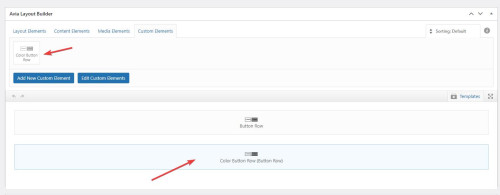
Please note in our documentation Custom Elements Advanced Options about the opton: Custom Elements For Subitems which by default is set to All sub-items use the same custom element template for button rows you will want to change this to Individually select subitem custom element templates
Please scroll down to this part of the documentation for Button Rows and review.
I have done this for you on your test page:

Best regards,
Mike
Hi,
Thanks for letting us know, we’ll close this thread for now then. Please open a new thread if you should have any further questions or problems.
Best regards,
Rikard



