the package you can download from google on fonts that have “variable fonts” contains a subfolder with those static fonts.
Enfold could handle variable fonts – but you had to know how to work with those variable fonts.
if you only like to upload those static fonts – pull this folder form that zip file to your desktop – rename it to “Montserrat” and (important) zip it for PC ( not including the invisible OSX files generates with their compression options.). Betterzip f.e. has a drop-window where you can choose for what system you zip it.
Why this is important. if you upload that zipped file you will have an additional font in there:
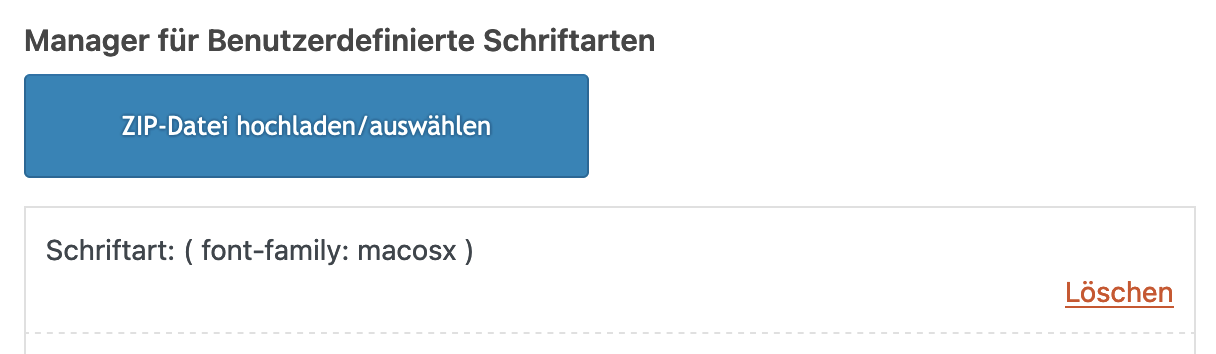
__________________
Next : Google does only offer ttf files for you. but it might be better to upload woff2 files ( brotli compression ) as font-files.
( less loading times on woff2 ). So it might be good to have both woff2 ( for modern Browsers ) and ttf (for older browser support)
see: https://kriesi.at/support/topic/host-web-font-yourself-some-info/#post-1364066
use transfonter to generate woff2 and ttf files – put them in one folder – rename the folder to your needs ( Montserrat ) – and upload that.
As mentioned there – think if you realy need an italic font to upload – because browser rendering might do a good job to of normal font.
Yes – or you use the enfold options dialog : General Styling – Socket :
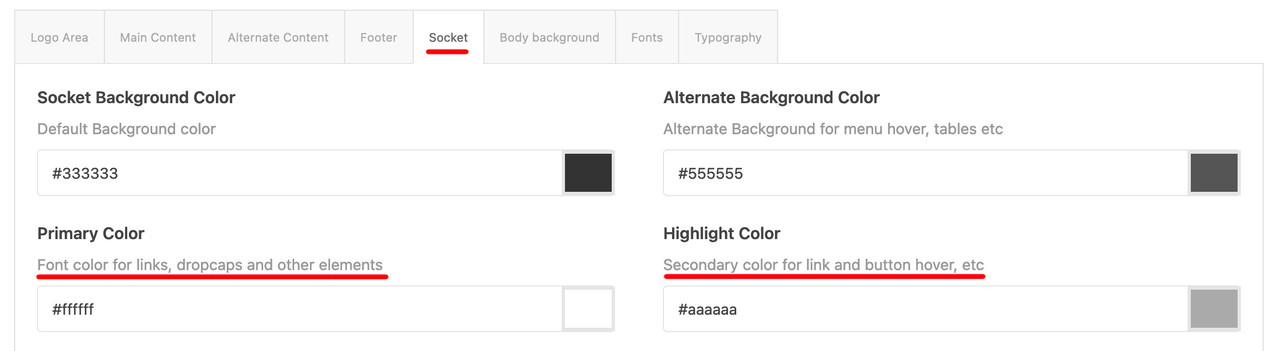
Reply to #1241984: Yes,
option_name = avia_envato_keys
option_value = a:1:{s:6:"Enfold";a:1:{s:4:"item";a:2:{s:24:"wordpress_theme_metadata";a:3:{s:10:"theme_name";s:6:"Enfold";s:10:"stylesheet";s:6:"enfold";s:7:"version";s:5:"5.6.9";}s:2:"id";s:7:"4519990";}}}
Just update string s:7:”version”;s:5:”5.6.9″; where 5.6.9 is theme version and before s:5 means quantity of chars, so “5.6.9” contains 5 chars. if your version is “4.7.6.4” then before should be “s:7” as “4.7.6.4” contains 7 chars.
Ok great. Can you give me the shortcode for a section on this page: https://kriesi.at/themes/enfold-2017/
Its the section with the title: “A growing library of more than 2 dozen demos” and has the website images on the left.
thanks
I have purchased several licenses for Enfold to use on different websites. Is there a way to know which licenses are currently being used? And if I previously used a license on a website that is no longer active – can that license be used on a different site now?
-
This topic was modified 2 years, 2 months ago by
 careyassoc.
 Margriet
Guest
Hi,
Regarding ticket #1432160: I can only respond when I log in, but I can not log in. I don’t know how to log in, I don’t know how to register, I don’t know if this theme was registered and if so, I don’t know by who or with what account. The only thing I know that it is on our website http://www.in-menz.nl and that it is this version: Your current Enfold Theme Version Number is 4.7.2 and that we need to update it, so please can you explain how I can do that?
This is what it says under the token:
De laatste keer dat we het token controleerden, konden we geen verbinding maken met Envato:
Aankopen waren niet toegankelijk
Gebruikersnaam kan niet worden benaderd (alleen nodig voor uw informatie)
E-mail was niet toegankelijk (alleen nodig voor uw informatie)
De volgende fouten traden op:
Aankopen: Foutcode 403 geretourneerd door Envato: Forbidden:
– response_code: 403
– reason: scope-missing
username Foutcode 403 geretourneerd door Envato: Forbidden:
– code: not_authenticated
email Foutcode 403 geretourneerd door Envato: Forbidden:
– code: not_authenticated
Aankopen: Er is een probleem opgetreden bij het openen van uw aankopen. Kan niet controleren op updates.
Hi,
Thanks for letting us know, we’ll close this thread for now then. Please open a new thread if you should have any further questions or problems.
Best regards,
Rikard
Hey Lene,
Please try the following in Quick CSS under Enfold->General Styling:
#socket a {
  color: #fff;
}
Best regards,
Rikard
Hey josikrop1,
Please try the following in Quick CSS under Enfold->General Styling:
.av-logo-container {
    max-width: 100%;
    padding-left: 0;
}
Best regards,
Rikard
Hey Margriet,
Did you register your theme license? If not, then please try to follow this: https://kriesi.at/documentation/enfold/theme-registration/
Best regards,
Rikard
Hey delmonte,
Please try the following in Quick CSS under Enfold->General Styling:
.slideshow_align_caption {
    vertical-align: bottom;
}
Best regards,
Rikard
Hi,
Thanks for the update, we’ll close this thread for now then. Please open a new thread if you should have any further questions or problems.
Best regards,
Rikard
Hi,
Thanks for the update. We’ll go ahead and close this thread for now then, please open a new thread if you should have any further questions or problems.
Best regards,
Rikard
OK, it seems to be that the ALB do not work with the additional tabs. So I decided to do without ALB. But now no pictures appear on the product site? Whats wrong with woocommerce and Enfold? In a test version it works… Any ideas?
MargrietGuest
Hi,
Someone made the website http://www.in-menz.nl with your theme some years ago. Now we make changes ourselves, but it has your Envato theme and it keeps sending messages every day, so we would like to fix that and update your theme.
We daily receive this:
WordPress Enfold theme <= 5.6.4 – Reflected Cross Site Scripting (XSS) vulnerability
Beheer kwetsbaarheid | Bekijk in Patchstack
WordPress Enfold premium theme <= 4.8.3 – Reflected Cross-Site Scripting (XSS) vulnerability
Beheer kwetsbaarheid | Bekijk in Patchstack
The name of the owner of In-Menz is Marijke Keur.
The account e-mail address is (Email address hidden if logged out) (I think)
Billing address is Jelmerstraat 4, 8701 XH Bolsward, The Netherlands
Last (and only?) purchase is the Envato Enfold theme
I hope you can help us out.
Rgds,
Margriet
In-Menz
Hi Ismael,
Thanks!! Well I was impressed with the hole package from RankMath including the AI features…. So that’s a game changer! :)
I did “push” the support team on RankMath to start talking to your lads – I know you are always up for more and more features and compatibility
And with all the Enfold sites out there… It’s an easy call … – What is the status for the AI part? Not working at all – “A Must Copy Yourself” or do you have other issues that could effect the transfer? – I am migrating from Yoast SEO PRO!! For the same reason!! AI is hot! :)
I will start a test site and go crazy with this tool… WE ONLY BUILD WITH ENFOLD!!!
But can you please look into the Classic Editor part – What do I miss – What are the limits – Can it be more compatible (I hate Gutenberg)
any tips, tools and ideas on that?
have a fantastic weekend
Netz
Hi,
Glad we were able to help, if you have any further questions please create a new thread and we will gladly try to help you. Thank you for using Enfold.
Best regards,
Mike
Hey there,
I hope you can help me to fix this problem. I already tried everything, but it does not work.
1. I uploaded a Google Font Zip with Monteserrat at Enfold import/Export
2. Enfold changes the font Name (Schriftart: static ( font-family: static )) (dont know why, but i already made this experience a few times with other fonts)
3. When I go to general styling I can choose this font (static)
4. at google Chrome, The Monteserrat is shown like Io want
5. At Safari: it does not take the montesserat font. but it also does not change to any other font. It always stays with default font.
I have no Idea why.
Do you have an Idea?
Hi,
Please try the following in Quick CSS under Enfold->General Styling:
@media only screen and (max-width: 767px) {
.page-id-3230 .avia-builder-el-0.av-minimum-height-100:not(.av-slideshow-section) .container {
    height: 767px !important;
}
}
Best regards,
Rikard
Hi,
Great, I’m glad that you got it working. If this should happen again, then please try turning off file compression and activate the option to delete old CSS and JS files under Enfold->Performance, then clear the cache from your plugin. After that you can activate file compression and turn off the option to delete old files again.
Best regards,
Rikard
Hi,
Thank you for the update, and sorry to hear about your illness. Hope you’re feeling better now.
We are not yet sure what is causing the errors, but it might be due to the content added in the page. Did you add any custom scripts or html tags in the “Reisebilder & Berichte” page? Please set the builder to debug mode so that we can see the builder content or shortcodes.
// https://kriesi.at/documentation/enfold/intro-to-layout-builder/#debug-mode
Best regards,
Ismael
Hi,
Thank you for the update.
You can apply a custom css class name or ID attribute to the Masonry element and adjust the css rule accordingly. Please check the link below.
// https://kriesi.at/documentation/enfold/add-custom-css/#enable-custom-css-class-name-support
Best regards,
Ismael
Hi,
Thank you for the update.
Could you provide links to the demo pages you’d like to copy? We should be able to provide you with the builder shortcodes, which can be manually applied to your pages. You have to set the builder to debug mode first.
// https://kriesi.at/documentation/enfold/intro-to-layout-builder/#debug-mode
Best regards,
Ismael
Hey gatehealing,
Thank you for the inquiry.
Have you tried creating a Custom Element Template for this instead of adding another element? Please check the link below for more info. In the upcoming version of the theme, there will also be Custom Layout and Dynamic Content features, which can be used to create custom layouts and content pulled directly from the database or custom fields.
// https://kriesi.at/documentation/enfold/custom-element-templates/
Best regards,
Ismael
Hi cambium.digital,
I’m glad that you were able to find a solution :)
Thanks for using Enfold and have a great day!
Best regards,
Nikko
Hi Bernd,
Have you tried changing Menu And Logo Position to Logo Left, Menu below? in Enfold > Header > Header Layout.
That setup should not hide the menu items when you scroll down the page.
Best regards,
Nikko
Hi Flyingeye78,
I’m glad that Rikard could help you :)
Thanks for using Enfold and have a great day!
Best regards,
Nikko
Hi profumopuntoit,
I’m glad that you were able to resolve the problem.
Thanks for using Enfold and have a great day!
Best regards,
Nikko
Hi goldengate415,
There’s no hook/filter to modify the default separator in Post Metadata, so the only option is to override the Post Metadata element via child theme, then do the following:
1. Go to wp-content\themes\enfold\config-templatebuilder\avia-shortcodes folder, then copy the post_metadata folder.
2. Go to the child theme and create a new folder shortcodes then paste the post_metadata folder, and edit post_metadata.php
3. Find this code (line 630 in the latest version)
$default = array(
	'post_selected'			=> '',
	'seperator'				=> '/',
	'before_meta_content'	=> '',
	'after_meta_content'	=> '',
	'margin'				=> '',
	'padding'				=> '',
	'align'					=> 'left',
	'custom_title'			=> '',
	'size'					=> '',
);
Just change the separator value.
Hope this helps.
Best regards,
Nikko
Hi Khaled,
Yes, just create a new post if you encounter any issues or need any assistance.
Thanks for using Enfold and have a great day :)
Best regards,
Nikko



