Hi,
Thank you for the update.
You can adjust the menu color in the Enfold > Transparency Logo Options section. Look for the Transparency Menu Color and Transparency Menu Color On Hover fields.
Best regards,
Ismael
Hi.
I’m trying to format the main title of the web page (Enfold>Header> Header Title and Breadcrumbs.
I’ve tried adding some lines in quick CSS however they seem to have no impact on the live site.
FOR EXAMPLE
.title_container .main-title {
text-transform: lowercase;
front-size 300px;
}
This does not alter anything on the live site however if I use Google Chrome element inspect and add/change the values, it works. Could you advise what code I should use and also how I can troubleshoot this myself as in my mind this should have worked.
The reason I am editing this is because I have a long page title which is causing the H1 to spill into the breadcrumbs.
The website is currently on localhost so I cannot share a link unfortunately.
-
This topic was modified 2 years, 1 month ago by
 TBant.
-
This topic was modified 2 years, 1 month ago by TBant.
Hi,
I have not updated the Enfold theme in a while and updating to 5.6.10 broke a custom HTML widget that I was using in the footer region and is not displaying anything now except a text msg that reads “Here are some interesting links for you! Enjoy your stay :)”
If I try and add any new widgets to the footer, none of them will be saved and updated on the website.
No Updates available. You are running the latest version! (5.6.10)
Your PHP version: 7.4.33.4
Has anyone else had this issue and is there a fix?
For now, I have had to revert back to a previous back up before I did the theme update.
Thanks
-
This topic was modified 2 years, 1 month ago by
 xuamox.
Hey Technohead,
Please try the following in Quick CSS under Enfold->General Styling:
.avia_textblock span a {
  word-wrap: break-word;
}
Best regards,
Rikard
Hey Anouk,
Thanks for the update, we’ll go ahead and close this thread for now then. Please open a new thread if you should have any further questions or problems.
Best regards,
Rikard
Hi,
Thanks for letting us know, we’ll close this thread for now then. Please open a new thread if you should have any further questions or problems.
Best regards,
Rikard
Hi,
Thanks for the update, we’ll close this thread for now then. Please open a new thread if you should have any further questions or problems.
Best regards,
Rikard
Hello,
I am attempting to update the Enfold Child theme to work with PHP 8.2 from PHP 7.4. I installed the latest version of the Enfold theme and the parent theme will update. However, I get a critical error on the child theme. I tried using the latest version of the files in the download available for the Child theme, and still get a critical error.
Please advise.
Thanks!
-
This topic was modified 2 years, 1 month ago by
 Empiread.
# problem is solved!!!!!!!!!!
Hi,
Since yesterday I can not change some elements. For instance connecting with a link to a page (the option does not show up and the loading circle keeps circeling). Or the settings in the 3/5 block, like layout settings. It’s the same here, the loading circle keeps loading which doesn’t make it possible to change the settings.
I run the latest version of Enfold, so I don’t know why this is happening. I can not finish the page now. Can you please check what the issue is?
Thank you in advance,
Best wishes, Anouk
-
This topic was modified 2 years, 1 month ago by
 Anouk.
Hi Mike, thanks for help
If you don’t want the featured image to show you can use this css to hide it:
my problem is that the user who submits a post on the Enfold blog via Gravity Forms & Advanced Post Creation Add-On, should be able to choose whether the post should have the featured image or not :(
Please also watch the video (see link on Private content), where if I try to add the costum field directly from the WordPress editor, I receive an error, so maybe I’m doing something wrong?
Best regards,
Oriano
Hi,
Thanks for the clarification. If Enfold is still active and working as it should, then please try to remove the theme which is called 75214096. If you should need further help, then please post admin WordPress and FTP login details in private.
Best regards,
Rikard
worked perfectly, i went with -20px for good measure.
Did not need to do the following:
You may need to toggle or temporarily disable the Enfold > Performance > File Compression settings to make sure that the changes take effect.
Thanks!
Hey designmek,
Thank you for the inquiry.
Please add this css code to adjust the space between the radio buttons and the input label.
@media only screen and (max-width: 767px) {
  /* Add your Mobile Styles here */
  .wp-block-woocommerce-cart-order-summary-shipping-block .wc-block-components-radio-control .wc-block-components-radio-control__input {
    margin-left: -10px;
  }
}
You may need to toggle or temporarily disable the Enfold > Performance > File Compression settings to make sure that the changes take effect.
Best regards,
Ismael
Hi,
Glad to hear that you have this sorted out, this would be the solution that I would recommend also, if you have any further questions please create a new thread and we will gladly try to help you. Thank you for using Enfold.
Best regards,
Mike
Hi,
I tried to recreate the post that you linked to, so I created a test page with two links:

the first link opens a Classic Editor post in a new tab, the second opens the same post in a lightbox, in order for the link to work this must be added to the end of the post url:
?iframe=true&modal
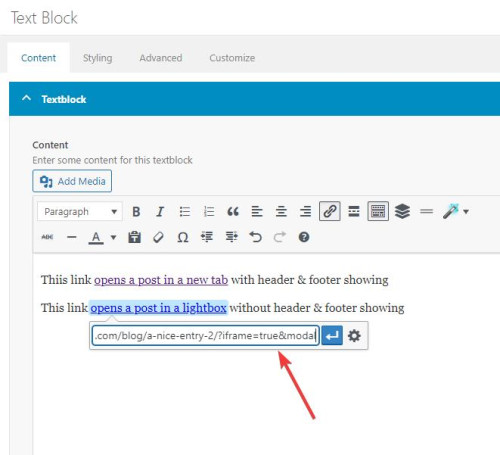
Then I added two snippets in my WP Code plugin, the first is a PHP snippet
function add_modal_qs(){
	if(isset($_GET['modal'])) {
		global $avia_config;
		if(isset($avia_config)) {
			$avia_config['template'] = 'blank';
		}
	}
}
add_action('init', 'add_modal_qs');
the second is a CSS snippet
#top.blank .title_container,#top.blank #main .sidebar{display:none;}
#top.blank .container .av-content-small.units {width: 100%;}
#top.blank .container .content {border: none;}
#top.blank #main .sidebar {border: none;}
The PHP snippet opens the post in a lightbox with no header or footer, the CSS snippet hides the titlebar and the sidebar and makes the post content full width.
So the first link, with the normal url, opens the post in a new tab with everything showing:
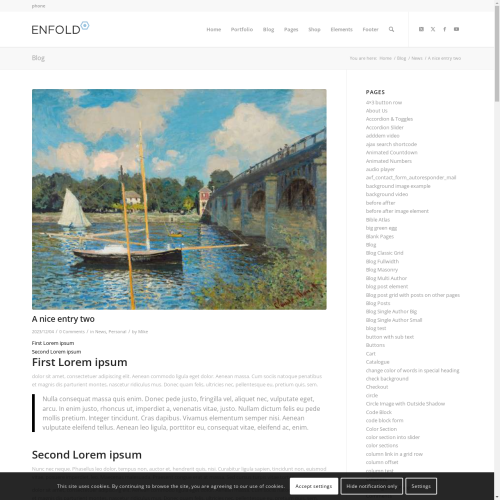
the second link with ?iframe=true&modal added to the url open a lightbox with only the content showing:

Best regards,
Mike
Hi,
Don’t be embarrassed, it can happen to the best of us :) Glad we were able to help, if you have any further questions please create a new thread and we will gladly try to help you. Thank you for using Enfold.
Best regards,
Mike
Hi,
Thank you for your patience and your screenshots, try this CSS in your Enfold Theme Options ▸ General Styling ▸ Quick CSS field:
#main .avia-timeline-vertical.av-milestone-placement-left .av-milestone-content-wrap {
    width: 44%;
}
Please ensure to copy the code from the forum and not an email notification so the symbols are not converted.
After applying the css, please clear your browser cache and check.
Best regards,
Mike
Hey northorie,
Try starting with the theme options to have the cookie bar at the bottom of the page, and then add this CSS in your Enfold Theme Options ▸ General Styling ▸ Quick CSS field:
#top .avia-cookie-consent.avia-cookiemessage-bottom {
	bottom: unset;
	left: unset;
	margin: 0;
	position: absolute;
	top: 50%;
	left: 50%;
	transform: translate(-50%, -50%);
	background-color: rgba(0,0,0,0.3);
}
#top .avia-cookie-consent .avia-cookie-consent-button {
	display: block;
    width: 60%;
    margin: 10px auto;
}
#top .avia-cookie-consent p {
	 display: block;
	 padding-bottom: 20px;
}
#top .avia-cookie-consent-button {
	 border-radius: 50px;
}
@media only screen and (max-width: 767px) {
	#top .avia-cookie-consent.avia-cookiemessage-bottom {
	width: 80%;
	}
}
@media only screen and (min-width: 768px) {
	#top .avia-cookie-consent.avia-cookiemessage-bottom {
	width: 25%;
	}
}
the desktop results:

tablet:

mobile:

Please ensure to copy the code from the forum and not an email notification so the symbols are not converted.
After applying the css, please clear your browser cache and check.
Best regards,
Mike
Hey jeel147,
Thank you for your patience, to remove the pencil icon try this CSS in your Enfold Theme Options ▸ General Styling ▸ Quick CSS field:
.fallback-post-type-icon {
	display: none;
}
The space between each item is created by the padding, this css will reduce it in half, but feel free to adjust to suit.
.bloglist-compact.post-entry {
    padding: 7px 0;
}
Please ensure to copy the code from the forum and not an email notification so the symbols are not converted.
After applying the css, please clear your browser cache and check.
Best regards,
Mike
Hi,
I logged into your site and review your css and found the error, your comment error disabled a large section of css:

in the screenshot all of the green css is disabled my the misplaced comment. I corrected it for you, please clear your browser cache and check.
Best regards,
Mike
Hi,
Glad we were able to help, if you have any further questions please create a new thread and we will gladly try to help you. Thank you for using Enfold.
Best regards,
Mike
Hi,
Please remove the code you added, then activate debug mode under Enfold->Layout Builder->Show Advanced Options->Debug Mode instead.
Best regards,
Rikard
Thanks Rikard. This is Brad…the owner of the site.
I’ve accessed both the YouTube link above, and the link in Private Browsing windows.
The YouTube link works.
The URL to my site displays a black box in places of the YouTube video.
Grateful for any advice or help. I have a ton of YouTube videos loaded up in Enfold.
THANKS!
Thank you but is not working for me….I have done it and my page was not working nd I received this error:
Detalles del error
==================
Se ha producido un error del tipo E_COMPILE_ERROR en la línea 1026 del archivo /home/faceclinic/www/wp-content/themes/enfold/functions.php. Mensaje de error: Cannot redeclare builder_set_debug() (previously declared in /home/faceclinic/www/wp-content/themes/enfold/functions.php:53)
Hey rqn,
If you want to hide the prev / next post navigation and add a new blog post navigation to the bottom of the posts, above the share buttons, try adding this code to the end of your child theme functions.php file in Appearance ▸ Editor:
add_filter( 'the_content', 'prev_next_post_nav' );
function prev_next_post_nav( $content ) {
	if ( is_singular('post') ) {
	$content .= '<div style="clear:both;"></div>';
	$content .= '<div class="prev-next-nav-container">';
	$content .= '<div class="prev-nav">';
	$content .= get_previous_post_link();
	$content .= '</div>';
	$content .= '<div class="next-nav">';
	$content .= get_next_post_link();
	$content .= '</div>';
	$content .= '</div>';
	return $content;
	}
	else {
		return $content;
	  }
}
Then add this CSS in your Enfold Theme Options ▸ General Styling ▸ Quick CSS field:
.prev-next-nav-container {
	width: 100%;
	height: 70px;
    padding-top: 20px;
    padding-bottom: 10px;
}
.prev-next-nav-container .prev-nav {
	display: inline-block;
	float: left;
    border-style: solid;
    border-width: 2px;
    border-radius: 0px;
    text-align: center;
    padding: 5px;
    text-decoration: none;
}
.prev-next-nav-container .next-nav {
	display: inline-block;
	float: right;
    border-style: solid;
    border-width: 2px;
    border-radius: 0px;
    text-align: center;
    padding: 5px;
    text-decoration: none;
}
.prev-next-nav-container .prev-nav:hover,
.prev-next-nav-container .next-nav:hover {
	background-color: rgba(0,0,0,.2);
	color: #fff;
}
.prev-next-nav-container .prev-nav:hover a,
.prev-next-nav-container .next-nav:hover a {
	color: #fff;
}
.prev-next-nav-container .prev-nav a,
.prev-next-nav-container .next-nav a {
	display: inline-block;
}
.prev-next-nav-container .prev-nav:empty,
.prev-next-nav-container .next-nav:empty,
.single-post .avia-post-nav.avia-post-prev,
.single-post .avia-post-nav.avia-post-next {
  display: none;
}
This will make post navigation buttons like this:

The buttons only have a light styling, you can adjust to suit.
On Advanced Layout Builder posts they will show at the bottom of the post page:

Please ensure to copy the code from the forum and not an email notification so the symbols are not converted.
Best regards,
Mike
Hi,
Glad we were able to help, if you have any further questions please create a new thread and we will gladly try to help you. Thank you for using Enfold.
Best regards,
Mike
Hi Enfold team,
Thanks always for your support and theme.
I’m using posts in two ways. 1) Display full post when accessing via post URL. 2) Displaying a lightbox of a post when adding the iframe=true to the end of the URL.
When doing #2, I’d like to only display the body of the post. When doing #1 I would like to display all (header, footer, sidebar and socket as it normally does.
I saw https://kriesi.at/support/topic/open-page-in-modal-lightbox-without-sidebars-header-and-footer/ but that addresses only one situation. How might I accomplish both?
Thanks for your help.
Hi,
Try this CSS in your Enfold Theme Options ▸ General Styling ▸ Quick CSS field:
#top .main_color .avia-data-table.avia_pricing_minimal.not-accepted th {
background-color: red; color: white; text-align: left;
}
Please ensure to copy the code from the forum and not an email notification so the symbols are not converted.
After applying the css, please clear your browser cache and check.
Best regards,
Mike



