Hi,
Try this CSS in your Enfold Theme Options ▸ General Styling ▸ Quick CSS field:
div.avia-popup .mfp-close:hover {
    border: none;
    transform: unset;
    -webkit-transform: unset;
}
div.avia-popup .mfp-close:hover,
div.avia-popup .mfp-close {
    border: none;
    cursor: pointer;
}
After applying the css, please clear your browser cache and check.
Best regards,
Mike
Here’s another website I recently created using Enfold. If you are looking for a reliable and easy-to-use website builder, then Enfold is the perfect choice for you!
https://rembedesign.com
I am thrilled to share with you the latest website I created using Enfold!
https://griegosfarms.com
Hey Antonio,
To remove the burger menu spin, Try this CSS in your Enfold Theme Options ▸ General Styling ▸ Quick CSS field:
#top .av-hamburger--spin.is-active .av-hamburger-inner {
    transform: unset;
}
#top .av-hamburger--spin.is-active .av-hamburger-inner::after {
    transform: unset;
}
#top .av-hamburger--spin.is-active .av-hamburger-inner::before {
    top: -10px;
    opacity: 1;
}
#top .av-hamburger--spin.is-active .av-hamburger-inner::after {
    bottom: -10px;
    opacity: 1;
}
Please ensure to copy the code from the forum and not an email notification so the symbols are not converted.
After applying the css, please clear your browser cache and check.
Best regards,
Mike
What happens if you declare that page (blue) as start page on : Enfold (Child) – Theme Options – Frontpage Settings ?
Hi,
Glad we were able to help, if you have any further questions please create a new thread and we will gladly try to help you. Thank you for using Enfold.
Best regards,
Mike
Hi,
Thanks for the link to your site, I have checked with Windows in Chrome, Firefox, & Edge, but I see no lines on the right side of your menu items:

perhaps try clearing your cache?
Best regards,
Mike
Hi,
Glad Ismael could help, if you have any further questions please create a new thread and we will gladly try to help you. Thank you for using Enfold.
Best regards,
Mike
Hi,
Great, I’m glad to hear that your problem is fixed. We’ll close this thread for now then, please open a new thread if you should have any further questions or problems.
Best regards,
Rikard
Hey snitt,
Please update the theme to the latest version first of all: https://kriesi.at/documentation/enfold/how-to-install-enfold-theme/#theme-update, then replace header.php in your child theme with the parent theme file.
Best regards,
Rikard
Hi,
You can use this link to open a new thread, or click the big blue button on the Enfold sub forum: https://imgur.com/a/AnoSPNb
Best regards,
Rikard
Hi,
ich benötige Hilfe beim Arbeiten mit Blogbeiträgen. Ich dupliziere Blog Beitrag wie diesen aus dem Enfold Law Theme. Wenn ich diesen veröffentliche wird er mir 1:1 mit Kategorie, Beitragsbild, Content, Schlagworte, Social-Links, weitere interessante Themen und der Formatierung (schmaler Contentbereich, links/rechts Platz) angezeigt.
Sobald ich eine kleine Änderung vornehme, z.B. geänderte Überschrift, wird nur noch der Contentteil über die gesamte Breite ohne Überschrift, Beitragsbild, Schlagworte, Social-Links, weitere interessante Themen angezeigt.
Ich arbeite mit Standard Editor (Avia Layout Architektur).
Ich sehe weder im Originalbeitrag noch in meinem Duplikat bei den Beitragseinstellungen wo ich das anpassen kann.
you belong to such a page: https://kriesi.at/themes/enfold-2017/blog/blog-masonry/
and you have allready set this:
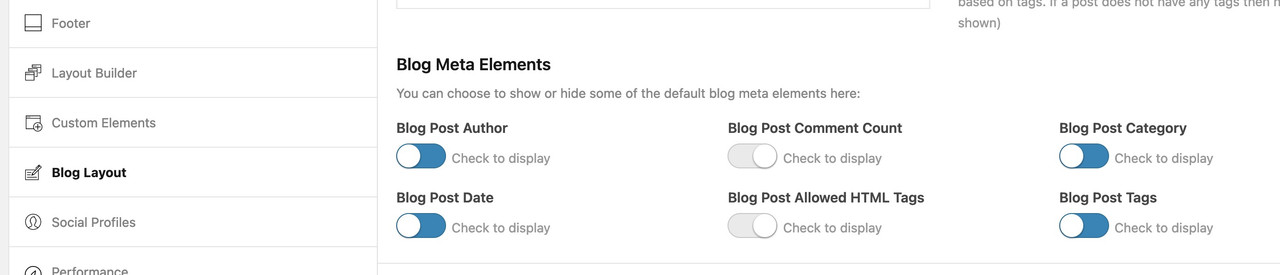
We’ve recently encountered an issue with one of our customer’s websites where the footer and copyright field are no longer displaying on pages using the Hello child theme. The website in question is utilizing Enfold Version: 4.8.7.1, and up until recently, this hasn’t been a problem.
Despite there being content in all three widget fields, they are not appearing as expected. We’ve thoroughly checked the settings and content, but the issue persists.
Could you please assist us in resolving this matter? Any guidance or troubleshooting steps you can provide would be greatly appreciated.
Thank you very much for your attention to this issue.
Hi,
Thanks, yes unfortunately you can not drag elements into an accordion as it uses a text element to display the inner part, you can add element shortcode into the plain text tab but creating nesting elements can be tricky.
This is not something that we can create at the support level, but you could create a Feature Request for the Dev Team to review. The Dev Team created the Github Feature Request section for users to place requests and follow them as the Dev Team reviews them.
Thank you for your patience and understanding, shall we close this support thread then?
Best regards,
Mike
Hi,
Glad Guenni007 could help, thank you Guenni007, if you have any further questions please create a new thread and we will gladly try to help you. Thank you for using Enfold.
Best regards,
Mike
Hi Ismael,
vielen Dank für die Info. Wenn ich diesen Beitrag dupliziere und veröffentliche wird er korrekt angezeigt. Wenn ich dann das Beitragsbild lsche und ein neues einsetze, wird dieses nur noch als übergeordnetes Vorschaubild angezeigt und der Text geht über die gesamte Seite. Auf der Blog Übersicht gibt es ja noch andere Beiträge ohne Bild. Diese werden auch mit Platz link/rechts angezeigt. Bei keinem ist eine Sidebar hinterlegt. Ich nutze den ‘erweiterten Layout Editor’.
Viele Grüße
Hi Rikard,
das padding hebt den Versatz der Schrift auf.
Ich möchte, dass der graue Hintergrund bis zur senkrechtren Linie geht. Die Demosseite ist auch enfold.
Viele Grüße
Hi,
Thanks for the update, we’ll close this thread for now then. Please open a new thread if you should have any further questions or problems.
Best regards,
Rikard
Hi,
Great, I’m glad that Ismael could help you out. Please open a new thread if you should have any further questions or problems.
Best regards,
Rikard
I need to create an alpha ordered list in the answer part of the Accordion element for an FAQ page.
I tried using <ol type="a"> which looks good in the Enfold text box but still comes out with numbers in the browser
Is there a way to do this?
-
This topic was modified 2 years, 1 month ago by
 mediaapps.
 Douglas McRae
Guest
ok well you couldnt reply to my last question
this is a shit company and theme
as now im fucked and backed into a corner
just another person that fucked me over
Hey mikecowles,
Thank you for the inquiry.
The post css file, which contains custom styles for elements in the builder, is not being generated on the live site. This issue could be due to file or folder permission problems within the wp-content > uploads directory. Did you change the location of the uploads folder?
Failed to load resource: the server responded with a status of 404 () post-212.css:1
Please try to disable the Enfold > Performance > File Compression settings and temporarily deactivate the plugins. Let us know if this changes anything.
Best regards,
Ismael
Hi,
@designguy2006: Do you encounter any errors during the demo import process? We tried to log in to the site using the provided credentials, but they seem to be invalid. Please open a new thread and provide a valid admin account so that we can thoroughly inspect the site. You can create a new thread here: https://kriesi.at/support/forum/enfold/#new-post
Best regards,
Ismael
Hi,
Thank you for the update.
You can temporarily disable the Enfold > Performance > File Compression settings and manually delete the entries in the dynamic_avia folder. Afterward, you can opt for a different compression plugin like Autoptimize, or use the default compression options provided by your cache plugin.
IMPORTANT: Please make sure to create a site backup or restore point before doing the steps above.
Best regards,
Ismael
Hi,
every image ID needs to be added to the css right?
Are you referring to @Guenni007’s modification? You can remove the .page-id-xxxxx selector from the css code if you want the changes to apply globally.
#top .with-lightbox-caption .avia_image {
  overflow: visible !important;
}

#top .av-image-caption-overlay {
  bottom: -30px !important;
  font-size: 10px !important;
  height: auto !important;
  width: 100% !important;
  text-align: justify !important;
}

#top .avia-image-overlay-wrap:hover .av-image-caption-overlay,
#top .avia-image-overlay-wrap:hover .av-caption-image-overlay-bg {
  opacity: 1 !important;
}
You should also remove the is_page conditional function from the animated_enfold_lightbox callback.
function animated_enfold_lightbox() {
?>
<script type="text/javascript">
(function($){
 // rest of the code
})(jQuery);
</script>
<?php
}
add_action('wp_footer', 'animated_enfold_lightbox', 999);
Best regards,
Ismael
Hi,
Glad Rikard could help, if you have any further questions please create a new thread and we will gladly try to help you. Thank you for using Enfold.
Best regards,
Mike
Hi,
Glad we were able to help, if you have any further questions please create a new thread and we will gladly try to help you. Thank you for using Enfold.
Best regards,
Mike
Hi,
Glad to hear that you have this sorted out, this as a strange issue that I have not seen before. If you have any further questions please create a new thread and we will gladly try to help you. Thank you for using Enfold.
Best regards,
Mike
Hello
I’m the designer who made the site for gatica. Borrowing their account to add this…
I also have bought several other Enfold themes for other clients and made their websites.
This site and another site with the Enfold theme show this behavior on the iPhone. Another Enfold site I made doesn’t.
I did flush the cache on the iPhone (iOS 17.x) and it correctly showed the website with all the styling for 1 day. The next day, the website only shows text and blank photos.
For my other client’s website(see private content), when I tried to load it on an iPhone on Safari with freshly cleared cache, it didn’t load correctly and showed text and blank pictures.
Please let us know how this can be fixed. The majority of users use mobile phones to view websites.
Thanks
Sean
-
This reply was modified 2 years, 1 month ago by
 gatica.



