Hey Gonmyr,
Did you explore the different settings under Enfold->Header? You can also set page based setting for the header in the Layout menu while editing a page.
Best regards,
Rikard
Hey Marcos,
The update to 7.1.4 has to be done manually from the version you are running, please refer to my replies in this thread: https://kriesi.at/support/topic/enfold-4-5-theme-update-update-failed-download-failed-a-valid-url-was-not-pro/#post-1021541
You can either update manually via FTP: https://kriesi.at/documentation/enfold/how-to-install-enfold-theme/#theme-update, or upload the theme as if it was new under Appearance->Themes->Add New Theme.
If that doesn’t work then please try to delete the whole theme folder, then replace it with the new version. Make sure that you have backups of the site before starting updating.
Also please read this after you have updated: https://kriesi.at/documentation/enfold/theme-registration/
Best regards,
Rikard
 Adam Golden
Guest
Bug Report, I don’t need support or help.
Description:
The filesize column added by avia_media_gallery in class-media.php displays a stale file size when an attachment’s underlying file has been replaced or converted after upload.
Steps to reproduce:
1. Upload a JPEG or PNG image
2. Programmatically convert it to WEBP or AVIF — update _wp_attached_file postmeta to point to the new file, update _wp_attachment_metadata[‘file’] and _wp_attachment_metadata[‘filesize’], update post_mime_type, and delete the original file
3. Visit wp-admin/upload.php in list view
4. The filesize column shows the original file’s size, not the converted file’s size
Expected: The column shows the size of the current file on disk, as returned by filesize( get_attached_file( $post_id ) )
Actual: The column shows a stale size — the original file no longer exists on disk, yet the old size is displayed
Cause: avia_media_gallery appears to cache or calculate the file size at upload time rather than reading it fresh at render time, or reads from a stale source that isn’t updated when the attachment file is replaced.
Verified: get_attached_file( $post_id ) returns the correct new file path, the file exists on disk, and filesize() on that path returns the correct size. WordPress core’s _wp_attachment_metadata[‘filesize’] is also correct. The issue is specific to Enfold’s column rendering.
Workaround: Hooking manage_media_custom_column at priority 20 and replacing the output with a direct filesize( get_attached_file() ) call produces the correct value.
In the meantime, I’ve reinstalled wordpress, tryed change a page : nothing works….
I’ve never seen that anywhere else, all the other websites that I’m working on with Enfold, with the same exact settings, are working properly.
Something or the entire Enfold seems ” broken”….
-
This reply was modified 1 week, 3 days ago by
 nnn666nnn.
 Marcos
Guest
I am currently working on a client’s website, which has version 4.2.6 of the Enfold theme installed. However, there is no option available to update it, and no newer versions are being displayed.
Could you please advise on how to proceed in this case? Additionally, I would like to know whether it is necessary to purchase a new license in order to access the latest updates.
Hi Enfold Support Team,
I am reaching out regarding an issue we have been experiencing on our WordPress website using the Enfold theme.
Problem:
We are unable to type spaces (using the spacebar) inside special/custom headings within the Enfold page builder. After thorough investigation, we have identified that this issue is caused by a conflict between the Schema Pro plugin and Enfold.
What we have already tried:
– Updated Enfold to the latest version
– Updated Schema Pro to the latest version
– Cleared all caches (browser cache, server cache, plugin cache)
– Tested and confirmed the conflict — the issue disappears when Schema Pro is deactivated
Could you please look into this compatibility issue and include a fix in the next Enfold update?
Thank you very much for your time and support. We are happy to provide further details, screenshots, or a temporary admin access if needed.
Best regards
This reply has been marked as private.
I am trying to translate URLs/Links for LayerSlider bundled in the Enfold Theme. Please see summary of the issue:
https://wpml.org/forums/topic/translating-page-links-in-layerslider/
Hey Tim,
Thanks for your patience, but the Dev Team doesn’t check here often, so I opened a feature request for you here:
https://github.com/KriesiMedia/Enfold-Feature-Requests/issues/152
Please feel free to add to it if you like, and check there for updates as it is reviewed. Otherwise the Dev Team may also reply here.
Best regards,
Mike
Hi,
When I check on my test site adding this to the top of my child theme, or parent right after if( ! defined( ‘ABSPATH’ ) ) { exit; } prevents entypo-fontello-enfold.woff2 from loading:
function avf_custom_font_display( $font_display, $font_name )
{
	if( 'entypo-fontello' == $font_name )
	{
		return 'swap';
	}

	return $font_display;
}

add_filter( 'avf_font_display', 'avf_custom_font_display', 10, 2 );
If you still have some css calling the entypo-fontello font, such as the submenu-indicator, you will need to override the css like this:
.html_av-submenu-hidden .av-submenu-indicator:before {
    content: ">";
    font-family: svg_entypo-fontello;
}
Best regards,
Mike
Hi,
Glad that we could help, if you have further questions please open a new thread and we will try to help. Thanks for using Enfold.
Best regards,
Mike
Yes — and what I mean by that is that you can achieve consistent column heights even without using display: table.
By the way, I’ve never understood why Enfold chose this method instead of using a true flex layout.
Hi,
I’m not sure what is going wrong on your site, but it doesn’t seem theme related. When the Enfold parent theme is active and no plugins are activate then there are error messages coming from Tinymce which is WordPress core, and when a default WordPress theme is activate then I see the error message in the screenshot in private. The problem might be related to the must-use plugins on your site, but I can’t say for sure. I would suggest that you reach out to your hosting provider for clarification on that.
Best regards,
Rikard
Hi,
Glad that we could help, if you have further questions please open a new thread and we will try to help. Thanks for using Enfold.
Best regards,
Mike
Hey magootim,
Could you try updating the theme to the latest version (7.1.4) to see if that helps please? https://kriesi.at/documentation/enfold/theme-update/. If not, then please post admin WordPress login details in private so that we can have a closer look at your site.
Best regards,
Rikard
Hi,
Glad that we could help, if you have further questions please open a new thread and we will try to help. Thanks for using Enfold.
Best regards,
Mike
Good afternoon. I have a site built on your wonderful Enfold theme.
We have the Timeline Element and it only displays the first two correctly and then drops off the rest more like just text.
THINGS I HAVE ALREADY DONE:
– Reinstalled Enfold
– Isolated the timeline on a new page to eliminate so other issue on the original page
Here is the text page with just the timeline element – https://www.georgiawritersmuseum.org/timeline-test/
The original page with it is – https://www.georgiawritersmuseum.org/voices-and-votes/
They want a horizontal timeline that maybe scrolls but either way, something else is going on.
I am making you a login see below.
Thanks for any help you can provide.
Chris
Dear Rikard,
I’m following up on this as I’ve tried to use Layout Builder from Enfold theme options as suggested to create a new custom layout, but I haven’t figured out how to implement this type of layout on the product page.
I’ve also tried the Advanced Layout Editor from the product page backend, but the final outcome overwrites all fields (price, short description, etc.) only partially displaying the elements inserted with the Editor (and I used them all just to check what happened). Apparently, these fields cannot inherit the WooCommerce elements used to customize the product itself.
In short, I’m not really finding a way to customize the product layout and would like to know if there’s any guidance material available to me in the documentation provided when I purchased your theme.
This said and going back to my original request, I’ve seen in your support forum that you can either provide codes to implement in functions.php or help users achieve the outcomes intended, and I’d like to know if purchasing a new license would allow me to receive prompt support by your team to customize product page layout. If not so, could you please advise who I can reach out to for further clarifications?
Thank you
Silvia
Hey webzies,
Thank you for the inquiry.
It looks like the critical error is caused by the create_function() in your child theme. This function was deprecated in php 7.2 and completely removed in PHP 8.0, which is why switching to PHP 8.1 triggers a fatal error.
You’ll need to replace any instances of create_function() in your child theme. Since this change is in your child theme and not Enfold core, you’ll need to make those updates yourself. You can search your child theme files for “create_function” to locate all instances.
Let us know if the issue persists after making those changes.
Best regards,
Ismael
Hey paulgross,
Thank you for the inquiry.
This is expected behavior. The tab element in Enfold uses anchor-based navigation (hash URLs), so clicking a tab only toggles the content on the current page. When you navigate to a detail entry URL like https://cprn.org/about-us/entry/200578/, the tab section from the parent page is no longer present, so clicking a tab just appends the hash to the current URL without redirecting back.
To get the behavior you’re looking for, the tab links on the detail page would need to redirect back to the parent page with the appropriate hash (e.g., https://cprn.org/about-us/#board). This would require custom js or modifications to the view template.
One approach is to override the tab click behavior using a small js snippet in your child theme:
add_action( 'wp_footer', function() {
    ?>
    <script>
    jQuery(document).ready(function($) {
        $('.tabcontainer .tab_titles .tab').on('click', function() {
            if (window.location.href.indexOf('/entry/') !== -1) {
                var hash = $(this).data('fake-id');
                window.location.href = 'https://cprn.org/about-us/' + hash;
            }
        });
    });
    </script>
    <?php
} );
This checks whether the user is on a detail entry URL and redirects them back to the parent page with the correct tab hash instead of just appending it. Another thing that might help is to create a custom layout that you can apply to multiple pages.
— https://kriesi.at/documentation/enfold/custom-layout-and-dynamic-content/
— https://kriesi.at/documentation/enfold/custom-element-templates/
Let us know how it goes
Best regards,
Ismael
This reply has been marked as private.
Hi,
Thanks Guenni007 for helping. If you have further questions please open a new thread and we will try to help. Thanks for using Enfold.
Best regards,
Mike
Hi,
Glad that Ismael could help, if you have further questions please open a new thread and we will try to help. Thanks for using Enfold.
Best regards,
Mike
Hi,
Thanks for the update. We’ll close this thread for now then, please open a new thread if you should have any further questions or problems.
Best regards,
Rikard
you see that image here:
https://kriesi.at/support/topic/making-the-logo-bigger-2/#post-1496150
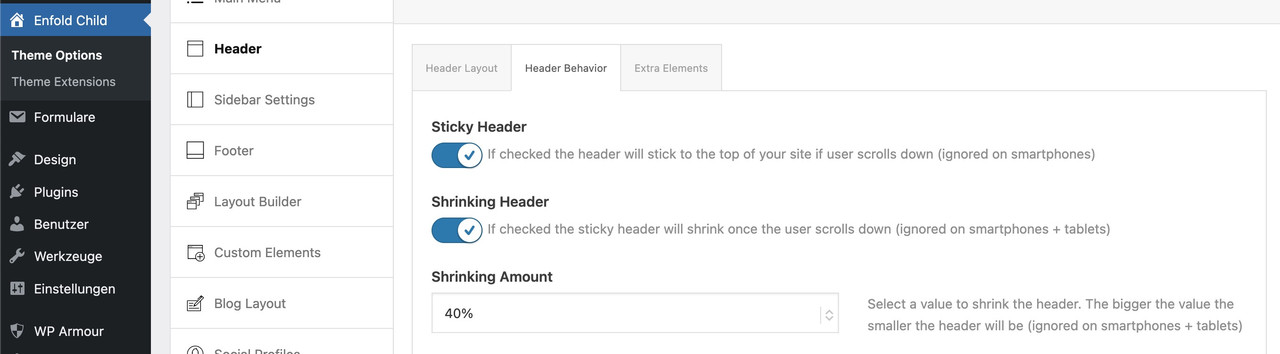
do not make it by mikes css – just use these settings on Enfold Header Options. Choose on the right custom pixel value – then the hidden input field will show – and enter 200px there – thats all.
put this to your quick css:
( or @media only screen and (min-width: 768px) {
@media only screen and (min-width: 990px) {
  #top #menu-item-logo a {
    display: inline-block;
    transform-origin: center top;
  }

  #top #menu-item-logo img {
    max-height: 200px;
    height: 100%;
    position: relative;
    top: 50%;
    transform: translateY(-50%);
  }
}
after that you can decide to have more or less shrink-faktor on:
Hi,
I have problems when updating my php version of the server to php 8.1. I already deactivated the plugin and switched to twenty twenty, the update works. If i activate Enfold theme i get a critical error.
Hope you could please help me out!
I am trying to remove a legacy Meta Pixel script that is hard-coded somewhere on my site, but it is not in the ‘Google Services’ box or the ‘Quick CSS’ area, or the meta plug in.
Could you please check if this script is hooked into the wp_head via the theme’s functions.php or if there is a specific ‘Integration’ or ‘Header’ setting I am missing? I need to ensure only my new Pixel ID is firing.
I cannot see the editor option in the Enfold appearance drop down.
See private content for ids
-
This topic was modified 2 weeks ago by
 JennyGr.
 Silvia Socinovi
Guest
Hi, I’m using Enfold on my website and now I need to customize the layout of WooCommerce product page. My license is now expired, but before purchasing a new one, I’d like to know if this would allow me to receive support to do one of the following actions:
1. have full-width tabs section below product form
2. include info for customers (how it works, payment methods, etc.) below product image
If you can confirm you can actually help me out, I’ll buy a new license right away.
Thank you
Silvia
Hi,
Sorry for the delay in my answer, I’ve been extremely busy with work.
It’s even worse than I thought : I did a reset to default settings on Enfold, tried again : each time I do a modification on the page I was working on, the banner and setting appear correctly on the browser I’m working on but everything is mashed up if I change browser…
I’ve put the website off and ” under construction”.
If you guys can help me, I’m adding the access infos in private.
In advance, thanks a lot.
i guess that these few icons (Entypo Fontello Enfold (Default)) are needed inside the enfold admin settings
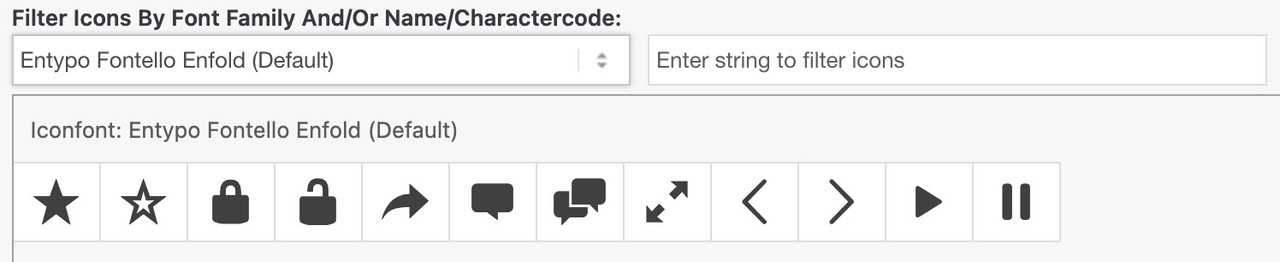
allthough there is an entypo-fontello-enfold/charmap-svg.php for those icons



