Since upgrading to the latest WordPress and Enfold version
Enfold Thumbnails are suddenly not being recognised by the system.
This includes the widget size thumbnail required for display in the back end of the website. So Posts > all posts or Pages > All Pages now shows stupendously large images.
Can you try installing this plugin and see if it correctly displays all enfold image sizes in the list of sizes available?
I can no longer see any of Enfolds image sizes in the list.
Hi,
There is an issue with the enfold galleries where they are duplicating and are appearing in one column, even when we set it to multiple columns.
Please see example page URL below.
Hey pnamroud,
Our current version is 5.7
If you are using the Advanced Layout Builder to create your posts you could add a widget element to your posts and add the TOC widget to the sidebar displayed in the widget element.

If you are using the WordPress editor for your posts you could try this javascript TOC, first add this code to your post: <div id="toc"></div> in the “text” tab:

Then add this code to the end of your child theme functions.php file in Appearance ▸ Editor, If you are not using a child theme you could use the WP Code plugin then add a new snippet, in the top right corner use the PHP snippet as the code type:

then add this code and save.
function custom_toc_script() { ?>
  <script>
document.addEventListener('DOMContentLoaded', function() {
    htmlTableOfContents();
} );

function htmlTableOfContents( documentRef ) {
    var documentRef = documentRef || document;
    var toc = documentRef.getElementById("toc");
	var content = document.querySelector(".single-post .entry-content");
	var headings = content ? [].slice.call(content.querySelectorAll( "h1, h2, h3, h4, h5, h6")) : []
    //var headings = [].slice.call(documentRef.body.querySelectorAll('#content h1,#content h2,#content h3,#content h4,#content h5,#content h6'));
    headings.forEach(function (heading, index) {
        var ref = "toc" + index;
        if ( heading.hasAttribute( "id" ) )
            ref = heading.getAttribute( "id" );
        else
            heading.setAttribute( "id", ref );

        var link = documentRef.createElement( "a" );
        link.setAttribute( "href", "#"+ ref );
        link.textContent = heading.textContent;

        var div = documentRef.createElement( "div" );
        div.setAttribute( "class", heading.tagName.toLowerCase() );
        div.appendChild( link );
        toc.appendChild( div );
    });
}

try {
    module.exports = htmlTableOfContents;
} catch (e) {
    // module.exports is not defined
}
	  </script>
  <?php
}
add_action('wp_footer', 'custom_toc_script');
This is the result:

There are many TOC plugins available, if you would like a different style, the RankMath SEO plugin also includes a TOC that works with Enfold.
Best regards,
Mike
Hey strumpumpel,
Unfortunately Enfold doesn’t have this feature, please check the plugins from the WordPress library, here is a good place to start.
Best regards,
Mike
Hey Intell,
Please go to Enfold Theme Options ▸ Cookie Consent ▸ Cookie Handling ▸ Enable cookie consent messages and choose Disable cookie consent messages
Best regards,
Mike
Hi,
Glad Ismael could help, if you have any further questions please create a new thread and we will gladly try to help you. Thank you for using Enfold.
Best regards,
Mike
Hi,
Please check that this setting is enabled on your iPhone

When I check your site with an iPhone on browserstack.com the favicon.ico shows, see the screenshot in the Private Content area.
Best regards,
Mike
I have a compatibility issue between the Enfold theme and the MagicZoom plugin, when I activate it I get a critical error.
If I activate a standard theme, no problem, it works.
The plugin site here: https://www.magictoolbox.com/magiczoom/
I have open an admin account for investigation (see credentials).
Regards.
Jean
Hello Enfold Team,
last french translation available by private link below
Best regards
Hi,
Glad we were able to help, if you have any further questions please create a new thread and we will gladly try to help you. Thank you for using Enfold.
Best regards,
Mike
Hi,
I found the conflict: extension: WPZOOM Instagram Widget & Block (vs 2.1.14).
When I disable this extension the JS errors in ENFOLD files disappear from the console.
JS errors are present on all pages.
I’ve put together a copy of the site if you want to try.
View in private content.
Best regards,
Hi,
Glad we were able to help, if you have any further questions please create a new thread and we will gladly try to help you. Thank you for using Enfold.
Best regards,
Mike
Hi everyone,
I’m in need of some theme support and hope you can help. I am using the Enfold theme with the Construction Demo.
1. I recently got a new license and added it to a website I made for someone. When I try to link it up with the Envato token it gives me errors. I have even deleted the token and tried readding it numerous times.
We checked the token on 2024/04/12 14:06 and we were able to connect to Envato and could access the following information:
Your purchases
Username could not be accessed (needed for your information only)
E-Mail could not be accessed (needed for your information only)
Following errors occurred:
username Errorcode 403 returned by Envato: Forbidden:
– code: not_authenticated
email Errorcode 403 returned by Envato: Forbidden:
– code: not_authenticated
2. Because the version of enfold is probably a bit older that was on this site, I get messages on the backend such as:
Deprecated: Function get_page_by_title is deprecated since version 6.2.0! Use WP_Query instead. in /home/ground/public_html/wp-includes/functions.php on line 6078
3. For some reason, the contact form is not sending emails. I have tried troubleshooting and no luck.
Addition info found in private.
Hi,
Thanks for the update, I’m glad to hear that you managed to find the problem. We’ll close this thread for now then, please open a new thread if you should have any further questions or problems.
Best regards,
Rikard
Dear support,
i need a foto gallery with vote/like function and a upload from user-fotos in frontend.
The visitor should can a vote or like for every foto in this gallery.
Can you help me in this case?
Enfold gallery have not this function… of a first view….
Please?!?!!!
Thanks strumpel
Hello Support Team,
I am currently utilizing the latest version (5.0.1) Enfold theme.
I would like to explore the possibility of placing the built-in “Enfold table of contents” widget directly within the body of the blog posts, before the first heading, rather than in the Sidebar Blog.
Could you please provide guidance on whether this is feasible within the Enfold template? If so, could you kindly provide instructions or suggestions on how to achieve this customization?
Thank you very much for your assistance.
Thanks for the information regarding the zip file Rikard and appreciate your input @guenni007. Very generous input.
We’ll remove it. The main concern we have is that we are changing fonts to preset available Google fonts in the enfold theme for elements such as header tags. However those changes don’t go into effect when made in the settings. If those fonts work in the settings we have no need to upload alternative fonts.
Hey Intell,
Please try the following in Quick CSS under Enfold->General Styling to align the logo on mobile devices:
@media only screen and (max-width: 767px) {
  .responsive #top .logo {
    position: static;
    display: table;
    height: 80px !important;
    float: none;
    padding: 0;
    border: none;
    width: 60%;
  }
}
When you have activated the child, then please go to Enfold->Import/Export and import the parent theme settings. If your settings don’t apply after that, then please try to save the theme options in order to regenerate the theme resources.
Best regards,
Rikard
Hi Rikard,
We found something: When deactivating the Events Calendar plugin the widgets appear again and can be edited. So it’s obvious that this plugin is causing the issue. Hopefully we are able to fix it now, but since it’s clearly not related to the Enfold version this thread can be closed.
Thank you so much for your time and effort!
Best regards,
Arnout
Hey Anna_Tewes,
Try this CSS in your Enfold Theme Options ▸ General Styling ▸ Quick CSS field:
#top.home #av_section_2 .avia_textblock > h2 > a:hover strong,
#top.home #av_section_2 .avia_textblock > h2 > strong a:hover {
	color: #a62c0a;
}
Please ensure to copy the code from the forum and not an email notification so the symbols are not converted.
After applying the css, please clear your browser cache and check.
Best regards,
Mike
Hey donillo,
Thank you for your patience, but the login doesn’t see to work, please check.
When I check my demo site categories, when a sub-category like this example for “Casual” under “Woman”:

will have a URL like: /shop/product-category/women/casual/ and the parent category “Woman” has a url of: /shop/product-category/women/
Your site is using this url path: ?product_cat=, I believe that you have not set your WordPress ▸ Dashboard ▸ Settings ▸ Permalink Settings try using the Post name option instead of Plain.
Best regards,
Mike
Hi Ismael,
I got this kind reply from Rank Math:
Jaideep Asrani – Wrote
Hello,
The option to insert the generated data into the content is only available for the page builders with advanced integration with our plugin. You can ask Enfold’s developers to get in touch with our developers at (Email address hidden if logged out) if they are interested in the advanced integration.
Hey Moondreamer21,
Please try to disable Enfold Theme Options ▸ Performance ▸ JS & CSS file merging and compression and enable Enfold Theme Options ▸ Performance ▸ Delete old CSS and JS files and Then clear your browser cache and any cache plugin, and check.
If this helps you can then try to put the settings back to the way they were and you should be all set. If this doesn’t correct please include admin login in the Private Content area so we can investigate.
Best regards,
Mike
Hey Anna,
To update your version of Enfold you will need to download the latest installable WP version from your Theme Forest account. If you do not have access to the Theme Forest account then you will need to purchase a new license. Then upload it to your WordPress ▸ Appearance ▸ Themes ▸ Add Themes ▸ Add New

after you choose the zip file and click install, you will see a This theme is already installed message because you are updating, you can continue

then you will see the Theme updated successfully message.

Best regards,
Mike
Hi,
Glad we were able to help, if you have any further questions please create a new thread and we will gladly try to help you. Thank you for using Enfold.
Best regards,
Mike
 Anna
AnnaGuest
Hello,
Our website https://www.ezdivers.com/ uses ENFOLD theme 4.2.6 with PHP 7.4.
We need to update it to the newest version that will support PHP 8.3.
We do not have LOGIN or PASSWORD to sign into the ENFOLD support forum.
How can we BUY NEW or UPDATE OLD enfold theme ?
Anna
Hi,
Thank you for the info.
You can remove the < div > wrapper with the inline style, and instead use this css code to make the flipbox float to the right:
.av_textblock_section.av-kixjzxtp-9ed3a66d2a7d456cbfa2223874306927 .oxi-addons-container .oxilab-flip-box-body-7 {
    float: right;
}
// https://kriesi.at/documentation/enfold/add-custom-css/#enable-custom-css-class-name-support
Best regards,
Ismael
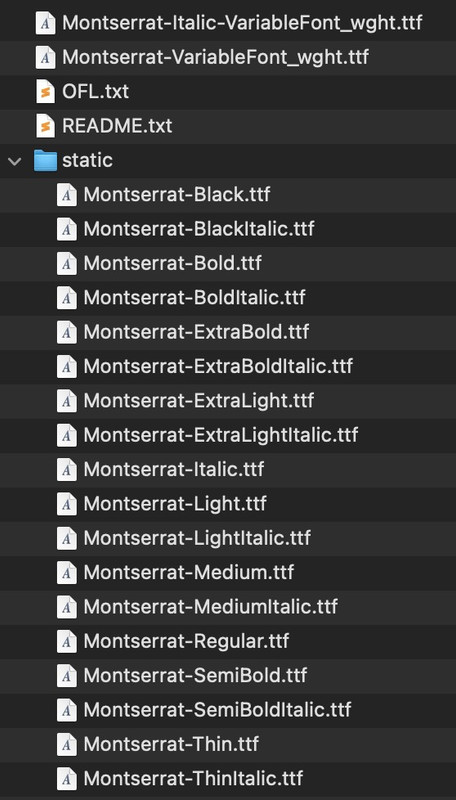
if it is you page ( and your nick is very informative ) i think you have uploaded only that montserrat font (and gotham-pro) via the fontmanager – but you have uploaded the whole downloaded font zip file.
Inside that zip there are variable font files and in a subfolder the static font files.
your static font folder leads to the result that the Montserrat Font is listed as font-family: static
By the way :
new Enfold can also handle these variable font files – but I would recommend uploading them separately.
For example, put the Montserrat variable files in a folder and name it Montserrat-variable.
Pull out the static folder from the zip file and rename it to Montserrat.
For performance reasons, it is now time to consider whether you really need all the fonts. The list is very long, especially for Montserrat. In principle, the variable fonts should be sufficient for all modern browsers.
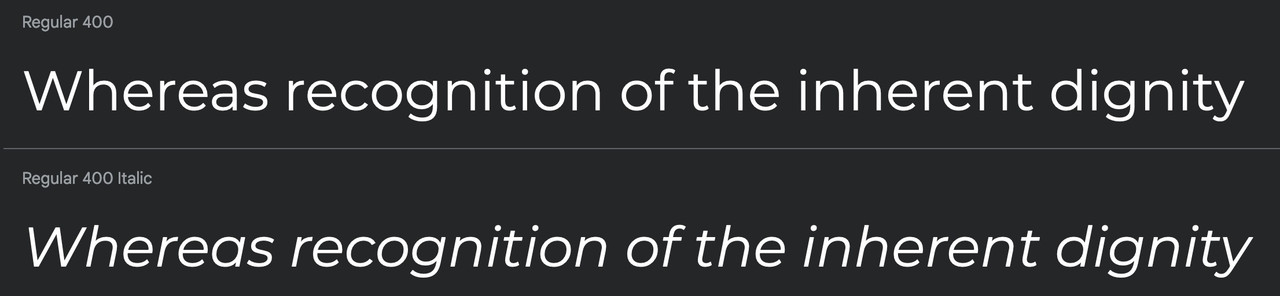
However, if you only need, for example, light, regualar and bold, it may even be better to upload only the static fonts (woff2, ttf). In addition, Montserrat is a font where the italic variant hardly differs from a normal slanted font.
You could therefore live with the fact that only the normal font styles are uploaded and the italic fonts are converted by browser rendering.
Then zip these two folders (please not in Mac Zip format – so without all the invisible files OSX packs in), but without the metadata. Betterzip also has a “zip for PC” option.
Then upload these folders to the font manager.
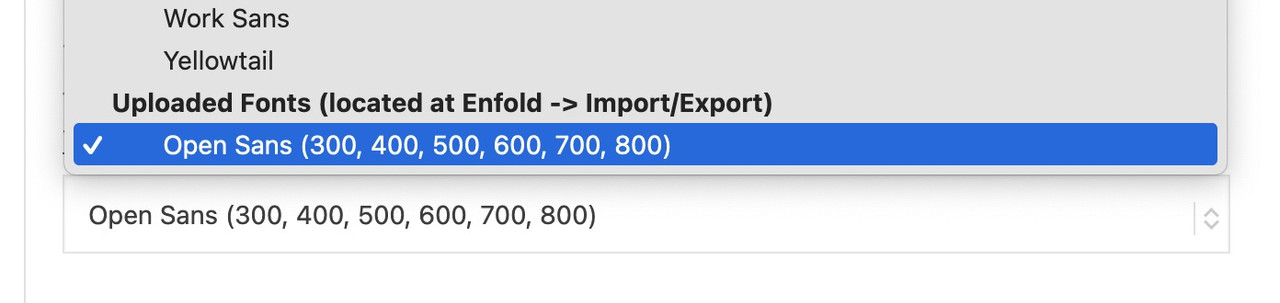
PS: the uploaded Fonts can be found at the bottom of the font dropdown list ;)
Hi there
Just performed a manual WP core update from v6.4.4 to v6.5.2.
Unfortunately, it broke my Enfold header including main navigation (logo shifted down, search field suddenly on the left above the logo and the whole main navigation was outside the header container.
Have I done something wrong and could you assist me please?
I am using a child theme and downgraded to WP 6.4.4 again to “solve” the issue for now.
Technical details
WordPress 6.4.4
PHP 8.2.13
Enfold parent version: 5.7
I see the following issues in my debug.log:
PHP Deprecated: Creation of dynamic property avia_superobject::$wpml is deprecated in ./wp-content/themes/enfold/framework/php/base-classes/class-object-properties.php on line 67
Any ideas how to fix this? I think the issue might be related to WPML as well.
Thanks a lot,
Michael
Dear Support Team,
We have integrated a contact form from ENFOLD on the following website – see link: http://neu2024.schollmeyer.dk/#kontaktform
1st question: the labels for the contact fields should be displayed within the field. This works so far, but the color (light green) is not good, because the whole thing is so difficult to read – see screenshot: http://neu2024.schollmeyer.dk/support/kontaktform-1.jpg
>> Which CSS script do I need to change this light green font to black?
2. in the mobile version, the font in the “Email” field is displayed larger – and not in “uppercase” – than the other fonts: see screenshot: http://neu2024.schollmeyer.dk/support/kontaktform-2.jpeg
Which CDD do I need so that the word “E-mail” is displayed in the same way as all other words in the mobile version?
Many thanks for your support. Best regards, Diana
Translated with DeepL.com (free version)



