-
Search Results
-
Hi !
The title of this thread says it all :
Since a moment there seems to be a bug and all the color section module that I use are blank when there should be a colored background and the special titles ( H1, H2,etc.) have lost all their color an size.
The strange thing is that when I do a preview of the page, everything is ok, but when the page is finally published everything is all messed up.Am I the only one with this problem ?
Here’s the website having this problem : http://www.dissolvurol.com
I would like to add that I’m using Enfold on some other sites and I don’t have any troubles.Kriesi please help !
In advance, thank you.
Hi,
We’re currently developing a site with WooCommerce using the Enfold builder. The product gallery in use is the Enfold slider, which at the moment displays all product sizes and variants as separate images.
We’ve been asked whether it’s possible to target and display the correct image when a user selects a specific option from the Size dropdown (for example, selecting a size updates the gallery to show the image for that size).
Is this functionality supported natively within the Enfold theme and WooCommerce, or would it require custom JavaScript? We’re also open to using an alternative gallery solution or plugin if that makes targeting the correct variation image easier or more robust.
A sample page is in the private environment.
Thanks in advance for your guidance.
Hi, i have a menu problem with a website. For long time i had a main menu with 3 items and a secondary menu with 10 items. Recently the website does not show the main menu anymore, it shows the secondary menu twice. One time in the header as secondary and as main menu. It looks like the secondary menu overrides the main menu.
I did not change any menu options or use a plugin that changes te menu. I use the latest version of Enfold 7.1.3
Quisiera poder actualizar la versión:
Your current Hervisaperles Theme Version Number is 4.7.6.4Página hervisaperles.com
Topic: CSS Problems
Hi Enfold Support Team,
I’m getting increasingly frustrated working with Enfold because my custom CSS changes are not being applied or recognized as expected. No matter if I add them in the theme’s “Quick CSS” field or in the child theme’s style.css file, the results either don’t take effect or are randomly overridden. I’ve already cleared all caches (browser, plugin, and server-side) and even disabled caching temporarily, but the issue persists.
This is making it extremely hard to design efficiently, as every minor change requires a lot of troubleshooting just to see if the CSS is working. I’d really appreciate some clear guidance or a reliable workflow to ensure custom CSS actually takes effect in Enfold and is not ignored or overridden.
Thanks for your help.
Topic: Enfold Update missing
Hello,
I have been using the Enfold theme on our website since 2020. I actually assumed that I would receive regular updates for Enfold, which I could install via the WordPress dashboard. However, this is not the case. I am still using Enfold version 4.7.6.4.
Currently, I am unable to edit the Layer Slider, and I suspect this is related to my outdated Enfold version.
How can I update my website to the latest Enfold version? Any tips on, how to activate this latest version would be very helpful!
Thank you very much!With kind regards
Georg Rupp
Hello Enfold Support Team,
I am experiencing a recurring fatal error on a live website (https://www.drisabelbalza.com) that triggers WordPress “Your Site is Experiencing a Technical Issue” emails repeatedly.Environment:
WordPress version: 6.8.3
Parent theme: Enfold 7.1.3
Active theme: Enfold Child (version 7.1.3)
Current plugin: (version )
PHP version: 7.4.33Error Details:
An error of type E_ERROR was caused in line 223 of the file /home/drisabel/public_html/wp-content/themes/enfold/includes/classes/class-social-media-icons.php. Error message: Uncaught Error: Class ‘avia_font_manager’ not found in /home/drisabel/public_html/wp-content/themes/enfold/includes/classes/class-social-media-icons.php:223Stack trace:
#0 /home/drisabel/public_html/wp-content/themes/enfold/includes/classes/class-social-media-icons.php(259): avia_social_media_icons->build_icon(Array)
#1 /home/drisabel/public_html/wp-content/themes/enfold/includes/classes/class-social-media-icons.php(288): avia_social_media_icons->html()
#2 /home/drisabel/public_html/wp-content/themes/enfold/includes/helper-main-menu.php(22): avia_social_media_icons(Array, false)
#3 /home/drisabel/public_html/wp-includes/template.php(812): require(‘/home/drisabel/…’)
#4 /home/drisabel/public_html/wp-includes/template.php(745): load_template(‘/home/drisabel/…’, false, Array)
#5 /home/drisabel/public_html/wp-includes/general-template.php(206): locate_template(Array, true, false, Array)
#6 /home/drisabel/public_html/wp-content/themes/enfold/header.php(275): get_template_part(‘includes/helper’, ‘main-menu’)
#What I’ve already tried:
1- Purchased and installed a fresh, original Enfold 7.1.3 download
2- Verified that only one Enfold parent theme exists in /themes/enfold
3- Confirmed child theme only contains custom files (no class overrides). It exists in /themes/enfold-child
4- Switched PHP versions (8.1 → 7.4.33)
5- Cleared cache and re-uploaded theme via FTP
Despite this, the error has persisted since August 27, 2025, and continues to send automated WordPress admin emails. The live website https://www.drisabelbalza.com works fine and normally, but my client wants to stop receiving these alert emails from WordPress.Questions:
It appears that avia_font_manager is not being loaded before class-social-media-icons.php is called. Could you please advise:
– Which file should load avia_font_manager in Enfold 7.1.3? May I need a code snippet somewhere?
– Whether this indicates a corrupted load order or a missing include
– If this is a known issue with WordPress 6.8.3
– I had a long stack trace list when I switched from PHP 7.4.33 to PHP 8.1, and it was worse in PHP 8.3, which is why I downgraded to PHP 7.4.33, where the list is shorter.Thank you for your help.
Best regards,
Claudia.-
This topic was modified 3 months, 2 weeks ago by
.
-
This topic was modified 3 months, 2 weeks ago by
-
This topic was modified 3 months, 2 weeks ago by
-
This topic was modified 3 months, 2 weeks ago by
-
This topic was modified 3 months, 2 weeks ago by
-
This topic was modified 3 months, 2 weeks ago by
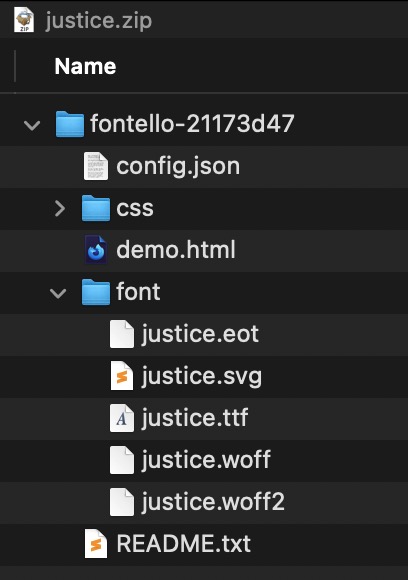
In your Law Demo (https://kriesi.at/themes/enfold-law/) the font file justice.woff2 seems to be missing (404). Where can I get that file from?
Thanks. -
This topic was modified 3 months, 2 weeks ago by