Hey totalweighing,
Thanks for the login details. The SG Optimiser plugin causes problems when the JS file compression is turned on under Enfold->Performance. I’ve turned that off for you and the maps are loading as they should now.
Best regards,
Rikard
I just updated my Website to php 8.0., bought and updated my theme to enfold version 5.7.1 (updated via ftp as described in previous threads) and WordPress Version 6.5.3. Now I have the following problem: I tried editing my pages with the Avia Layout Architect and when I click on an element to edit it, the pop up window of the layout architect is blank (no text or images shown). I have already cleared my cache several times, tried different browsers but the problem stays the same. I don*t have Gutenberg, but the plugin classical editor installed (as this was also mentioned in some related threads). Also, in some previous threads it was said to manually change the enfold theme via ftp (I just did that and thats when the problem showed up). I hope there is an easy fix for this issue that I am overlooking.
Thank you!
ok – if there is no easy way. Just switch for a short moment to:
General Layout : Top Header
Go to “Header – Extra Elements and choose on Enfold WPML Language Flags (Global Setting) : hide …
Switch back to your “Left Sidebar Header”
Save the settings
Now insert this to your child-theme functions.php:
add_action('ava_main_header_sidebar', function() {
  echo do_shortcode("[wpml_language_selector_widget]");
});
And now style it via WPML – Languages – Custom language switchers
DOM will look like this then:
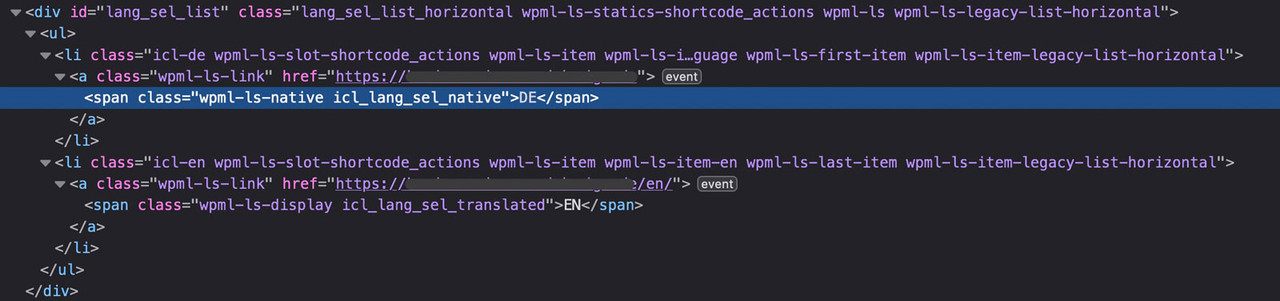
on WPML – Languages – there is in the options : “Menu language switcher ” Add a new one.
Then you see the options for that menu you choose
if the switchers are not inside a menu – you can scroll down a bit and have : “Custom language switchers” mark it and customise it there.
i do not have an enfold setting with header on the left and WPML – so i can not test it for you.
if that position does not belong to these settings:
try: https://kriesi.at/support/topic/wpml-language-switcher-8/#post-695476
but: i think these filters and action hooks are deprecated now. on : class-avia-wpml.php lines 86 to 110 there are more options to influence. i think a mod should instruct you with these new “options”
or read this for more info: https://wpml.org/documentation/theme-compatibility/enfold/#enfold-language-switcher
I can’t figure out what’s going on. When I view source on a page, there are a few resources which have a hard return after the domain and as a result they’re not loading. For example:
var avia_framework_globals = avia_framework_globals || {};
    avia_framework_globals.frameworkUrl = 'https://domain.com
/wp-content/themes/enfold/framework/';
    avia_framework_globals.installedAt = 'https://domain.com
/wp-content/themes/enfold/';
    avia_framework_globals.ajaxurl = 'https://domain.com/wp-admin/admin-ajax.php';
There’s also this one with the same issue:
@font-face {font-family: 'entypo-fontello'; font-weight: normal; font-style: normal; font-display: auto;
src: url('https://domain.com
/wp-content/themes/enfold/config-templatebuilder/avia-template-builder/assets/fonts/entypo-fontello.woff2') format('woff2'),
url('https://domain.com
/wp-content/themes/enfold/config-templatebuilder/avia-template-builder/assets/fonts/entypo-fontello.woff') format('woff'),
url('https://domain.com
/wp-content/themes/enfold/config-templatebuilder/avia-template-builder/assets/fonts/entypo-fontello.ttf') format('truetype'),
url('https://domain.com
/wp-content/themes/enfold/config-templatebuilder/avia-template-builder/assets/fonts/entypo-fontello.svg#entypo-fontello') format('svg'),
url('https://domain.com
/wp-content/themes/enfold/config-templatebuilder/avia-template-builder/assets/fonts/entypo-fontello.eot'),
url('https://domain.com
/wp-content/themes/enfold/config-templatebuilder/avia-template-builder/assets/fonts/entypo-fontello.eot?#iefix') format('embedded-opentype');
One final bit of weirdness that may or may not be related is that I can’t get the theme to detect that there is a new version of Enfold available. The site is using Enfold 5.0, and when I log into WordPress and go to Enfold > Theme Options > Theme Update it says: No Updates available. You are running the latest version! (5.0) Successful check on 2024/05/01 12:24.
Any idea what’s going on here?
Thank you @guenni007. I was able to get all my fonts loaded and successfully convert them and see the css file. The @font-face generator changed all the font file names to random numbers and letters – example: 4ab16c3952a6f71bb538afe303ac6379.woff2
It’s showing as this in the CSS file, which I assume is fine. When I upload to Enfold Custom Font Manager it changes to Font Name: MACOSX (font-family: macosx) normal: 400. Is this just how it works with the @font-face generator? Or do I need to rename them all (files and in the CSS file)? Thanks again, appreciate your help.
Hehe…they send me back to you.
“Hi there.
Of course, I am happy to help.
The switchers that you have at the top of your site are not served by WPML directly but by the AVIA builder that comes with the Enfold theme.
I’m attaching a screenshot below so that you can see the code of that content part and you will see it is AVIA-related.
You will see multiple “avia” words in there.
I am not sure if avia builder or the enfold theme has the possibility to show the language names instead of the language flags, I would recommend that you check this with their support team here:
https://kriesi.at/support/”
However, this seems like a forgotten part on your end, that the Hide the flags in Theme options – Header is unavailable with this menu layout…
Can you still help?
:)
I need to be able to scale fonts on mobile. How can I scale fonts as the viewport gets smaller? I came across Calc, but I could not figure out how to use it with Enfold.
On my frontpage I have a few sentences that does not look good on mobile. I have tried media query but nothing happens.
Could you please advice on how to make the text scale properly?
Regards
Nina Sæther
Hey imc-html,
Verwendet Ihr die letzte Version von Enfold 5.7.1 ? Wenn nicht, bitte einmal updaten (wenn möglich zuerst auf einer Staging Site testen).
Die “Initialisierung” der Bilder erfolgt in ..\config-templatebuilder\avia-shortcode-helpers\class-avia-slideshow.php in function set_slides( $ids ) mit
get_posts() und diese Funktion wird von WPML unterstützt, um die Bilder ID zu übersetzen.
Voraussetzung dafür ist, dass die Bilder auch mit WPML übersetzt sind. Könnt Ihr das einmal überprüfen?
Best regards,
Günter
Hey nm,
If you are getting different result when logged compared to not logged in, then it’s very likely a caching problem. Please try to clear all caches and/or deactivate any caching plugins. You could also try to toggle the file compression options and activate the option to delete old CSS and JS files under Enfold->Performance.
Best regards,
Rikard
Hi,
thanks! To fix this in the menus page: you had to be selected the option “Enfold Child Main menu”.
I’ve used other themes, but I don’t think they need this step. Anyway, it’s work now!
p.s. the problem was that the menu items appeared all visible in the page above other element.
I think these two might be related, but lets start with the full width issue.
I have had to make some pages on the Gutenberg block editor with Spectra addon as the avia Advanced Layout Builder button suddently went missing. As you can see in this image, full width is not full with. The background colours do not stretch to the top or the bottom.
Enfold General layout is set to stretched.
Ive also tried adding this code in quick CSS and theme customise CSS based on an old post, but it did not help.
`#top .fullsize .template-blog .post .entry-content-wrapper > *,
#top .fullsize .template-blog .post .entry-content-wrapper {
max-width: 100%;
}
Front end and admin panel images showing not full width:


Hey Tanja,
Thank you for the inquiry.
You can use this css code to adjust the style of the submit button in the footer widget:
#footer .field-wrap>div input[type=checkbox], #footer .field-wrap button, #footer .field-wrap input[type=button], #footer .field-wrap input[type=submit] {
    width: auto;
    border-radius: 3px;
    padding: 10px;
    font-size: 16px;
    text-decoration: none;
    display: inline-block;
    border-bottom-style: solid;
    border-bottom-width: 1px;
    margin: 3px 0;
    line-height: 1.2em;
    position: relative;
    font-weight: 400;
    text-align: center;
    max-width: 100%;
    color: var(--enfold-alternate-color-button-font);
    border-color: var(--enfold-alternate-color-button-border);
    background-color: var(--enfold-alternate-color-primary);
    min-width: 180px;
}
Best regards,
Ismael
Hey Tanja,
Thank you for the inquiry.
1.) You can adjust the style of the Widget Links element in the Enfold > Advanced Styling panel, or use the following css code to manually increase the font size.
#footer .widget_nav_menu a {
    font-size: 2em;
}
2.) Which widget title are you trying to adjust? If you need to adjust the title of the menu widget, use this css code:
#footer #nav_menu-2 h3.widgettitle {
    color: red;
}
Best regards,
Ismael
Hey Tanja,
Thank you for the inquiry.
1.) Try to set the Styling > General Styling > IconBox Styling to the last option (Display icon above title).
2.) To increase the font size, go to the Styling > Font Sizes panel, then adjust the element settings accordingly.
3.) You can upload monocolored fonts from fontello or flaticon using the Iconfont Manager. Please check the documentation below for more info: https://kriesi.at/documentation/enfold/icon/#adding-your-own-fontello-or-flaticon-icons-
Best regards,
Ismael
I get these warnings with or without Enfold stuff on, so I’m leaving it on for now. webpagetest.org:
“The main thread was blocked for 803 ms
When files block the main thread, users are unable to interact with the page content. Typically, parsing and executing large JavaScript files, as well as running long JavaScript tasks can block the main thread and should be avoided. These files had high thread blocking times:
433 ms: https://gatehealing.com/wp-content/cache/fvm/min/1716491784-js1db7bfbb70f04a04198b11ece1c41cb248cf037b911e614d23f81401289950.js
51 ms: https://gatehealing.com/wp-content/plugins/ewww-image-optimizer/includes/lazysizes.min.js?ver=760
61 ms: https://gatehealing.com/wp-content/cache/fvm/min/1716491784-jsedbcf6951571e6485545760cccb8f49295c49965809acbc639d566a524df9a.js
105 ms: https://gatehealing.com/wp-content/cache/fvm/min/1716491784-js6884522fa218dfb9c77ef1c2691017bc8c2e165d203911a70bad4cfa4386f9.js
687 ms: https://www.googletagmanager.com/gtag/js?id=G-C340SLHPCH”
I’m not sure how DeBugBear gets higher numbers–is it just not seeing the render-blocking stuff? Not bothering with PSI.
I just noticed that the enfold Performance options for Merge and Compress Css/Js is back on. I think I had it off since I’m using FVM plugin. Do those not create a duplication conflict?
J
Hi,
The url ?avia-element-paging=3 is correct and the Dev Tea has set this to not interfere with the WordPress pagination.
In the past the pagination was as you point out but it caused a conflict and so the Dev Team changed this, if you feel this is in error you can submit a request to the Dev Team in their Github Feature Request for users to place requests and follow them as the Dev Team reviews them.
Best regards,
Mike
Hi,
Thanks your account looks activate, please open a new thread with this link
Please remember you may need to login to the support forum first.
Try to view this from the support forum and not from a email notification.
Best regards,
Mike
Hi,
Please refer to this and check if you have selected the correct permissions: https://kriesi.at/documentation/enfold/theme-registration/#toggle-id-5
Best regards,
Rikard
Hi,
Thanks for the update. I’m not sure I fully understand your last post, but if you are referring to the differences between using the Enfold Layout Builder and the default WordPress editor when creating posts, then that is the intended behaviour. When using the Layout Builder, you have to add all content to your posts manually, or use one of the options that I recommended earlier.
Best regards,
Rikard
Very Frustrated. We tried the longer You Tube links but those do not change anything.
Now the Vimeo embed (a hack to get around the bigger YouTube issue) has stopped loading consistently on the front page so this is adversely affecting the website for the client (since it is now a LIVE site). The Seedprod people tried to troubleshoot and they are blaming it on the Enfold Theme. Saying that the different types of YouTube embeds require different scripts and that the page is getting confused on what scripts to load. We do NOT like using Vimeo for background embeds on Enfold as they are too inconsistent. How can we get this resolved. We HAVE to be able to use the Seedprod plug-in to control all the YouTube feeds. Would prefer to also be able to have a consistent method to stream the background video – that does not involve uploading it to the hosting server.
We have another site under development now for a musician that will have this EXACT same issue so we need to figure out how to get it resolved. Really hoping you might have some sort of code we can add to just the pages using the background videos, or some other fix we can implement to use ALL YouTube as the embeds AND still allow other plugins like Seedprod to do their thing.
Help! Thank you in advance.
the explanation is very easy. in pagination mode in ALB, the canonical URL must refer to page numbers. for example, we have 5 pages. just in page one the canonical must refer to the Home page. On page2,3,4 and five it must refer to page2, page3, page4 and page 5. now in ALB, when we have pagination and use rankmath plugin, all pagination canonical URLs refer to the home page. the problem is not related to rankmath because when we use Gutenberg page builder all things are correct and just when we use ALB in Enfold this challenge is appear.!!!! in fact it is related to Enfold compatibility with rankmath plugin. for example I send to you a URL in page number 3 in ALB pagination in private. please check the page source and see the canonical URL to home page!
I just installed Enfold and everything works fine. I would like to always have the latest versions available. Obviously I would like the website to be stable.
Should I let both WordPress and Enfold update automatically?
Should I disable updates to avoid website problems?
thanks in advance.
R
if the html lang attribute changes to the new language – the labels are not translated?
does your lang plugin set a html lang attribute?
_________
anyway:
give a unique ID to your countdown element f.e.: spanish
then follow the exemple here: https://enfold.webers-webdesign.de/3-columns/
for child-theme functions.php:
function set_spanish_translations(){
?>
<script>
window.addEventListener("DOMContentLoaded", function () {
	(function($) {
		$('#spanish').attr('lang', 'es-ES');
		$('#spanish .av-countdown-years .av-countdown-time-label').attr({'data-label': 'Año', 'data-label-multi': 'Años'});
		$('#spanish .av-countdown-months .av-countdown-time-label').attr({'data-label': 'Mes','data-label-multi': 'Meses'});
		$('#spanish .av-countdown-weeks .av-countdown-time-label').attr({'data-label': 'Semana','data-label-multi': 'Semanas'});
		$('#spanish .av-countdown-days .av-countdown-time-label').attr({'data-label': 'Día','data-label-multi': 'Días'});
		$('#spanish .av-countdown-hours .av-countdown-time-label').attr({'data-label': 'Hora','data-label-multi': 'Horas'});
		$('#spanish .av-countdown-minutes .av-countdown-time-label').attr({'data-label': 'Minuto','data-label-multi': 'Minutos'});
		$('#spanish .av-countdown-seconds .av-countdown-time-label').attr({'data-label': 'Segundo','data-label-multi': 'Segundos'});
	}(jQuery));
});
</script>
<?php
}
add_action('wp_footer', 'set_spanish_translations');
it differs between data-label and data-label-multi – for singular and plural form of the Units
Hi Enfold
How do I change language in the animated countdown ?
Alan ;)
Your code should actually work because of the important setting.
Try first renewing the caching / merging of Enfold?
_______
on your selector there are only classes ! A class is not so high in specifity than an ID.
not knowing your page – i can not say if your selctor is the right one – but try:
@media only screen and (max-width: 767px)  {
  #top #main .avia-section .content {
    padding-top: 0;
    padding-bottom: 0;
  }
}
Hey Advantage09,
Please try the following in Quick CSS under Enfold->General Styling:
.header_color .av-hamburger-inner, .header_color .av-hamburger-inner::after, .header_color .av-hamburger-inner::before {
  background-color: white;
}
Best regards,
Rikard
Hi,
Thank you for your patience, when I check your page as mobile the image src is 260px 153px

the other image sizes are in the srcset, which a available sizes for larger screens, so in this case the correct image size has been picked.
When I test in lighthouse, it only tests the full image size even though the correct image height & width is there 260px 153px
I researched this and found many comments like this, in this thread the lighthouse code serves up to 3x the image size in the test, and looks like they recommend changing it.
So since we can see that the correct image is the src image, this looks like a error in the lighthouse test. The only recommend that I found was to use a tag for the test to work correctly, but this would not be effective just for the test.
Best regards,
Mike
Hi,
@christian.wien
We plan to release Enfold 6.0 including the ACF support in approx. 3 weeks – if nothing unexpected occurs.
Best regards,
Günter



