
-
AuthorSearch Results
-
July 11, 2024 at 11:18 am #1461837
In reply to: Table of content
Hi,
Thanks for the update, we’ll close this thread for now then. Please open a new thread if you should have any further questions or problems.
Best regards,
RikardJuly 11, 2024 at 11:10 am #1461833Topic: Updating Question
in forum Enfoldlanikita
ParticipantHello—
I have a client that is currently running Enfold Child Version: 1.0 / EnfoldVersion: 3.8.
We would like to get their site up to date. They are currently using WordPress 4.9.26. Can we update their WordPress to 6.5.5?
What is the best / latest php version that will work with WordPress to 6.5.5 and Enfold Version 6.0.1?
How do I update the theme?
What is the step by step process to make the above updates in the best way?
(A few weeks ago I created a staging site in BlogVault that seemed to work in staging, but when I tried to merge it back to their site I got a critical error.)
Thanks.
July 11, 2024 at 6:05 am #1461811In reply to: issue with update to Enfold 6
Hi,
Thank you for the update.
There are a few script errors in the console that are likely causing the site to not load correctly. Please temporarily disable the Enfold > Performance > File Compression settings and purge the cache before checking the page again. Let us know if this changes anything.
avia-head-scripts-1dcaec7ca9fdf7e163df8d3c9af0e2b5---668d4efd485b9.js:1 Uncaught TypeError: Cannot set properties of undefined (setting 'applyFilters')
    at aviaJSHelpers.wpHooks (avia-head-scripts-1dcaec7ca9fdf7e163df8d3c9af0e2b5---668d4efd485b9.js:1:476)
    at new aviaJSHelpers (avia-head-scripts-1dcaec7ca9fdf7e163df8d3c9af0e2b5---668d4efd485b9.js:1:114)
    at avia-head-scripts-1dcaec7ca9fdf7e163df8d3c9af0e2b5---668d4efd485b9.js:1:737
    at avia-head-scripts-1dcaec7ca9fdf7e163df8d3c9af0e2b5---668d4efd485b9.js:2:369
Best regards,
IsmaelJuly 10, 2024 at 10:02 pm #1461800In reply to: Maleware problems with LayoutSlider
Hi,
You can deactivate or remove it under Enfold->Layout Builder->Integrated (Bundled) LayerSlider Plugin.
Best regards,
RikardJuly 10, 2024 at 10:00 pm #1461799In reply to: Text is not showing up in mega menu
Hey sunseekertours,
Please try the following in Quick CSS under Enfold->General Styling:
#top #header .mega_menu_title a {
  color: #fff;
}
Best regards,
RikardJuly 10, 2024 at 5:41 pm #1461792In reply to: Fullwidth Submenu – Onepage Dotsmenu
Hi,
In your example:

each icon links to a different pages, the dots menu above links to different section on the same page, are you still going to use it like this, for links on the same page?Best regards,
MikeJuly 10, 2024 at 4:18 pm #1461787In reply to: Purchase code nicht akzeptiert
Hey Rikard,
I think you did not understand the problem. I know where I find the theme registration. BUT:
I have purchased the Enfold theme for three customers via Themeforest. However, for the last two purchases, when I enter the purchase code in the theme, I receive the information that no connection to Envato can be established. Accordingly, I do not receive any updates for the theme despite purchasing a license. What is the reason for this and how can it be changed?
July 10, 2024 at 3:52 pm #1461786Meine Empfehlung wäre schon eher den Code für die functions.php zu nehmen.
siehe den Endkommentar meinerseits.Da post ids und page ids wohl offenbar bei Enfold mit als Klasse bei html geführt werden sollte es reichen nur diese aufzuführen.
Damit der Selector stärker wird solltest Du noch das html vor die Klasse setzen.
Pass auf, das alle selectoren durch Kommata getrennt sind, nur der letzte in der Reihe erhält kein Komma vor der eröffnenden Klammer.die variablen kannst du natürlich anpassen. Je nachdem, was du ersetzen willst. Die Liste was Enfold da anlegt bezieht sich auf die Einstellungen – siehe unten – die Farben bzw. anderen Werte entsprechen den Styling-Einstellungen
html.html_entry_id_777,
html.html_entry_id_778,
html.html_entry_id_779 {
	--enfold-header-color-bg: #eee;
	--enfold-main-color-bg: #eee;
	--enfold-footer-color-bg: #eee;
	--enfold-alternate-color-bg2: #eee;
	--enfold-header-color-bg2: #eee;
	--enfold-socket-color-bg: #eee;
	--enfold-socket-color-border: #eee;
}
Beispiel-Liste was alles von Enfold als variablen geführt werden.
:root {
  --enfold-socket-color-bg:#333333;
  --enfold-socket-color-bg2:#555555;
  --enfold-socket-color-primary:#ffffff;
  --enfold-socket-color-secondary:#aaaaaa;
  --enfold-socket-color-color:#eeeeee;
  --enfold-socket-color-meta:#999999;
  --enfold-socket-color-heading:#ffffff;
  --enfold-socket-color-border:#444444;
  --enfold-socket-color-constant-font:#333333;
  --enfold-socket-color-button-border:#dddddd;
  --enfold-socket-color-button-border2:#888888;
  --enfold-socket-color-iconlist:#333333;
  --enfold-socket-color-timeline:#333333;
  --enfold-socket-color-timeline-date:#000000;
  --enfold-socket-color-masonry:#444444;
  --enfold-socket-color-stripe:#ffffff;
  --enfold-socket-color-stripe2:#ffffff;
  --enfold-socket-color-stripe2nd:#bbbbbb;
  --enfold-socket-color-button-font:#333333;
  --enfold-footer-color-bg:#222222;
  --enfold-footer-color-bg2:#333333;
  --enfold-footer-color-primary:#ffffff;
  --enfold-footer-color-secondary:#aaaaaa;
  --enfold-footer-color-color:#dddddd;
  --enfold-footer-color-meta:#919191;
  --enfold-footer-color-heading:#919191;
  --enfold-footer-color-border:#444444;
  --enfold-footer-color-constant-font:#222222;
  --enfold-footer-color-button-border:#dddddd;
  --enfold-footer-color-button-border2:#888888;
  --enfold-footer-color-iconlist:#333333;
  --enfold-footer-color-timeline:#333333;
  --enfold-footer-color-timeline-date:#000000;
  --enfold-footer-color-masonry:#222222;
  --enfold-footer-color-stripe:#ffffff;
  --enfold-footer-color-stripe2:#ffffff;
  --enfold-footer-color-stripe2nd:#bbbbbb;
  --enfold-footer-color-button-font:#222222;
  --enfold-alternate-color-bg:#fcfcfc;
  --enfold-alternate-color-bg2:#ffffff;
  --enfold-alternate-color-primary:#719430;
  --enfold-alternate-color-secondary:#83a83d;
  --enfold-alternate-color-color:#666666;
  --enfold-alternate-color-meta:#8f8f8f;
  --enfold-alternate-color-heading:#222222;
  --enfold-alternate-color-border:#e1e1e1;
  --enfold-alternate-color-constant-font:#ffffff;
  --enfold-alternate-color-button-border:#507210;
  --enfold-alternate-color-button-border2:#61861b;
  --enfold-alternate-color-iconlist:#d0d0d0;
  --enfold-alternate-color-timeline:#d0d0d0;
  --enfold-alternate-color-timeline-date:#a0a0a0;
  --enfold-alternate-color-masonry:#eeeeee;
  --enfold-alternate-color-stripe:#93b652;
  --enfold-alternate-color-stripe2:#82a541;
  --enfold-alternate-color-stripe2nd:#94b94e;
  --enfold-alternate-color-button-font:#ffffff;
  --enfold-main-color-bg:#ffffff;
  --enfold-main-color-bg2:#fcfcfc;
  --enfold-main-color-primary:#719430;
  --enfold-main-color-secondary:#83a83d;
  --enfold-main-color-color:#666666;
  --enfold-main-color-meta:#919191;
  --enfold-main-color-heading:#222222;
  --enfold-main-color-border:#e1e1e1;
  --enfold-main-color-constant-font:#ffffff;
  --enfold-main-color-button-border:#507210;
  --enfold-main-color-button-border2:#61861b;
  --enfold-main-color-iconlist:#d0d0d0;
  --enfold-main-color-timeline:#d0d0d0;
  --enfold-main-color-timeline-date:#a0a0a0;
  --enfold-main-color-masonry:#ebebeb;
  --enfold-main-color-stripe:#93b652;
  --enfold-main-color-stripe2:#82a541;
  --enfold-main-color-stripe2nd:#94b94e;
  --enfold-main-color-button-font:#ffffff;
  --enfold-header-color-bg:#ffffff;
  --enfold-header-color-bg2:#f8f8f8;
  --enfold-header-color-primary:#719430;
  --enfold-header-color-secondary:#444444;
  --enfold-header-color-color:#333333;
  --enfold-header-color-meta:#808080;
  --enfold-header-color-heading:#000000;
  --enfold-header-color-border:#e1e1e1;
  --enfold-header-color-constant-font:#ffffff;
  --enfold-header-color-button-border:#507210;
  --enfold-header-color-button-border2:#222222;
  --enfold-header-color-iconlist:#d0d0d0;
  --enfold-header-color-timeline:#d0d0d0;
  --enfold-header-color-timeline-date:#a0a0a0;
  --enfold-header-color-masonry:#e7e7e7;
  --enfold-header-color-stripe:#93b652;
  --enfold-header-color-stripe2:#82a541;
  --enfold-header-color-stripe2nd:#555555;
  --enfold-header-color-button-font:#ffffff;
  --enfold-header_burger_color:inherit;
  --enfold-header_replacement_menu_color:inherit;
  --enfold-header_replacement_menu_hover_color:inherit;
  --enfold-font-family-theme-body:"HelveticaNeue","Helvetica Neue",Helvetica,Arial,sans-serif;
  --enfold-font-size-theme-content:13px;
  --enfold-font-size-theme-h1:34px;
  --enfold-font-size-theme-h2:28px;
  --enfold-font-size-theme-h3:20px;
  --enfold-font-size-theme-h4:18px;
  --enfold-font-size-theme-h5:16px;
  --enfold-font-size-theme-h6:14px;
  --enfold-font-size-content-font:18px
}
July 10, 2024 at 3:17 pm #1461785Hi,
i added this code for the page id 777.html_entry_id_777, #top.page-id-777 { --enfold-header-color-bg: #eee; --enfold-main-color-bg: #eee; --enfold-footer-color-bg: #eee; --enfold-alternate-color-bg2: #eee; --enfold-header-color-bg2: #eee; --enfold-socket-color-bg: #eee; --enfold-socket-color-border: #eee; }and it works well, thanks!
Just for my understanding, to add more pages it would be like:
.html_entry_id_777,.html_entry_id_778,.html_entry_id_779
#top.page-id-777 {
	--enfold-header-color-bg: #eee;
	--enfold-main-color-bg: #eee;
	--enfold-footer-color-bg: #eee;
	--enfold-alternate-color-bg2: #eee;
	--enfold-header-color-bg2: #eee;
	--enfold-socket-color-bg: #eee;
	--enfold-socket-color-border: #eee;
}
?
kind regards JakJuly 10, 2024 at 3:05 pm #1461782In reply to: Purchase code nicht akzeptiert
Hey inbo,
Please refer to this: https://kriesi.at/documentation/enfold/theme-registration/
Best regards,
RikardJuly 10, 2024 at 11:55 am #1461770In reply to: (Really) slow website with Enfold 6.0
Hi,
Thank you very much for checking and your help.
I will add a fix to 6.0.1 and we will release it very soon.
Have a great day – and thank you for using Enfold.
Best regards,
GünterJuly 10, 2024 at 11:45 am #1461768Topic: Purchase code nicht akzeptiert
in forum Enfoldinbo
ParticipantGuten Tag,
ich habe für drei Kunden das Theme Enfold über Themeforest erworben. Jedoch erhalte ich bei den letzten beiden Käufen bei der Eingabe des Purchase Codes im Theme die Information, dass keine Verbindung zu Envato hergestellt werden kann. Entsprechend erhalte ich trotz Lizenzerwerb keine Aktualisierungen für das Theme. Woran liegt das und wie lässt sich das ändern?
July 10, 2024 at 11:37 am #1461766In reply to: (Really) slow website with Enfold 6.0
Removing the ORDER BY and adding a LIMIT does the trick indeed:

Without ‘LIMIT’ the query is still slow.
-
This reply was modified 1 year, 8 months ago by
roelvanleuken.
July 10, 2024 at 11:16 am #1461764In reply to: (Really) slow website with Enfold 6.0
Hi,
Thanks for checking and your time.
Using the index seems to be server depending:
https://planetscale.com/learn/courses/mysql-for-developers/indexes/indexing-for-wildcard-searches
I removed the order by clause and the query time dropped dramatically on my install.
Could you try to remove the following line from ..\enfold\config-templatebuilder\avia-template-builder\php\class-dynamic-content.php
around line 1410:
$sql .= 'ORDER BY meta_key ';and can you please check with and without limit ?
Thank you very much in advance.
Best regards,
GünterJuly 10, 2024 at 10:46 am #1461763Hi Ismael,
I understand what you’re saying. It’s just very unfortunate that something that works just fine in other editors (to hide/display whole elements in certain languages), doesn’t work in your theme’s Advanced Layout Builder. Translatepress can’t do anything about that, as I said, I’ve already been in contact with them. It’s specific to Enfold.
So thank you for your explanations. It’s clear to me now that I’ll have to rebuild this website with another editor.
Best regards!
July 10, 2024 at 9:15 am #1461759In reply to: (Really) slow website with Enfold 6.0
It’s not doing anything unfortunately:

The database index is not being used when a wildcard is used in the query. As far as I know, that is normal MySQL behavior. I’m not sure why the index is used in your own hosting environment..
-
This reply was modified 1 year, 8 months ago by
July 10, 2024 at 8:46 am #1461757In reply to: (Really) slow website with Enfold 6.0
Temporary fix for anyone experiencing the same issue (until the authors of Enfold fix this issue permanently):
Add this to your child theme’s functions.php:
// Enfold 6.0 slow query fix
add_filter('avf_before_query_wp_default_custom_fields', function($custom_fields) { return []; });
The dynamic custom fields don’t work anymore with this line, but at least your website is working again.
July 10, 2024 at 8:44 am #1461756We had to revert back to Enfold 5.7. Or you can add this to your child theme’s functions.php as a temporary fix until the authors of Enfold fix this issue:
// Enfold 6.0 slow query fix
add_filter('avf_before_query_wp_default_custom_fields', function($custom_fields) { return []; });
The dynamic custom fields don’t work anymore with this line, but at least your website is working again.
July 10, 2024 at 8:27 am #1461755The function is called in the frontend as well in 6.0.
See this related topic here:
July 10, 2024 at 7:19 am #1461743Hey Rafael,
Thank you for the inquiry.
This is possible, but you may need to override and modify the enfold/includes/loop-index.php file in your child theme. Look for this function around line 613:
//share links on single post
avia_social_share_links_single_post();
And move it above this code or comment around line 219:
//on single page replace the link with a fullscreen imageThis should render the share section above the featured image or slider.
Best regards,
IsmaelJuly 10, 2024 at 6:29 am #1461736In reply to: Video Not Working On Mobile
Hi,
Looks like you didn’t place the video inside a Color Section element. Please add a Color Section element, move the video element inside, and then follow the instructions in the following documentation to make the container of the Color Section full width.
// https://kriesi.at/documentation/enfold/color-section/#color-section-with-100-content-width
If you have any additional questions at this time we kindly ask that you open them up in a separate thread. The longer threads get in the forum, they become more difficult to support as they tend to drift off topic and they also make it troublesome for users trying to search for solutions. Keeping threads relevant to their original inquiry ensures that we can keep better track of what has been resolved and that users can more effectively find answers to similar issues they might be experiencing.
Thanks!
Best regards,
IsmaelJuly 9, 2024 at 11:42 pm #1461731In reply to: Save Entry as Template not working
Hi Rikard,
It was long time ago when I thought it would help for SEO.
Latest Enfold version.
Best,
XavierJuly 9, 2024 at 9:04 pm #1461723Topic: Top banners gone after Enfold 6.0
in forum EnfoldIllingco
ParticipantHello. Is there a reason our top banner are blank now after this update? Also, why is there no text under tabs on first load of a single product page?
Thanks.-
This topic was modified 1 year, 8 months ago by
Illingco.
July 9, 2024 at 6:30 pm #1461711Topic: Updating to version 6.0 has made one of our websites unusable
in forum EnfoldBrendanG
ParticipantWe have a website that has stopped working since the update to version 6. We seem to be having similar issues to the person in this thread:
Since the update the site isn’t just slow, but it’s impossible to log into. We currently switched to a different theme to allow us to log into the website – how can we fix this?
July 9, 2024 at 5:48 pm #1461709In reply to: 2 times drop down menu in left side bar menu
Hi,
Thanks for the login, I found that the setting Menu Icon Submenu Items ▸ Display submenu items on click should be set, I did this for you:

Now the multiple dropdowns work:

but for some of your top menu items like Beelden you need to change it to a # and add the link below, otherwise clicking it will only open the sub-menu and not go to the page, The same way Collectie is.Best regards,
MikeJuly 9, 2024 at 5:09 pm #1461706Topic: issue with update to Enfold 6
in forum Enfolddaimonart
ParticipantGood morning, I am using the “Product Add-ons & Extra Options” plugin on this site https://sito-internet-torino.com/terasol/ and with the update to Enfold 6, the site goes into a loop, and the site and theme cannot coexist. Can you help me resolve this issue, please? Thank you.
July 9, 2024 at 2:00 pm #1461694In reply to: (Really) slow website with Enfold 6.0
Hi,
I checked the query on my localhost:

Can you check that meta_key is an index on your install and maybe also try to reindex it. Sounds a bit strange that an SQL Server does not use an index.
If you do not need the custom field feature added with 6.0 disable it in theme option Enfold->Template Builder-> Custom Layout And Dynamic Content.
Our query is based on the WP query in ..\wp-admin\includes\template.php function meta_form() which fills the custom fields when editing a post. This query is limited to 30 entries by default.
There are also several filters for our query (see ..\config-templatebuilder\avia-template-builder\php\class-dynamic-content.php function get_default_custom_fields() ) – even to shortcut it or to limit:
$limit = apply_filters( 'avf_query_default_custom_fields_limit', 0 );But we offer the custom fields in dropdowns to be selected by users – not showing all might result in being not user friendly. There is much depending on your application.
If you know exactly which custom fields are needed you can return this set hardcoded with filter:
			/**
			 * Allow to short circuit the query against post meta table.
			 * Return an array filled with the keys.
			 * Query for _ only might get much longer than other queries
			 *
			 * @since 6.0
			 * @param array|null $keys
			 * @param bool $filter
			 * @param int $limit
			 * @return array|null
			 */
			$wp_custom_fields = apply_filters( 'avf_before_query_wp_default_custom_fields', null, $filter, $limit );
Best regards,
GünterHey jossanhueza,
Thanks for the screenshot. There are no layouts which look exactly like that in Enfold unfortunately, what exactly do you need help with? If you are looking to add extra elements to the header, then please try following this: https://kriesi.at/documentation/enfold/header/#adding-a-header-widget-area
Best regards,
RikardJuly 9, 2024 at 11:42 am #1461685In reply to: customer contact information
Hi,
Thanks for the clarification. I’m not sure exactly how that works unfortunately, but you can switch to the Block Editor at the bottom of the page under Enfold->Theme Options.
Best regards,
RikardJuly 9, 2024 at 9:29 am #1461672In reply to: (Really) slow website with Enfold 6.0
Thanks for your quick response. Our table contains 11 million records (1GB in size).
The ‘NOT LIKE’ part skips the index, see the attached screenshot:
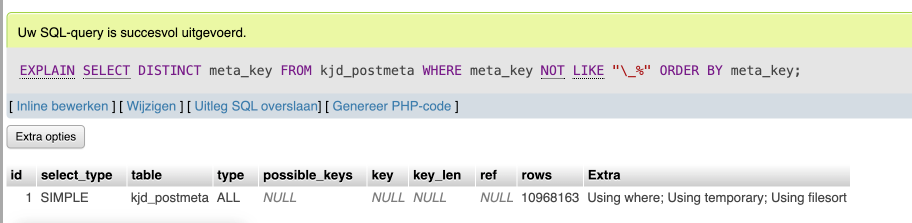
You should optimize this somehow (using WP transients? using a more optimized database query?).
Disabling it on the frontend still gives us issues on the backend off course.
-
This reply was modified 1 year, 8 months ago by
-
AuthorSearch Results
-
Search Results
-
Topic: Updating Question
Hello—
I have a client that is currently running Enfold Child Version: 1.0 / EnfoldVersion: 3.8.
We would like to get their site up to date. They are currently using WordPress 4.9.26. Can we update their WordPress to 6.5.5?
What is the best / latest php version that will work with WordPress to 6.5.5 and Enfold Version 6.0.1?
How do I update the theme?
What is the step by step process to make the above updates in the best way?
(A few weeks ago I created a staging site in BlogVault that seemed to work in staging, but when I tried to merge it back to their site I got a critical error.)
Thanks.
Guten Tag,
ich habe für drei Kunden das Theme Enfold über Themeforest erworben. Jedoch erhalte ich bei den letzten beiden Käufen bei der Eingabe des Purchase Codes im Theme die Information, dass keine Verbindung zu Envato hergestellt werden kann. Entsprechend erhalte ich trotz Lizenzerwerb keine Aktualisierungen für das Theme. Woran liegt das und wie lässt sich das ändern?
We have a website that has stopped working since the update to version 6. We seem to be having similar issues to the person in this thread:
Since the update the site isn’t just slow, but it’s impossible to log into. We currently switched to a different theme to allow us to log into the website – how can we fix this?
Good morning, I am using the “Product Add-ons & Extra Options” plugin on this site https://sito-internet-torino.com/terasol/ and with the update to Enfold 6, the site goes into a loop, and the site and theme cannot coexist. Can you help me resolve this issue, please? Thank you.


