Hey Patrick,
What you are explaning is basically how caching is supposed to work, it’s supposed to serve the resources it has stored in cache. If something is changed in the theme options for example, then the Enfold style sheets will be regenerated, but not the files stored in cache. If you change images or anything related to styling, then a clearing of cache is necessary for it to show up on the frontend.
Best regards,
Rikard
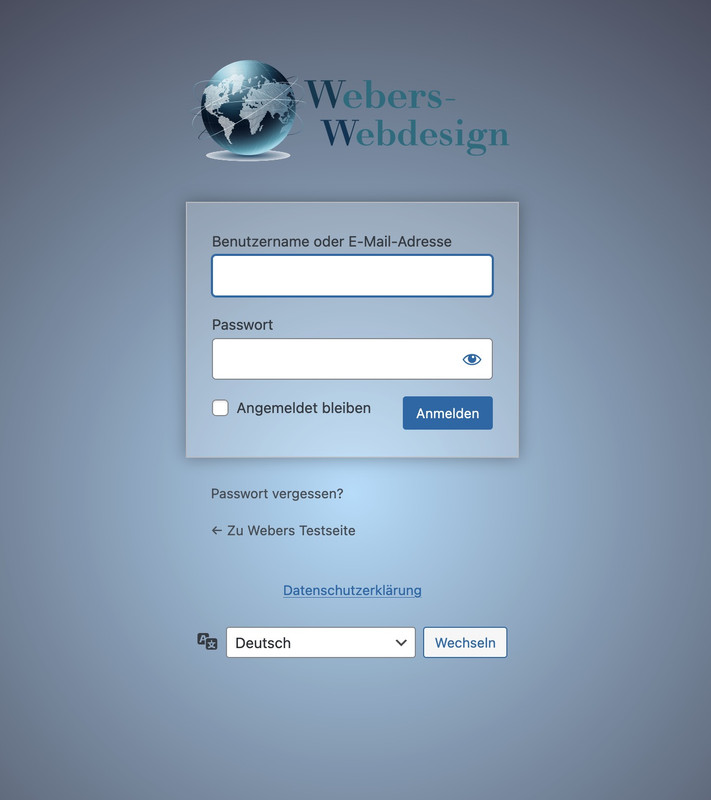
well this wordpress login screen is not influenced by the themes installed !
This is a pure wordpress setting – so you have to check where it might be set a different Login Page.
i often make an own settup for it by this snippet for child-theme functions.php:
function custom_loginlogo_url($url) {
  $url = get_site_url();
  return $url;
}
add_filter( 'login_headerurl', 'custom_loginlogo_url' );

function my_login_logo(){
$logo = avia_get_option('logo');
?>
<style type="text/css">
    #login h1 a, .login h1 a {
      background-image: url(<?php echo $logo; ?>);
      height: 120px;
      width: 320px;
      background-size: contain !important;
      background-repeat: no-repeat;
      background-position: center top;
      position: relative;
      left: 50%;
      transform: translateX(-50%);
    }
    body.login {
      background-image: -webkit-radial-gradient(circle farthest-corner at center center, #B8E1FC 0%, #231421 100%) !important;
      background-image: radial-gradient(circle farthest-corner at center center, #B8E1FC 0%, #231421 100%) !important;
      background-repeat: repeat;
    }
    body.login form {
      background: rgba(255,255,255,0.2);
      box-shadow: 0 0 15px rgba(0,0,0,0.3);
    }
</style>
<?php
}
add_action( 'login_enqueue_scripts', 'my_login_logo' );
you see in the snippet that the logo you set in the logo input field of enfold will be dynamically inserted there. If you like to have a differente one – then insert an absolute url on that place: background-image: url(<?php echo $logo; ?>);
this is then the look for it:
Hi Ismael,
Thanks for getting back to me.
I’ve gone through the documentation, installed an SMTP plugin, and configured it using the settings from SiteGround. That part is now working in the sense that emails from the Enfold contact form are being delivered to my SiteGround mailbox.
However, even after speaking with SiteGround support, I still can’t get those emails to arrive in my Gmail inbox via forwarding. SiteGround say the messages are leaving their server, but nothing shows in Gmail (not in spam either). This only started happening recently, and it seems to coincide with WordPress updates and the need to move away from the default PHP mail function to SMTP.
My concern is that I now have to rely on an extra plugin just to get a basic contact form working, which ideally shouldn’t be necessary for a core feature of the theme.
Could you clarify:
1. What exactly has changed recently that caused the built-in Enfold contact form emailing to stop working in the way it previously did?
2. Whether there is a recommended solution that doesn’t rely on an additional SMTP plugin?
3. If this is something that is likely to be addressed in future Enfold updates so that the contact form can send reliably again without extra plugins?
At the moment everything “half works”, but the forwarding/Gmail side is still unreliable, and I’d like to avoid a fragile setup if possible.
Thanks in advance for any clarification you can provide.
Kind regards,
Andrew
Hi,
I hope you are fine.
I have a responsive issue: Text in 64px not fully responsive on Mobile which make 2 titles to large on my mobile. When I simulate it on my PC Browser, it’s fine, but it brakes on my mobile.
Other responsive issue is the menu: when I decrease the width of my PC windows (on Edge), the menu is overlapping the logo before switching to burger mobile menu, thus not being fully responsive.
Any idea?
Thanks folks
An Enfold lover :-)
Hi,
I’m experiencing an intermittent issue with Enfold’s dynamic CSS (specifically post.css) not being found on the frontend when using Redis as the WordPress object cache. Sometimes images do not load correctly, too.
Setup:
– Enfold theme (latest version)
– WP Rocket
– Redis object cache
As far as I can tell, Enfold stores CSS file metadata in WordPress options (avia_stylesheet_exists, avia_stylesheet_dynamic_version, etc.) and post meta (_av_css_styles), and these get cached in Redis.
When the CSS files are regenerated on disk, Redis still holds stale option values pointing to old file references or version strings, causing the mismatch.
Deleting the object cache manually solves the problem.
Is there a recommended approach to handle this? Is this a known issue with Enfold?
Thanks you in advance!
Hi Enfold Support Team,
I’m experiencing persistent CSS issues with the Enfold theme on my WordPress site that are affecting responsiveness and styling, particularly for mobile and desktop layouts. Custom CSS added via Quick CSS or the child theme’s style.css often fails to apply, gets overridden, or doesn’t update despite clearing all caches (browser, plugins, server-side). Changes to theme options like advanced styling, colors, or typography also don’t reflect on the frontend reliably.
Specific Problems
Caching/Loading Issues: Styles revert or show defaults even after disabling CSS/JS merging and compression in Enfold > Performance.
Responsive Design Breaks: Headings get cut off on iPad/smaller screens (e.g., change font-weight to bold, font-size smaller, text-transform uppercase based on viewport).
Typography Overrides: Headings and text styles (bold, small caps, uppercase/lowercase transforms) fail to adapt responsively across devices, requiring constant !important hacks that still don’t stick.
Overrides and Conflicts: Theme options ignore inputs; unclosed Quick CSS blocks break everything; plugin conflicts (e.g., forms, checkouts) exacerbate issues.
Troubleshooting Steps Tried
Cleared caches everywhere and tested in incognito mode across browsers (Chrome, Safari, Firefox).
Disabled caching plugins, performance optimizations, and child theme customizations temporarily—no fix.
Updated WordPress, Enfold, PHP (tested 7.4 vs. 8), and relevant plugins; issue persists across devices including Mac OS.
A staging site/credentials can be provided for testing. Any guidance on debugging responsive heading styles, CSS caching, or fixes would be greatly appreciated!
-
This topic was modified 2 months, 2 weeks ago by
 Sonno.
Dear Sirs,
I am using Gravity forms and thay recommend popup maker plugin. I have therefore created a pop up with the form embedded using avia layout builder and using the button in the content elements tab. I have set up a popup called Brochure Website with the gravity form embedded with a css class of popmake-5288 but cant seem to get this to work. I have also added some php from another enfold forum see below but if even if I add this on a text block the popup short code to be selected but and when I select brochure website it wont save the trigger from here?
Please note I have added this also
Can you help
Code now in functions php
function avf_alb_supported_post_types_mod( array $supported_post_types )
{
$supported_post_types[] = “popup”;
return $supported_post_types;
}
add_filter(‘avf_alb_supported_post_types’,’avf_alb_supported_post_types_mod’, 10, 1);
function my_custom_exec_sc_only( $exec_sc_only, $obj_sc, $atts, $content, $shortcodename, $fake )
{
/**
* Return if true – Enfold already requested an execution because of preview in backend
* Otherwise this is likley to be false.
*/
if( true === $exec_sc_only )
{
return $exec_sc_only;
}
return true;
/**
* Make your checks here – make sure to return boolean true if you want to force execution
*
* Following is an example to allow it for all ajax calls.
*/
if( defined( ‘DOING_AJAX’ ) && DOING_AJAX )
{
return true;
}
return $exec_sc_only;
}
add_filter( ‘avf_alb_exec_sc_only’, ‘my_custom_exec_sc_only’, 10, 6 );
Hey Ismael, thanks for your reply.
What I mean is that in the Enfold version of the login screen there is a tiny stuff unser the field that is doind the revail password thing:
https://www.awesomescreenshot.com/video/48386775?key=6b73c617bba3728fd0fbc925e8be1fe5
It’s not recognizable at all.
It should look like more as the default theme feature.
The little strange button ist’s shown only in Enfold. Any other theme will have that eye on the fild as I was showing in my previous post.
Thanks!
Hey kreativeseite,
Enfold is compatible with PHP 8.4, but I would advise that you perform the update on a staging site first.
Best regards,
Rikard
Hi,
I checked the contact page and the email is delivered, but as spam. Note that Enfold does not deliver your emails, your mail server does. If emails from your site are classified as spam, then you need to whitelist them in your local email client, and/or improve the delivery of the messages. Your hosting provider should be able to help you out with the latter.
Best regards,
Rikard
Dear Sirs,
I am using Gravity forms and thay recommend popup maker plugin. I have therefore created a pop up with the form embedded using avia layout builder and using the button in the content elements tab. I have set up a popup called Brochure Website with the gravity form embedded with a css class of popmake-5288 but cant seem to get this to work. I have also added some php from another enfold forum see below but if even if I add this on a text block the popup short code to be selected but and when I select brochure website it wont save the trigger from here?
Can you help
Code now in functions php
function avf_alb_supported_post_types_mod( array $supported_post_types )
{
$supported_post_types[] = “popup”;
return $supported_post_types;
}
add_filter(‘avf_alb_supported_post_types’,’avf_alb_supported_post_types_mod’, 10, 1);
function my_custom_exec_sc_only( $exec_sc_only, $obj_sc, $atts, $content, $shortcodename, $fake )
{
/**
* Return if true – Enfold already requested an execution because of preview in backend
* Otherwise this is likley to be false.
*/
if( true === $exec_sc_only )
{
return $exec_sc_only;
}
return true;
/**
* Make your checks here – make sure to return boolean true if you want to force execution
*
* Following is an example to allow it for all ajax calls.
*/
if( defined( ‘DOING_AJAX’ ) && DOING_AJAX )
{
return true;
}
return $exec_sc_only;
}
add_filter( ‘avf_alb_exec_sc_only’, ‘my_custom_exec_sc_only’, 10, 6 );
Hi. I would like to change the PHP version of my website to 8.4, as this is the recommendation of the host. Is this possible with my Enfold installation (wordpress 6.9), or will it cause problems? Thank you for your help! Best regards, Andreas
Hi,
WooCommerce filter to our home page.
Please note that the default Woocommerce filters or widgets will only display on standard product pages or templates, such as product category pages or the base shop page. They will not display on custom pages, such as your homepage. This behavior is determined by the widget function, which we don’t have control over. You may need to look for a custom solution if you want to display filters on the homepage.
For the single product page, please try to follow these steps: https://kriesi.at/support/topic/enfold-sidebar-on-single-product-pages/#post-1162484
Best regards,
Ismael
Hey Andrew,
Thank you for the inquiry.
Have you tried setting a From address or activating an SMTP plugin? You should also try using a different email address to test whether the issue is related to the email provider. Please check the link below for more information on how to troubleshoot contact form issues:
We would like to check this further, but it looks like you may have forgotten to include the site URL in the private field. Please provide this information so we can investigate the issue further.
Best regards,
Ismael
Hey Sonno,
Thank you for the inquiry.
Add a Fullscreen Slider, then add a Color Section below it with a unique ID or Custom CSS Class. You can then apply some css modifications to move the Color Section over the slider and set its background to transparent. If you can create a test page, we’ll try to check it further.
— https://kriesi.at/documentation/enfold/add-custom-css/
Best regards,
Ismael
Hi,
Thank you for the update.
(removing the custom code and using only the Enfold Theme Options field with a 512x512px PNG)
Have you tried using an actual favicon or .ico file instead of a png? Again, we checked the site on a favicon validator and it can properly detect the icon. It’s also visible in the browser tabs.
We found these markups, which might be conflicting with the default favicon. These are not generated by the theme.

Best regards,
Ismael
Hi guys,
I hope you’re well.
I’m having an issue with the Enfold contact form across several websites I own. The forms were working fine previously, but have recently stopped sending emails without any changes on my side.
A few details:
* All sites are running the **latest version of WordPress**
* The **Enfold theme is updated** to the latest version
* I’ve double-checked the **admin email addresses** and settings
* The contact forms **used to work**, and then suddenly stopped
* I installed **Contact Form 7** as a test and its emails are sending and being received in my Gmail inbox without any issues
I’ve gone through the documentation you recommend regarding email delivery and contact forms, but I still haven’t been able to get the built-in Enfold contact form working again.
Could you please advise
Many thanks in advance for your help.
Kind regards,
Andrew
if this works – here is the extended Way trying to have that for pagination or “load more” Masonry:
/**
 * ENFOLD MASONRY: Show Sticky Posts first in Blog/Portfolio Masonry only
 * (excludes Masonry Galleries)
 */
function avia_masonry_entries_query_mod($query, $params) {
    // Exit if admin
    if (is_admin()) return $query;

    // Exit if this is a Masonry Gallery
    if (isset($params['container_class']) && $params['container_class'] === 'av-masonry-gallery') {
        return $query;
    }

    // Exit if post_type is attachment (additional safety check)
    if (isset($query['post_type']) && $query['post_type'] === 'attachment') {
        return $query;
    }

    // Exit if no sticky posts exist
    $sticky = get_option('sticky_posts');
    if (empty($sticky)) return $query;

    // Get the limit from element settings
    $per_page = isset($query['posts_per_page']) ? $query['posts_per_page'] : 6;

    // Fetch all non-sticky posts matching the query
    $args = array(
        'post_type'      => $params['post_type'],
        'post__not_in'   => $sticky,
        'posts_per_page' => -1,
        'fields'         => 'ids',
        'tax_query'      => !empty($query['tax_query']) ? $query['tax_query'] : array(),
    );
    $other_posts = get_posts($args);

    // Merge sticky posts first, then others
    $all_ids = array_merge($sticky, $other_posts);

    // Apply the ordered IDs to the query
    $query['post__in'] = wp_parse_id_list($all_ids);
    $query['orderby']  = 'post__in';
    $query['order']    = 'ASC';
    $query['posts_per_page'] = $per_page;
    $query['ignore_sticky_posts'] = true;

    return $query;
}
add_filter('avia_masonry_entries_query', 'avia_masonry_entries_query_mod', 10, 2);
EDIT: i changed the code with a check if it is an image masonry – because it should not influence these masonries.
can you test this instead ( and remove your solution temporarly ) :
/**
 * Enfold Masonry Filter: Show sticky posts first, followed by other entries (including CPTs)
 * This filter captures selected post types dynamically from the element settings.
 */
function avia_masonry_entries_query_mod($query, $params) {
    // Prevent the filter from running in the WordPress admin backend
    if (is_admin()) {
        return $query;
    }

    // 1. Get the IDs of all sticky posts
    $sticky = get_option('sticky_posts');

    // If no sticky posts exist, return the original query without modifications
    if (empty($sticky)) {
        return $query;
    }

    // 2. Fetch IDs for the remaining posts (including Custom Post Types)
    // We use $params['post_type'] to dynamically support whatever is selected in the Masonry element
    $args = array(
        'post_type'      => $params['post_type'],
        'post__not_in'   => $sticky,         // Exclude stickies so they aren't duplicated
        'posts_per_page' => -1,              // Fetch all IDs to ensure we have enough for the merge
        'fields'         => 'ids',           // Performance optimization: only fetch IDs
    );

    // If a specific taxonomy/category is selected in the element, apply it to our helper query
    if (!empty($params['taxonomy'])) {
        $args['tax_query'] = array(
            array(
                'taxonomy' => $params['taxonomy'],
                'field'    => 'id',
                'terms'    => explode(',', $params['categories']),
            ),
        );
    }

    $other_posts = get_posts($args);

    // 3. Merge the arrays: Stickies first, then the remaining posts
    $combined_ids = array_merge($sticky, $other_posts);

    // 4. Sanitize the IDs (ensure they are integers)
    $query['post__in'] = wp_parse_id_list($combined_ids);

    // 5. Force the Masonry to respect the exact order of our merged array
    $query['orderby'] = 'post__in';
    $query['order']   = 'ASC';

    // Set the final limit of items to display
    $query['posts_per_page'] = 6;

    // Disable default sticky handling to prevent WP from interfering with our custom order
    $query['ignore_sticky_posts'] = true;

    return $query;
}
add_filter('avia_masonry_entries_query', 'avia_masonry_entries_query_mod', 10, 2);
 Karen Butler-Purry
Guest
Expired key number:
b7ac163e-cf03-4000-aa4d-a6dc4a6bfc00
We need to renew our expired key and purchase an Enfold theme update. The login credentials for our Themeforest account are associated with a former employee’s email address. Therefore we cannot login or reset our login on the Themeforest website.
Can you please look at my site and see why both forms are not working now. When you hit Submit, they dont’ do anything. I have many websites that use Enfold and have form issues a lot. Hopefully you can find a solution here so I don’t lose any clients because this is how people contact them. And if it doesn’t work, there’s no point of the website. Please help.
 Philipp Kellerhals
Guest
Guten Tag
Heute habe ich einen neue 6-monatige Support Lizenz erworben:
Item ID Qty Description Amount
4519990 1 Enfold – Responsive Multi-Purpose Theme – 6 months renewed
support
$41.13
Invoice Total: USD $41.13
Paid via PayPal
Unter meinem Profil https://kriesi.at/support/profile/philippkellerhals/ kann ich jedoch kein neues Support Ticket aufgeben.
Wie kann ich meine neue Lizenz nutzen, um ein Support-Ticket für die Webseite https://kellerhalsconsulting.com/ zu eröffnen?
Vielen Dank!
Freundliche Grüsse
Philipp Kellerhals
Hi,
also il your demo there is the missing eye icon (the one what would suggest to see the password:
The strange littpe square the should contain it is also misplaced (should be inside the password field)

It should look like this svg (default theme)
data:image/svg+xml,<svg width="20" height="20" viewBox="0 0 20 20" fill="none" xmlns="http://www.w3.org/2000/svg"><path d="M17.3 3.3C16.9 2.9 16.2 2.9 15.7 3.3L13.3 5.7C12.2437 5.3079 11.1267 5.1048 10 5.1C6.2 5.2 2.8 7.2 1 10.5C1.2 10.9 1.5 11.3 1.8 11.7C2.6 12.8 3.6 13.7 4.7 14.4L3 16.1C2.6 16.5 2.5 17.2 3 17.7C3.4 18.1 4.1 18.2 4.6 17.7L17.3 4.9C17.7 4.4 17.7 3.7 17.3 3.3ZM6.7 12.3L5.4 13.6C4.2 12.9 3.1 11.9 2.3 10.7C3.5 9 5.1 7.8 7 7.2C5.7 8.6 5.6 10.8 6.7 12.3ZM10.1 9C9.6 8.5 9.7 7.7 10.2 7.2C10.7 6.8 11.4 6.8 11.9 7.2L10.1 9ZM18.3 9.5C17.8 8.8 17.2 8.1 16.5 7.6L15.5 8.6C16.3 9.2 17 9.9 17.6 10.8C15.9 13.4 13 15 9.9 15H9.1L8.1 16C8.8 15.9 9.4 16 10 16C13.3 16 16.4 14.4 18.3 11.7C18.6 11.3 18.8 10.9 19.1 10.5C18.8 10.2 18.6 9.8 18.3 9.5ZM14 10L10 14C12.2 14 14 12.2 14 10Z" fill="%23111111"/></svg>
Hi Ismael,
I am writing to update you on the situation. Unfortunately, even after following your last suggestion (removing the custom code and using only the Enfold Theme Options field with a 512x512px PNG), the favicon is still not appearing in the Google SERP.
It has been two weeks since the last change, and I have also requested a fresh indexing via Google Search Console, but the default globe icon remains.
Since I have already:
Used the Enfold built-in favicon field.
Verified that the file is accessible in the root directory.
Cleared all caches (Litespeed and server-side).
Checked that the site is correctly validated by external favicon checkers.
Is there anything else we can check? Could there be a specific meta tag generated by the theme that might be conflicting, or perhaps a suggestion on how to make the favicon “more attractive” specifically for the Google Bot crawler?
I would really appreciate any further technical insight you might have.
Best regards, Stefano
Hey pikkuapuri,
Please try the following in Quick CSS under Enfold->General Styling:
.grid-sort-container .av_one_third {
  width: 33%;
}
Best regards,
Rikard
Hey krafzik,
Are you sure that you are using the correct file? Note that you might have to extract the files that you download from Themeforest, then use the file enfold.zip located in the extracted folder.
Best regards,
Rikard
Hey Mark,
Thanks for reaching out to us. Classic or Modern are only demos, all demos are included in the purchase and can be imported in the theme options.
The update to 7.1.3 has to be done manually from the version you are running, please refer to my replies in this thread: https://kriesi.at/support/topic/enfold-4-5-theme-update-update-failed-download-failed-a-valid-url-was-not-pro/#post-1021541
You can either update manually via FTP: https://kriesi.at/documentation/enfold/how-to-install-enfold-theme/#theme-update, or upload the theme as if it was new under Appearance->Themes->Add New Theme.
If that doesn’t work then please try to delete the whole theme folder, then replace it with the new version. Make sure that you have backups of the site before starting updating.
Also please read this after you have updated: https://kriesi.at/documentation/enfold/theme-registration/
Best regards,
Rikard
Hi, how can i realize something like this in Enfold?
I tried iz withe the Fullscreen Slider but there ist no possibility to place text over the slider element.
Thanks in advance.
 Mark
MarkGuest
Hello
I have adopted a website and it currently runs enfold 4.0.7 and when updated wordpress it crashed. Therefore I understand I need to purchase updated version. However I have a few questions so I can chose the right one (modern vs classic).
1. How do i know if the current version of enfold I currently have is classic or modern (does not say in theme details)?
2. As I am a not a professional web designer, is it seamless to go from the 4.0.7 version to the latest version (7.0+)?
3. What is the difference between enfold classic and modern?
4. Considering I am wanting to go from my version 4.0.7 to latest version, which do you recommend classic or modern?
5. If I purchase modern, does it still support classic (if that is what my current website is)?
6. Will I need to create a new child theme after buying updated enfold theme?
For reference, if you need to see my website to determine classic or modern – it is http://www.jaunaviltis.lt
thank you for your time to answer these questions
Mark
Hi,
I´ve downloaded the installable file enfold.zip as well as the “installable WordPress file only”. Both of them can´t be installed.
This is the message:
Das Theme wird von der hochgeladenen Datei enfold.zip installiert
Entpacken des Pakets …
Die Datei konnte nicht kopiert werden. enfold/config-layerslider/LayerSlider/assets/static/codemirror/addon/dialog/dialog.css



