Viewing 30 results - 601 through 630 (of 244,626 total)
  • Author
    Search Results
  • #1494650

    Our website’s ver. are WordPress 6.9.1 & Enfold 7.1.3.
    Thank you for your text messages.

    #1494643

    Hey Leoning,

    Thank you for the inquiry.

    Where is the site hosted? It’s possible that your hosting provider or server is blocking outgoing requests to external servers, including the demo source (kriesi.at). If that’s the case, you will need to import the demo manually using the available XML demo files. Please refer to this documentation for more info.

    https://kriesi.at/documentation/enfold/import-demos/#how-to-manually-import-a-theme-demo

    Let us know if you need more assistance.

    Best regards,
    Ismael

    Hi,

    Great, I’m glad that Ismael could help you out. We’ll close this thread for now then, please open a new thread if you should have any further questions or problems.

    Best regards,
    Rikard

    Lee Sang Min
    Guest

    Hello Enfold Team,

    I am a long-time user of the Enfold theme.
    I have been using Enfold for several years because of its excellent design and overall convenience, and I truly appreciate the quality of your work.

    However, I have been experiencing a recurring issue when using the Tab Section element while building pages.

    When I add layouts or other content elements inside a Tab Section, errors occur frequently. In many cases, after editing the content, the page fails to save properly. This issue happens repeatedly and seriously interrupts the page-building workflow.

    In most situations, once I remove the Tab Section from the page, the problem disappears and the page works normally again. Because of this, the Tab Section has become a major obstacle during content creation.

    Could you please look into this issue and let me know if there is a fix or an update planned to resolve this problem?

    Thank you very much for your continued support and for creating such a great theme.

    #1494618

    In reply to: Light issue

    Hi,

    Thank you for the update.

    You can try temporarily disabling the Enfold > Performance > File Compression settings to regenerate the scripts and stylesheets. We also found that the WP Media Folder plugin is loading the same lightbox assets. Have you tried disabling this plugin or disabling its lightbox option?

    Best regards,
    Ismael

    #1494606

    Hi,
    Glad that Ismael could help, if you have further questions please open a new thread and we will try to help. Thanks for using Enfold.

    Best regards,
    Mike

    #1494603
    madisonstudios1
    Participant

    I have the settings all set for the Cookies on https://procomconsulting.com/ using Enfold.
    It was working, and not it is not. I have reinstalled Enfold. I reinstalled WP too.

    Enable Cookie Consent Messages:
    “Enable cookie consent message selected”

    Default Cookie Behaviour:
    I have tried all four options.

    There are a ton more settings too many for this ticket. I will add the login info below for your review.

    ANOTHER WEIRD THING:
    I can not DISMISS all the Enfold messages, the X won’t close them. Strange things going on.

    Can you help please???

    #1494597

    In reply to: Update template

    Hey Niels,

    The update to 7.1.3 has to be done manually from the version you are running, please refer to my replies in this thread: https://kriesi.at/support/topic/enfold-4-5-theme-update-update-failed-download-failed-a-valid-url-was-not-pro/#post-1021541
    You can either update manually via FTP: https://kriesi.at/documentation/enfold/how-to-install-enfold-theme/#theme-update, or upload the theme as if it was new under Appearance->Themes->Add New Theme.
    If that doesn’t work then please try to delete the whole theme folder, then replace it with the new version. Make sure that you have backups of the site before starting updating.
    Also please read this after you have updated: https://kriesi.at/documentation/enfold/theme-registration/

    Best regards,
    Rikard

    do you think of that perhaps?
    https://enfold.webers-webdesign.de/3-columns/

    #1494592
    Niels Oneglio
    Guest

    Good morning,

    I’ve taken over a site with the Enfold template version 4.7.2. I’d like to upgrade it by purchasing a new license on Themforest to version 7.1. Should the site remain as it is now, or will I have to recreate it entirely? I know the version gap is significant, so I have these doubts!

    See you soon.
    Niels

    #1494587

    Hi,
    Glad that we could help, thanks also for helping Guenni007, if you have further questions please open a new thread and we will try to help. Thanks for using Enfold.

    Best regards,
    Mike

    #1494582

    Hi Rikard,

    thank you for your answer. So can i export the child theme settings and import them to the Enfold theme? How is this working? Theme-Options / Import & Export will the styles be all exported?
    best regards

    Stephan

    #1494577

    In reply to: Enfold Shop Demo

    Hey actichemph,

    Thank you for the inquiry.

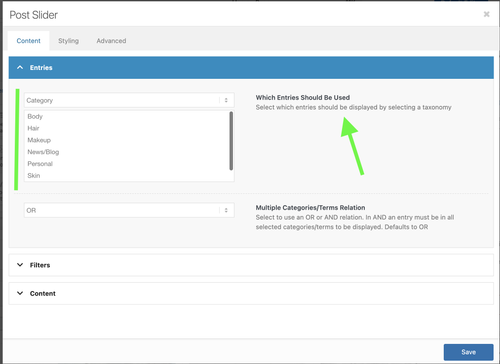
    We have added a Post Slider element below the slider, and the posts seem to be displaying as expected. You may need to select a category in the Content > Entries > Which Entries Should Be Used settings, as shown in the screenshot below.

    fZ3Y3XI.md.png

    To help you get started with the theme, please check out the documentation and feel free to reach out here in the forum if you need any assistance.

    https://kriesi.at/documentation/enfold/

    Best regards,
    Ismael

    ok – du hast jetzt statt bold das mit der Farbe realisiert, das die Jahre in einen eigenen tag kommen. Das wäre so nicht nötig gewesen.
    Denn die Farbe hättest du dann generell über dieses den strong-tag setzen können; so wie ich es auf der Beispielseite tat. Den bold style hatte ich dann ja mittels css zurückgenommen.

    damit meine Setzungen greifen, könntest Du jetzt eben das über dein span-tag machen:

    #top .my-listings li {
      display: grid;
      gap: 0 20px;
      grid-auto-flow: row;
      grid-template-columns: 120px 1fr;
      justify-content: start;
      margin: 0;
      margin-bottom: 10px;
    }
    
    #top .my-listings li span {
      font-weight: normal;
      justify-self: end;
    }
    
    #top .my-listings li em {
      font-style: normal;
    }
    
    /* === responsive styling === */
    @media only screen and (max-width: 469px) {
      #top .my-listings li {
        grid-template-columns: 1fr;
        justify-content: center;
        margin-left: 0 ;
      }
    
      #top .my-listings li span {
        font-weight: normal;
        justify-self: start;
      }
    }

    Das mit dem Kursiv setzen für den rechten Text brauchst du nur wenn du einzelne Begriffe dort verlinken möchtest. Wenn du immer den kompletten rechten Teil verlinkst, wie es in einem Beispiel auf deiner Seite war ist dies noch nicht mal nötig, da dann der ganze linke Teil in einem a-tag steht.

    Diese Einstellung hier bestimmt wo die Jahre bündig sind:

    #top .my-listings li span {
      font-weight: normal;
      justify-self: end;
    }

    wenn du z.B die lieber linksbündig hast, dann stelle justify-self : start
    (ps kopiere und ersetze die my-listings Regeln komplett, da ich noch das margin-left der enfold Standard Einstellung damit überschrieb. Der #top selektor garantiert hier noch das ich keine unnötigen !important Regeln setzen muss um bestehende Regeln von Enfold zu überschreiben.

    bei deiner Schriftgröße würden für den linken Teil der Jahre auch 90px reichen:
    grid-template-columns: 90px 1fr;

    wenn du die Jahre jetzt auf einen Schlag verändern willst, dann könntest du jetzt setzen ( bold und andere font farbe)

    #top .my-listings li span {
      font-weight: bold;
      justify-self: start;
      color: #3f9681 !important;
    }

    (ps hier ist das !important nötig, da du einen inline-style gesetzt hattest – mit dem Einfärben im Textfeld)

    wenn du der ganzen Liste ( also dem ul tag ) nur noch eigenschaften geben möchtest :

    #top .my-listings {
      padding: 5px;
      background-color: #f8f8f8;
      border: 1px solid #3f9681; 
      border-width: 1px 0px 0px 1px !important; /* unterschiedliche Border Weiten für : Oben, Rechts, Unten, Links */
    }

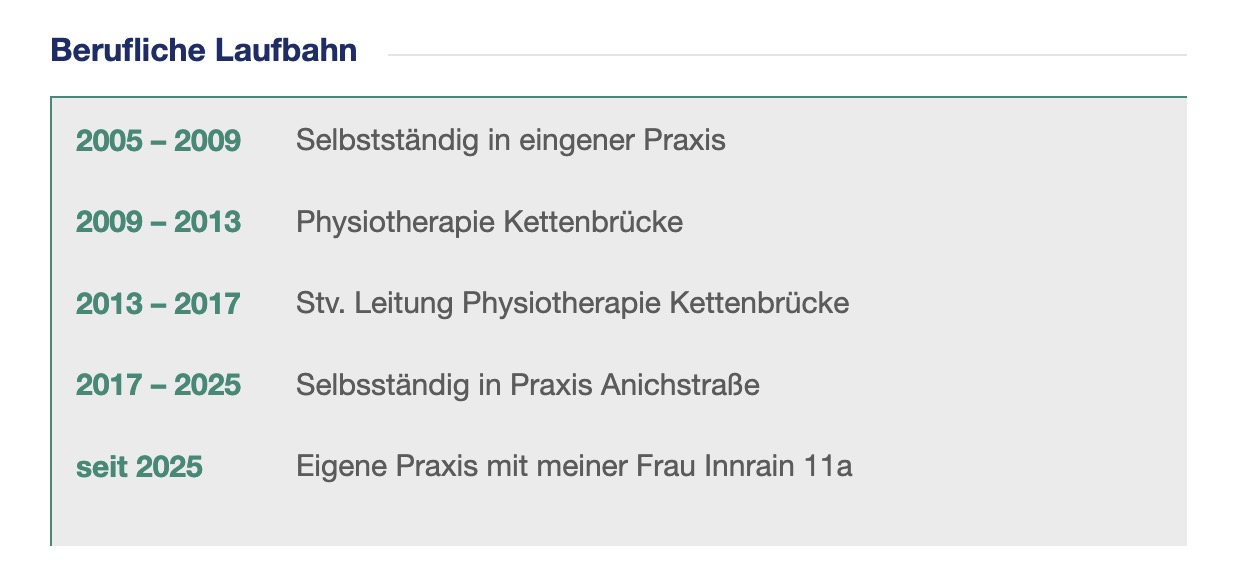
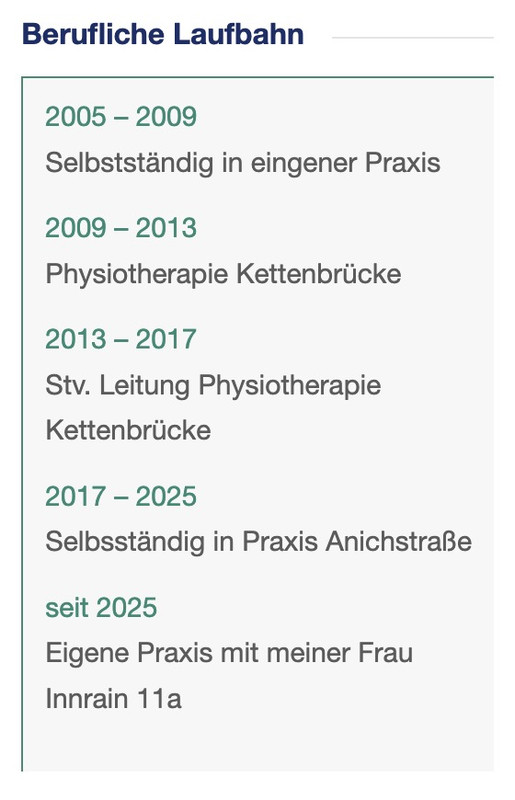
    Resultat wäre dann:

    wenn dir der Abstand der Zeilen ( der li elemente ) zu groß ist, dann ändere diesen Wert bei den
    #top .my-listings li auf z.B. 5px

    du siehtst, über diese custom class my-listings – ist dann alles geregelt. Sobald du eine Liste einsetzt, und den text-block mit der Klasse versiehst, wird die darin enthaltene Liste so dargestellt.

    _____________

    Responsiv ( für Mobile screenweiten im Hochkant Format)

    dcarlsondesign
    Participant

    The Featured Image does not display when —

    Single Author, small preview Pic (no author picture is displayed, feature image is small)

    The featured image does display in other Blog style settings such as Feature image is big or in the Grid Layout…alas these are not styles I want.

    I just updated to Enfold 7.1.3 and also WordPress 6.9 — and the small featured imaged displayed before the update.

    Do you know how to fix this?

    Issue can be seen here: (no small featured images display to left of text 180 x 180 pixel selected

    #1494562

    Not at all. Default editor does not load the page. We’ve reported that over and over. And we never ever had to revert to the WordPress default editor to do anything – ANYTHING – in Enfold in the 10 years we have used this theme. That is, up to now. Unless we are misreading something, you have made a major change to the way Enfold works that is so completely unuser friendly and costs coders significant lost time. Or are we wrong? Are you saying that there was never a color picker in Enfold before now?

    #1494560

    There was always a color picker in text editing until now. Why did you remove it? What was the logic in removing such an elemental user friendly element that is found in virtually every other website builder, wordpress theme, and creative apps ranging across all Adobe products to Mailchimp to Canva…really all over the world. We need to have this back as an Enfold standard core feature. When will that happen?

    #1494558

    Hey MOHAMED ELAMINE MEFTAH,
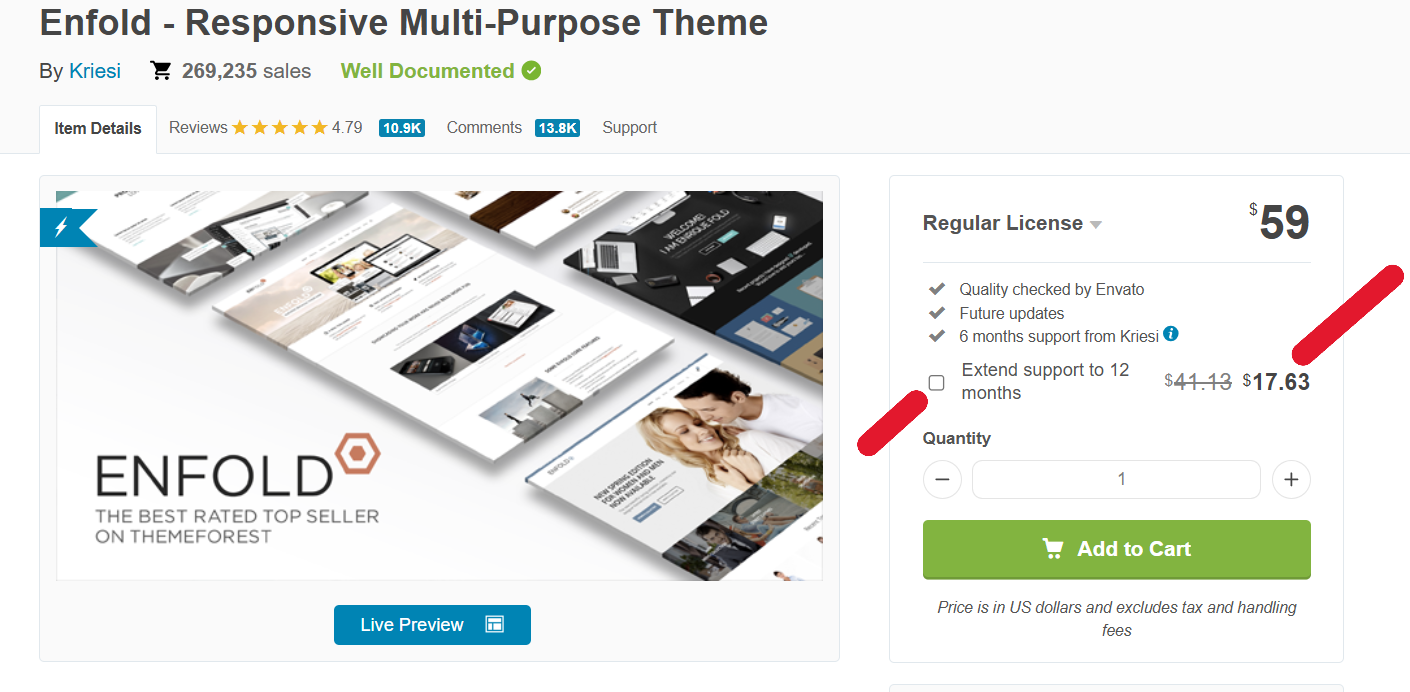
    The only place that the theme can legally purchased is here: https://themeforest.net/item/enfold-responsive-multipurpose-theme/4519990
    Most pirate sites add backdoors and other malicious code, I would not trust them.
    When you purchase a legal license you will have lifetime updates and 6 months of forum support, I recommend upgrading to a full year for just a little more.
    fQjgqlf.png

    Best regards,
    Mike

    MOHAMED ELAMINE MEFTAH
    Guest

    Hello Enfold Team,

    I hope you are doing well.

    I recently came across a website called GPL Times, which claims to distribute products under the GNU GPL license, and I noticed that the Enfold theme is listed there.

    To ensure that I am using Enfold legally and ethically, I would like to kindly ask you to clarify the following points:

    Has Enfold officially granted GPL Times or any other third-party site the right to distribute Enfold under any license?

    Am I allowed to use Enfold obtained from GPL Times on my own or my clients’ websites without violating Enfold’s Terms of Service?

    Are there any restrictions, license keys, or conditions I need to be aware of when using Enfold obtained from GPL Times?

    Thank you very much for your time and clarification.

    Kind regards,

    #1494552

    In reply to: excerpt length

    Hey MarcusEls,
    It depends on which element you are using, there are a few different solutions, a link to your page and a admin login would help. Or review this thread: https://kriesi.at/support/topic/how-to-adjust-the-excerpt-length-in-enfold/#post-1415474

    Best regards,
    Mike

    Hi,
    Glad that Ismael could help, if you have further questions please open a new thread and we will try to help. Thanks for using Enfold.

    Best regards,
    Mike

    #1494547

    Hi,
    The code that you have posted above is your Purchase Code, not your Envato Personal Token, they are two different things.
    So you have entered the wrong info in the theme field that says: Enter a valid Envato private token.
    Please review this page in our documentation and open each toggle to read all of the info. You need to create the Token in your Envato account and Set the required Token Permissions, as per the documentation.

    Best regards,
    Mike

    #1494541

    In reply to: Color headers link

    Hi,

    Thanks for that. Enfold is not installed on the site that you sent login details to.

    Best regards,
    Rikard

    #1494540

    Hi,

    I’m not sure what you mean by the layout being broken. If you are referring to the theme settings, then they can be exported and imported under Enfold->Import/Export. The critical error is not there when the parent theme is activate, so that means that the problem is coming from your child theme.

    Best regards,
    Rikard

    #1494538

    Hey michellebc,

    Please follow this: https://kriesi.at/documentation/enfold/theme-registration/

    Best regards,
    Rikard

    #1494537

    Topic: Expired Link

    in forum Enfold
    timmainz
    Participant

    Hi There :-) i tried to upload the enfold zip-Files but in WP it says the link has expired.
    In my download folder are 2 versions since i bought the theme for an other HP before. I can see which one is the “newer” one. But i used all zip Files, always getting the expired Link message

    #1494536

    In reply to: Upgrade Question

    Before you change anything, create a backup copy of your site’s status quo (a good plugin, even in the free version, is: duplicator)

    I would recommend this approach to everyone, especially for major updates (5.x to 6.x; …). This way, you always have a rollback option in the background.

    The advantage of this method is that it can be reversed.
    Uploading the new theme takes a little time; if everything goes well, the website will only be offline for a short time (only for the moment of renaming).

    Update via ftp

    • Download the “installable WordPress file only” file from themeforest and unzip it
    • After that – you got a folder : enfold
    • Rename this downloaded newest version to enfold-new
    • via ftp: Upload that enfold-new folder to the themes folder
    • ftp: You now have the “enfold” folder (the older version) and the “enfold-new” folder side by side.
    • via ftp: Rename the existing enfold folder to f.e. enfold-old
    • via ftp: Rename your uploaded enfold-new folder now to enfold
    • On Enfold – Performance – check mark and “Delete Old CSS And JS Files?”
    • Check if your Website works to your full satisfaction.
    • Yes – then stop here – Update is finished
    • After a while of testing – you can delete that enfold-old folder via ftp
    • No – delete or rename back the enfold folder back to enfold-new
    • rename the enfold-old folder back to enfold
    • check on enfold board if there are known bugs – or similar problems

    PS: I’m not sure if the new Enfold also has requirements for the PHP version number.
    Log in to your hoster and check which PHP version is set there.
    Most hosts will show you which PHP version they currently prefer (8.2, 8.3—some even recommend the 8.4 PHP version).

    #1494535

    With these larger and bolder icons, you will now see a shift when opening the submenus (“Services”), which you can prevent by widening the whole thing (e.g., 375px instead of 350px). You could also reduce the indentation of the menu items (paddings).

    /* you can set the width to 375px f.e. on the enfold options */
    .html_av-overlay-side .av-burger-overlay-scroll {
      width: 375px;
    }
    /* However, this width setting is not mandatory if you only reduce these indents and leave the width at 350px. */
    .html_av-overlay-side #top #wrap_all .av-burger-overlay li a {
      padding: 15px 30px;
    }
    
    .html_av-overlay-side #top #wrap_all .av-burger-overlay li li a {
      padding-left: 60px;
    }
    #1494533
    slikslok
    Participant

    Looking for a snippet to show a deafult image in blog views – but NOT Single view (there only images should be shwon, which are uplaoded with the post).
    I tried it like this:

    function enfold_fallback_thumb_url( $size = ‘enfold-blog-thumb’ ) {
    // Deine Fallback-ID (anpassen!)
    $fallback_id = 4283;
    return wp_get_attachment_image_url( $fallback_id, $size );
    }

    // Enfold-kompatibler Filter: Nur Übersicht, kein Single
    function enfold_fallback_thumbnail_html( $html, $post_id, $post_thumbnail_id ) {
    global $post;

    // Admin/Single/hat Bild: überspringen
    if ( is_admin() || is_singular() || $post_thumbnail_id ) {
    return $html;
    }

    // Nur Posts in Übersichten
    if ( ! is_home() && ! is_archive() || $post->post_type !== ‘post’ ) {
    return $html;
    }

    // Fallback-Bild rendern (Enfold-Size)
    $fallback_html = ‘<img src=”‘ . enfold_fallback_thumb_url( ‘enfold-blog-thumb’ ) . ‘”
    alt=”‘ . esc_attr( get_the_title( $post_id ) ) . ‘”
    class=”attachment-enfold-blog-thumb wp-post-image fallback-thumb” />’;

    return $fallback_html;
    }
    // Filter aktivieren
    add_filter( ‘post_thumbnail_html’, ‘enfold_fallback_thumbnail_html’, 10, 3 );

    But it doesn’t work. Any advices? Thakns
    Tim

    #1494526
    michellebc
    Participant

    I have a valid support token for a few more month yet I am getting the following message:
    3ccae7d4-e678-4d58-a4cd-6925c154b65b
    Last time we checked the token, we were not able to connect to Envato:

    Purchases could not be accessed
    Username could not be accessed (needed for your information only)
    E-Mail could not be accessed (needed for your information only)
    Following errors occurred:

    Purchases: Your private token is invalid.
    username Your private token is invalid.
    email Your private token is invalid.
    Purchases: A problem occurred accessing your purchases. Unable to check for updates.

Viewing 30 results - 601 through 630 (of 244,626 total)