I’m using the plugin Filter Everything Pro (https://filtereverything.pro/). The plugin works perfectly with the custom post type “Organizations” (https://www.give.or.at/organisation/). However, the filter isn’t working correctly on the shop page (https://www.give.or.at/material/). As long as the number of filter results is less than the number of products per page (e.g., 6 results for 15 products per page), it only displays the 6 filtered results. But the pagination for all 53 shop pages is visible at the bottom.
Please filter for “Aggression” + “School Leadership” and you’ll see the problem. If you access the results page externally at https://www.give.or.at/material/thema-aggression/target-schulleitung/, the pagination disappears.
The filter “Aggression” returns 42 results. The first page shows correctly filtered results, but again with pagination for 53 pages. From page 2 onwards, the products appear unfiltered again. However, accessing the results page externally at https://www.give.or.at/material/thema-aggression/ only shows three pages with the correct results.
I tested the plugin on another domain with a standard WordPress theme and WooCommerce. It’s definitely a problem with Enfold. The filter plugin worked correctly in the shop during the initial installation.
Best Regards,
Günter
Hey Alex,
The theme can only be purchased here: https://themeforest.net/item/enfold-responsive-multipurpose-theme/4519990
When I check Envato offers credit cards:
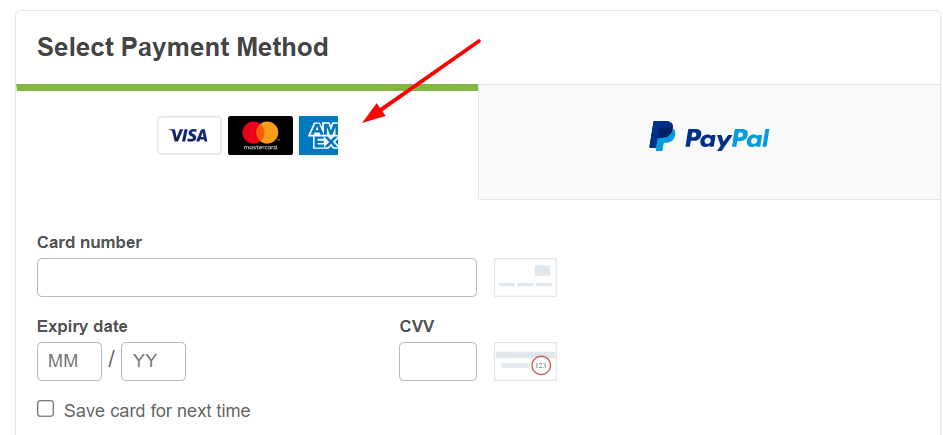
Best regards,
Mike
 Alex
AlexGuest
Hi! How can I buy enfold wordpress theme? Envato Market does not have a crypto or credit card payment option.
Hi
I too have had a message about the 7.1.3 Enfold Cross Site Scripting (XSS) vulnerability
Please advise
Thank you
Nick
Hi everyone,
I know this is a basic question, but I don´t know how to solve it. After installing WordPress and Enfold, my page builder looks like this (See picture 1). But I would like to have an environment with metaboxes on the side, similar to what picture 2 shows. It must be a simple configuration, but I cannot find the right key. Can someone help me to achieve this desired configuration?
In other words:
Picture 1: Current working setup

Link: https://drive.google.com/file/d/1DB0Btl_SxxnxGEIuTxbusOWdMC7nyNIE/view?usp=sharing
Picture 2: Desired outcome

Link: https://drive.google.com/file/d/1sIcB5jiVChSJPVlCUO8EYAXjGkp2N2RZ/view?usp=sharing
Othernotes:
I just started with this website. Installed plugins: RankMath SEO, WorldFence, Cookie Compliance, and UpdraftPlus.
-
This topic was modified 2 months, 1 week ago by
 tinycreatorsclub.
-
This topic was modified 2 months, 1 week ago by tinycreatorsclub. Reason: Pictures were not showing up
-
This topic was modified 2 months, 1 week ago by tinycreatorsclub. Reason: The pictures were still not showing up, I pasted the link on the text
Hi,
Thanks for the update. Please open a new thread if you should have any further questions or problems.
Best regards,
Rikard
Hi Mike,
Both IPv4 and IPv6 are whitelisted.
Please take a look and let me know.
If you are able to access, the most urgent thing to resolve is that the product page sidebar moved to the left like all other pages.
Ismael sent me those 2 steps (PHP and quick CSS), but the PHP is not running properly.
https://snipboard.io/iBH6VE.jpg
Also, after you told me that the sidebars/Woo filters won’t work on our home page, I’ve downloaded a Mega Menu plugin to bring all the categories and search filters to the home page. But … I can’t bring them up as a menu within the same design/location we have, using the Enfold theme default menu placement. It always shows underneath the header. It would be awesome if we could have the same look and feel.
Online Shop: https://snipboard.io/Yw6hGR.jpg
Akhurst global site: https://snipboard.io/KlMEuG.jpg
You’ll notice that we use a code snippets plugin to store all the specific code for each site, as we run our sites on a multisite platform.
The website is 99% done, and I think you can help me get it done once and for all ;)
https://snipboard.io/kaFzCy.jpg
Thank you so much!
Leo
We’re having problems with an order document on a website built with the Enfold theme. The document doesn’t arrive when the customer resubmits or ends up in the spam filter.
What could be the problem?
Link to document:
 Rina Peru
Guest
I am considering to use the Enfold Lawyer. I’m not a lawyer but I think that the layout will work best for our business (cosmetic ingredients). I’m sure the colors are customizable, but can there be a full slider on the Home page? Enfold Lawyer demo Home page is fixed.
Solutions
This security issue has a low severity impact and is unlikely to be exploited.
maybe it is not so urgent ;)
____________________
Perhaps it’s time to introduce a nonce solution for all Enfold scripts?
(for my own i have written a small plugin that will bring to every script/inline-script a nonce-key; and my csp directive says:
script-src ‘nonce-key==’ ‘strict-dynamic’ ) that is the best against XSS – and check f.e. on: https://securityheaders.com/?q=https%3A%2F%2Fwebers-testseite.de&followRedirects=on )
Hi,
We’ve built a lot of websites with Enfold and WPML. This always works fine. However, now we’re using Polylang for a website and this has some conflicts with Enfold. It seems the options page for Enfold isn’t supported in multiple languages. Whenever we change a setting in one language, it clears or overwrites the settings in other languages too. Any idea how to solve this?
 Andrew McMullen
Guest
Hello,
I want to make a serious complaint about the Enfold theme’s very large “Reset All Options” button being placed right under every page in Enfold Theme Options. The placement makes it extremely easy to click by accident.
I destroyed my site in one click after spending three days meticulously setting it up. I’ve seen on your forums that this issue happens to many users, and it’s not uncommon. My support period has expired and I paid for this theme a long time ago, so it feels unfair that I have to pay again just to report how problematic this placement is.
There is no clear “Are you sure?” or confirmation before the reset executes, and the button is right where your eye and cursor naturally land as you scroll the settings. When I have clicked it in the past, I thought it was resetting only the specific settings page I was on. This time the placement caused the click — I didn’t even read the button text before instinctively clicking because it was right where I expected the “Save” or similar button to be.
This needs to be updated. A destructive action like this should be in a safe location and require a confirmation step, not shown prominently on every settings page where it’s constantly open to accidental disastrous results. It’s a simple change that would prevent a lot of unnecessary loss and frustration for your users.
In addition to a confirmation prompt, the reset action should recommend that users export their theme settings first (using Enfold > Import/Export → Export Theme Settings File), so they can easily restore customisations if something goes wrong. According to the documentation, exporting theme settings saves all theme options into a file that can be re-imported later — this is exactly the kind of protective step missing before a destructive action like “Reset All Options” is run.
guys please , I beg of you fix this issue, its heartbreaking when you loose all your settings because an easily preventable mistake.
Thank you.
Andrew
there is a globaly set rule on enfold :
.container_wrap {
  clear:both;
  position:relative;
  border-top-style:solid;
  border-top-width:1px
}
Personally, I consider them unnecessary. This is what I set on my installation:
#top .container_wrap {
  border: none !important;
}
But that’s actually a well-known problem.
Hi Ismael,
Sorry, but you have a current new security vulnerability that was published three days ago on Patchstack! And not the vulnerability that was fixed with 7.1.3 in October 2025!
https://patchstack.com/database/wordpress/theme/enfold/vulnerability/wordpress-enfold-theme-7-1-3-cross-site-scripting-xss-vulnerability
So please check and fix it quickly and deliver an appropriate version.
Hey PACO ORTEGA,
Thank you for your interest in the theme.
To answer your questions:
1. All of the demos you see in the preview are included with Enfold. You are not purchasing just one demo. After installing the theme, you can import any of them from Enfold > Import/Export. More details here: Import Demos
2. By default, Enfold installs with a clean, blank layout and no demo styling. You can then either build your site from scratch or import a demo and customize it to your liking. The demo import process is explained in the link above.
3. Yes. Enfold has extensive documentation covering all aspects of configuration and usage. You can get started here: https://kriesi.at/documentation/enfold/
4. Enfold does not use Elementor or WPBakery. It comes with its own native Advanced Layout Builder (ALB), which is tightly integrated with the theme. You can learn more about it here: https://kriesi.at/documentation/enfold/intro-to-layout-builder/
5. Yes, a single license includes 6 months of support, with the option to extend it afterward. Average response times are typically within one business day, depending on ticket volume.
6. Enfold is actively maintained and has been in continuous development for over 13 years. Support and compatibility updates will continue, ensuring the theme works with current and future versions of WordPress and PHP.
Let us know if you need more information.
Best regards,
Ismael
Hey Jody,
Thank you for hte inquiry.
This has been fixed in the latest version of the theme (7.1.3). Please make sure to upgrade to the latest version.
Patchstack team XSS vulnerability report: column and cell link fixed
— https://patchstack.com/database/Wordpress/Theme/enfold/vulnerability/wordpress-enfold-theme-7-1-2-cross-site-scripting-xss-vulnerability?_s_id=cve
Best regards,
Ismael
Hi,
Glad that we could help, if you have further questions please open a new thread and we will try to help. Thanks for using Enfold.
Best regards,
Mike
WordFence Warns
Enfold: Cross Site Scripting (XSS) vulnerability discovered
We have 20+ sites using Enfold and dread having to change themes.
Hi,
If you click the keyboard icon in the WordPress default editor, then you will see more options.
The Enfold layout builder and the WordPress editor are not compatible with each other, please try to stick to either one of them.
Best regards,
Rikard
Hi,
since i made some changes in my layout, after certain color section fine lines are appearing, like i defined a border.
I have not done that!
Why is Enfold in many ways so problematic?
It is frustrating…
Hi all, any news regarding my licence issue? Since I have two urgent support questions for my ENFOLD theme implemended on this website: https://kellerhalsconsulting.com/ I need to use my licence in the next few days. Thank you.
Please note, I have requested the same licence issue to Envato:
————————————————————————————————-
We’ve received your enquiry
Envato Help < (Email address hidden if logged out) >
14:06 (vor 5 Minuten)
Hi,
Your request has been received and we’ll get back to you as soon as possible.
Your ticket number is 4108366.
Please note that we are currently experiencing a high volume of inquiries, and our team is working diligently to respond as quickly as possible. Due to this, it may take up to 5 days before we can get back to you. We appreciate your patience and understanding during this time.
If you’d like to email an update before you hear back from us, please reply to this email. In the meantime, feel free to check out our Help Center resources for more help.
Kind regards,
Envato Customer Success Team
Philipp Kellerhals
0 seconds ago
Can you please dounle-check my purchase, since Envato has not received an update of
my purchase. See here their response:
“Hey Philipp,
Thanks for reaching out to us. I checked your account but it looks like your support
status has not been updated yet, did you use the same account to purchase the
extention as you did when purchasing the theme? You can ask your support questions
here until your support status has been updated.
Best regards,
Rikard”
IVIP56438423.pdf
30 KB · Download
 PACO ORTEGA
Guest
Good morning, I have a few questions before purchasing the ENFOLD theme for WordPress:
1. When I access the ENVATO purchase page at the URL: https://themeforest.net/item/enfold-responsive-multipurpose-theme/4519990? and click on LIVE PREVIEW, I see many DEMOS. How do I know which one I am purchasing? Or are these all the options that ENDFOLD offers depending on the configuration?
2.- When I install the ENFOLD theme on my WORDPRESS, what will it look like by default before I configure it to my liking?
3.- Is there a document that explains each aspect of the ENFOLD configuration?
4.- Is the WEBSITE content in the ENFOLD theme edited with ELEMENTOR or WP BAKERY?
5.- Will I have support for 6 months? What is the average response time?
6.- Seven years ago, I purchased the PH THEME from your SITE, which has now stopped working in WORDPRESS 6.9 and PHP 8.6, and there is no way to contact anyone who can help me. I don’t want this to happen again with ENFOLD, which I see has been around for 13 years.
Thank you and best regards,
Paco Ortega
Translated with DeepL.com (free version)
Hi,
im using the build-in maintenance mode with the enfold 2017 prebuild maintenance page. Everything works fine, except the possibility to change the ENFOLD logo on that page to the logo of my website. It ist not accessable in the editor. I found out, that there is an absolute path: “http://kriesi.at/themes/enfold-2017/files/2017/02/logo-white.png” and i can’t find a place to change it. Setting the logo via CSS to “display: none;” will set every picture of the whole site to that value.
Thanks for help, best regards, Sebastian
Hi,
Please try to update manually via FTP: https://kriesi.at/documentation/enfold/how-to-install-enfold-theme/#theme-update, or upload the theme as if it was new under Appearance->Themes->Add New Theme.
Best regards,
Rikard
Hi,
Great, I’m glad that you found a solution. Please open a new thread if you should have any further questions or problems.
Best regards,
Rikard
Hi Mike, Hi Ismael,
I’m writing to give you some great news: the favicon is finally appearing correctly in the Google SERP!
It took a few days after Mike’s last adjustments (setting the Site Icon in WordPress General Settings and the .ico file in Enfold Options), and the Google Bot has finally updated the snippet.
Thank you so, so much for your top professional support, your patience, and for taking the time to log in and fix the settings manually. It made all the difference!!!.
You can now close this thread.
Best regards, Stefano (jodys1976)
Hallo Zusammen,
ich kann auf meiner Webseite die Seiten nicht mehr bearbeiten. Ich hab die aktuelle Enfold Version installiert und es kommen immer Fehlermeldungen, wenn ich eine der Seiten bearbeiten möchten. Woran kann das liegen?
Danke.
Viele Grüße
Bettina
Hi,
Yes, you can place the code in the Enfold > General Styling > Quick CSS field or in the style.css file. Let us know the result.
Best regards,
Ismael
Hi,
Thank you for the inquiry.
The notice above is not critical and should not affect how the site works, but we’re not yet sure why it’s there. As a temporary workaround, you can set WP_DEBUG_DISPLAY to false to hide the warning.
— https://developer.wordpress.org/advanced-administration/debug/debug-wordpress/#example-wp-config-php-for-debugging
To update the theme to the latest version, go to your Themeforest account, download the theme package manually and then upload it to your server via FTP. Please refer to the following documentation for more information.
— https://kriesi.at/documentation/enfold/theme-update/#update-via-ftp
Let us know the result.
Best regards,
Ismael



