It does not show them on this page https://kriesi.at/themes/enfold-shop/checkout/ , so why is it showing on https://headstartprimary.com/checkout/
-
This reply was modified 1 year, 5 months ago by
 whdsolutions.
Hi, goodmorning,
When I want to edit a page the layout of the avia editor is not in one line.
You should see (from top to bottom) Title, Layout editor, Yoast and on the right side image, publish, category, tags etc.
This is on multiple websites with Enfold.
So far I have:
Reinstalled WordPress;
Downgraded Enfold to 6.0 and updated to 6.0. 5;
Deactivated plugins and activated them one by one.
I have not found an answer for this problem anywhere.
I have made a small video and a screenshot and would like to share it with you so you know what I mean. But I can’t find an upload possibility.
Hey bemodesign,
Please try the following in Quick CSS under Enfold->General Styling:
.main_menu #menu-item-11678 a:hover {
  color: green;
}
Best regards,
Rikard
Hey Martin,
Please try the following in Quick CSS under Enfold->General Styling:
section.related .inner_product .thumbnail_container {
  height: 300px;
  max-height: 300px;
}
Best regards,
Rikard
Hi there
There seems to be 2 credit card fields on the checkout page and we only need one.
How do we remove these? https://ibb.co/DGsJkdY
It does not show them on this page https://kriesi.at/themes/enfold-shop/checkout/ , so why is it showing on https://headstartprimary.com/checkout/
We are using the folowing payment gateways:
Stripe
Invoice
PayPal
Disabling the gateways makes no difference!
-
This topic was modified 1 year, 5 months ago by whdsolutions.
-
This topic was modified 1 year, 5 months ago by whdsolutions.
Dear support team, dear forum,
As part of the frontpage setting, I have selected a page that is unfortunately not displayed. Only when I specify this page as a custom 404 page is it displayed. However, I then get the https://MEINESEITE.com/?avia_forced_reroute=1 after my domain name in the address field.
If I use the option “Display selected page without redirect” under the custom 404 settings, there is no addition in the address bar.
Do you have any idea why my selected page in the frontpage setting is not working?
Many thanks.
Kind regards,
bleistift
Enfold 6.0.5, WP 6.6.2
-
This topic was modified 1 year, 5 months ago by
 bleistift. Reason: Additions
Hey Svlf1,
Thank you for the inquiry.
What is the current version of the theme? Please make sure to update to version 6.0.5. If the issue persists after the update, try to toggle or temporarily disable the Enfold > Performance > File Compression settings. Let us know of the result.
Best regards,
Ismael
Hi,
We adjusted the css code again. Please make sure to temporarily disable the Enfold > Performance > File Compression settings and purge the cache before testing the page again. You can also try checking the site on incognito mode:
@media only screen and (max-width: 390px) and (max-height: 844px),
       only screen and (max-width: 375px) and (max-height: 812px) {
    .avia-section.av-4yjl9v-7b320115415e977d04047ac1e3f3980a .av-parallax .av-parallax-inner {
        top: 150px;
    }
}
Best regards,
Ismael
Hi,
Thank you for the update.
We adjusted the css code a bit. Please try it again, then temporarily disable the Enfold > Performance > File Compression settings and purge the cache to make sure that the changes take effect.
@media only screen and (max-width: 767px) {
    .responsive .av-horizontal-gallery.av-4jjnvc9-2446bbdde681cfd04907a6d49c39f8a5 .av-horizontal-gallery-img, .av-horizontal-gallery.av-4jjnvc9-2446bbdde681cfd04907a6d49c39f8a5 .av-horizontal-gallery-inner {
        height: 400px !important;
    }
}
Best regards,
Ismael
To get the best help here, try to describe your project as well as possible.
Where are the lists? Are they in text blocks – or have you used the Enfold Advanced Element: ‘Icon List’?
It would always be best to see the relevant page. If you don’t want to make them public, there is a private content input field that only mods can see.
Hey Consolas,
Please send us a temporary WordPress admin login and login URL so that we can have a closer look. You can post the details in the Private Content section of your reply. You also try to import the demo manually: https://kriesi.at/documentation/enfold/import-demos/#how-to-manually-import-a-theme-demo
Best regards,
Rikard
I just did a fresh install of WP on a new site.
When I go to ENFOLD > Theme Options > Demo Import I can’t download the theme I want (Law Demo). Every time I try to download it I get an error message saying: “Error accessing file for download: cURL error 28: Connection timed out after 10000 milliseconds”.
I get the same error with all demo themes – and two days in a row.
Hi,
Thanks for the update, we’ll consider that for a future release. Please open a new thread if you should have any further questions or problems.
Best regards,
Rikard
Sorry if my explanation is a bit confusing, English is not my native language. First you need to explain the phrase
Classic Editor or the old editor
What is the “old editor”?
I want to use Classic editor on Posts/Pages/Portfolio as the Enfold layoutbuilder works better there. But Memberpress works _only_ with the Block Editor.
Hence my question IF its possible to have both. Maybe as a option setting in the Enfold settings page. (choose where you want to classic or not)
May the force be with you
.mange
Hello team, I would like to integrate a form on all portfolio pages as the last element in the content (not via hook after the content – before the footer). I tried this with the recommended shortcut from Contact Form 7 and put it directly into the corresponding template of Enfold:
<?php echo apply_shortcodes( ‘[contact-form-7 id=“1234” title=“Contact form 1”]’ ); ?>
Unfortunately, the shortcode is not executed, why is that?
Many thanks and best regards
When using macOS and Safari, this comes up in a form just loading the page. Probably because of Private Relay.
This contact form is deactivated because you refused to accept Google reCaptcha service which is necessary to validate any messages sent by the form.
That comes from Enfold? I need to translate it.
Hey Jay,
Thanks for the video, that is a server error message and is very likely not related to Enfold. Please try reaching out to your hosting provider for further help.
Best regards,
Rikard
I am at a loss on this one I have increased the uploads to 256MB 300 timeout across the board. and still get the 413 error code when trying to update pages that are using the advanced layout builder see screenshot.
https://nimb.ws/WCT7049
Hallo! Leider wird bei mir der Basispreis auf der Produktdetailseite nicht richtig angezeigt. Auf der Übersichtsseite wird der Basispreis richtig angezeigt.
Bei der Nutzung der Woocommerce Produkt-Standarddarstellung funktioniert es. Bei der individuellen Darstellung mit Nutzung der ENFOLD-Funktionen klappt es nicht.
Muster Übersichtsseite (hier stimmt der Basispreis): https://nutriqm.de/shop-katze/snacks-katze/
Muster Produktdetailseite ( hier wird der falsche Preis angezeigt): https://nutriqm.de/shop-katze/snacks-katze/nutriqm-snack-soup/
LG Oliver Scheffler
Hi Ismael,
Sorry for my late reply. I tried activating delayed JS execution in WP-Rocket while disabling the Enfold > Performance > File Compression settings. But whitout success. It only works, if the delayed JS execution in WP-Rocket is disabled. But that’s ok for me.
You can close this topic.
Regards,
Bernd
Hey nicolealbaek,
Please try to temporarily deactivate file compression under Enfold->Performance, also try to activate the option to delete old CSS and JS files on the same page. If you should need further help with this, then please post admin WordPress login details in private.
Best regards,
Rikard
Hi,
Thanks for the update, but we still can’t provide customisations like this. If all you need to do is to add a custom post type, then you can do so under Enfold->Layout Builder->Activate Your Custom Post Types For ALB.
Best regards,
Rikard
Hey bemodesign,
I’ve written this before, but it seems like I have to do it again – you need to mark threads with adult content as not safe for work. We work from home and in public places, viewing content like this can expose children to it and can put us in potentially very awkward positions. If you can’t comply with this simple rule in the future, then we will consider removing your support forum account.
Please try the following in Quick CSS under Enfold->General Styling:
#footer .textwidget .menu-blissfull-main-menu-container p {
  margin: 0;
  width: auto;
  display: inline-block;
}
Best regards,
Rikard
Hi Ismael I sent to you a very clear link. You must look in mobile version. In desktop all is ok. The issue is on mobile.
Tabs are all the same. For example the fist tab is exactly as like the second one. Both tabs hace titles but In the first I can see titles correctly. In the second title has problems. If I invert the tabs, first become correct, second one become with issue.
In all pages I have the same problem. The first tab is ok. Second, third… title disappears.
It’s clear that there is some bug in Enfold tabs.
Waitng for your answear please.
Hi,
We have two images by using the enfold image element and want to open the the link set in the settings in an iframe. One images links to a youtube video and opens correctly in an iframe. The second image links to a youtube short and doesn’t open in an iframe. If I put ?iframe=true I get an error (blocked by youtube). The link to the video itself is correct and if I do an iframe with the link in code its working correctly.
Regard,
Patrick
 Daniel Szymanski
 Guest
Hi,
I have an urgent problem:
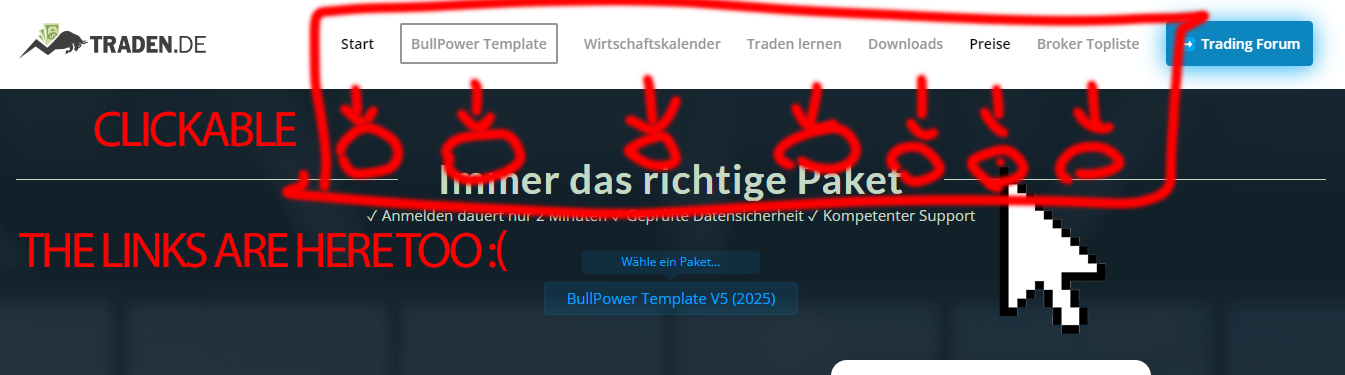
The links in the menu are still clickable several hundred pixels below the actual menu (see attached image: https://s20.directupload.net/images/241008/ynpcomra.png). This seems to be an Enfold issue in WordPress, as users keep clicking the wrong links.
Additionally, I’m writing here because your website mistakenly claims that I don’t have a valid license. After entering my license, it shows that I have 5 months left, but I still can’t post anything (License Code: 64lVbHxMIt7r1FasPsuqhpwBwPPIhlz7). I have two licenses, so something seems to be wrong.
I’d appreciate your help with this issue.
Best regards,
Daniel from Traden.de
Hey Magnus,
Thank you for the inquiry.
Is there a way to choose, per page/post, if I want Classic or Block editor?
Have you tried selecting the default editor in the Enfold > Theme Options > Select Your Editor settings? It is located at the very bottom of the panel. Select the second option if you want to use the classic editor.
Best regards,
Ismael
Hi,
Please go to the WordPress admin panel > Appearance > Theme File Editor, select the Functions.php file, and insert this code to the 51st line ( https://imgur.com/a/wNrnTQV ):
add_theme_support( 'show_advanced_custom_element_options' );
Then, go to Enfold theme options > Custom Elements > Show Advanced Options > Custom Elements For Subitems, and select the “Individually select subitem custom element templates” option ( https://imgur.com/a/6yYuLfn ).
Best regards,
Yigit
I just realised that my Contact Form (created with the included Contact Form with the Enfold theme) has not been working for an unknown period of time. I have managed to get it working again using the wp-email-SMPT plugin, but I want to know if there is any way to retrieve emails that were sent via the form and not delivered? There will be some really important stuff in there so I am hoping they are archived in some way and can be retrieved. Very grateful for any support here. Thanks!
Hi
I have looked around for a membership plugin and even bought/tested a few. Most functions that I liked was Memberpress. The bad thing is that you need to activate Gutenberg/Blocks to be able to build lessons. I don’t want that on my original pages as I’m using the built in layout builder and the classic editor…
Is there a way to choose, per page/post, if I want Classic or Block editor? Or do you have a tips on a Membership plugin that works with Enfold?
I need content restriction (pages/posts & files for logged in users) and login page that can be a bit customizable. No need to have a paywall or tiers of membership, just building landing pages that I want to have a login (and track who is logging in and give them the right access)