Hallo Enfold Team,
bei einer Onepager Seite arbeite ich in der Top Navigationsleiste mit lokalen Sprungmarken, angelegt im WP-Menü als “Individueller Link” (z.B. “https://xxx.de/#expertise-anchor”).
Diesen sind im ALB Element “Trennlinie/Leerraum” unter “Entwickler-Einstellungen” jeweils an den passenden Positionen unterschiedliche “Benutzerdefinierte IDs” als Sprungziel zugeordnet (z.B. “expertise-anchor”).
Klicke ich den Link in der Navigation eines Navielements an, so springt die Seite korrekt dorthin, jedoch highlighted die Navigationsleiste einen anderen Punkt als “aktiv”.
Wenn ich die Seite manuell nach unten scrolle (anstatt die Navipunkte zu benutzen) springt die Markierung in der Navigation anstatt zu dem jeweils aktiven Bereich wechselnd scheinbar beliebige Punkte in der Navigation an.
Ich kann das Problem für dieses Verhalten nicht nachvollziehen bzw. beheben und wäre für eine Lösung dankbar.
Beste Grüße
This reply has been marked as private.
I just looked in my Themes>Enfold>Uploads>dynamic_avia folder and discovered .5 million files. It appears that some automatic process is creating a set every day. How do I turn this off and/or manage when and how they get used?
In some recent updates, the product gallery images are now square.
I can load an old image that was already in the media library into a product page and it looks fine, but a new image comes in as square. See the sample page here: https://galaxypress.com/product/battlefield-earth-trade-paperback-russian/
I have checked in the Appearance/Customize/WooCommerce and the product images are “uncropped”.
I looked in my functions and CSS and don’t see anything that would be causing this now. Again an old image looks fine, it is just newly imported images that are doing this.
I also see the same issue on the shop page where it is cropped and then you go to the actual page and the image is fine. She here:
https://galaxypress.com/shop/?filter_format=foreign-language-books
The last title with purple books for $50 in Russian is cropped on the page, but when you click the actual page it is fine, see here:
I am running WP 6.6.2 with an Enfold Child Theme running the latest Enfold of 6.0.6. PHP version is 8.2.23 (Supports 64bit values).
Hi,
Thank you for the update.
How did you place the Embed block inside a Text Block element? The issue might be due the avia_small_fixes function in the wp-content\themes\enfold\js\avia.js file:
function avia_small_fixes(container)
	{
		if(!container) container = document;

		//make sure that iframes do resize correctly. uses css padding bottom iframe trick
		var win		= jQuery(window),
			iframes = jQuery('.avia-iframe-wrap iframe:not(.avia-slideshow iframe):not( iframe.no_resize):not(.avia-video iframe)', container),
			adjust_iframes = function()
			{
				iframes.each(function(){

					var iframe = jQuery(this), parent = iframe.parent(), proportions = 56.25;

					if(this.width && this.height)
					{
						proportions = (100/ this.width) * this.height;
						parent.css({"padding-bottom":proportions+"%"});
					}
				});
			};

			adjust_iframes();

	}
Best regards,
Ismael
Hey Hichem Bouchouareb,
Thank you for the inquiry.
The logo is actually rendering but it’s white, so it’s not visible against the background. You may need to toggle or temporarily disable the Enfold > Performance > File Compression settings to make sure that the changes take effect. By disabling the file compression settings, you will be able to make the necessary adjustments and updates without any conflicts. Once you have made the required modifications, you can re-enable the file compression settings to optimize the performance of your website.
Regarding the support license, this new policy is imposed by Themeforest, which now limits the duration of support validity. This change means that support for certain items purchased from Themeforest is only available for a fixed period after purchase, requiring renewal if further assistance is needed beyond the timeframe.
Best regards,
Ismael
Hi,
Glad that we could help, if you have any further questions please open a new thread and we will be happy to help.
Best regards,
Mike
Hi,
It looks like you are trying to import the Law demo, correct?
If you include a admin login, and a FTP login and allow me to rest the site and re-import the demo I might be able to fix, sometimes this will correct, but you will lose everything you have done so far.
Best regards,
Mike
Hi,
Thank you for your patience, but unfortunately this doesn’t seem to be possible for “products” I tested many possible solutions but none worked for “products”.
If you would like to request this feature the Dev Team has opened a Github Feature Request for users to place requests and follow them as the Dev Team reviews them.
Best regards,
Mike
 Hichem Bouchouareb
Guest
hi, i experience a bug with enfold and wanted to ask a question in the forum and have the bad surprise to read i need to buy another licence ??? isnt the theme buy a life buy ? i bought 3 enfold and am now asked to buy again just for some support ??? come on.
my color section at the top at the page keeps white despite all the attempt to change it
also, it seems the logo at the header doesnt want to appear (i re loaded it as the data base was oddly dubbing all the images, i delated the doubles and thus needs to re affect some images in some pages. including the footer and header logo … but the logo seems to always show a broken image .. what is happening with enfold guys ?
Hi Mike,
This is even stranger, now. I’m also not seeing any flipbox images, only the overlay text. I haven’t made any changes since I posted the screenshots with the images, and this is a fresh WordPress install with no plugins or anything. The only thing I’ve added in the Enfold theme. images are indeed uploaded, as you can see here.
https://www.isaacsbbq.cz/wp-content/uploads/2024/10/Screenshot-2024-10-27-at-17.03.16.png
Any help would be appreciated.
Best,
Isaac
Hi,
Glad we were able to help, if you have any further questions please create a new thread and we will gladly try to help you. Thank you for using Enfold.
Best regards,
Mike
Hi,
I cleared your cache at Enfold Theme Options ▸ Performance ▸ Delete old CSS and JS files and now it shows for me on Andrid mobile:

please clear your device cache and check again.
Best regards,
Mike
Hey rixi,
Please check that the parallax demo “frontpage” is selected at Enfold Theme Options ▸ Theme Options ▸ Frontpage Settings and nothing is selected in the blog page setting below it, sometimes the same page is selected twice causing this error.
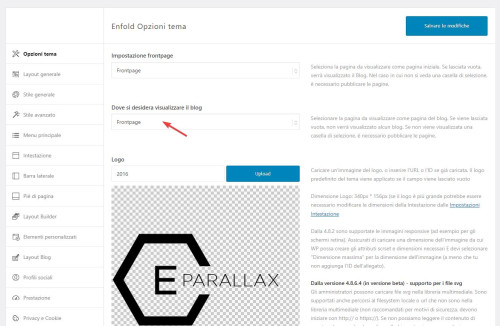
Best regards,
Mike
Yes, of course, it was my mistake.
So I copied the file from the Enfold theme to my Enfold child theme. I’ve moved the code line – echo avia_pagination( ”, ‘nav’ ); to be below the code line – global $avia_config;
But nothing has changed. I created a sub-folder – includes – inside the enfold child folder and put the correct loop-search.php file in this folder
and still, nothing has changed.
What am I missing?
I’ve added links to the 2 websites I’m having this problem directly to a random search results page for you to see the problem on your own.
The first one is the website I’ve altered the files
The second one I didn’t change anything.
Hey Tobias,
The ALB builder is built into the theme and can not be removed or added to another theme, unfortunately we don’t have a “free demo” that you can try.
The theme is a single lifetime price, unlike the subscription that Elementor charges.
The theme includes slideshow elements that you can add to the header.
This is a good unofficial video about the theme elements to give you a better idea of how Enfold works.
Best regards,
Mike
Hey peterolle,
Please see our documentation, scroll down to Adding your own Fontello Icons, please note that they must be black & white “icon fonts” and not color images.
Best regards,
Mike
Hey peterolle,
You can use the Avia Layout Builder Debugger, but you will need to add the images to your media library and then reset them in your page, they will not be imported automatically.
Best regards,
Mike
 Tobias
Guest
Hello,
I would like to ask if the Avia builder for the enfold theme – purchased on themeforest, is completely free (all features are available), or are they somehow limited by subscription (as with Elementor)?
For example, is it possible to set up a listing of articles by category and put it on individual subpages as well (each subpage would have a listing from a different category)? Does it also support creating a slideshow of photos in the header of the main page?
I would like to use the theme to create a school page. Would it be possible to try the builder for free (DEMO)?
Thank you for your reply.
it is not in the wordpress folder – it is inside the enfold folder : includes
Hey Alexandre,
Enfold does not have functionality for selecting which image should be shared on social networks, please try setting one using a plugin like Yoast SEO for example.
Best regards,
Rikard
Good morning,
I am having a problem with the articles on my site with Enfold Child,
When I share a post with the Facebook share button,
on the article:
https://kerry-han.fr/sonotherapie-et-entreprises-pour-les- Personnes-reaches-du-cancer/
The image is displayed in preparation for publication, but disappears once published.
Do you have a solution to fix this problem?
Sincerely.
Pour les français :
Bonjour à tous,
Je me permet aujourd’hui de créer un ticket car cela fait déjà un moment que j’ai finaliser la publication du site web d’un de mes clients et depuis, mon client à eu besoin de partager sur son compte Facebook un de ses articles grâce aux boutons de partages que j’ai intégré au site web. Cela fonctionnait correctement depuis quelques mois et depuis aujourd’hui, quand je partage via n’importe quel compte Facebook l’article en question, une image blanche s’affiche à la place de l’image intégrée à l’article partagé.
Quelq’un pourrait m’aider ou me donner une piste s’il vous plaît ?
Merci.
For English people :
Hello everyone,
I now allow myself to create a ticket because it has been a while since I finished publishing the website of one of my clients and since then, my client needed to share on his Facebook account one of his articles thanks to the sharing buttons that I integrated into the website. It worked properly for a few months and since today, when I share via any Facebook account the article in question, a white image is displayed instead of the image integrated into the shared article.
Can someone help me or give me a clue please?
Thank you.
Hey halkmarine,
Thanks for your patience, unfortunately for mobile this is not a good way to achieve is, instead try this CSS in your Enfold Theme Options ▸ General Styling ▸ Quick CSS field to prevent the overlap:
@media only screen and (max-width: 767px) {
	#menu-item-shop .cart_dropdown_link {
    padding: 0;
	}
  .responsive.html_cart_at_menu #top .main_menu .menu>li:last-child {
    padding-right: 0;
    margin-right: -24px;
  }
}
After applying the css, please clear your browser cache and check.
This is the expected result:

Best regards,
Mike
Hi,
Glad to hear that you have this sorted out, and thank you Guenni007 for offering help, if you have any further questions please create a new thread and we will gladly try to help you. Thank you for using Enfold.
Best regards,
Mike
Hey David,
If you don’t own a license then you can purchase one here: https://themeforest.net/item/enfold-responsive-multipurpose-theme/4519990. The update to 6.0.6 has to be done manually from the version you are running, please refer to my replies in this thread: https://kriesi.at/support/topic/enfold-4-5-theme-update-update-failed-download-failed-a-valid-url-was-not-pro/#post-1021541
You can either update manually via FTP: https://kriesi.at/documentation/enfold/how-to-install-enfold-theme/#theme-update, or upload the theme as if it was new under Appearance->Themes->Add New Theme.
If that doesn’t work then please try to delete the whole theme folder, then replace it with the new version. Make sure that you have backups of the site before starting updating.
Also please read this after you have updated: https://kriesi.at/documentation/enfold/theme-registration/
Best regards,
Rikard
Hi,
i just saw on a webpage which has the borlabs cookie banner that the Cookie Box on the start page its just blinking shortly one time and on the contact side google maps is just visible for one moment and then its totally gone. it always worked ok. Has that something to do with the update of enfold?
Would be great if you can help me with this :)
Many regards rixi
HI Support,
I am new to Enfold – I tried PHP7.3, 8.2 and 8.3 always with the same result. I can not save anything.
Best regards
Dennis
 David
DavidGuest
updated version of WordPress Theme “Enfold” that is compatible with PHP 8.1
 Karina Gigler
Guest
Hi!
I now bought Enfold, so you can please ignore my last message.
Regards, karina
Karina GiglerGuest
Hi!
I am working for a client and your theme “enfold” was used there. unfortunately the client has no access to the license code anymore.. I updated WordPress and the PHP-language, but now Enfold does not work anymore.
is there a possibility to get access to the updates for enfold, so that the site is running again?
Regards and thanks in advance for your help, Karina



