TimGuest
Related to: https://kriesi.at/support/topic/categories-5/?avia_support_contact=avs_66f932b44f1ab8.19832496_1468049
Dear Mike,
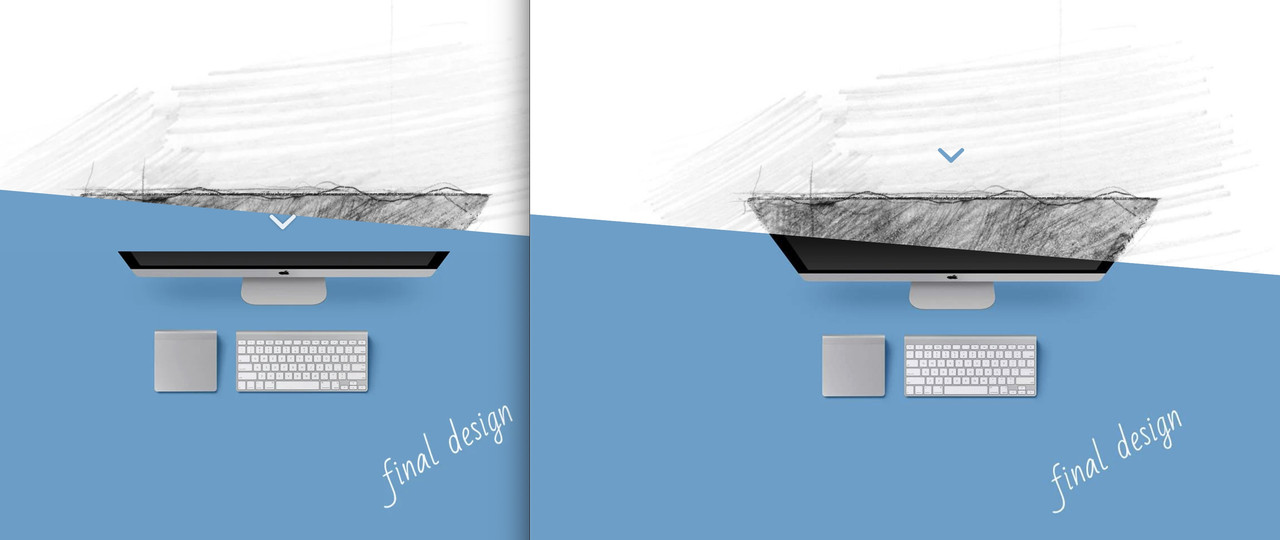
Thank you very much for your quick reply. I have tried to illustrate it. Normally it seems to look like in part 1 with Enfold.
As in part 2 it would be great: I found out how to left-align the heading from an earlier post of yours. But I have not been able to find out whether you can also set the categories (in each post) left-aligned via CSS in your theme.
Best regards!
Hey jcombatfitness,
I’m not sure exactly what you are referring to, but you can set text sizes for all screens under Enfold->General Styling->Typography.
Best regards,
Rikard
Thank you for replying. You may have misunderstood my problem. I’m used to installing WP the ‘old’ way. Upload zip file, extract files, create DB, edit wp-config.php, and carry on. The page I was sent to instructed me to download Bitnami, (whatever that is), and after telling me how much I would love this new approach, presented me with a laborious install process that I could not understand the least bit. There wasn’t even a wp-config.php file anywhere to be found. Here’s my question — can I get the latest version of Enfold that includes the typical ‘old’ install method. Is that even possible? If it is, and if you can send me a download link to retrieve it, I will follow the same steps I always have to install WP and be able to carry on. BTW, I do very much appreciate you getting back, and I truly hope there is a way to simply install Enfold as I always have. Thank you.
by the way –
how to have a child-theme avia_layout.php
via filter: avf_theme_options_pages
this child-theme solution works as expected with the edited files from the bottom:
require_once( get_stylesheet_directory() . '/functions-enfold.php' );
function my_avia_layout_mod($avia_pages){
$avia_pages['layout']['include'] = get_stylesheet_directory().'/includes/avia_layout.php';
return $avia_pages;
}
add_filter( 'avf_theme_options_pages', 'my_avia_layout_mod', 10, 1 );
functions-enfold.php: https://pastebin.com/dl/UTGvNGKB (see lines 1556 – 1561)
– put into root directory of your child-theme
avia_layout.php: https://pastebin.com/dl/RnmpK2Mu
– put into includes folder (subfolder of child-theme)
Im not sure how to edit the mobile version text in the Enfold theme.
Is there a video showing how because the desktop version is too big on the mobile version.
thank you
Hi,
Glad Rikard could help, if you have any further questions please create a new thread and we will gladly try to help you. Thank you for using Enfold.
Best regards,
Mike
Hey brookjames,
You can change the logo to be used when the header is transparent under Enfold->Theme Options->Transparency Options.
Best regards,
Rikard
Hi Mike,
Oh, this really helped now. Allowing cookies on Safari for iPhone and all the mentioned features are visible. Please accept my apologies, it seems I may have blocked cookies in the recent past and forgot about that. Appreciated.
On my desktop PC I am working with different browsers like Firefox, Opera, Microsoft Edge preferably in private mode. And since the last two updates the mentioned features are not working anymore on Firefox. So this is still not clear to me although I allow Firefox to set cookies.
So here’s the update:
Enfold Cookie-Disclaimer does not work on Firefox
Scroll to top button does not work on Firefox
Plugin Portfolio Filter Gallery does not work on Firefox
Plugin NextGEN Gallery does not work on Firefox
Many thanks & all the best!
Matthias
Just starting setting up my second Enfold Site. I’m using the Single page restaurant demo.
I have changed my Logo in Enfold Theme Options, but my Logo only shows when it shrinks on sticky header. When at the top of the page where it integrates into the Fullscreen slider, it still shows the Enfold Logo. If I turn off the sticky header, only the Enfold Logo shows, but only on Desktop. Mobile shows the correct Logo.
Where do I change this?
TIA for any assistance.
-
This topic was modified 1 year, 4 months ago by
brookjames.
-
This topic was modified 1 year, 4 months ago by
brookjames.
-
This topic was modified 1 year, 4 months ago by
brookjames.
Hi,
Ok, I thought that you wrote:
This is what I found:
Enfold Cookie-Disclaimer does not work on Firefox and Safari
Scroll to top button does not work on Firefox and Safari
Plugin Portfolio Filter Gallery does not work on Firefox and Safari
Plugin NextGEN Gallery does not work on Firefox and Safari
Menue does not work on Safari
But when I check I don’t see an issue with these.
But note that Safari has changed their AD block settings to now block FB and other items, so you would need to manually disable this.
Also note that you typically need to accept the cookie settings for some elements to work like the NextGEN Gallery.
Best regards,
Mike
Hi,
Glad we were able to help, if you have any further questions please create a new thread and we will gladly try to help you. Thank you for using Enfold.
Best regards,
Mike
This reply has been marked as private.
PS: in the newest Enfold 6.04 there is inside avia-snippet-sidebarmenu.js no difference between left and right sidebar.
Always only as selector for both .html_header_sidebar. So those files could be untouched !
only that one entry in enfold_functions.php had to be deleted (1556ff):
if( strpos($header['header_position'] , 'left') === false ){
$header['sidebarmenu_sticky'] = 'never_sticky';
}
and those entries inside avia_layout.php had to be adjusted ( f.e. for the required lines – see line 210 on my edited file )
avia_layout.php on pastebin: https://pastebin.com/RnmpK2Mu
Hi,
Try this CSS in your Enfold Theme Options ▸ General Styling ▸ Quick CSS field:
.home .comment-entry {
display: none;
}
After applying the css, please clear your browser cache and check.
Best regards,
Mike
Hey bemodesign,
Please try the following in Quick CSS under Enfold->General Styling:
.woocommerce-Tabs-panel ul {
list-style: disc;
margin-left: 15px;
}
Best regards,
Rikard
Hi,
Thanks for the update. Please open a new thread if you should have any further questions or problems.
Best regards,
Rikard
Hi RoseNReckless,
Could you try updating the theme to the latest version (6.0.4) to see if that helps please? https://kriesi.at/documentation/enfold/theme-update/. If you should need further help, then please open a new thread and include WordPress admin login details in private, so that we can have a closer look at your site.
Best regards,
Rikard
Hello,
I am writing to you in regards to site samuelblack.co that I am helping my husband fix.
I have my own site rosenreckless.com where I use Enfold theme that I purchased and installed myself and that is the license number I am using for being able to log in a kris.
However, for samuelblack.co it was his old intern that purchased and installed Enfold theme (child) for the site back in 2015 and I do not have license number etc.
Until yesterday I was getting a critical error but at least I was able to log in to wp-admin, now I can’t even log in to the wp-admin.
I contacted our hosting company and they said that all the errors that I’m getting are with the theme and php configurations/critical/core files of the theme.
I was hoping you’d be able to help me out. I am not even sure where to begin.
Thank you
Ksenia
Hi,
Thanks for the update, we’ll close this thread for now then. Please open a new thread if you should have any further questions or problems.
Best regards,
Rikard
Hi mike. I can update WordPress core and plugins and there are no problems but I just can not download the Enfold demo
Hi,
Try this CSS in your Enfold Theme Options ▸ General Styling ▸ Quick CSS field:
#menu-test-menu-with-logo {
margin-left: 0;
}
I believe this corrects:

Best regards,
Mike
Hi,
Glad we were able to help, if you have any further questions please create a new thread and we will gladly try to help you. Thank you for using Enfold.
Best regards,
Mike
Hi,
/jquery-?[0-9.](.*)(.min|.slim|.slim.min)?.js
/jquery-migrate(.min)?.js
/dynamic_avia/avia-footer-scripts-(.*).js
var avia_is_mobile
/enfold/js/avia.js
/enfold/js/shortcodes.js
/enfold/config-templatebuilder/avia-shortcodes/
/enfold/js/avia-compat.js
If you are also using the Wp Rocket REMOVE UNUSED CSS option you will also need to add this list to it:
.main_menu
.menu-item-avia-special
.av-hamburger
.av-hamburger-box
.av-hamburger-inner
.av-burger-overlay
.av-burger-overlay-scroll
.av-burger-overlay-inner
.av-active-burger-items
.av-burger-overlay-active
.av-burger-overlay-active-delayed
.av-hamburger--spin
.av-js-hamburger
.avia_hidden_link_text
.av-burger-menu-main
#av-burger-menu-ul
#avia-menu
.av-width-submenu
.av-active-burger-items
.current_page_item
.current-menu-item
.av-active-burger-items
.avia-menu
.av-main-nav-wrap
I’m not able to login to your site, I get an error that the user name is not valid, I also can not reproduce the error on your site.
Best regards,
Mike
Hi,
Glad we were able to help, if you have any further questions please create a new thread and we will gladly try to help you. Thank you for using Enfold.
Best regards,
Mike
Hi,
Glad we were able to help, if you have any further questions please create a new thread and we will gladly try to help you. Thank you for using Enfold.
Best regards,
Mike
Hi,
Try this instead
function enfold_widget_before_footer_for_single_portfolio() {
if(is_singular('post') || is_singular('portfolio')){
dynamic_sidebar( 'portfoliocontact' );
}
}
add_action('ava_before_footer', 'enfold_widget_before_footer_for_single_portfolio' );
Best regards,
Mike
Hi Mike,
Yes, we tried the information in this post. However, there isn’t any information on how we can exclude the menu. We tried something like: /mes-htdocs/themes/enfold/config-templatebuilder/avia-shortcodes/menu/menu.js?ver=6.0.2.
Can you tell us which .js files are responsible for the burger menu?
Best regards,
Thilo kiefer
Hi guys. I want to use a different enfold demo on the local host before I use it on the main site. but it can not download and import in the local host. is there any way to test the theme on the local host? because I want to see the elements and their adjustment in my ALB for better work and practice by Enfold’s ALB. I found their shortcodes in the Shortcodes of demo pages but I want access to elements in my back-end ALB.
Hi,
Glad we were able to help, if you have any further questions please create a new thread and we will gladly try to help you. Thank you for using Enfold.
Best regards,
Mike