Hey Nick_Skehan,
Thank you for the inquiry.
You can adjust the Content | Sidebar Ratio settings in the Enfold > General Layout > Dimensions tab to decrease the sidebar’s width. Let us know of the result.
Best regards,
Ismael
Hi, I have had a few issues this morning with my website https://www.444retreat.co.uk/. It started with contact forms returning an error of:
Invalid form for reCAPTCHA sent.
Form could not be submitted. Please reload page and try again.
Name for token field was missing.
So I did some digging and thought it might be because I hadn’t got an active Privacy statement which sounded odd but I saw it in a thread. I installed Complianz | GDPR/CCPA Cookie Consent and added a Cookie policy and link to the Privacy policy page. Google ReCAPTCHA continued to return an error so I disabled all plugins including wp-rocket which I thought might be causing an issue. At this point I started getting 404 errors on all pages except the home page. I went in to a random page to make a minor alteration and save it in the hope it would refresh the page but I then received the ‘Updating failed. The response is not a valid JSON response’ error.
I have reinstalled a fresh copy of Enfold and even installed a previous version but I still get the error and all pages except the home page see a 404 error.
Please help, I have spent all morning trying to fix this after trawling through this forum and I only seem to be making things worse.
Lyndon
This reply has been marked as private.
Hello Ismael – yes I added that code, as per the code I posted to you, you can see it in the first line. What I am trying to do is create a video scrubber scrolling effect. This requires the container to be at that height, so the scroll is tied to the video position (see rest of code). Then to remove the height so it works similarly to parallax then we use section.vid div.holder {position:sticky!important; top:0!important;}. Making the screen stick to enable the scrolling video. However the problem is that Enfold automatically generates container tags around a code block. Therefore these div containers are also being set at that height of the section.vid box. My original question was how do we insert code without the container tags being generated, which would be the cleanest method. If that is not possible, then is there another solution to make the container tags also the same size? Any ideas appreciated. Thanks, Philip.
Well enfold provided the option to only show submenu items on hover or on click.
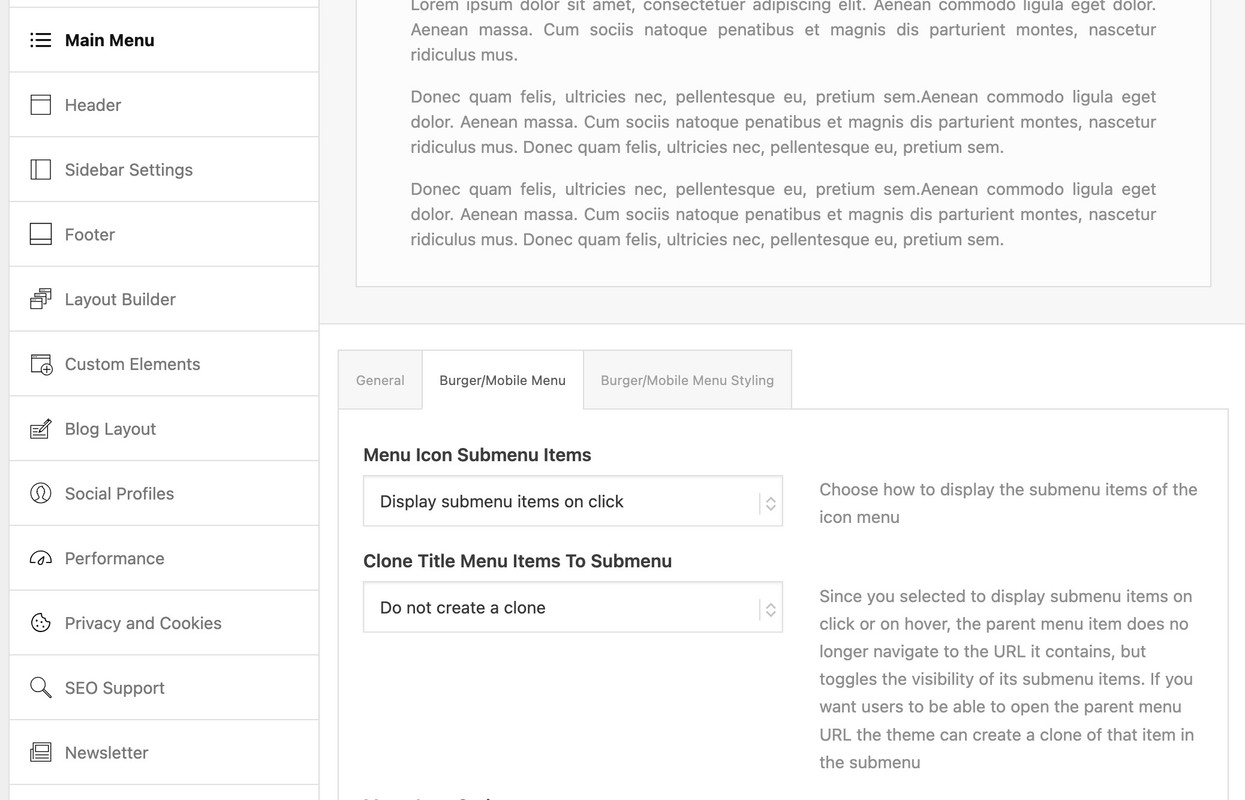
If you choose click we can edit that to only show one toggle open.
then put this to your child-theme functions.php:
function only_one_submenu_open_on_burger(){
?>
<script>
window.addEventListener("DOMContentLoaded", function () {
  (function($) {
    $('body').on( 'click touch', '.av-active-burger-items > a', function () {
      $(this).parent('li').siblings().removeClass('av-show-submenu');
      $(this).parent('li').siblings().find('ul').slideUp( "fast");
    });
    $('body').on( 'click touch', '.av-active-burger-items .av-width-submenu > a', function () {
      $(this).closest('.sub-menu').siblings().find('li').removeClass('av-show-submenu');
      $(this).closest('.sub-menu').siblings().find('ul').slideUp( "fast");
    });
  })(jQuery);
});
</script>
<?php
}
add_action('wp_footer', 'only_one_submenu_open_on_burger');
after doing that i will have a look to your site to optimize if needed.
Hi there, I dont understand why some of the links are not working in a the template. I used this one: https://kriesi.at/themes/enfold-parallax/, and I wanted to change the links in the menu, and wanted to change the links on the “Learn more” buttons. Some of them work others won’t and I cannot figure out why. I hope someone can give me good instructions how to make those links.
Hi,
Thanks for the update, we’ll close this thread for now then. Please open a new thread if you should have any further questions or problems.
Best regards,
Rikard
Hey DONGHOON,HAN,
If you already own a license, then you don’t need to purchase a new license. You only need to update your current version. Please refer to this: https://kriesi.at/documentation/enfold/theme-update/
Best regards,
Rikard
Hey jelly00,
Could you try updating the theme to the latest version (6.0.8) to see if that helps please? https://kriesi.at/documentation/enfold/theme-update/.
Best regards,
Rikard
 DONGHOON,HAN
Guest
To resolve the issue below, would purchasing a new license and updating it fix the problem?
When I click “Add New Page,” the Avia Layout Builder does not appear. How can I activate it? It works on pages that I’ve already created, but it doesn’t activate when I try to add a new page. I’m using WordPress version 6.7.1, Enfold Theme version 4.6.3.1, and PHP version 7.4.5p1. How can I make the Avia Layout Builder visible on new pages?
When I click “Add New Page,” the Avia Layout Builder does not appear. How can I activate it? It works on pages that I’ve already created, but it doesn’t activate when I try to add a new page. I’m using WordPress version 6.7.1, Enfold Theme version 4.6.3.1, and PHP version 7.4.5p1. How can I make the Avia Layout Builder visible on new pages?
Hi,
Thanks for the update, we’ll close this thread for now then. Please open a new thread if you should have any further questions or problems.
Best regards,
Rikard
Hi,
Thanks for the update, we’ll close this thread for now then. Please open a new thread if you should have any further questions or problems.
Best regards,
Rikard
Hey Lance,
Enfold is compatible with PHP 8.x, there might be other things on your site which are generating the errors. You could try deativating all plugins and remove any custom code that you have added for example, and then update the PHP version.
Best regards,
Rikard
Hello,
I’m currently running PHP v.7.7 on my site. From time-to-time, my hosting provider urges me to upgrade to the latest PHP v. 8.2. When I do so, the formatting of my Enfold site gets scrambled and a “critical error” message is displayed. See linked screenshot. When I go back to 7.4, format is restored to normal. Hosting techs wonder if my theme is incompatible with the latest PHP versions.
Advice appreciated.Thanks, Lance
https://postimg.cc/gx8bZdCQ
https://kriesi.at/documentation/enfold/intro-to-layout-builder/#customization
This is a real good docu – unfortunately, there is too little research being done here
PS : above there are the two lines listed ( 876 and 877 newest Enfold 6.0.8) – but only the 876 has been changed .
but i guess it is easier to replace that little block of those two lines.
Hello,
I published a post this morning and, for the first time in going on 20 years of using Enfold, it didn’t appear at the top, or indeed anywhere, on my News page. It can be found at it’s own URL, and appears on at the top of the “Recent” widget list on other blog pages, but not on the blog landing/News page.
I’m using Enfold v. 18-01-14 with WordPress v. 6.6.2.
Appreciate your advice to fix this. Thanks! Lance
Hi,
Could you try updating the theme to the latest version (6.0.8) to see if that helps please? https://kriesi.at/documentation/enfold/theme-update/. Also make sure that you have registered your theme license: https://kriesi.at/documentation/enfold/theme-registration/
Best regards,
Rikard
Hi,
If you have added it there, then yes you can. Otherwise you can generate separate tokens for each of your sites: https://kriesi.at/documentation/enfold/theme-registration/
Best regards,
Rikard
Hi,
For the css, each icon has a different code number, for your shield with the check mark it is \e802
div[data-av_icon="\e802"] {
	content: " ";
	background-image: url(/wp-content/uploads/2024/12/Goering_Icon1_eCheck_farbig_RGB.png) !important;
	background-size: contain;
	background-repeat: no-repeat;
       font-size: 0 !important
}
I adjusted your css and now it works.

Please review the thread on how to find the icon code:

Best regards,
Mike
Hi,
Thanks for the update, we’ll close this thread for now then. Please open a new thread if you should have any further questions or problems.
Best regards,
Rikard
Hi,
Thanks for letting us know. Please open a new thread if you should have any further questions or problems.
Best regards,
Rikard
Hi,
Thanks for the update. Please open a new thread if you should have any further questions or problems.
Best regards,
Rikard
Hi,
Thanks for the update. Please open a new thread if you should have any further questions or problems.
Best regards,
Rikard
Hi Ismael,
The case I’m dealing with is fairly straightforward and is likely to recur quite often among Enfold users.
Typical example:
- I’m using a Custom Layout to display a company directory via a dedicated CPT.
- For each company listing I can fill in 2 custom fields for their links to the company’s social networks (let’s say LinkedIn and Facebook, to keep it classic).
- How do I handle the display of data depending on whether or not companies have links to provide for each of the three custom fields?
If you have any recommendations on how to handle this situation, I’d love to hear from you.
For the moment, I’ve created duplicates of my Custom Layout to correspond to the 4 possible scenarios (no link, only link 1, only link 2 or both links). With only a hundred or so entries, I was able to manually set the appropriate Custom Layout, but this would be very complicated for several thousand entries. I’ll need a conditional display solution.
Best regards,n
Hi,
i needed to set the content with to fix with bcs of the design rules.
But the Google map should be 100% width. Any ideas how to enlarge the container with map?
https://die-home-stager.ch/kontakt/
The instruction here: https://kriesi.at/documentation/enfold/color-section/#toggle-id-2
does not work
-
This topic was modified 1 year, 4 months ago by
 xeovision.
This reply has been marked as private.
Hey SurigliaStudio,
Please try the following in Quick CSS under Enfold->General Styling:
#header_main {
  position: absolute;
  top: 50%;
  -ms-transform: translateY(-50%);
  transform: translateY(-50%);
}
Best regards,
Rikard
Hi,
Thanks for letting us know. Please open a new thread if you should have any further questions or problems.
Best regards,
Rikard
To clear it: I didn’t use a uploaded google-font, I just choose from an option within Enfold-Theme…



