Hi,
Thanks for the update. If you have further questions which is not on the original topic, then please open a new thread and try to explain the problem that you are having a bit further. We’ll close this thread for now.
Best regards,
Rikard
Hi,
Thanks for the update, we’ll close this thread for now then. Please open a new thread if you should have any further questions or problems.
Best regards,
Rikard
Hello @Guenni007,
Thank you for the tip, the first thing I tried was to click the synchronize global settings option, and compare all enfold settings between the two languages but to no avail. Now I have tried exporting and importing the settings file.
Feel free to take a look at the two variants and their html structure of the header:
https://veltrh.abcbrand.sk/en
Best regards
as a participant i do not see your private content messages – but do you use WPML?
WPML does handle your language Settings even for those enfold options.
you got on top your lang flags :
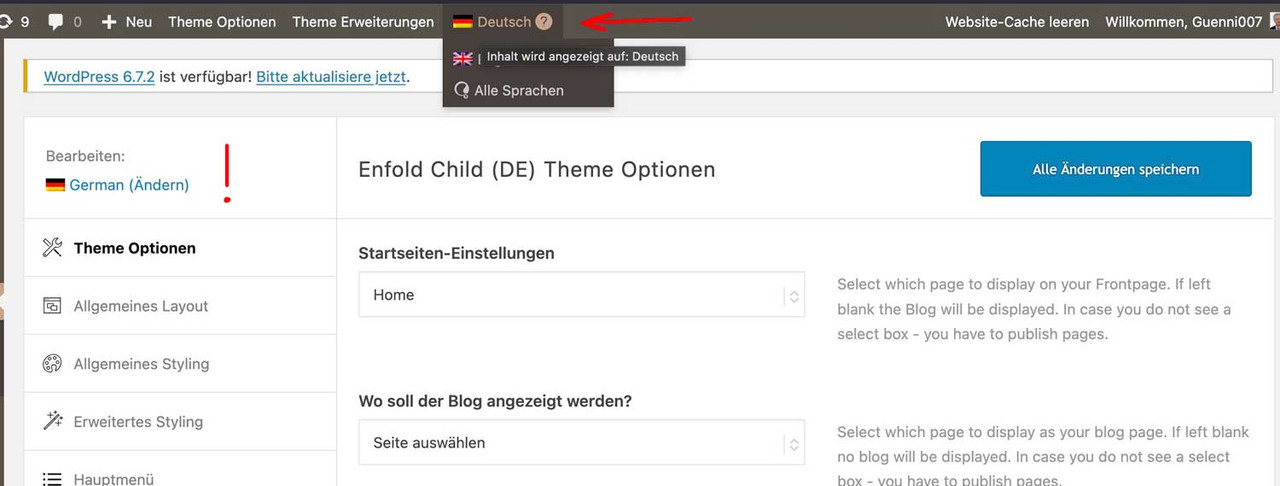
so if you like to have the same look – you had to synchronise these settings for each language.
read here https://kriesi.at/support/topic/implementing-the-same-theme-setting-to-all-languages-using-enfoldwpml/
My advice: first style the page completely in your native language, then go via the theme settings. ( see link above)
First: how did you embed/activate that Sacramento Font to Enfold?
Next: what is common to those headings that should use the Sacramento Font? (maybe there is something we can use as selector)
_______
If there is no commonality for these headings, you will need to do this manually.
You should give a custom class to those heading elements. (f.e. sacramento – why not?)
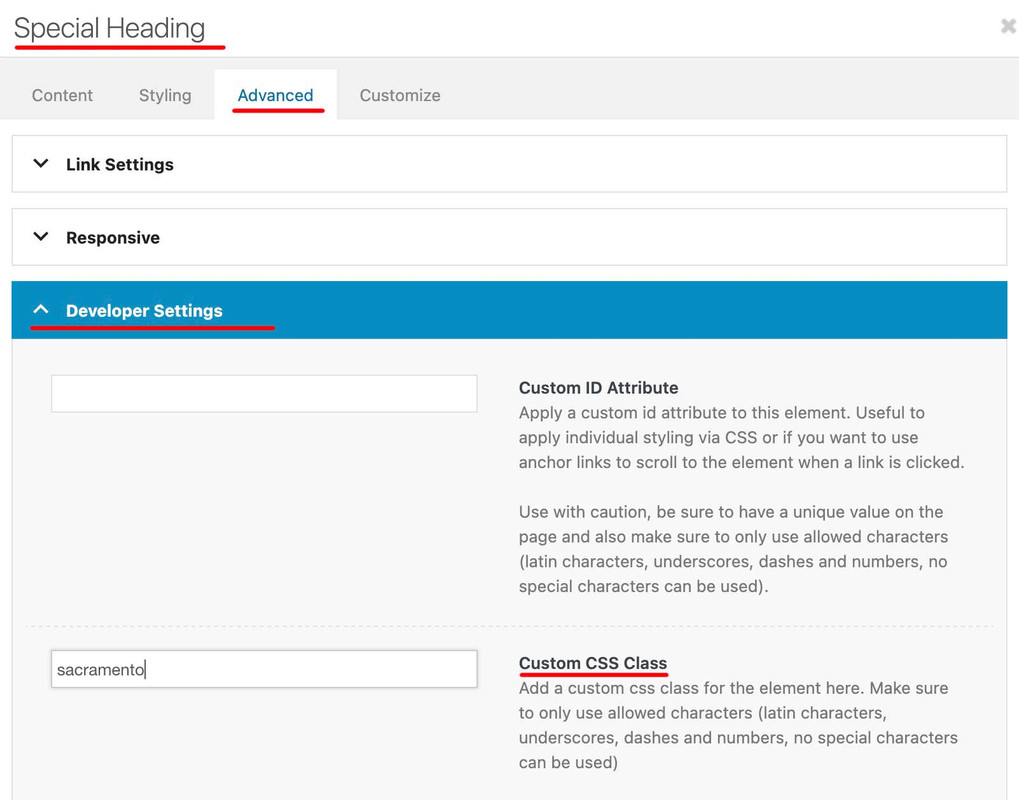
then you will have that custom class at the parent of your h-tags (av-special-heading-tag)
#top .av-special-heading.sacramento .av-special-heading-tag {
  font-family: 'sacramento';
  font-weight: 700
}
It may be necessary to force the font family by adding !important to this declaration.
Hello,
Could you please take a look at my website, and see why the header structure is different for main language and /en/ variant? The settings in enfold are the same for both languages, but one custom html is in container, other language doesn’t have it inside the container.
Thank you
I seem to remember running tests and finding that my speed suffers greatly unless i have somethings controlled by your stuff, and others controlled by the plugin . . . it was a maddeningly long process of figuring that out. I’ll try it both ways and see. The plugin interface looks different now than last time I looked at it, so they may have simplified it (or I may be thinking about a different plugin that was more complex).
I also have WP super cache running . . . does that have any impact? With enfold minification/merging off and super minify on, my debugbear numbers are showing ttfb at 2 seconds: https://www.debugbear.com/test/website-speed/W7grfudn/overview . . . I do remember that jetpack really screwed things up.
I’m putting my login creds in private box in case y’all need to see how its setup. I appreciate y’all’s help and patience.
UPDATE: With enfold css/js minification/merging ON with super minify, it gets me back to where I should be . . . no clue why it needs to do double duty? https://www.debugbear.com/test/website-speed/2QkjuPDT/overview
Thx!
Jon
@Ismael,
I have another issue linked here for which I need assistance. I’m assuming you’ll likely be the one to respond to it since most of modifications I made to tabs section was from CSS you’ve posted in previous forum posts. Please let me know if I need to create a new issue, or what the enfold moderators need to move forward with the issue. LINK is here. – https://kriesi.at/support/topic/pill-tab-section-not-working-as-expected/
Thank you!
Hi Rikard,
thank you for your answer.
The problem is that under “Enfold Child Theme Options – Blog Layout” under the option “Single Post Style” you can set that a large or small image should be displayed above the blog article. But since this looks unsightly for us, I would like to leave out this image above the blog article altogether.
Hope this helps to understand.
Best regards
 Ali Trevino-Murphy
Guest
Hi there,
I got a little overwhelmed by your contact system so just decided to go this route. My site has the enfold theme I think running in the background– a marketing company set it up for us. I have been getting emails from WordPress that my site has a vulnerability due to this theme and I asked Flywheel and they said the solution was to reach out to the makers of the theme directly.
Please help! I’m worried this will cause us to fail our PCI compliance that is coming up soon.
Thanks very much,
Ali
Hey Munford,
Thanks for the update, we’ll close this thread for now then. Please open a new thread if you should have any further questions or problems.
Best regards,
Rikard
Hi Ismael,
Thanks but I did not mean to ask that.
Google sent me an email about Google Consent V2, for tracking visitors behavior (recaptcha, analytics, ads conversions).
Due to the European GDPR I need to ask for the visitors consent to track these things.
Currently I am only using the Enfold cookiebar. So my question is if the Enfold cookiebar is sufficient for this.
In other words does the Enfold cookiebar comply with the Google Consent V2 regulations for Google recaptcha, Google analytics and Google ads conversion tracking.
If not, will it be implemented and can you suggest any plugins and setup instructions in the meanwhile in order to comply to Google Consent V2?
Thanks
-
This reply was modified 1 year, 1 month ago by
 wzshop.
Hey Tanja,
Thank you for the inquiry.
You can adjust the default fonts for the headings in the Enfold > General Styling > Fonts panel. Look for the “Heading Font” option. This can also be adjusted in the Enfold > Advanced Styling panel.
We tried logging in, but the username provided above does not exist. Please check and confirm.
Best regards,
Ismael
Hey Katja,
Thank you for the inquiry.
Please add this css code to adjust the color of the active mobile menu items and the search icon:
.html_av-overlay-side #top #wrap_all div .av-burger-overlay-scroll #av-burger-menu-ul a:hover {
    color: #000000;
}

.header_color .main_menu ul:first-child > #menu-item-search > a svg:first-child {
    stroke: #fff;
    fill: #fff;
}
You may need to toggle or temporarily disable the Enfold > Performance > File Compression settings.
Best regards,
Ismael
Hey lara666,
Thank you for the inquiry.
We checked the actual image, but it doesn’t exist — please check the link in the private field. Kindly try uploading the logo image again in both the Enfold > Theme Options > Logo and Enfold > Theme Options > Transparency Options > Transparency Logo settings. Let us know the result.
Best regards,
Ismael
Hey wzshop,
Thank you for the inquiry.
Yes, the privacy cookies can control reCAPTCHA, but only if it has been configured in Enfold > Google Services > Google reCAPTCHA settings, and you are using the default Contact Form element from the Advanced Layout Builder. You can use the cookie shortcode av_privacy_google_recaptcha to display the privacy toggle.
Google reCaptcha Settings:

[--av_privacy_google_recaptcha--]
Best regards,
Ismael
Hi,
Glad Ismael could help, if you have any further questions please create a new thread and we will gladly try to help you. Thank you for using Enfold.
Best regards,
Mike
Hey gatehealing,
Your site is showing the error Uncaught SyntaxError: Unexpected string
try disabling Enfold Theme Options ▸ Performance ▸ JS & CSS file merging and compression and enable Enfold Theme Options ▸ Performance ▸ Delete old CSS and JS files and clear your browser cache and check.
If this doesn’t help please include an admin login in the Private Content area so we can be of more assistance.
Best regards,
Mike
Hi,
Glad we were able to help, if you have any further questions please create a new thread and we will gladly try to help you. Thank you for using Enfold.
Best regards,
Mike
Since updating to Enfold 7.0, Gravity Forms shortcodes are no longer functional on SOME sites. The forms display, but the submit button doesn’t work.
Is anyone else experiencing the same? No feedback, console output or errors in the logs when a gravityforms shortcode is used in a page with Enfold 7.0
Hi,
Thanks for the update, we’ll close this thread for now then. Please open a new thread if you should have any further questions or problems.
Best regards,
Rikard
Hi, ich würde gerne für auch Enfold die automatischen Aktualisierungen aktivieren.
Das sollte doch möglich sein? 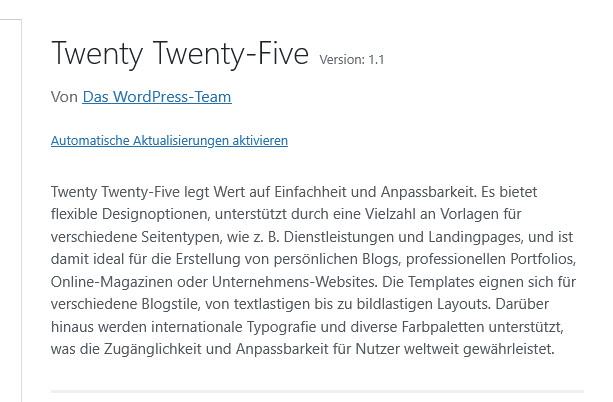
Konnte hier im Forum leider nichts dazu finden, freue mich über Hilfe!
ich glaube nicht, das es mit einem shrinking header leicht zu realisieren sein wird. Man stößt auch mit dem flex layout an Grenzen.
Daher habe ich mal hier eine Seite erstellt, die ein grid layout nutzt. ( Viele der Einstellungen überschreiben die in dieser Installation mit einem shrinking header standard Einstellungen. Wenn du in den Optionen direkt das Shrinking abstellst, dann sind einige der Einstellungen überflüssig)
____
I don’t think it’s going to be easy to do with a shrinking header. Even with the Flex layout there are limits.
So here is a page that uses a grid layout. (Many of the settings will overwrite the default settings in this installation with a shrinking header. If you disable shrinking directly in the options, some of the settings will be superfluous)
https://enfold.webers-webdesign.de/grid-header/
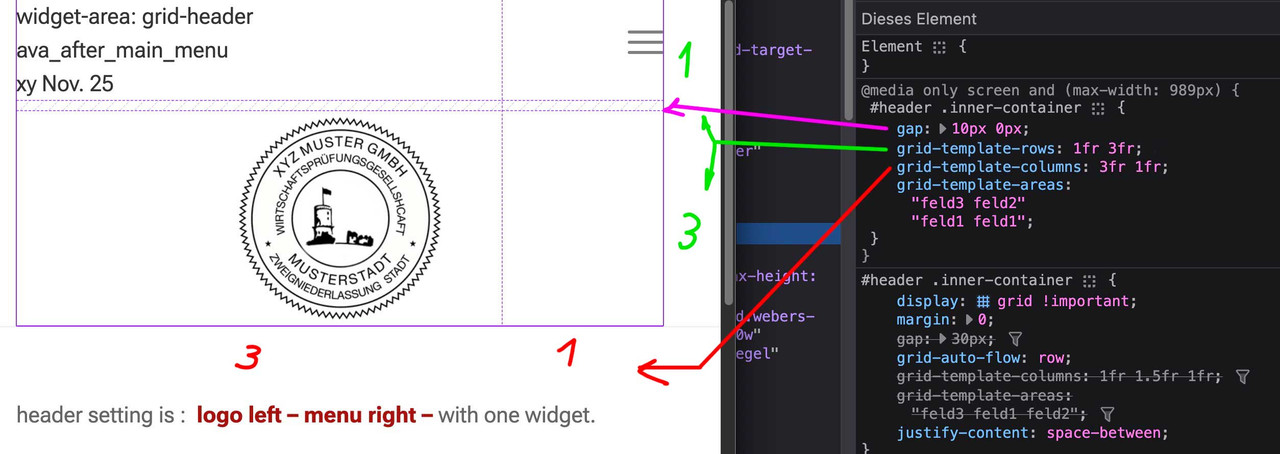
Du kannst hier sehen, wie es dann responsive gesetzt wird ( fr = fraction)
You can see here how it is then set responsive ( fr = fraction)
Hi,
So I am running a Woocommerce store with the Enfold theme and now am obligated to implement the Google Consent V2 cookies in order to track data. Can this be configured in the Enfold cookie settings? If not will it be implemented in the (near) future and do you recommend any plugins and setup instructions in the meanwhile? This is a mandatory setting for all wordpress webstores, so I guess it should be implemented in the Enfold cookie settings?
Thanks
-
This topic was modified 1 year, 1 month ago by wzshop.
Hi,
Thanks for that. I might be missing something, but it looks like the options in your screenshot arem the same as in the documentation?
Best regards,
Rikard
This reply has been marked as private.
Hey eggmedia-salient,
Thank you for the inquiry.
You can find the list of changes for version 7.0 here: https://kriesi.at/documentation/enfold/changelog/
Before proceeding with the update, we recommend creating a site backup or restore point using plugins like All-in-One WP Migration, Backup, Duplicator, or WP Migrate DB.
One of the new features in version 7.0 is the SVG icons, so you may or may not encounter issues related to this. If you do, you can always reach us here in the forum.
Best regards,
Ismael
Hi,
Thank you for the update.
Are you zooming out in your browser? If you want to increase the maximum width of the container inside the color section, you can adjust the value of the Enfold > General Layout > Dimensions > Maximum Container Width option. However, please note that this will be applied globally.
You can also try this: https://kriesi.at/documentation/enfold/color-section/#color-section-with-100-content-width
Best regards,
Ismael
Hey JW,
Thank you for the inquiry.
You may need to contact the previous developer/designer and ask for the purchase code or the private token. The private token can be generated using this link: https://account.envato.com/sign_in?to=envato-api
— https://kriesi.at/documentation/enfold/theme-registration/#how-to-generate-a-envato-personal-token
If this is not possible, you’ll need to create your own Themeforest account, purchase another license, and generate your own token.
Best regards,
Ismael
Hey tsays,
Thank you for the inquiry.
Yes, it’s possible with the Advance Layout Builder (ALB). Please check the links for more info.
— https://kriesi.at/documentation/enfold/intro-to-layout-builder/#templates
— https://kriesi.at/documentation/enfold/custom-element-templates/
Let us know if you have more questions.
Best regards,
Ismael



