Dear Enfoldteam,
i tried to set the Header on logo left, TopMenu left. Logo and the normal text are in one line on the left side. The Topmenu is indented to about 20px, i guess on behalft of the normal distance between every item, this must be the half of this distance.
Anyway it does not look good. Are there any options to fix this?
Thanks a lot!
Regards,
Constanze
Hi
The following error message appears on a customer website::
Warning: Undefined property: stdClass::$ID in /home/httpd/vhosts/sbv-asgm.ch/4000arbeitssicherheit.ch/wp-content/themes/enfold/includes/config-enfold/functions-enfold.php on line 860
The same warning also appears for line 862
I have already deactivated all plugins, then reactivated them one by one. The problem seems to be due to a conflict between Enfold and the plugin “The Events Calendar”. Despite the error message, everything seems to be working. But this error message gives me no peace…
Everything is up to date:
WordPress 6.7.2
PHP 8.1.3
Enfold 7.1
The Events Calendar 6.10.2
I would be very happy and very grateful if you could help me to solve the problem.
Best regards
Megan
Hello,
my website is white and I have one page I want it to be black. But I cannot find how to set it in Enfold. I can only make the fullwidth column container black bud there is still lots of white background around. Can you help, please?
Thanks!
if header scrolls away – think of correcting the padding-top for #main
_____________
PS: I’m sure you’ll agree that it’s best to save this for another day, until the moment you have a clear idea of what your header should look like and how it should behave. I know you’re working on it, but just be aware that many of the solutions found wouldn’t work with a shrinking header. I’m sorry to say that I think we’ve lost time.
The next problem we might encounter is with mobile devices. Unfortunately, Enfold doesn’t provide a shrinking header for these, so it uses the scroll variant. But don’t worry, there’s a way around this! If we can adjust this (using a child theme avia-snippet-sticky-header.js), we can make sure your header reacts as you like it. So, what do you think, how big should it be at the start (maybe relative to the screen height)? And then, how small should it get?
Is this still the usual support we’re dealing with? You might want to consider getting in touch with a web design freelancer. ;)
Hey jensmart,
If you activate debug moder under Enfold->Layout Builder->Show Advanced Options, then you will be able to see the layout builder shortcodes under the regular layout window. That means that you can copy/paste shortcodes between pages and sites. If you want demo content, then the easiest way would be to import the demo in question on a different site, then copy from there. If that is not an option for you, then please let us know which demo page that you want to copy.
Best regards,
Rikard
I would image you have done a basic check on this function.
The problem does not occur if you click VIEW PAGE from the bar at the top of the page.
But it does if you reload the page or load the page from front end cache when signed out.
Something is preventing the animation on the text running.
I’ve swapped the elements to colour sections with background images instead of full width sliders which has solved the issue.
But this is still a bug present in Enfold.
Hello.
Since Enfold 7.0. it is no longer possible to use the audio player element in the Avia Layout Editor with Firefox & Safari. After adding any audio file the playlist remains empty and an error is displayed in the developer console of the browser. I have observed this in two browsers and on three different Enfold-based websites.
Error message from Safari 18.3:
[Error] TypeError: update_html.indexOf is not a function. (In 'update_html.indexOf( '###avia64###:' )', 'update_html.indexOf' is undefined)
	(anonyme Funktion) (avia-builder.js:2324)
	each (jquery.min.js:2:3134)
	update_builder_html (avia-builder.js:2251)
	(anonyme Funktion) (avia-media.js:553)
	I (underscore.min.js:2:9612)
	(anonyme Funktion) (backbone.min.js:2:1130)
	(anonyme Funktion) (avia-media.js:413)
	p (backbone.min.js:2:3705)
	(anonyme Funktion) (backbone.min.js:2:3499)
	a (backbone.min.js:2:694)
	(anonyme Funktion) (backbone.min.js:2:3382)
	_onModelEvent (backbone.min.js:2:14082)
	p (backbone.min.js:2:3763)
	(anonyme Funktion) (backbone.min.js:2:3510)
	a (backbone.min.js:2:694)
	(anonyme Funktion) (backbone.min.js:2:3382)
	click (media-views.min.js:2:72101)
	click (media-views.min.js:2:51096)
	dispatch (jquery.min.js:2:40041)
Best Regards,
Mischa
by the way: on former times it is better to place the anchor-tag inside the heading-tag (as enfold do with f.e. entry-title etc.)
since html5 / xhtml this is not mandatory. You can have it vice-versa:
function use_text_logo_only($logo){
    $link = apply_filters( 'avf_logo_link', home_url( '/' ) );
    $logo_tag = "h1";
    $logo_heading = "My Website Textlogo";
    $alt = get_bloginfo( 'name' );
    $title = get_bloginfo( 'name' );

    $logo = '<a class="logo text-logo" href="'.$link.'" alt="'.$alt.'" title="'.$title.'"><'.$logo_tag.'>'  .$logo_heading.  '</'.$logo_tag.'></a>';
    return $logo;
}
add_filter('avf_logo_final_output','use_text_logo_only');
to aline that heading with f.e. navigation to the right some css is needed:
#top .logo.text-logo  {
  display: flex;
  justify-content: left;
  align-items: center;
  width: auto;
}

#top .logo.text-logo h1  {
  margin: 0 !important;
  font-size: 30px;
}

Sorry, that’s burlagepeter25.wpenginepowered.com
And I can give you access to the original site, but it’s not enfold… I’ll put it in the private content
Hello,
I am trying to disable the standard language flags in the Header Top Bar (frontend).
I managed to hide them via css at first, but they appeard again, after activating a flag in the main menu list.
I only want a flag to appear under the last menu item not in the top bar.
The problem appears only on the german version of the site.
I have tried varios solutions (CSS and PHP) i found in your forum but without success.
I contacted WMPL support but they have been unable to help, because it seems to be part of Enfold.
Tried this in functions.php:
//————————————————————–
// Remove Enfold Language Switcher
//————————————————————–
function avia_remove_main_menu_flags(){
global $avia_WPML;
add_filter( ‘wp_nav_menu_items’, ‘avia_append_lang_flags’, 9999, 2 );
remove_filter( ‘wp_nav_menu_items’, [ ‘avia_WPML’, ‘handler_append_lang_flags’ ], 9998, 2 );
remove_filter( ‘avf_fallback_menu_items’, [ ‘avia_WPML’, ‘handler_append_lang_flags’ ], 9998, 2 );
remove_action( ‘avia_meta_header’, ‘avia_wpml_language_switch’, 10 );
remove_action( ‘ava_main_header_sidebar’, ‘avia_wpml_language_switch’, 10 );
}
add_action(‘init’,’avia_remove_main_menu_flags’, 9999);
Best regards,
Christopher
Hey Lance,
Thank you for the inquiry.
The heading row uses the color set in the Enfold > General Styling > Main Content > Primary Color field. If you need to adjust it manually, you can also use this css code:
.main_color .pricing-table li.avia-heading-row, .main_color .pricing-table li.avia-heading-row .pricing-extra {
    background-color: red;
    color: blue;
    border-color: gray;
}
Best regards,
Ismael
Hi,
Try to replace the code in the functions.php file with this:
//--------------------------------------------------------------
// Remove Enfold Language Switcher
//--------------------------------------------------------------
function avia_remove_main_menu_flags(){
	global $avia_WPML;

	add_filter( 'wp_nav_menu_items', 'avia_append_lang_flags', 9999, 2 );
    remove_filter( 'wp_nav_menu_items', [ 'avia_WPML', 'handler_append_lang_flags' ], 9998, 2 );
	remove_filter( 'avf_fallback_menu_items', [ 'avia_WPML', 'handler_append_lang_flags' ], 9998, 2 );
	remove_action( 'avia_meta_header', 'avia_wpml_language_switch', 10 );
	remove_action( 'ava_main_header_sidebar', 'avia_wpml_language_switch', 10 );
}
add_action('init','avia_remove_main_menu_flags', 9999);
If the issue persists, please open another thread.
Best regards,
Ismael
Hey djsmbd,
Thank you for the inquiry.
Both links redirect to the same page or layout. Did you figure this out? Please make sure that the homepage is set in Enfold > Theme Options > Frontpage Settings.
Best regards,
Ismael
Hey Rowin Klerks,
Thank you for the inquiry.
You will need to ask the previous developer for the purchase code or access to the account used to purchase the theme. Otherwise, you’ll have to create your own account and purchase another license to generate a private token and register the theme.
— https://kriesi.at/documentation/enfold/theme-registration/
You could try asking ThemeForest if you have the receipts or necessary credentials to prove that you purchased the theme.
Best regards,
Ismael
Hey TheConduitLondon,
Thank you for the inquiry.
You could insert widgets inside the main header area. Please check this documentation for more info: https://kriesi.at/documentation/enfold/header/#adding-a-header-widget-area
Best regards,
Ismael
Hi,
Try this CSS in your Enfold Theme Options ▸ General Styling ▸ Quick CSS field:
.avia_cookie_text {
	max-width: 50%;
	line-height: 12px;
}

Best regards,
Mike
Hi,
Glad to hear that you have this sorted out, if you have any further questions please create a new thread and we will gladly try to help you. Thank you for using Enfold.
Best regards,
Mike
In the Avia Layout Builder, I’m using the Table Content Element on a page. On the Styling tab, I’ve selected Use the table as a Pricing Table + Default + Show empty cells. At this point, the table has a Heading Row at the top, followed by two Default Rows, with two columns.
When viewed, the Heading Row has a red background with white letters.
My question is, how are the colors (background, text) of the Heading Row controlled? Is there any way to adjust those colors, perhaps in the Enfold theme options? Or . . .?
While I’m at it, I searched for documentation for how to use the Table Content Element in the Enfold documentation. Couldn’t find anything. Is there any such “how to” documentation?
Thanks! Lance
Hello Rikard
they cant help me.
now I also cant actualise ENFOLD Theme from Version 6.0.9 to the newer Version.
It gives me the Error 500.
Greetings
Fred
Hi,
Thank you for your feedback.
I added a slightly modified fix for the next release 7.1.1.
As I do not have access to the plugin could you please check if it works:
Please replace enfold/js/avia-js.js with
https://github.com/KriesiMedia/enfold-library/blob/master/temp_fixes/Enfold_7_1/js/avia-js.js
and if you are using minified files also
https://github.com/KriesiMedia/enfold-library/blob/master/temp_fixes/Enfold_7_1/js/avia-js.min.js
Do not forget to clear server and browser cache.
Best regards,
Günter
Can you please update LayerSlider? Thank you.
Hi Rikard,
Strange that the Enfold 7.1 update changed the search icon from white to grey. Your fix worked. Can you please close the thread? Thank you!
 Baden
BadenGuest
The Enfold theme’s core initialization process triggers WordPress translation functions before the recommended hook (init), causing WordPress to generate “doing it wrong” notices in debug logs when Ultimate Member plugin is installed.
Details on the issue, how to recreate and work-around found here:
https://github.com/baden03/enfold
 Rowin Klerks
Guest
Hi,
We have a website that we use on our support department. It uses the Enfold theme. However the coworker who used to handle this websites business has moved on to a new company and didn’t properly document everything. It is in regard to 2 separate purchases apparently. Back in 2023.
Now I can prove that we paid for your theme but I can’t retrieve the purchase code. Would it be possible for me to get a personal token? So I can properly update the website and document things accordingly.
Thank you in advance for any help you might be able to offer. Apologies if this is not the correct form to use for this question but I can’t get in touch otherwise.
Please don’t be offended by this question. Not everyone on this forum is confident enough to navigate the wealth of Enfold options available.
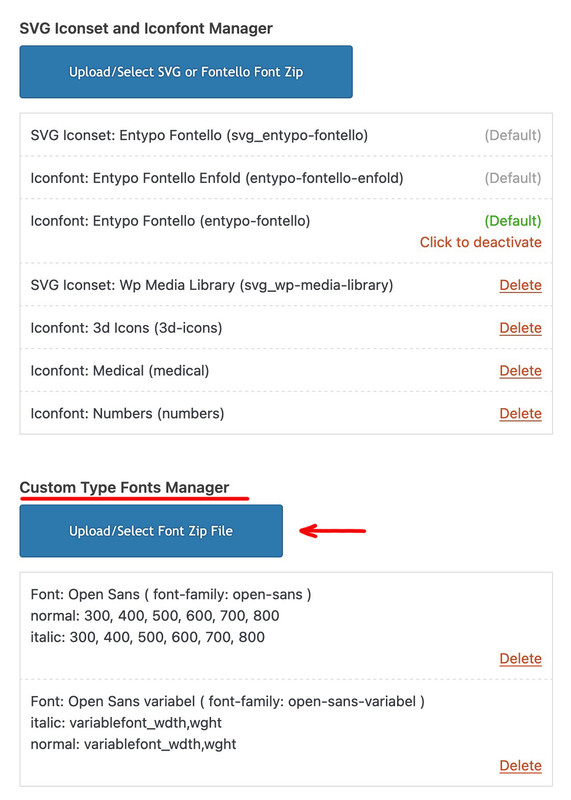
Just to be sure, you are uploading these zip files via the Custom Type Fonts Manager and not via the SVG Iconset and Iconfont Manager. As I see your screenshot, and in the background you can see this field of icon fonts.
Hello,
I am trying to disable the standard language flags in the Header Top Bar (frontend).
I managed to hide them via css at first, but they appeard again, after activating a flag in the main menu list.
I only want a flag to appear under the last menu item not in the top bar.
The problem appears only on the german version of the site.
I have tried varios solutions (CSS and PHP) i found in your forum but without success.
I contacted WMPL support but they have been unable to help, because it seems to be part of Enfold.
Best regards,
Christopher
Hi,
Thanks for the update. Please open a new thread if you should have any further questions or problems.
Best regards,
Rikard
Hi,
Great, I’m glad to hear that you found the problem. We’ll close this thread for now then, please open a new thread if you should have any further questions or problems.
Best regards,
Rikard
Hi Rikard,
So..
I logged in with the user credentials I created for you to access the admin. user enfoldtech. And now I can access the Layout builder with no issues.
So somehow, I must have created a conflict, with my username!! Very strange. Never seen that happen before.
So for now, the issue seems to be solved.
Thanks a lot for your input Rikard, it’s appreciated.
I do have another question, but I’ll start a new thread.
Thanks again.
John
Hey Ismael,
And there is no way to override this in the Enfold theme? So that it will take the order from the Post Types Order plugin? It used to work and has now stopped working.
Best,



