Viewing 30 results - 271 through 300 (of 244,632 total)
  • Author
    Search Results
  • #1496052

    Hey bemodesign,

    Thank you for the inquiry.

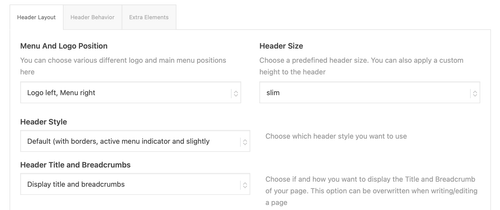
    You can disable the breadcrumb from the Enfold > Header > Header Layout > Header Title and Breadcrumbs — set it to “Hide Both”.

    qGMrixe.md.png

    Let us know if you have more questions.

    Best regards,
    Ismael

    #1496051

    In reply to: Plugin updates

    Hey kreativeseite,

    Thank you for the inquiry.

    Sorry to hear you’re having trouble updating plugins. There are a few things you can try:

    1. Make sure Enfold is updated to the latest version (7.1.4). You can check and update from Enfold > Theme Updates or login to your Themeforest account.

    2. Try switching to a default WordPress “twenty” themes temporarily and attempt the plugin update again. This will help determine whether the issue is theme-related or not.

    If the problem persists even with the default theme active, this is likely a WordPress core, server or hosting issue rather than something related to Enfold. In that case, we’d recommend reaching out to your hosting provider or the plugin developers directly for further assistance.

    Best regards,
    Ismael

    #1496049

    Hey hegartpetersen,

    Thank you for the update.

    If you prefer wrapping the title container into multiple rows, please try to add this css code:

    
    #top .av-tabs-scrollable .av-tab-section-outer-container {
        overflow: visible;
    }
    
    #top .av-tabs-scrollable .av-tab-section-tab-title-container {
        display: flex !important;
        flex-wrap: wrap;
        justify-content: center;
        min-width: unset !important;
        left: 0 !important;
        white-space: normal;
    }
    
    #top .av-tabs-scrollable .av-section-tab-title {
        flex: 0 0 auto;
    }
    

    Note that this will hide the arrow indicator beneath the active tab since it depends on the container’s positioning logic. Please refer to the documentation on adding custom css classes to elements:

    https://kriesi.at/documentation/enfold/add-custom-css/

    Let us know the result.

    Best regards,
    Ismael

    #1496047

    Hi,

    Thank you for the screenshot.

    We couldn’t reproduce the alignment issue on smaller screens on our end. For the table text size, you can try adding this to Enfold > General Styling > Quick CSS or your child theme’s style.css file:

    
    .t3-widget-root .t3-table tbody tr td {
        font-size: 20px;
    }
    

    Please make sure to purge the cache before testing.

    For any other styling issues specific to the booking module itself, we recommend keeping in touch with the Tomm Booking support team since we don’t provide support for third-party plugins. They’ll be in the best position to help you with additional configuration options.

    Let us know if you have more questions.

    Best regards,
    Ismael

    #1496043

    Hi,
    Glad that we could help, if you have further questions please open a new thread and we will try to help. Thanks for using Enfold.

    Best regards,
    Mike

    #1496035

    Hi,
    You would want a older version of Enfold not Enfold Child. What was the last working version?
    Perhaps you could roll back with your web host backup?

    Best regards,
    Mike

    #1496027

    Hi Mike,
    Thank you very much for your reply.
    I’ve installed the same search function on five other pages.
    Everything was working fine until a few days ago.
    And I was able to open the galleries on mobile exactly the same way—
    just like on the desktop.
    I would “Auswählen” the dropdown, choose the desired gallery, press OK, and then click Search.
    No updates have been applied to the script.
    Only WordPress and Enfold.

    I installed the same search function on the page linked below:
    It works fine on desktop, but doesn’t open on mobile.

    Is there anywhere I can download an older version of Enfold Child?

    Thanks and best regards,
    Franz

    Hey Arjan Steenbergen,
    This typically occurs when the page or the template was saved with unclosed tags, which breaks the page structure. Note that once the template is saved it can not be repaired it must be deleted and recreated. If the unclosed tags are on the page they can be repaired, if you find them. Often users will add html tags to title fields, despite the warning that is shown in the element. Code blocks are another place that html may be, along with text blocks that have had content copied from other pages and pasted into the visual tab, often content that is copy/paste will include html from to source, review the code tab to verify.
    I can not review your code snippet because it is malformed though the contact form. Please note that the contact form is not appropriate for support requests, please login to the support forum and open a new thread
    If you are unable to login to the support forum because you don’t have a activate support contract, please try going to your Theme Forest account and renew your support and then register your Purchase Code
    Please include a admin login to your page within your support forum new thread so we can examine. If your site is live, perhaps creating a staging site would be a good idea.

    Best regards,
    Mike

    #1496023

    In reply to: unable to log in

    Hey Sabina,
    To register for the Enfold Support Forum, first go to the Register Page and enter your Purchase Code from your Theme Forest account and creat a login. Then you can login to the forum and create a New Thread for your question.
    Meanwhile you could add this css into the theme options Quick CSS to change the uppercase to the same case that is typed into the elements.

    .template-page .entry-content-wrapper h1, .template-page .entry-content-wrapper h2 {
        text-transform: unset;
    }
    .iconbox .iconbox_content .iconbox_content_title {
        text-transform: unset;
    }
    .widgettitle,.av-catalogue-title {
        text-transform: unset;
    } 

    Best regards,
    Mike

    #1496015
    pdxammo
    Participant
    #1496014

    Hy Mike, thank you very much.

    Best regards,
    Oriano

    Enfold4ever 🕺

    #1496012

    In reply to: burger menu mobil

    Hi,
    Glad that we could help, if you have further questions please open a new thread and we will try to help. Thanks for using Enfold.

    Best regards,
    Mike

    #1496011

    Hey spitsdesign,
    You can request demos in our Feature Requests where the Dev Team will see it, click the green button at the top right “New Issue” to create a new request with the type of demo you would like to see.
    Please keep each request to one topic, but you can summit multiple topics.

    Best regards,
    Mike

    #1496008

    Hey Oriano,
    You could edit line 304 in /enfold/includes/classes/class-avia-custom-pages.php from this:

    if( is_user_logged_in() && current_user_can( 'edit_published_posts' ))

    To this:

    if ( is_user_logged_in())

    Best regards,
    Mike

    Hey Coen Verkuyl,
    Your new host is probably using PHP 8, which the very old version of Enfold that you are using will not support. Updating should solve.
    To update your version of Enfold you will need to download the latest installable WP version from your Theme Forest account and upload it to your WordPress ▸ Appearance ▸ Themes ▸ Add Themes ▸ Add New
    after you choose the zip file and click install, you will see a This theme is already installed message because you are updating, you can continue,
    then you will see the Theme updated successfully message.
    After which you can go to your Theme Forest account and create a new Token for future automatic updates.

    Best regards,
    Mike

    Coen Verkuyl
    Guest

    Hi,

    As a volunteer I took over the website of a non-profit organization. The website was updated a long time ago and running and old version of Enfold (4.2.4). Because the current host is ending its hosting I need to move the website to another host (Strato). When I backup the site and restore it temporarily on my Rasp5 host to see if the migration will work, I get a WordPress critical erre which seems to be caused by the Enfold theme: when the theme is remove all is working again.
    Would installing the latest version of Enfold help here?

    #1496003
    orianos
    Participant

    By default, when Enfold Maintenance Mode is activated, only the Administrators, Editors and Authors can view the site.

    I would like subscribed users to be able to view the site as well.


    @Mike
    ,
    you had already replied to me in this ticket (but the screenshot is no longer visible).
    Could you please send me the instructions again to edit line 304 in /enfold/includes/classes/class-avia-custom-pages.php ?

    Best regards,
    Oriano

    sebastianpesl
    Participant

    Hallo,

    auf unserer Website mit Enfold funktioniert seit kurzer Zeit der erweiterte Layout Architekt nicht mehr.
    Wenn ich eine Seite bearbeiten möchte, komme ich leider nur zu einer leeren Seite, wo ich keine Elemente oder Werkzeuge sehe.

    Habe Enfold gestern bereit aktualisiert, leider ohne Erfolg. Weiß mittlerweile nicht wirklich weiter.
    Wie gehe ich nun weiter vor?

    LG

    #1495992

    Hi,

    Thanks for the update. Did you try the suggestion that I posted earlier?

    you could try to activate debug mode under Enfold->Layout Builder->Show advanced options, then copy the shortcodes to a new page to see if that helps.

    Best regards,
    Rikard

    • This reply was modified 1 month, 2 weeks ago by Rikard.
    #1495989

    Sorry about that.
    Since the main page (first link)
    is currently under heavy revision, I’ve created a new link.
    See below.
    Thanks, best regards, Franz

    There is a search function on this page:
    Link below:
    It works perfectly on the desktop.
    Until a few days ago, it was also working fine on mobile. I don’t know if there was a change due to the WordPress update or the Enfold theme update,
    but in any case, I can no longer click on the dropdown on mobile.

    https://img.savvyify.com/
    Is this page no longer working?

    #1495986
    schweg33
    Participant

    There is a search function on this page:
    Link below:
    It works perfectly on the desktop.
    Until a few days ago, it was also working fine on mobile. I don’t know if there was a change due to the WordPress update or the Enfold theme update,
    but in any case, I can no longer click on the dropdown on mobile.

    Thanks for the info,
    Best regards,
    Franz

    https://img.savvyify.com/
    Is this page no longer working?

    2funky
    Participant

    Hello,

    When updating plugins while using Enfold together with WP Super Cache, a fatal error occurs on all my sites!

    Enfold triggers avia_force_clear_caches() during the update process, which calls wp_cache_clear_cache(). This leads to a call to get_blog_option() in wp-super-cache/wp-cache-phase2.php, but the function is not available at that point, causing a fatal error.

    Error:
    Uncaught Error: Call to undefined function get_blog_option()

    It seems cache clearing is triggered too early during the plugin upgrade process.

    Best regards, Pete

    #1495981

    theorie und praxis : mit Enfold gibt es doch noch Besonderheiten.

    lass mal diese Rule weg (also löschen):

    @supports (-webkit-touch-callout: none) {
        .avia-safari.avia_mobile .av-minimum-height, .avia-safari.avia_mobile .fullsize, .avia-safari.avia_mobile .av-fullscreen {
            min-height: 100dvh !important;
            height: auto !important;
        }
    }

    Hey Jack Song,
    You can update and we do not expect any issues, but some things to keep in mind, if you have a custom header.php or footer.php in your child theme, you should remove these first, as they have changed. After you update you can review the new version of these files and make copies with your customizations into your child theme. I recommend tring to find a different way to add your customizations without using these files, or you will run into this issue again in the future.
    The same is for any custom elements that you have in your child theme. If your child theme only has a style.css & functions.php & screenshot.png then you are fine.
    If you have added any custom code to any parent theme files, you should save the code as it will be lost when you update.
    You will not be able to automatically update via the theme options, as Theme Forest has changed since your version, after you manually update you will be able to update via the theme options for future updates.
    A good practice is to use your web host options to create a stagging site and update it first to ensure your site looks & works the same, and then update your live site. If you are not able to do this, at least ask your web host to create a full backup, including the database for a fallback just in case.
    To update your version of Enfold you will need to download the latest installable WP version from your Theme Forest account and upload it to your WordPress ▸ Appearance ▸ Themes ▸ Add Themes ▸ Add New
    after you choose the zip file and click install, you will see a This theme is already installed message because you are updating, you can continue,
    then you will see the Theme updated successfully message.
    After which you can go to your Theme Forest account and create a new Token for future automatic updates.

    Best regards,
    Mike

    Hey Dan2275,
    Glad to hear that you have solved this, if you have further questions please open a new thread and we will try to help. Thanks for using Enfold.

    Best regards,
    Mike

    #1495978

    Bitte lies auch mal was ich so schreibe!

    Warum das CSS deine Seite zerstört:
    Der “Sticky-Footer”-Killer: html, body { height: -webkit-fill-available } zwingt das gesamte Dokument dazu, genau so hoch wie der Bildschirm zu sein. Das bricht oft das natürliche Scrollverhalten.

    Die “Tab-Bar-Überdeckung”: Dass der Footer unten überdeckt wird, liegt am Konflikt zwischen -webkit-fill-available und 100svh. Das iPhone rechnet bei fill-available oft die untere Leiste (die Browser-UI) nicht korrekt ab, wodurch der Content “hinter” die Safari-Buttons rutscht.

    Die Weißflächen: min-height: -webkit-fill-available !important in Kombination mit height: auto !important zwingt Sektionen, die eigentlich klein sein sollten, dazu, den gesamten Screen zu füllen – selbst wenn sie mitten im Content stehen.

    Daher: notiere dir die bestehenden CSS Rules – und lösche diese:

    html, body {
        height:-webkit-fill-available
    }
    
    #wrap_all {
        min-height:-webkit-fill-available
    }
    
    @supports (-webkit-touch-callout: none) {
        .av-minimum-height, .fullsize {
            min-height: -webkit-fill-available !important;
            height:auto !important
        }
    }
    
    @supports (-webkit-touch-callout: none) {
        .av-fullscreen, .av-minimum-height {
            min-height:100svh !important
        }
    }

    und versuche mal diese hier:

    /* 1. Globalen Zwang für html/body nur auf Mobilgeräten aufheben */
    /* Nur für Mobile + Safari (iPhone/iPad) */
    .avia-safari.avia_mobile #wrap_all, 
    .avia-safari.avia_mobile html, 
    .avia-safari.avia_mobile body {
        /* Wir heben den globalen Zwang auf, der das Scrollen und die Footer-Sichtbarkeit stört */
        height: auto !important;
        min-height: 0 !important;
    }
    
    /* 2. Gezielter Fix für die Weißflächen und Footer-Überdeckung auf iOS Safari */
    @supports (-webkit-touch-callout: none) {
        /* Nur wenn Enfold Safari und Mobile erkennt */
        .avia-safari.avia_mobile .av-minimum-height, 
        .avia-safari.avia_mobile .fullsize,
        .avia-safari.avia_mobile .av-fullscreen {
            /* Nutze dvh (Dynamic Viewport Height) für korrekte Footer-Berechnung */
            min-height: 100dvh !important;
            height: auto !important;
            /* Verhindert den Geister-Weißraum durch fill-available */
            -webkit-fill-available: stretch; 
        }
    }
    
    /* 3. Sicherstellen, dass der Footer nicht von der unteren Tab-Bar verdeckt wird */
    .avia-safari.avia_mobile #main {
        padding-bottom: env(safe-area-inset-bottom) !important;
    }
    @supports (-webkit-touch-callout: none) {
        .avia-safari.avia_mobile #wrap_all {
            /* Erzeugt einen Puffer unten, damit der Content nicht unter der Leiste klebt */
            padding-bottom: env(safe-area-inset-bottom) !important;
        }
    }
    

    Ob du den fixierten “Einwilligung verwalten” da lassen solltest – oder lieber hinter dem Footer verschwinden lässt ist dir überlassen.
    Setze mal :

    #socket{
        z-index: 10005;
    }
    #1495977

    Hi,
    The only way would be to try reinstalling the theme. If this doesn’t work please start a new thread and include an admin login for us to examine in the private content area. Your login would not be private in this thread, as it is not your thread.
    To reinstall your version of Enfold you can download the latest installable WP version from your Theme Forest account and upload it to your WordPress ▸ Appearance ▸ Themes ▸ Add Themes ▸ Add New
    after you choose the zip file and click install, you will see a This theme is already installed message because you are reinstalling, you can continue,
    then you will see the Theme updated successfully message.

    Best regards,
    Mike

    #1495975

    I understand that the latest version of LayerSlider included with Enfold is 17.15.1. However, I have a website that’s stuck on 17.11.1, despite Enfold being on version 7.1.4. Is there some way I can force the update from 17.11.1 to 17.15.1?

    TDPS Ltd
    Participant

    Hi Enfold Support,
    I am seeing a PHP warning on a site using Enfold related to the bundled LayerSlider integration.

    Issue
    The site log shows a malformed path being passed to file_get_contents(). It looks like a full theme path is being incorrectly prefixed with the plugins directory path.

    Log entry
    [12-Mar-2026 10:24:06 UTC] PHP Warning: file_get_contents(/var/www/***/public_html/wp-content/plugins/var/www/***/public_html/wp-content/themes/enfold/config-layerslider/LayerSlider/layerslider.php): Failed to open stream: No such file or directory in /var/www/***/public_html/wp-includes/functions.php on line 6910

    The actual LayerSlider file does exist at:
    /wp-content/themes/enfold/config-layerslider/LayerSlider/layerslider.php
    However, the warning shows WordPress trying to load this instead:
    /wp-content/plugins/var/www/…/wp-content/themes/enfold/config-layerslider/LayerSlider/layerslider.php
    So it appears that:
    an absolute theme path is being generated correctly at some point, but then
    /wp-content/plugins/ is being prepended to it incorrectly

    Enfold should reference the bundled LayerSlider file using the correct theme path.

    A malformed path is built, causing file_get_contents() to fail and generate a PHP warning.

    Could you please advise:
    whether this is a known Enfold / bundled LayerSlider issue
    whether there is a patch or theme update available
    which file/function in Enfold is responsible for building this path
    If helpful, I can also provide the full environment details and additional logs.

    Thanks.

    Hi,
    Glad that we could help, if you have further questions please open a new thread and we will try to help. Thanks for using Enfold.

    Best regards,
    Mike

Viewing 30 results - 271 through 300 (of 244,632 total)