

-
AuthorPosts
-
March 14, 2026 at 5:58 pm #1496009
Hi,
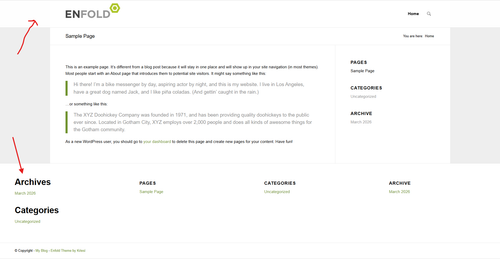
How can I accomplish an boxed layout with full width header, footer and socket?
Best regards,
Erwin
March 14, 2026 at 6:48 pm #1496013Hey Erwin,
The footer & socket are inside the main container, so you will need this JavaScript to move them after it:
Add to your child theme functions.php filefunction move_footer_scoket_after_main() { ?> <script> document.addEventListener('DOMContentLoaded', function () { const main = document.getElementById('main'); const footer = document.getElementById('footer'); const socket = document.getElementById('socket'); if (!main || !footer || !socket) return; const parent = main.parentNode; parent.insertBefore(footer, main.nextSibling); parent.insertBefore(socket, footer.nextSibling); }); </script> <?php } add_action( 'wp_footer', 'move_footer_scoket_after_main', 99 );Then add the css for the header, footer, & socket:
.responsive.html_boxed.html_header_sticky #header,
#footer, #footer .container,
#socket, #socket .container {
    width: 100vw;
    max-width: 100vw;
		left: calc(-50vw + 50%);
}
Best regards,
MikeMarch 15, 2026 at 9:09 am #1496020Hi,
That’s helping. Next thing is, I would like the slideshow full width same as the header, so out of the box. Then the content beneath with a negative margin-top sliding up into the slideshow. How can I do that? Because the site is still under construction, I’ve added the login credentials in the Private content box.
March 15, 2026 at 12:09 pm #1496022Hi,
That won’t work out, I recommend removing the above solution and using the stretched layout, then add padding/margin to the content area to give a boxed appearance and adding the title to the slideshow instead of using a negative margin for a constant placement on different screen sizes.Best regards,
MikeMarch 15, 2026 at 4:55 pm #1496033Hi,
It’s now almost as I like. I did use a negative margin for .content because I would like a backgroundcolor to the title. There’s just one thing, .content isn’t aligned in the middle. Tried to set some margins to zero, but I can’t find the right id/class. Can you help me with this?
Best regards,
ErwinMarch 15, 2026 at 5:20 pm #1496037Hi,
As I see the .content div is overlapping the slider, if you want it overlapping more you would increase the negative margin.Best regards,
MikeMarch 15, 2026 at 6:08 pm #1496040Hi,
Sorry, I was not clear. The overlapping is what I want. Only thing is, space right and left isn’t the same. It’s to much to the right.
Best regards,
ErwinMarch 15, 2026 at 6:23 pm #1496041Hi,
Try this css:.container .av-content-full.units { width: 95%; }Best regards,
MikeMarch 15, 2026 at 6:25 pm #1496042Hi Mike,
Great, that did the job! Thank you.
Best regards,
Erwin
March 15, 2026 at 6:27 pm #1496043Hi,
Glad that we could help, if you have further questions please open a new thread and we will try to help. Thanks for using Enfold.Best regards,
Mike -
AuthorPosts


- The topic ‘Boxed layout with full width header and footer’ is closed to new replies.