Hello
Thanks for the information. I only have the current version of the Enfold theme and Enfold child theme version 1.
Okay, I’ll rename the current Enfold folder and then install the latest version via FTP.
The child theme will then automatically access the Enfold folder, right?
Afterwards, I’ll gradually increase the PHP version to 8.4!
Hi,
You can keep the old version just in case, you can rename the folder to enfold-old or something like that. When you can see that everything is working as it should, then it can be deleted.
Please update the theme first, then the PHP version. The latest version of Enfold should work with 7.3, but since it’s an outdated version, we recommend that you use a more recent and supported version.
Best regards,
Rikard
Sorry but the condition you added
    if ( ! wp_script_is( 'avia_element_js', 'registered' ) ) {
        wp_register_script( 'avia_element_js', false );
    }
prevents Enfold to select Avia elements in editing the page (I try to click on Media tab or Content Elements tab) and it is stuck.
I had to delete it
Hi, I can’t upgrade the theme , even if we have the license.
this is the message: There was an error while updating Enfold: Update package not available.
Looking forward to hearing from you.
Best regards.
M.
-
This topic was modified 1 month ago by
 maryenvato.
This reply has been marked as private.
Hey Erik,
The update to 7.1.4 has to be done manually from the version you are running, please refer to my replies in this thread: https://kriesi.at/support/topic/enfold-4-5-theme-update-update-failed-download-failed-a-valid-url-was-not-pro/#post-1021541
You can either update manually via FTP: https://kriesi.at/documentation/enfold/how-to-install-enfold-theme/#theme-update, or upload the theme as if it was new under Appearance->Themes->Add New Theme.
If that doesn’t work then please try to delete the whole theme folder, then replace it with the new version. Make sure that you have backups of the site before starting updating.
Also please read this after you have updated: https://kriesi.at/documentation/enfold/theme-registration/
Best regards,
Rikard
 Erik
ErikGuest
Hello,
I am using Enfold Theme version 4.3.2. I purchased and downloaded the latest version from ThemeForest. I am also using Enfold Child Version: 1.0.
Question: How do I update the theme now?
Do I simply delete the enfold folder in “wp-content/themes”? Unfortunately, I couldn’t find any instructions on the website.
Currently, PHP (7.3.33) is still running, and this also needs to be changed. I would like to take the intermediate step to 7.4 and then to 8.5. Is this possible with the Enfold Theme I am currently using?
I would be grateful if you could help me.
Best regards, Erik
Hi,
Great, I’m glad that Ismael could help you out. Please open a new thread if you should have any further questions or problems.
Best regards,
Rikard
Hi,
Thanks for the update, we’ll close this thread for now then. Please open a new thread if you should have any further questions or problems.
Best regards,
Rikard
Thanks very much. It is much better now, but I still see some warnings. I report here the debug log, when opening Enfold Theme options and one page with layout builder on
[26-Feb-2026 09:14:54 UTC] PHP Notice: Function WP_Scripts::add was called <strong>incorrectly</strong>. The script with the handle "avia_template_save_js" was enqueued with dependencies that are not registered: avia_element_js. Please see <a href="https://developer.wordpress.org/advanced-administration/debug/debug-wordpress/">Debugging in WordPress</a> for more information. (This message was added in version 6.9.1.) in /home/yqmnhcyo/public_html/wp-includes/functions.php on line 6131
In another installation it seems ok though. I have to check the options settings
Hi Ismael,
Thank you so much for looking into this further.
We have not installed any new plugins recently. However, we have been updating existing plugins, as well as the Enfold theme. The last changes we pushed from our dev environment to live were the Enfold theme update and the Yoast plugin update five days ago, and we believe that may be when this issue started.
What I find especially interesting is that I checked our dev site, and the builder appears to be working properly there, while the issue is happening on our live site. I’m sharing the dev login credentials below as well in case it is helpful for comparison.
One other thing that may be worth mentioning: last month I made a change to the functions.php file because our EveryAction (our nonprofit CRM we use for donations, data collection) forms that are embedded throughout our website had stopped working on the backend (same issue, infinite spinning, but just on the pages were the forms were embedded). I added a script there to fix that issue, and it resolved the problem. Since everything was working fine afterward, I do not think that is the cause here, but I wanted to mention it just in case it may be relevant. I’m also sharing the code changes below for reference.
Unfortunately, as a very small nonprofit, we do not have in-house developers. I am largely self-taught and far from an expert, so I would be very grateful if you could please help us identify what is causing this issue and what might be going wrong. We edit our site on a daily basis, so not being able to access or use the builder properly is a significant issue for us right now.
Thank you again for your help, we really appreciate it.
Roberta
Hi Rikard,
you asked me to open a new thread “Me too; I have the same problem and now I used an older Backup to restore. But how can I find “open html markup” that is breaking up my layout?”
Since I have replayed an older backup. The website works.
My problems were missing containers in the Header (Logo and Slider), missing pictures under Header (verical picture “Drucken”) and empty containers underneath. Also the links in the Menüpoint “Shop” did not work.
Thanks for taking care.
Michael F
Your description of the whole thing is quite unclear.
Which Enfold element did you use? Portfolio Grid? ( When I searched for avia_post_grid in the Enfold folder, I only found portfolio.php as an element with such an entry. )
Then you selected “Open in Lightbox” for link handling.
You can set the preview image size in the “Styling” tab – Grid settings:
To do this, you must first select “Select the grid image size manually” under “Portfolio Grid Image Size”—a second drop-down menu will then open where you can specify the grid image size.
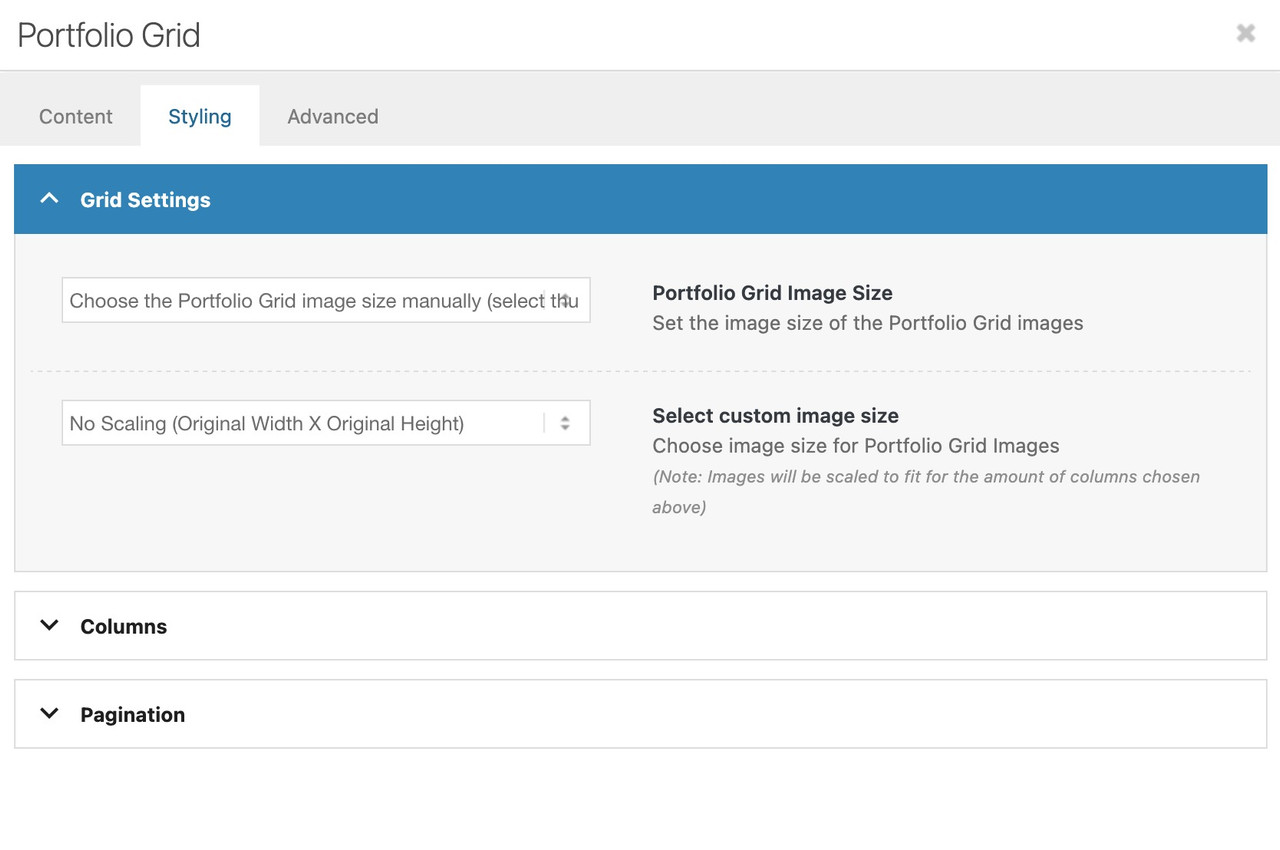
Do you like to change something on the lightbox images – or the bottom-bar text?
Hi,
Your screenshots are not working but I understand. Your issue seems to be related to a cache, when I check your page with Firefox & Edge the accodeon toggles are gray because the mouseover color is set by the main-color-bg set in the theme options #e1e1e1:
.main_color .toggler:hover {
background: var(--enfold-main-color-bg2);
}
If you what them to be orange then try changing that color in the theme settings, but note that this color setting changes many elements in the theme. If you don’t want everything to change then try this css:
#top .main_color .toggler:hover {
	background: #db5200;
}
As for your second question, I can’t see the screenshot but I see that the top color section has a background color of white. Try changing the color in the color section, or try this css:
.page-id-9206 #av_section_1.main_color {
	background-color: #d5c58a;
}
After these changes clear all of your caches.
Best regards,
Mike
I just realized that there’s a second problem : the top banner with “la gamme” should be on a kaki background like this : https://ibb.co/DDHwJLwz
But again, it works correctly on firefox on my computer, but as soon as I try on edge I only have a black title on a white background.
THe exacdt same thing happens if I try on a different computer or on a phone.
Something semms to be broken somewhere…
Can you help please ?
Note : I work on many websites with Enfold and I’ve never had that kind of troubles…
In advance, thank you for your help.
Hi Rikard,
After checking the website and Enfold (v. 7.1.3 & 7.1.4), it looks like the ‘Classic Editor’ plugin was interfering with the form?
The site (WP 6.9.1) had this plugin still running for some reason.
It seems the problem was solved by turning the plugin off.
Rob
Hey Ismael,
Thanks for the feedback.
Yes I’m using the latest version of Enfold (7.1.4).
In private content you can find the system info.
The icons used to work in the past…
Hi,
Glad that you found a solution, if you have further questions please open a new thread and we will try to help. Thanks for using Enfold.
Best regards,
Mike
Hi,
Thanks for that. I uploaded a fresh copy of the theme and activate that. Your site responded with a critical error, which unfortunately doesn’t make much sense. I would have expected the site to look and behave the same, since both versions of Enfold should theoretically be identical. Did you make any types of changes to the core theme files? Please share server error logs with us, so that we can have a closer look at them.
Best regards,
Rikard
-
This reply was modified 1 month, 1 week ago by
 Rikard.
Hi,
Did you try to clear all caches that might be applying to the site? Did you try to toggle the file compression options under Enfold->Performance? You could also try to activate the option to delete old CSS and JS files on the same page.
Best regards,
Rikard
Hi,
Thank you for the update.
Yes, you can change the page ID or apply a custom css class name to the elements. Please check the documentation for additional info.
— https://kriesi.at/documentation/enfold/add-custom-css/#enable-custom-css-class-name-support
Best regards,
Ismael
Hi, I ‘m trying to have my pdfs load in a lightbox. I have tried 2 methods – the first being adding this code which didnt work. The second thing I treid (which I prefer) is the adding the plugin ARI Fancy Lightbox. But the same things happens and it is just black and the pdf wont load.
i guess you only want to influence the lightbox images source. And because Enfold uses on default the large image. This does not always uses the original aspect ratio.
I would not influence the thumbnail sizes of the gallery. Only the lightbox source image.
If you are usiing the gallery element try:
function custom_alb_lightbox_image_size( $size, $context ){
  if( $context == ('av_gallery' || 'avia_masonry') ){
    return 'original';
  }
  return $size;
}
add_filter( 'avf_alb_lightbox_image_size', 'custom_alb_lightbox_image_size', 10, 2 );
yes – enter your red logo to the enfold logo input field.
on media library determine the path to your : ETH_galabau_Logo
guess it looks like this one :

insert that url to the is_tree(265) url:
place this snippet to your child-theme functions.php:
function is_tree($pid) {
    global $post;
    if ( is_page() ) {
        if ( is_page($pid) ) {
            return true;
        }
        $ancestors = get_post_ancestors($post->ID);
        if ( in_array($pid, $ancestors) ) {
            return true;
        }
    }
    return false;
}

function av_change_logo($logo){
        if (is_tree(265)) { $logo = "/wp-content/uploads/…/…/your_green_galabau_Logo.png";}
return $logo;
}
add_filter('avf_logo','av_change_logo');
the first function (function is_tree($pid) ) is for having all subpages to your galabau page (which has the id: 265.
from this moment – you do not need to add a new page-id to your page_array. If a page is a child of that 265 it will have that green logo.
Dear Enfold Theme,
We are currently implementing a gallery page where a lightbox opens in a gallery with additional data and the image. Unfortunately, the image is only displayed partially. We are using the following function for this:
$grid = new avia_post_grid(
                                        array(
                                            'linking'			=> ‘’,
                                            ‘columns’            => ‘3’,
                                            ‘contents’            => ‘title’,
                                            ‘sort’                => ‘no’,
                                            'paginate'			=> ‘yes’,
                                            ‘set_breadcrumb’    => false,
                                            ‘preview_mode’        => ‘auto’,
                                            ‘image_size’        => ‘full’
                                        ));

						$grid->use_global_query();
echo $grid->html( ‘’ );
Highlighted in bold that the full images should actually be used. However, this does not seem to work.
-
This topic was modified 1 month, 1 week ago by
 RENZCOM.
-
This topic was modified 1 month, 1 week ago by RENZCOM.
in your case i would create a is_tree conditional and then change the logo for all subpages by that conditional
function is_tree($pid) {
    global $post;
    if ( is_page() ) {
        if ( is_page($pid) ) {
            return true;
        }
        $ancestors = get_post_ancestors($post->ID);
        if ( in_array($pid, $ancestors) ) {
            return true;
        }
    }
    return false;
}

function av_change_logo($logo){
        if (is_tree(265)) { $logo = "[logo url]";}
    elseif (is_tree(509)) { $logo = "[logo url]";}
    elseif (is_tree(530)) { $logo = "[logo url]";}
return $logo;
}
add_filter('avf_logo','av_change_logo');
your Landschaftbau is page ID: 265
by the way enfold has now a class on subpages for that on body tag: parent-pageid-265 – but this will only work for the next level of direct children.
then you can have that conditional:
if ( is_page(265) || $post->post_parent == 265 ) {
    // ...
}
But: the is_tree seems to be more elegant.
Hey Rajender,
What exactly are you trying to do? If you are looking to get updates in the backend, then please refer to this: https://kriesi.at/documentation/enfold/theme-registration/
Best regards,
Rikard
 Rajender Kumar
Guest
Hi have bought the Enfold theme 7-8 month ago while developing the site
now i am update the license code it not working
can u check so that i can buy clear ny another purchase
 Tim Payne
Guest
Hi Have a website that I’m migrating from DIVI. I have moved all the pages to Enfold but can’t find a way to bulk rename all the links to the new domain. Could you please advise?



