The pages that are designated by the plugin do not apply the enfold general styling in terms of colours of fonts, backgrounds, etc.
Such pages are for example this one: https://tricorn-travels.com/all-trips/
You see if white (#ffffff) because i manually inputted the CSS for it. None of the text colours are what the enfold general styling should impose.
If the enfold general styling was applying to the page, here how the trip search would look: https://tricorn-travels.com/
Now, I could manually edit the CSS for everything on all plugin pages…. which is lenghty…..But I would like to know: is there a simple CSS that makes the Enfold Styling override plugins for all looks (font color, background, alternate colour etc) on all the pages of my website included the plugin designated pages?
Hey Paolo,
Did you try generating a new token in your Google account? Please refer to the documentation for further help: https://kriesi.at/documentation/enfold/contact-form/#captcha
Best regards,
Rikard
Hi,
Thank you for the info.
We just noticed that the site contains a very old version of the theme (6.0.6). Please download the latest version (7.1.3) from your Themeforest account, then try to update the theme manually via FTP. Please check the documentation below for more info.
— https://kriesi.at/documentation/enfold/theme-update/#update-via-ftp
The upgrade should fix the issue with the fold/unfold feature and the rest of the layout issues in the builder.
Best regards,
Ismael
Hi,
Thanks for the update, we’ll close this thread for now then. Please open a new thread if you should have any further questions or problems.
Thanks @guenni007 for helping out :-)
Best regards,
Rikard
Hey Alex,
We are actively developing Enfold. So far we released 6 updates this year and planning to release another one before the new year.
Adding new demos is something our team is considering, however, we can’t confirm if or when this would occur.
If you have any specific features you’d like to see in Enfold, please feel free to share, and we’ll pass it to our development team.
Best regards,
Yigit
Hi, i had to manually change the background color with CSS. You can see it in the customisation tab.
However, it’s still not the best solution as those pages do not inherit all the styling set on Enfold via General Styling. Could you take a look? I put the new credentials for the account below
you can see (including a snippet for child-theme functions.php ) a different solution – where the margin-bottom value is ruled by a script.
Only for masonry galleries – not for Masonry Entries
This code fixes caption overlay issues in Enfold’s Masonry elements by:
– Flexible Masonry: Places captions below images instead of overlaying them
– Perfect Grid: Dynamically calculates margin-bottom based on caption height
see: https://webers-testseite.de/masonry-with-captions/
PS: for pefect grid and automatic grid – there are sometimes timing problems . Maybe i find some time to correct it in the script. For flexible Masonry this solution works very good.
Hey milkrow,
Thanks for your patience, if I understand correctly you are adding images in the text element in the ALB (advanced layout builder):
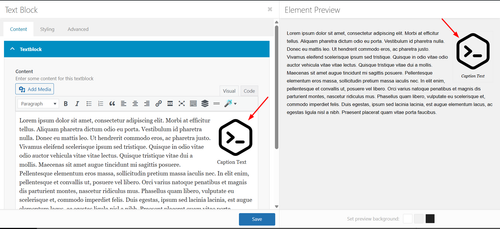
and instead of just the caption showing below the image, you want caption, description, copyright, and title to show like this:
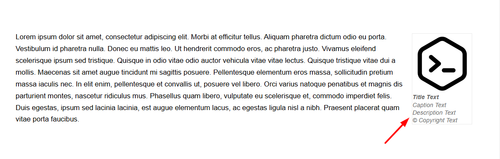
In my tests this snippet in your child theme functions.php works:
add_filter('the_content', 'enfold_add_image_metadata');

function enfold_add_image_metadata($content) {
    // Only process on frontend
    if (is_admin()) {
        return $content;
    }

    // Pattern to match images with WordPress attachment IDs
    $pattern = '/<img[^>]+wp-image-(\d+)[^>]*>/i';

    preg_match_all($pattern, $content, $matches);

    if (!empty($matches[0])) {
        foreach ($matches[0] as $index => $img_tag) {
            $attachment_id = $matches[1][$index];

            // Get image metadata
            $title = get_the_title($attachment_id);
            $caption = wp_get_attachment_caption($attachment_id);
            $description = get_post_field('post_content', $attachment_id);
            $copyright = get_post_meta($attachment_id, '_avia_attachment_copyright', true);

            // Build metadata HTML
            $metadata_html = '';

            if ($title || $caption || $description || $copyright) {
                $metadata_html .= '<div class="image-metadata" style="line-height: 14px; color: #666;">';

                if ($title) {
                    $metadata_html .= '<div class="image-title" style="font-weight: bold;">' . esc_html($title) . '</div>';
                }

                if ($caption) {
                    $metadata_html .= '<div class="image-caption" style="font-style: italic;">' . esc_html($caption) . '</div>';
                }

                if ($description) {
                    $metadata_html .= '<div class="image-description">' . wp_kses_post($description) . '</div>';
                }

                if ($copyright) {
                    $metadata_html .= '<div class="image-copyright">© ' . esc_html($copyright) . '</div>';
                }

                $metadata_html .= '</div>';
            }

            // Replace the image with image + metadata
            if ($metadata_html) {
                $replacement = $img_tag . $metadata_html;
                $content = str_replace($img_tag, $replacement, $content);
            }
        }
    }

    return $content;
}

/**
 * Add CSS to hide default WordPress caption text
 * while keeping the caption container styling
 */
add_action('wp_head', 'enfold_hide_default_caption_text');

function enfold_hide_default_caption_text() {
    ?>
    <style>
        /* Hide the default WordPress caption text inside caption shortcode */
        .wp-caption p {
            display: none !important;
        }
    </style>
    <?php
}
In your media library add the text to your image:
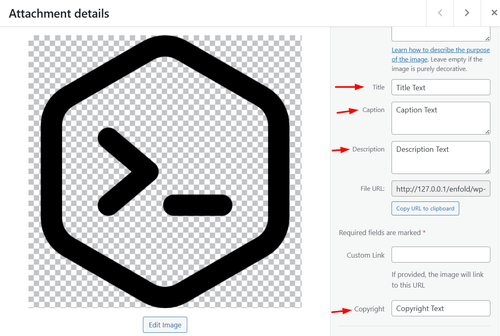
Best regards,
Mike
Hey ti2media,
Try this css in your child theme stylesheet:
#top.home #av-masonry-1.av-masonry a.av-masonry-entry {
	margin-bottom: 50px !important;
}
#top.home #av-masonry-1.av-masonry .av-inner-masonry {
	overflow: visible;
}
#top.home #av-masonry-1.av-masonry .av-inner-masonry-content {
	position: relative !important;
	top: 100%;
	width: auto;
}
Then clear your cache and check.
Based on Guenni007’s solution.
Best regards,
Mike
Hi,
Glad that Ismael could help, if you have further questions please open a new thread and we will try to help. Thanks for using Enfold.
Best regards,
Mike
Hi,
Thank you for the update.
Image captions are associated with featured images or other media attachments, which are stored as a separate post type (attachment). This is different from regular posts or portfolio items, which do not have a built-in caption field — only an excerpt if supported. It is definitely possible to retrieve the caption of the featured image attached to a post but this will require modifications to the templates, which is beyond the scope of support.
If you want to try it yourself, you can find the Masonry template in the enfold/config-templatebuilder/avia-shortcode-helpers/class-avia-masonry.php file.
Thank you for your understanding.
Best regards,
Ismael
The Demo: enfold-business-flat has on all pages a transparent header. !!!
The transparency logo is shown then. So did you have inserted an alternate logo on :
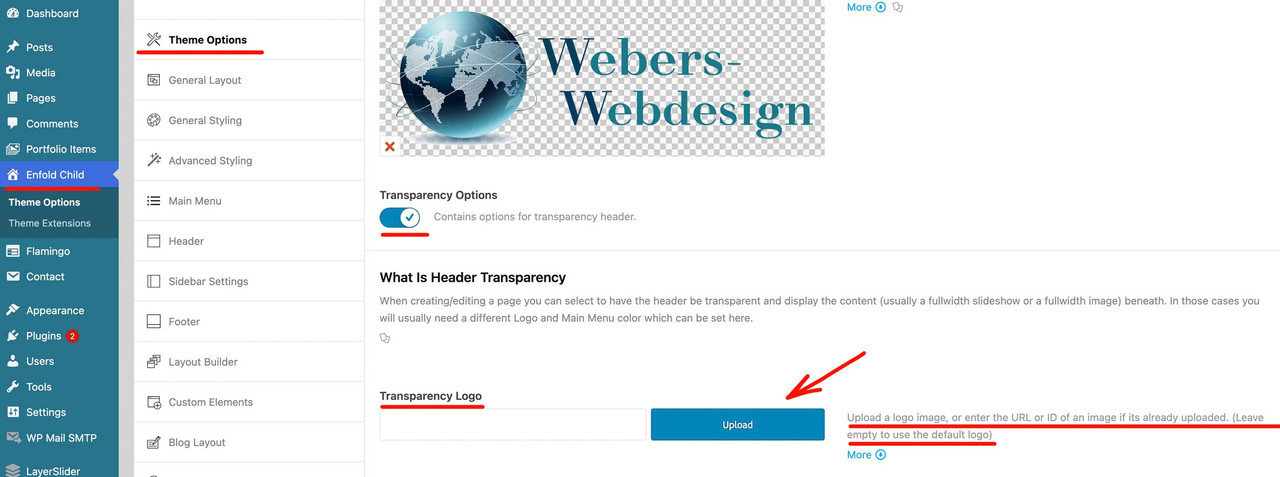
on the rest of your pages you do not see any logo because the default logo for transparency on that logo is white – and all pages of your page have a white color-section on top.
Hey tricorntravels,
Did you set your preferred colour under Enfold->General Styling->Body background?
The login details that you posted are not working, please check and verify.
Best regards,
Rikard
Hey Grace,
Thanks for reaching out to us. I see that you are running an old version of the theme, the update to 7.1.3 has to be done manually from the version you are running, please refer to my replies in this thread: https://kriesi.at/support/topic/enfold-4-5-theme-update-update-failed-download-failed-a-valid-url-was-not-pro/#post-1021541
You can either update manually via FTP: https://kriesi.at/documentation/enfold/how-to-install-enfold-theme/#theme-update, or upload the theme as if it was new under Appearance->Themes->Add New Theme.
If that doesn’t work then please try to delete the whole theme folder, then replace it with the new version. Make sure that you have backups of the site before starting updating.
Also please read this after you have updated: https://kriesi.at/documentation/enfold/theme-registration/
If you don’t own a license for the theme, then you can buy one here: https://themeforest.net/item/enfold-responsive-multipurpose-theme/4519990
Best regards,
Rikard
 Grace Donaldson
Guest
HI Team,
I need to update the enfold theme on my website to allow me to update PHP. (I have had the theme on the website now for around 7-8 years
In order to update the theme on wordpress, I need themeforest username and API key which I don’t have.
Are you able to assist?
Thanks!
I’m not using the block editor. I’m editing the custom post type Portfolio Entry with ALB and a custom template. Are you saying I have to use the block editor and NOT the classic editor just to view the Excerpt in WP 6.9 with Enfold?
Hello, I installed Enfold and i have your WP travel engine pro plugin.
I am experiencing a conflict with the styling on my website.
My theme’s global color settings (white background and specific font colors) are not been applied to the pages that are designated by WP Travel Engine. For example, on Enfold Styling, i put white background everywehere. Yet the All Trips page, the single trip page and others show persistent brown background and incorrect font colors. This issue affects all pages designated as plugin pages (single trips, search results pages).
Here are the URLs demonstrating the issue:
Problematic Pages (Brown Background & Incorrect Font Color):
Single Trip Page: tricorn-travels.com
I contacted the plugin support, but they said i needed to talk to the theme support team
Can you help?
Hey kurson,
Thank you for the inquiry.
The green color can be overridden using this css code:
.main_color a, .main_color .widget_first, .main_color strong, .main_color b, .main_color b a, .main_color strong a, .main_color #js_sort_items a:hover, .main_color #js_sort_items a.active_sort, .main_color .av-sort-by-term a.active_sort, .main_color .special_amp, .main_color .taglist a.activeFilter, .main_color #commentform .required, #top .main_color .av-no-color.av-icon-style-border a.av-icon-char, .html_elegant-blog #top .main_color .blog-categories a, .html_elegant-blog #top .main_color .blog-categories a:hover {
    color: #555555;
}
This can also be adjusted in the Enfold > Advanced Styling panel — look for the strong tag and configure it.
Best regards,
Ismael
Hi,
Thank you for the inquiry.
The lightbox is not opening or working. Did you enable the Lightbox Modal Window option in the Enfold > Theme Options panel? Please check the screenshot below.
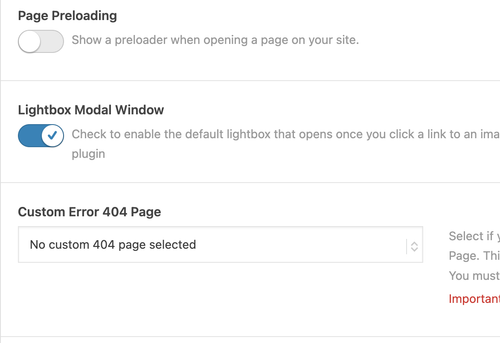
Let us know the result.
Best regards,
Ismael
Hi,
Thank you for the update.
We can’t reproduce the issue on our end, as shown in the screenshot above, but you can try this css code to apply a minimum height to the color section container.
@media only screen and (max-width: 767px) {

  /* Add your Mobile Styles here */
  .page-id-30 #av_section_2 .container {
    min-height: 350px;
  }
}
You may want to apply a custom css class name or ID to the element and adjust the selectors in the css rule.
— https://kriesi.at/documentation/enfold/add-custom-css/
Best regards,
Ismael
Hi,
Thank you for the update.
Please add this code to fix the “uber mich” issue.
.header_color .main_menu ul:first-child > li > a {
    color: var(--enfold-header-color-color) !important;
}

.header_color.header-scrolled .main_menu ul:first-child > li > a {
    color: var(--enfold-header-color-meta) !important;
}
Then use this code to adjust the color of the active menu on scroll.
.header_color.header-scrolled .main_menu ul:first-child > li.current-menu-item > a {
    color: #0d3c63 !important;
}
Make sure to add this code to the bottom of the previous code.
Best regards,
Ismael
enfold is the newest version
I noticed that my lists have css for bold code in my enfold theme that adds a green color. I don’t want this. It is inconsistent as code that isn’t list code and just normal text code that is bold is black.
Q: How do I identify where the CSS is coding the
Text
is being applied and remove this added green value?
It is especially confusing as my link colors are also bold and green
Screenshot: https://tinyurl.com/28wop55w
Blog Post Example: https://blgenvironmental.com/florida-backyard-privacy-landscaping-creating-shade-natural-screening-for-orlando-homes/
Please advise where the CSS is an how to adjust this issue and resolve.
Hello:
Demo import: Import: Small Business – Flat Demo
The Enfold Logo will not stop displaying. Have cleared all cache. Have deactivated all plugins. Upon inspection, it says my logo should be showing, but the enfold logo displays. Enfold logo image has been deleted.
I have changed nothing on the demo except for the logo and some color in the general styling. My logo displayed perfectly in another demo import. Have no clue, but would appreciate help. Thank you.
Tim
Hello Rikard,
thank you for your reply. I have some concerns about updating my site. My website currently only works on PHP 7.0, and if I switch to PHP 7.1 or higher, the whole site breaks and I cannot access the WordPress dashboard.
I want to update to the latest Enfold theme version (7.1), but I am unsure if it will work properly on PHP 7.0. I am worried that if I update the theme while still on PHP 7.0, the dashboard might stop working and I will lose access.
If the new theme does not work on PHP 7.0 and the site breaks, how can I then fix it or finish the update if I cannot access the dashboard? Is there a safe way to update without risking losing access to WordPress?
Thank you very much for your guidance.
Best regards
Hi,
Thanks for the update, we’ll close this thread then. Please open a new thread if you should have any further questions or problems.
Best regards,
Rikard
Hey Enfold
My client would like to show instagram post on their site.
They want to show the 4 latest post in a row next to each other
How is that done ?
Thanks ;)
Merry Christmas
 victoria
Guest
Is Enfold 100% with WP TRAVEL ENGINE PRO plugin?
Hi,
Thanks for the update. The stylesheets on your site looks like they are being served from a CDN. Please try to temporarily deactivate file compression and activate the option to delete old CSS and JS files under Enfold->Performance, then flush any cache that might be activate, then ask the CDN to renew the resources being served.
Best regards,
Rikard
Hi,
Great, I’m glad that Ismael could help you out. We’ll close this thread for now then, please open a new thread if you should have any further questions or problems.
Best regards,
Rikard



