Hello,
I recently changed my homepage Custom Error 404 Page from “redirect to selected page” to “No custom 404 page selected” and now my home page will not show up in google search when i am logged out. It is only my home page.
I have changed the settings bak to “redirect to selected page” and selected the “home page”, but the home page is still not working.
I noticed that on 2 of my websites and the other one is losing Google ranking. Please assist ASAP
Hi Enfold Team,
I*ve just noticed that certain CSS code doesn’t work under Chrome Browser.
Example #1 – Hiding Main Menu Entries
I have hidden the main menu items “Ankaufsprofil, Presse, Karriere and Kontakt” for desktop with the css-class “only-mobile” and the following CSS code:
@media only screen and (min-width: 990px) {
.only-mobile { display: none !important; }}
Example #2 – Hiding the date of portfolio posts in Footer
I have hidden the date of the newst portfolio entries in the footer:
#footer .news-time {
display: none;
}
Both examples work with Firefox and Explorer but not with Chrome !?
You can test this URL: http://bema.more-impact.net/
Example #1 doesn’t work also with Firefox and Explorer on the search results page. Please try to search something: on the result page you see alle main menu items – also the ones with “only-mobile”.
Especially Example #1 brings me into trouble.
Do you have a solution for me?
Best
Alex
-
This topic was modified 6 years, 3 months ago by
 ahanauer.
Hi Enfold Support Team,
Enfold latest Portfolio Widget
I’m using Enfold latest Portfolio Widget in the Footer and I’ve choosen “display title only”. Is it possible to hide the date and show only the title?
Footer viewed with an iPhone
My client is a perfectionist and has discovered that the search button behind the magnifier symbol doesn’t fit perfectly and that the linespacing of the footer menu is much too tight.
Kind regards
Alexander
Hi,
we need your help. We are searching for the reason, why our TTFB is so bad (more than 6 seconds).
We can exclude the server because when rendering a statical page from the same server, the problem does not occur.
We created an empty page without footer and header within the enfold page. This is slow, too.
I send the urls in the private section.
Can you please give us a hint what could be the reason for the bad TTFB?
Regards
Dear members and support,
how can i setting that a user send a e-mail over a contact form and get the copy of this message to him e.mail address.
How can i do this with enfold contact form? I search here in forum, but i don’t find a solution.
Can anybody help me? Please!
So many thanks sp
Hi,
Thank you for the feedback, after researching about PodLove some more I found that you will need to create a custom taxonomy by using this function:
add_theme_support('add_avia_builder_post_type_option');
add_theme_support('avia_template_builder_custom_post_type_grid');
and then add your taxonomy to the episodes, but not your pages, then if you use the ALB or shortcodes and choose that taxonomy it will only show your episodes and not the pages. Such as in this example.
So we can understand better, are you using the blog post element in the Advanced Layout Builder to create your episode grid pages, or are you using PodLove shortcodes to create the grid? [podlove-episode-list] If you are using PodLove shortcodes, then there must be variables that you can add to the shortcodes to filter what is shown, in which case please ask the PodLove support, because we don’t know their shortcodes. Or are you using a template like this? If that is the case then I would think that the PodLove support would have a filter for that too.
Best regards,
Mike
Hello everyone,
i’m currently updating my website and trying to do something who already exist but i can’t manage to do it with WordPress Enfold.
Here are 2 exemples of what i want to do :
https://www.lg.com/ca_en/desktop-monitors/lg-27GL850-B
https://merch.riotgames.com/en_US/promos/2019/snowdown
As you can see, the full background is made from multiple smaller backgrounds and everything is scalable.
Here is my work atm :
As you can see, my backgrounds just resize from their own center and not going to stack to the top of the previous content so there is some dark line between each section.
Do you have any idea how i can do that or how it’s called to search more information by myself ?
Thanks
-
This topic was modified 6 years, 3 months ago by
 ultranawak.
maybe a search on google could help you : look for wordpress and nested shortcodes f.e.: https://slewis.org/nested-wordpress-shortcodes/
it all is about setting filterpriority – and be carefull on dooing that too early – maybe a mod could give you a hint on what priority ( 10 or 20 …) it is best to implement.
this comes to child-theme functions.php:
define('filter_priority', 10);
add_filter('the_content', 'do_shortcode', filter_priority);
add_filter('widget_text', 'do_shortcode', filter_priority);
– A nice idea ! indeed – and in combination with f.e. restrict widget plugin you can define for different pages in a quick manner different footers.
______________________
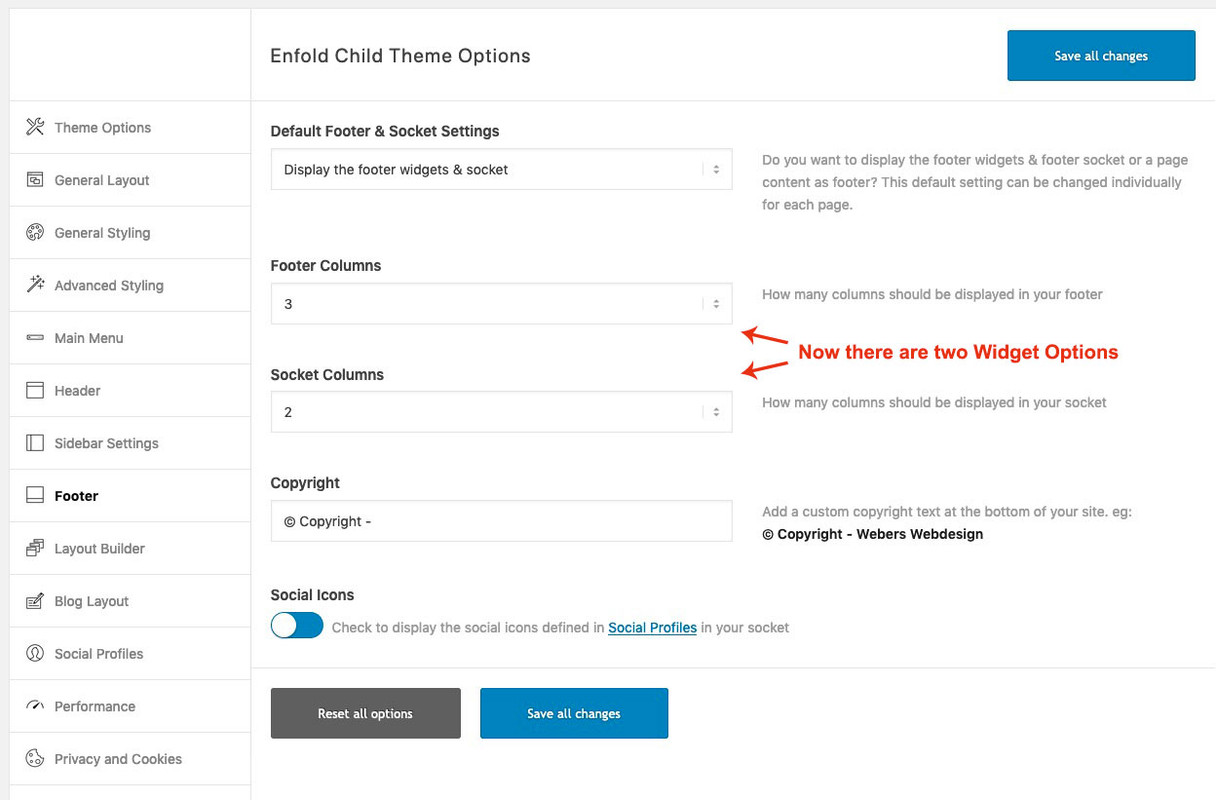
Off-Topic: by the way i showed a way to have a second footer widget row in the footer – or to have a widget row in socket here:
https://kriesi.at/support/topic/second-widget-line-in-footer/
all you need is a custom child-theme footer.php and one entry in child-theme functions.php:
here for footer: https://kriesi.at/support/topic/second-widget-line-in-footer/#post-1156806
here for Socket: https://kriesi.at/support/topic/second-widget-line-in-footer/#post-1156800
it will end in an extra setting in enfold options dialog f.e.:
Hi Victoria,
thanks for helping me out!
The button is now created and i tested with the code your’re providing here: “Menu Centered” but cant find the right modification without destroying the current process with overlapping and so on. :)
I think now I just need to modify this snippet right?
/************************************

 Add a widget area on the right side
 Logo left, Menu center, Widget right

*************************************

CSS Settings:

» Initiate Flexbox
» Topbar
» Header
» Logo
» Menu
» Widget
» Social icons
» Search
» Cart icon

***********************************/

/*--------------------------------

» Initiate Flexbox

--------------------------------*/

/* Header */
.responsive #top #header,
/* Top bar */
.responsive #top #header #header_meta,
/* Search icon */
.responsive #top #header #menu-item-search a,
/* Cart icon */
.responsive #top #header a.cart_dropdown_link,
/* Social icon */
.responsive #top #header #header_main nav .social_bookmarks,
/* Logo */
.responsive #top #header #header_main .inner-container .logo,
/* Main menu, cart and social icons */
.responsive #top #header #header_main .inner-container .main_menu,
/* Widgets */
.responsive #top #header #header_main .inner-container .widget,
/* Header inner container */
#top #header #header_main .container.av-logo-container .inner-container {
    display: flex;
    position: relative;
}

/*--------------------------------

» Topbar

--------------------------------*/

/* Top bar */

.responsive #top #header #header_meta {
    flex-basis: 100%;
}

/*--------------------------------

» Header

--------------------------------*/

/* Height */

#top #header #header_main .container.av-logo-container {
    height: inherit;   /* Auto height: Header takes the height of the contents */
}

/* Header inner container */

#top #header #header_main .container.av-logo-container .inner-container {
  height: inherit;
  position: relative !important;
  flex-wrap: nowrap;
  justify-content: space-between;
}

/* Wrappers
--------------------------------*/

/* Header content and Topbar */

.responsive #top #header {
    flex-wrap: wrap;
}

/* Header contents: Logo, Menu, Social Icons and Widgets. */

.responsive #top #header #header_main {
    flex-basis: 100%;
}

/* Transparent header
--------------------------------*/

.responsive.html_header_transparency #top #wrap_all #header {
    position: absolute;
}

/* Main content:
-----------------------*/

.responsive #top #main {
    padding-top: 0px; /* Gap between the content and header */
}

/* Fixed header
--------------------------------*/

/* Fixed header */

.html_header_sticky.html_header_transparency #top #wrap_all #header,
.html_header_sticky #top #wrap_all #header {
    position: fixed;
}

/* Fixed header and page content gap.
   Padding value should be same as the fixed header height. */

.html_header_sticky:not(.html_header_transparency) #top #wrap_all #main {
    /*padding-top: 145px !important; */
}

@media only screen and (max-width: 767px) {
.html_header_sticky #top #wrap_all #main {
    /*padding-top: 145px !important; */
}}

/*--------------------------------

» Logo

--------------------------------*/

/* Logo */

.responsive #top #header #header_main .inner-container .logo {
    order: 0;
    flex-basis: auto;
    /*width: auto;*/

    /* Define scalable min width of the logo on small screens */
    min-width: 100px;
    /* Define scalable max width of the logo on big screens */
    /* Logo width: (auto | 100% | px );  Set auto to display the uploaded image size */
    max-width: 180px;

    z-index: 9;
}

/* Logo image size */

.responsive #top #header .logo,
.responsive #top #header .logo a,
.responsive #top #header .logo img {
    width: auto;

    /* Height specification is not required. It is proportional to the max width of the logo */
    height: auto;
    align-items: center;
    align-self: center;
    justify-content: center;
}

/* Vertically center transparency logo */

.responsive #top #header .logo span img {
    position: absolute;
    top: 50%;
    transform: translateY(-50%);
}

/*--------------------------------

» Menu

--------------------------------*/

/* Menu outer container: Menu with siblings cart and social icons */

.responsive #top #header #header_main .inner-container .main_menu {
    order: 0;
    flex-basis: auto;   /* Use calc to minus the width of the logo */
    align-items: center;
    align-self: center;
}

/* Navigation */

#header .av-main-nav {
    display: flex;
    flex-wrap: nowrap;
}

/*  Activate burger menu  */

@media only screen and (max-width: 1000px) {
    #top #header .av-main-nav>li.menu-item {
        display: none!important;
    }
    #top #header .av-burger-menu-main {
        cursor: pointer;
        display: block!important;
    }
}

@media only screen and (max-width: 767px) {

/* Mobile menu position fix */
.responsive #top .av-logo-container .avia-menu {
    display: flex!important;
    align-items: center;
}}

/* Mega menu position fix */
#header li .avia_mega_div,
#header li:hover .avia_mega_div {
    right: 0 !important; /* submenu position */
    left: auto!important; /* submenu position */
    max-width: 50vw;
}

/*--------------------------------

» Widget

--------------------------------*/

/* Widgets */

.responsive #top #header #header_main .inner-container .widget {
    order: 0;
    flex-basis: auto;
    padding: unset;
    clear: none!important;

    align-self: center;
    align-items: center;
    z-index: 1;

}

.responsive #top #header #header_main .inner-container .widget>div {
    width:100%;
    line-height: 14px;
    padding:0 10px;
}

/*--------------------------------

» Social icons

--------------------------------*/

/* Flex support and position fix */
.responsive #top #header #header_main nav .social_bookmarks {
    display: flex;
     top: auto;
     margin-top: 0;
     align-items: center;
}
/* Inherit height for flex alignment */
#top .av-logo-container .social_bookmarks li {
    height: inherit;
}

/*--------------------------------

» Search

--------------------------------*/

/* Your styles here */

/*--------------------------------

» Cart

--------------------------------*/

/* Cart position fix */

#top #header #header_main #menu-item-shop a.cart_dropdown_link {
    height: auto;
}

@media only screen and (max-width: 767px) {
    .responsive #top #menu-item-shop.cart_dropdown {
        display: flex;
        align-items: center;
    }
    .cart_dropdown .dropdown_widget .avia-arrow {
        display: none;
    }
}
Thank you very much!
 Mariusz
Guest
Hello,
We will soon have to change our current website based on wordpress – http://www.Lux4home.com to a newer version. We were searching for a new on on Themeforest and we found your template: https://kriesi.at/themes/enfold-elegant-portfolio/portfolio-item/a-dummy-portfolio-entry-1/
Would you please help us – can you have a look at the current arrangement in our website, more precisely the presentations of products, for instance: https://www.lux4home.com/stone-bathtubs/flumen/ and can you please advise if your Theme will be suitable to transfer our content, or should we look for a different one?
Hi,
So Enfold-customers must decide if they want good SEO or a responsive website??
As we’ve said, the theme is SEO-friendly, but it is up to the site owners or developers to make the site fully optimized for search engines. It’s all about the content. If you don’t know where to start, there are a lot of free SEO tutorials out there — Yoast’s documentation for example.
Do you agree that one part of responsiveness is to save bandwidt for users???
Yes, we agree. This is why we created the following articles to help users optimize their site.
// https://kriesi.at/archives/scoring-100-100-in-google-pagespeed-insights-gtmetrix-pagespeed-and-yslow
// https://kriesi.at/archives/4-key-wordpress-image-optimization-tips
Best regards,
Ismael
Hello dear Enfold Team,
i currently try to let 3 boxes within a color section overlap slightly into the above positioned slideshow/slider. I allready took some research but none of the information i found worked for me. I tried to define a customclass and let it run with a negative padding. I also tried directly a negative padding within the colorsection settings – but without sucess.
it would be glad if you could help me out on this or give me a hint :)
Kind regards
hans
Hi,
1- Please go to Enfold theme options > Main Menu and disable “Append search icon to main menu”
2- Please go to Enfold theme options > Advanced Styling and edit “Main Menu Links” and change background color
That should do it :)
Cheers!
Yigit
How can I explain it? Maybe this is helpful for you to understand. Structured data is added directly to a page’s HTML markup. Search engines use structured data to generate rich snippets, which are small pieces of information that will then appear in search results. Google has written a lot about it. https://developers.google.com/search/docs/guides/intro-structured-data But this is a language I don’t understand.
We have it implemented on our website on one page with a plugin. But it is outside the ENFOLD template and therefore ugly. Look at https://www.m24o.net/product/music-trips-italy/ at the bottom of the page. It is a FAQ structure. When you search in google with “m24o music trip italy” then you see how google shows the page. Nice. It helps to bring us up in the ranking and it covers a lot of real estate in the search display.
It would be nice if the Accordion element had the code to create this data structure. I think you could make a lot of people happy with that option.
Hello Basilis,
thanks for that offer but i think that we optimised everything
– Caching
– Shortpixel
– Speedsettings on Aviapage
– htacess (expires/caches/compress and more)
– Defer JS
– responsive (which by the way leads to a massive increase in pageload because if you use Enfold you need to decide if you want SEO or Responsiveness.)
and more….
What else do you want to optimize??
And now back to topic
Yesterday the page did almost NOT load at all – for minutes.
PLEASE see the video:
[video src="https://maskenzauber.com/temp/maskenzauber-dead.mp4" /]
Of course we searched the reason for that desaster not only in the theme and thats why we discuss that since weeks also with our hosting company – Hetzner – and they always blame the theme.
Actually they said that there are problems with loading the fonts via JQuery.
Since we did not edit anything in the code (i only use the features and options offered by Enfold) it must be searched in the theme (if Hetzner is right with the font issue)
Here is the screenshot they provided to proof the issue:
https://maskenzauber.com/temp/maskenzauber-hetzner.png
Maren
Thank you for the link! It is a good search tool. There are some people they combine Enfold with WPML.
Hi there,
I’m using Enfold successfully and I have designed my web site exactly the way I want. I have tested this website on every kind of device, ipads, iphones and android phones, and everything looks pretty and usable. So the question is:
Why is google reporting a mobile usability error in search console? It’s been more than a month since I have launched and indexed my site on google, and still I have these reports. The error is:
– text too small to read
– clickable elements too close together
I see other users have encountered this kind of errors with enfold, some have talked about modifying the robots file, someone else just said to wait in order for google to re-index the page… but I’m waiting and nothing changes. I wonder whether there’s a problem with the code and the way google is seeing css and javascript.
Can you please help me to find a solution to this problem?
thanks.
 Maria
MariaGuest
Hello,
My client’s site has the Enfold theme and also it has the “WP Crontrol” for cron events. When I’m trying to add a cron the plugin redirects me to the search page. I have contact to the plugin’s support and told me that the problem is on the theme. What is the problem?
Thank you.
Hey,
Menu search icon is disabled when using side header. Please create a new widget area in Appearance > Widgets and add a Search widget and then choose to display that widget in Enfold theme options > General Layout
Regards,
Yigit
Hi,
Good news, apparently we have a fix for this already, I guess I had searched our GitHub with different keywords.
So this will be in the next update, but for now please try replacing: /enfold/js/avia-snippet-cookieconsent.js
with this file.
Please keep a backup copy of the old file, just in case.
Best regards,
Mike
I would be interested in Enfolds recommendation as well. The Yoast SEO is indeed a power pig. And as I search for alternatives, The Seo Framework (thhttps://wordpress.org/plugins/autodescription/) is emerging as a great alternative. One reviewer mentioded that it was “lightweight and powerful” but I don’t know if it is substantially.
I’ll be having to switch out my Yoast SEO plugins on several of my sites. I’m hoping that Seo Framework (or whichever is recommended by Enfold) will be the safe choice.
UPDATE
Here’s what I did that (mostly) worked:
- Went to Settings > Permalinks and changed the Portfolio ‘custom bases’ to “titles” and “titles-entries”
- In the enfold-child theme, I opened functions.php and pasted in this:<br />
// portfolio args
add_action( 'after_setup_theme', 'init_reg_portfolio' );
function init_reg_portfolio() {
	add_filter('avf_portfolio_cpt_args', 'avf_portfolio_cpt_args_mod', 50, 1);
}

function avf_portfolio_cpt_args_mod($args) {
	$labels = array(
		'name' => _x('Book Titles', 'post type general name','avia_framework'),
		'singular_name' => _x('Title Entry', 'post type singular name','avia_framework'),
		'add_new' => _x('Add New', 'portfolio','avia_framework'),
		'add_new_item' => __('Add New Title','avia_framework'),
		'edit_item' => __('Edit Title Entry','avia_framework'),
		'new_item' => __('New Title Entry','avia_framework'),
		'view_item' => __('View Title Entry','avia_framework'),
		'search_items' => __('Search Title Entries','avia_framework'),
		'not_found' =>  __('No Title Entries found','avia_framework'),
		'not_found_in_trash' => __('No Title Entries found in Trash','avia_framework'),
		'parent_item_colon' => ''
	);

	$args['labels'] = $labels;
	return $args;
}
//END
- In wp-content > themes > enfold > includes > admin I opened register-portfolio.php and made the $labels = array code block look like this:
$labels = array(
		'name' => _x('Book Titles', 'post type general name','avia_framework'),
		'singular_name' => _x('Title Entry', 'post type singular name','avia_framework'),
		'add_new' => _x('Add New', 'portfolio','avia_framework'),
		'add_new_item' => __('Add New Title','avia_framework'),
		'edit_item' => __('Edit Title Entry','avia_framework'),
		'new_item' => __('New Title Entry','avia_framework'),
		'view_item' => __('View Title Entry','avia_framework'),
		'search_items' => __('Search Title Entries','avia_framework'),
		'not_found' =>  __('No Title Entries found','avia_framework'),
		'not_found_in_trash' => __('No Title Entries found in Trash','avia_framework'),
		'parent_item_colon' => ''
	);
[ NOTE: I’m not sure this is important, but I made the names match what I did in functions.php above ]
I said “mostly works” above because “Portfolio Categories” is still visible in the options.

I tried to follow what Ismael and mikeraymarketer were doing here to fix the same issue, but when I did it, I got errors so I walked it back.
Hi,
It looks like \enfold\functions-enfold.php line 348
get_the_time( $search_messages['time_format']
Best regards,
Mike
Hi team Enfold
After searching the forum and finding several similar issues and testing their solutions, I’m still struggling with two things on a client’s website.
I provided credentials in the private content by the way.
– When I try to upload a zip file for Flaticons, it doesn’t work. It did with the first file, but I needed another icon so I deleted that file and uploaded the new one with the new icon included. But only two icons out of a total of 11 eleven icons showed up in the page builder. I added this code to the .htaccess file
 <FilesMatch ".(ttf|otf|woff)$">
<IfModule mod_headers.c>
Header set Access-Control-Allow-Origin "*"
</IfModule>
</FilesMatch>
And while that fixed the issue of rectangular boxes with the first file, it doesn’t anymore with the second. So some help here would be much appreciated.
– Second, I’m trying to change the background image for the scroll to top button. I entered this code in custom css:
#scroll-top-link {
    background: url(‘https://warredal.wpstagecoach.com/wp-content/uploads/2019/12/acorn-42791_640-e1575362775251.png’) center center no-repeat;
}

#scroll-top-link:before {
    display: none;
}
But the only thing that did was make the button completely transparent. I need it to be this acorn image that I uploaded to the media library.
Thanks in advance!
-
This topic was modified 6 years, 3 months ago by
 KatrienW.
Good morning.
I hope you can help me. I am new to Enfold and pretty new to changing CSS, I have been trying to change the navigation menu colour which I have succeeded in doing following reading the forum using the following code, however on mobile it looks wrong as the menu turns to a block of colour, is there a way to make the mobile menu the default colour?
The search bar is also now not visible in the menu as its blended with the colour.
#top #header .av-main-nav > li > a {
background-color: #076872 !important;
}
#top #header_main_alternate {
background-color: #076872 !important;
}
#top #header .av-main-nav > li > a .avia-menu-text, #top #header .av-main-nav > li > a .avia-menu-subtext {
color: #ffff!important;
}
#top #header #avia-menu > li:hover > a {
background: #dcdcdd !important;
border: 0 !important;
}
#top #header #avia-menu > li:hover > a span.avia-menu-text {
color: #076872 !important;
border: 0 !important;
}
Thank you very much.
Hi,
@guenni007
The update note from Envato is because Kriesi launched the black friday/ciber monday sale – not a real update of enfold.
The script works because I added a more flexible logic to check for the plugin (comparing both lower case modified strings and only searching with path to our config folder) – see line 635ff the foreach loop.
It is already merged for 4.6.4.
Best regards,
Günter
oh…
The problem is solved. I don’t know the exact reason, but after adding the search icon to the main menu in Enfold Child Theme Options’s main menu, I refreshed and ‘accordion’ worked fine. The reason I added the search icon is that when I tested ‘accordion’ on the test page, I tested ‘search’ together, and since then ‘accordion’ didn’t work properly.
And ‘accordion’ works fine even if I remove the search icon from the main menu of the enfold child theme option.



