Hi JantienM,
Yes, you need to modify the /enfold/search.php file to have all the external links to open in the new tab. Or maybe it can be easier done with the JavaScript, just to find the links with the pdfs and add the appropriate attribute.
Best regards,
Victoria
Hi,
I did a quick search & test for a popup plugin and found WP Popups it says it works with CF7 and in my test it worked fine with Enfold and the Enfold shortcode and was able to link to a button using a custom class trigger in the popup options, you’ll see the option under triggers when you build your popup.
As for the next & previous, we don’t have an easy way to add these into a custom location or assign them to different buttons like you are asking, but I was able to write this function to get the current next & previous links and replace the links in your custom buttons. This will work now but if your buttons change when you add the popup we may need to adjust the script, but after that it should work for every product.
Try adding this code to the end of your functions.php file in Appearance > Editor:
function custom_next_prev(){
	?>
  <script>
(function($){
  $(document).ready(function(){
    var getprev = $("a.avia-post-nav.avia-post-prev").attr("href");
    var getnext = $("a.avia-post-nav.avia-post-next").attr("href");
    $(".woocommerce-product-details__short-description .avia-buttonrow-wrap a.avia-button:nth-child(2)").attr("href", getprev);
    $(".woocommerce-product-details__short-description .avia-buttonrow-wrap a.avia-button:nth-child(3)").attr("href", getnext);
});
})(jQuery);
</script>
<?php
}
add_action('wp_footer', 'custom_next_prev');
Best regards,
Mike
-
This reply was modified 6 years, 1 month ago by
 Mike. Reason: correct an error
Here, I took two screenshots from old and new Enfold to describe the issue.
As you will see, the new system requires more clicks to do the same, and generally slows down editing of options. That is highly negative, because sometimes when I have to search for an appropriate option, it is easier when I see them all, instead of clicking around.


-
This reply was modified 6 years, 2 months ago by
 MORTULGAAH.
Hi,
Thank you for the update.
Create a new menu in the Appearance > Menu panel and set it as the Enfold Footer Menu under the Theme Location settings. You can also set the default or main menu if you prefer.
If you have any additional questions at this time we kindly ask that you open them up in a separate thread. The longer threads get in the forum, they become more difficult to support as they tend to drift off topic and they also make it troublesome for users trying to search for solutions. Keeping threads relevant to their original inquiry ensures that we can keep better track of what has been resolved and that users can more effectively find answers to similar issues they might be experiencing.
Thanks!
Best regards,
Ismael
Hello Support
on my clients web site we have YOAST SEO: VIDEO installed, this is a payed addon to the YOAST Premium Version.
The plugin scans the website for Videos (Youtube, Vimeo,…) codes and generates a sitemap for the content (Videos) for better indexing by google search engine. The problem is: Using the enfold video module from the Avia Layout Architect leads to no results – no Videos found! – by the YOAST Video plugin :(
I noticed that the load blocking time for the entypo-fontello.woff takes about 0.5 second and as much as 1.0 seconds to load or longer on a regular basis. This really hurts my page load times. I think thet the search icon is the primary need for the font entypo-fontello.woff. Here is the URL,
https://cdn.neverthirsty.org/wp-content/themes/enfold/config-templatebuilder/avia-template-builder/assets/fonts/entypo-fontello.woff
How can I eliminate / reduce the blocking time?
Thanks for the help.
Hey bishstan,
Here is the code you can put in Enfold > General Styling > Quick Css, if it does not work, put into themes/enfold/css/custom.css
@media only screen and (max-width: 1024px) {
  nav.main_menu, #menu-item-search {
    display: block !important;
  }
  .menu-item {
    display: none;
  }
  .av-burger-menu-main.menu-item-avia-special {
    display: block;
  }
}
If you need further assistance please let us know.
Best regards,
Victoria
Hi,
Thank you, as I research further I find that polylang & layerslider don’t seem to play together:
polylang support
polylang support
enfold support
So I tried setting all of the homepages to use the same IT slider and used the “cleanup database with unused text strings” option in polylang to clear out all of the old translions.
Then I opened each of the IT slides in layerslider and saved, then I went to the “translation strings” in polylang and manually set each language to the correct translation using Google Translate:
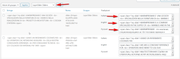
and then saved the “translation strings” at the bottom of the page.
Now each language homepage shows the slider with the correct language, please clear your browser cache and check.
Best regards,
Mike
Hi Ismael,
Do I have to apply the exact same fix to all of the sites I manage? I think this is a bug.
My other sites do not have staging areas so I will not update Enfold for them. I don’t want to ruin the markup. I also found some kind of hiccup on the live site and got a notification from Search Console “no Logo” seems to happen only on this post where the sidebar shows up on the bottom?: https://staging-conversionsciencesdev.kinsta.cloud/visualizing-your-marketing-and-sales-process/ (happens both on the live and staging sites same post)
Please help!
Thank you!
Havi
Hi: I have searched your forum and tried a couple of things as a result, to no avail. My Search Icon, divider icons and scroll to top icons all appear as rectangular boxes. I have upgraded the php version to 7.3; have Enfold version 4.7.1; then I saw one of your fixes to add some code to the .htaccess file, but that didn’t work either.
I added this to .htaccess:
<FilesMatch “.(ttf|otf|woff)$”>
<IfModule mod_headers.c>
Header set Access-Control-Allow-Origin “*”
</IfModule>
</FilesMatch>
These did work before last couple of Enfold updates and I have not moved the site
Hi,
I’m using plugin Knowledge Base (Echo plugins) in which I have added a lot of documents (mostly PDF’s, but also external links). They are all set to open in a new window. This is working fine except for when they are appearing in a search result. All search results are opening in the same window. For pages on the website this is fine, but I want the external links and links to PDF’s to open in a new window.
I’m using plugin Relevanssi for better search results. I have asked the same question on that forum but Mikko Saari (from Relevanssi) referred me to Enfold support stating that I have to modify my search results template.
Can you help me with that?
Thanks a lot!
Hi there, I didn’t build this site originally, it was handed off for managing and updates, but I just updated to the newest Enfold theme and it broke the ability to add inline CSS to the Avia full slider caption title fields. I’ve searched the webs and I’m unable to find a solution to get this working again. Any help will be greatly appreciated.
I’m including a link to a few screenshots where you’ll have a visual of the issue.
Inline CSS Issues
Thanks,
Sol
When I try to edit a page with content in it, the advance editor keep loading.
If i open a new page or edit a page with no content, the editor works but when I save the page, it redirect me to the search page.
I have tryed this :
– activated wpDebug without warnings
– manually delete and replace the enfold folder theme with most recent
– disabled all plugins
– activated an other theme (save work at that time but as soon as i reput enfold it stops)
– opened site in anonymous to be sure cache is cleared
I have wordpress 5.3.2–fr_FR and enfold 4.7.1 on a php 5.6
I am out of ideas on how to troubleshoot this issue and since it’s linked to enfold, i am hoping you could help me out
Hey Studio-ADE,
Thank you for the inquiry.
This is probably an issue with the French translation. Please install the Loco Translate plugin, look for the Enfold theme or avia_framework text domain in the plugin’s Themes panel and search for the strings or text “3 Items”, “4 Items” and “5 Items”. Once you’ve found each text, apply the translations accordingly, then update and sync the language files.
// https://wordpress.org/plugins/loco-translate
Best regards,
Ismael
This is the settings:
token for enfold updates
This token has access to:
View and search Envato sites
View your Envato Account username
View your email address
View your account profile details
Download your purchased items
Verify purchases of your items
List purchases you’ve made
Hello, I still have this problem so I searched for other solutuions. I have now found this plugin:
https://envato.com/market-plugin/
I have installed this plugin, set up a new token, and now I do get update notifications for the Enfold theme!
Questions:
– Can I use this plugin savely with Enfold? Are there any know issues?
– I use Enfold Child themes; does this plugin leaves the Child theme as they are?
Thank you :)
Alwin
Hi guys,
I use the Enfold theme, Yoast for search engine optimalisation (plus) and WP Globus (plus) for translation. Now, I should be able to add Yoasts SEO recommendations like focus keywords etc, to the different languages of my pages. However, if I fill in the SEO in English and save that page, it over writes the Dutch SEO that I filled in earlier (my main language).
I contacted the people of Yoast and they asked me to find out where the problem could be. They asked me to deactivate all plugins except for Yoast and WP Globus and run a default theme.
So I installed and activated a default theme (Twenty twenty) and deactivated all plugins except for Yoast and WP Globus and now it seems to work. I can now fill in English SEO save it, without overwriting my Dutch SEO. If I use my Enfold theme and only switch on Yoast and WP Globus plugin the problems occur again. Now the people of Yoast asked me to contact you.
Obviously I am happy with Enfold but it is vital for me to have both WP Globus and Yoast. I hope you can help me out.
Thank you and best regards,
Tristan
Hi melanie_erfrischt,
Here is the code you can put in Enfold > General Styling > Quick Css, if it does not work, put into themes/enfold/css/custom.css
#top #s, #top #searchsubmit {
    border: 1px solid #ccc;
}
.html_header_sidebar #top .fullsize .template-blog .post .entry-content-wrapper .post_delimiter {
    border-bottom: 1px solid #ccc;
}
If you need further assistance please let us know.
Best regards,
Victoria
Hey!
I am getting a 404 error when trying to access the admin for the enfold theme:
http://SITENAME.co.uk/wp-admin/admin.php?page=avia
Nothing Found
Sorry, the post you are looking for is not available. Maybe you want to perform a search?
If I scroll down to the bottom of the page I can see the theme options but I can’t use or change anything and it has no CSS applied.
I’ve checked the php logs and I get this:
[07-Jan-2020 11:27:38 UTC] PHP Deprecated: Function create_function() is deprecated in /home/SITENAME/public_html/wp-content/themes/enfold/config-layerslider/LayerSlider/wp/widgets.php on line 4
[07-Jan-2020 11:27:38 UTC] PHP Warning: Invalid argument supplied for foreach() in /home/SITENAME/public_html/wp-cron.php on line 117
[07-Jan-2020 11:27:39 UTC] PHP Warning: Invalid argument supplied for foreach() in /home/SITENAME/public_html/wp-cron.php on line 117
I’m on
EnfoldVersion: 4.0.7
Wordpress: 5.3.2
PHP; 7.2
I’ve tried deactivating all plugins but no joy?
Hey dethfire,
Thank you for using Enfold.
Have you tried disallowing crawlers from indexing pages with the search query? This can be done in the robot.txt file as described in the following thread.
// https://kriesi.at/support/topic/how-to-exclude-internal-search-results-to-be-indexed-properly-robots-txt/
All you need is this line
User-agent: *
Disallow: /*?s=
This is according to Yoast’s.
// https://yoast.com/blocking-your-sites-search-results/
Best regards,
Ismael
Hi,
Thank you for the update.
According to the page speed insight tool, you have to eliminate render-blocking resources such as non-critical stylesheets and scripts. You won’t be able to do this with the theme without manual modification, so the easiest solution is to enable file compression as suggested by the tool.
There are a number of WordPress plugins that can help you inline critical assets or defer less important resources. Beware that optimizations provided by these plugins may break features of your theme or plugins, so you will likely need to make code changes.
// https://wordpress.org/plugins/search/critical+css/
// https://wordpress.org/plugins/search/defer+css+javascript/
If you don’t want to install a plugin, go to the Enfold > Performance panel, then look for the File Compression settings.
Best regards,
Ismael
Hi,
Thank you for the login, so I see that you are using the mobile menu for all screen sizes, I believe in this case adding a custom header widget area would work best, please see this in our documentation.
This function in your functions.php will add the widget area after the logo and before the menu:
add_action( 'ava_before_bottom_main_menu', 'enfold_customization_header_widget_area' );
function enfold_customization_header_widget_area() {
dynamic_sidebar( 'header' );
}
then you can add your button shortcode or html link to the widget and use css to position it next to the search icon, and make it show on the one page only.
Your WordPress > Appearance > Editor was not showing on your site so I couldn’t add the function for you, perhaps you will need to add via ftp, or unhide the editor. Once you have added the widget area and link we can help with the css.
Best regards,
Mike
Hi,
I am facing 2 issues that might be related between them:
1. When i click on the search icon in the header i am getting the below error messages:
Warning: include(/home/netinfoweb/public_html/aglantzia/wp-content/uploads/avia_fonts/30122019/charmap.php): failed to open stream: No such file or directory in /home/netinfoweb/public_html/aglantzia/wp-content/themes/enfold/config-templatebuilder/avia-template-builder/php/font-manager.class.php on line 469
Warning: include(/home/netinfoweb/public_html/aglantzia/wp-content/uploads/avia_fonts/30122019/charmap.php): failed to open stream: No such file or directory in /home/netinfoweb/public_html/aglantzia/wp-content/themes/enfold/config-templatebuilder/avia-template-builder/php/font-manager.class.php on line 469
Warning: include(): Failed opening ‘/home/netinfoweb/public_html/aglantzia/wp-content/uploads/avia_fonts/30122019/charmap.php’ for inclusion (include_path=’.:/opt/cpanel/ea-php70/root/usr/share/pear’) in /home/netinfoweb/public_html/aglantzia/wp-content/themes/enfold/config-templatebuilder/avia-template-builder/php/font-manager.class.php on line 469
2. Under Theme Options -> Import/Export -> Iconfont Manager -> I see a package there called “Font: 0”. I am deleting it and clicking on save, but on page reload i see it again there. Perhaps this has something to do with point 1.
I am just letting you know that i am using PHP 7.0.
Should you need to deactivate or install any plugins (like WP File Manager for modifying/investigating any files), please feel free to do so.
Thank you so much in advance!
Hi,
i set some pages to noindex with another plugin (rank math). It works finde for google.
Problem is, that for bing.com (search engine) it does not seem to work. I checked source code and found:
<meta name=”robots” content=”index, follow” />
<!– mobile setting –>
<meta name=”viewport” content=”width=device-width, initial-scale=1, maximum-scale=1″>
<!– Scripts/CSS and wp_head hook –>
<!– Suchmaschinenoptimierung von Rank Math – https://s.rankmath.com/home –>
<title>Kontakt – My website</title>
<meta name=”robots” content=”follow,noindex,noarchive,nosnippet”/>
It seems bing.com is fetching the first meta-name “index, follow” and ignores second (set with rank math plugin) “follow,noindex,noarchive,nosnippet”.
How can i remove the first meta name, given from enfold?
Many thanks & kind regards Jak
Hey terra3110,
1. Please refer to this: https://kriesi.at/support/topic/missing-icons-after-updating-to-wordpress-5-3-1-and-maintenance-releases/
2. Please try the following in Quick CSS under Enfold->General Styling:
#search-3 {
  min-height: auto !important;
}
Best regards,
Rikard
Howdy!
I use The Event Calendar. The title of an event single page is set to h2 by default. I would like to change this to h1.
In my search for a solution, I found this thread.
So far, this solution works, but:
1. the solution sets all h2 on the event page to h1. I’d like only to change the title
2. I cannot find a way to apply this solution to a child-heme.
Do you have any ideas?
regards
joerg
-
This topic was modified 6 years, 2 months ago by
 netgo2017.
Hi,
Sorry for the late reply, I took a look at your /special-report-research/ page and found in your technical data of your report the “less-than” signs broke the page shortcodes, so to correct I replaced all of the less-than signs with this html:
<span class="lthan"></span>
and added this css to your Enfold Theme Options > General Styling > Quick CSS field:
span.gthan:before {
  content: ">";
}
span.lthan:before {
  content: "<";
}
and now the page is showing correctly. Please try this for any other pages that might have the error.
Please note that when you add this html to your text element, please add it through the “text” tab and not the “visual” tab:
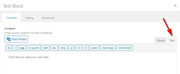
If you are using the “greater-than” sign on any pages please use this html instead:
<span class="gthan"></span>
Best regards,
Mike
Hi ahanauer,
Here is the code you can put in Enfold > General Styling > Quick Css, if it does not work, put into themes/enfold/css/custom.css
@media only screen and (max-width:479px){
    #socket .sub_menu_socket li {
        line-height: 25px;
    }
}
.avia_mobile #top #searchsubmit, .avia_mobile .ajax_load {
    height: 44.1px;
}
If you need further assistance please let us know.
Best regards,
Victoria



