Hey spheor!
I don’t see an easy way of going about that unfortunately. You can try using a plugin, https://wordpress.org/plugins/ultimate-wp-query-search-filter/, but I do not know of any that I can recommend.
Consider creating a feature request here, https://kriesi.at/support/enfold-feature-requests/, for more advanced query options to be included. If it gets enough interest then we may see something get added in the future.
Cheers!
Elliott
Gday Enfold users
My website uses the ajax portfolio: http://www.itchybrain.com.au/portfolio
Each portfolio item has associated text, eg. a paragraph about the portfolio piece.
When the full link is used (eg. such as indexed by google and shown in google search results) the resultant portfolio item page is empty, except for the featured image, eg. this type of full url: http://www.itchybrain.com.au/portfolio-item/monaro-farming-systems/
I would expect some information to appear, given that there is written text associated with each portfolio item (you will see in the ajax portfolio view).
Does this indicate I have set things up wrong, or is this how they ordinarily appear?
cheers
Darryl
Hi guys
A google console (webmaster tool) 500 response code occurs for:
wp-content/themes/enfold/
“Googlebot couldn’t access the contents of this URL because the server had an internal error when trying to process the request. These errors tend to be with the server itself, not with the request”
This issue has cropped up before on some of my other enfold sites, and I’ve searched previous replies. The issues keeps coming back after I “mark as fixed”
memory is 128 RAM, the robots file does not exclude it. using digital pacific business plan – a good plan, good host.
My wordpress developer replied to me “…. Google needs access to the folder so that it can get the css and js files, definitely, but access to the root directory is 100% not going to happen, and should definitely be throwing a 500 error. If google (and by definition anyone else from the public) could just access the root of your theme folder, it’d be days before your site was hacked; plain and simple.
I believe that, if google is trying to access wp-content/themes/enfold/ then there must be something pointing to it, and that is wrong.
If you can tell me why/where that specific url is being pointed to, I will be able to work out a fix.
The only other option is to just set up a 301 redirect; which is what I’ve done for the short term.”
From my point of view, a 500 error is something I’m a little concerned about.
Thanks for advising.
Hello,
We use the Events Calendar Pro plugin by Modern Tribe. When using the built-in Enfold search, we really like how event posts pop up in the preview as you type. But on the search results page, the post date is displayed beside each event. Is there a way to instead show the event date? The post date is misleading to viewers.
Thanks
Hey!
Please add following code to Quick CSS in Enfold theme options under General Styling tab to fix header issue
.avia-safari #header { background-color: white; }
I could not reproduce search icon issue and could not find your form. Can you please post the link to your page where we can see the forms?
Best regards,
Yigit
I’m waiting for a response from the developer. However, as per previous Enfold users and what they’ve stated that the developer indicated — and from my research — it seems that Enfold uses the built-in WordPress media player element and bundles it all in a folder called js/mediaelement — and this conflicts with other audio players … Another plugin developer (also dealing with audio) that was conflicting with Enfold said deleting Enfold’s js/mediaelement folder resolves the problem.
However, what will happen if I do that? Is it just the audio player functionality that I’ll lose? What other ramifications are there if I delete this folder?
No, you can’t see it any more, because we’ve made some changes to the menu.
BUT in enfold there is a search icon for the menu. And this icon should be in the header.
You can look at a standard Enfold installation, like here: http://kriesi.at/themedemo/?theme=enfold-overview
We simply need to know which code we have to copy from where and what classes or ids we have to take care of when positioning and designing the icon.
Thanks.
-
This reply was modified 10 years, 5 months ago by
 elbnetz.
Hey idespiran!
Thank you for using Enfold.
If possible, please use images with the same size and proportion. It will be much easier for WP to serve the exact thumbnails. Edit the portfolio grid, set the “Portfolio Grid Image Size” to the second option then choose the size that you want in the “Select custom image size” option.
Regarding the search icon, it’s possible to add it inside the mobile menu or just show it as a default icon. Refer to this link: https://kriesi.at/support/topic/search-widget-only-in-mobile-view/#post-517247
Cheers!
Ismael
Hi Gekko101!
Thank you for using Enfold.
You can use this plugin in order to improve or modify the search index: https://wordpress.org/plugins/relevanssi/
Integrate the relevanssi query in the ajax search, refer to this link: http://kriesi.at/documentation/enfold/use-relevanssi-in-search-instead-of-the-default-search/
Regards,
Ismael
Hi Guys,
When using the built in Enfold search feature (icon in menu bar) I want to control the search results it provides.
I want it to only search for Woocommerce products and to also display the results with Thumbnails of the products etc.
It seems to be using the basic WordPress search feature, how do I change this?
Thank you.
Hey Kevin!
Please add following code to functions.php file in Appearance > Editor
add_shortcode('avia_search', 'get_search_form');
and then go to Appearance > Menus and add a new link and add following into navigation label in your Enfold secondary menu
[avia_search]
Regards,
Yigit
Nope, doesn’t work sadly. Still pops for half a second.
This is the custom css (child theme) I have on the search field. But tried inserting it in Enfold custom CSS as well. Didn’t work.
.avia-search-tooltip { /* wider search field */
    width: 400px;
    border-bottom: none;
    opacity: 0;
}

#top #searchform>div {
    max-width: none;
}

@media only screen and (max-width: 989px) { /* helps search icon appear on mobile in hamburger menu. Found it on kreisi support */
    #top #searchform>div {
        display: block !important;
        opacity: 1 !important;
        padding: 0 1em;
    }
}
And thanks :)
Hi!
We can offer basic support only in this forum, as written in our support policy. If you are under pressure (time sensitive projects), then feel free to hire a freelance developer. You can find one for example here: http://kriesi.at/contact/customization
As I already told you: Please open different tickets for different questions, because then we can answer your questions simultaneously and you would get a faster reply. Furthermore it will be easier for people searching in this forum to find solutions, as the threads will be clean and easy to follow.
1.) Not sure about which icons exactly you are talking about and I am not sure if I understand you correctly. Why do you need to add any icons, which are already shown in your (Enfold) homepage?
As I already told you im my previous post, you can upload your very own icons to fontello.com. Click here:
View post on imgur.com
Afterwards you should follow the video tutorial on how to add your own icon fonts (which I already sent you as well in my previous post): http://kriesi.at/documentation/enfold/adding-your-own-icon-fonts/
2.) Responsive does not mean it will behave automatically the way you want. No plugin or theme can know what you wish to have. Instead it means that you can control different behaviors on different screen sizes. If you open a new ticket for this issue, then we can try to find the correct media queries for you.
3.) Screenshots would have helped a lot, to make things clear for us. In the future you can use imgur.com or dropbox.
Use this code instead:
#footer .container {
left: 10%;
}
and adjust as needed.
Regards,
Andy
Hey idespiran!
Please go to Enfold theme options > Header > Extra Elements and make sure that you have “Append search icon to main menu” checked
Best regards,
Yigit
Hey!
I successfully activated the latest version of Enfold on your installation. You are going to need to reconfigure theme options unfortunately as it seems like you were using an illegal copy.
I have not deleted old copy just in case you made changes on theme file. You can find it wp-content/themes/techsearchold. You can feel free to remove it if you have not made any changes on it.
Cheers!
Yigit
Hi,
I’ve been using enfold to create a website and have been having issues with everyone looking at it on Windows and Internet Explorer. Everyone comes back and says the team member images (link below) are pixelated badly. The same happens on blog post images.
I’ve uploaded them at 2500 pixels and inserted as full size (also tried smaller sizes, did not make a difference). The originals which are uploaded are definitely not pixelated and everything looks fine on Chrome, Safari & Firefox on mac.
I did some research on google and found some information saying that Internet Explorer has an issue scaling down images and renders them horribly. How do I get around this issue and still have nice and crisp images on Internet Explorer Windows, as well as Retina or on mac?
I’ve installed the Retina 2x plugin already, has not made a difference to the photos.
Thanks so much for your help. I really appreciate it, as my client is having massive issues with this.
Kindest Regards,
Corina
Hey!
Sorry for the delay. Please try to replace the code with this:
remove_action( 'woocommerce_before_shop_loop', 'avia_woocommerce_before_shop_loop', 1);
remove_action( 'woocommerce_before_shop_loop', 'avia_woocommerce_frontend_search_params', 20);
remove_action( 'woocommerce_after_shop_loop', 'avia_woocommerce_after_shop_loop', 10);

add_action( 'woocommerce_before_shop_loop', 'avia_woocommerce_before_shop_loop_mod', 1);

function avia_woocommerce_before_shop_loop_mod()
{
	global $avia_config;
	if(isset($avia_config['dynamic_template'])) return;
	$markup = avia_markup_helper(array('context' => 'content','echo'=>false,'post_type'=>'products'));
	echo "<main class='template-shop content ".avia_layout_class( 'content' , false)." units' $markup><div class='entry-content-wrapper'>";
	do_action('prdctfltr_output'); /* This is the part you should add to initiate the Product Filter in your Enfold template */
}

#
# closes the avia framework content container arround the shop loop
#

add_action( 'woocommerce_before_shop_loop', 'avia_woocommerce_after_shop_loop_mod', 1);
function avia_woocommerce_after_shop_loop_mod()
{
			global $avia_config;
			if(isset($avia_config['dynamic_template'])) return;
			if(isset($avia_config['overview'] )) echo avia_pagination('', 'nav');
			echo "</main>"; //end content
}
Regards,
Ismael
Hello,
I have discovered a strange behaviour when using the search function. When I search for anything, and click to view page 2 of the search results, I see components of my website pages rather than the second page of search results.
Is this anything to do with enfold settings or maybe a conflict with a plugin?
Thank you.
Hey richardelectrix!
Please try using a more advanced search plugin such as Relevanssi – http://kriesi.at/documentation/enfold/use-relevanssi-in-search-instead-of-the-default-search/
Regards,
Yigit
We’ve been trying to disable commenting on our blog posts and can’t get them turned off. We’ve searched the Enfold forum and found some things to try, but none have worked.
Here is a link to our blog page:
http://www.helpersinc.org/news/
We’ve turned off comments in WordPress Settings -> Discussion, but that didn’t have any effect.
Please tell us how to turn off all comments on our blog posts using the Enfold theme.
Thank you!
When you are on a device with the screen size of an ipad the nav menu overlaps with the search button Here is another screenshot url http://server.myspace-shack.com/d21/enfoldnavbug.png
Hi cherrmann!
Please add following code to Quick CSS in Enfold theme options under General Styling tab
.html_main_nav_header #top .main_menu .menu>li:last-child>a, .html_bottom_nav_header #top #menu-item-search>a {
    padding-right: 13px;
}
.html_header_searchicon_disabled #top .av_header_border_disabled.av_bottom_nav_disabled .main_menu .menu>li:last-child>a .avia-menu-fx {
    padding-right: 0;
}
Please make sure that > sign is not converted to – http://i.imgur.com/IDXRZQ3.png in Quick CSS field.
Regards,
Yigit
The main question currently is: Is it possible to include the search icon to more than one nav menu? The option in the Enfold configuration allows only to display it in the main menu.
I found a solution for the WPML language switcher. I added this code to Enfold Child: Theme Functions (functions.php)
function fixed_nav_menu_items($items) {
if (function_exists(‘icl_get_languages’)) {
$languages = icl_get_languages(‘skip_missing=0’);
if (!empty($languages)) {
foreach ($languages as $l) {
if(!$l[‘active’]) $items = ‘<li class=”menu-item custom-switcher”>![' . $l['language_code'] . '](' . $l['country_flag_url'] . ') ‘ .$items;
‘ .$items;
}
}
}
return $items;
}
add_filter(‘wp_nav_menu_items’, ‘fixed_nav_menu_items’);
Is there something similar for the search function?
All the best,
Steffen
Yeah, I searched the css files but will try a search on the enfold folder. Have figured another solution in the meantime. Thanks for your help.
Hi richardelectrix!
Please add following code to functions.php file in Appearance > Editor
add_shortcode('avia_search', 'get_search_form');
and then go to Appearance > Menus and add a new link and add following into navigation label
[avia_search]
then refer to this post and choose to hide it on desktop – http://kriesi.at/documentation/enfold/hide-menu-itemselements-on-mobile/
Best regards,
Yigit
Hi,
I can see the class added to the slider but no styles are being applied from the class itself. You could try to open each CSS file and do a simple search for it maybe? Or do a search in the Enfold folder only?
Best regards,
Rikard
Hi,
I’m installed Enfold and configure a large portfolio with items. I want that before click portfolio item or instead of click when mouse hover image this image zoom.
I was looking for image magnifiers and zooms, but a lot of them are for woocommerce, i haven’t installed, and the other plugins don’t work with enfold.
I tryed:
- Zoom Image
- Wd Image Magnifier
- Image Magnify
- Wp Zoom Image
- WM Zoom
- Image Zoom
- WP Image Zoooom
- Nextend Image Magnifier
- …
I think that hover effect before click showing circle with two arrows are overriding any magnifier plugin (i suposse)
Please. i search a lot and nothing found, in this forums are older responses or woocommerce responses.
Thank You
Victor
Hi Friends,
I’m continuing my effort to build my non-profit page with Enfold, and allow our members to pay their membership dues and register online for our events.
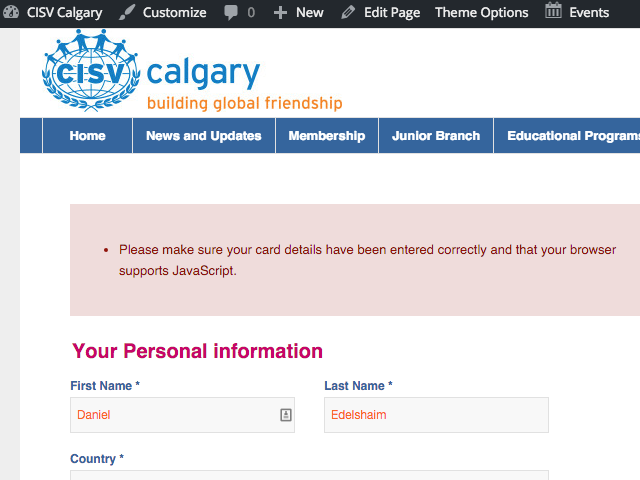
I’ve added the WooCommerce Stripe gateway, and am having some issues with it. I keep getting the following error:
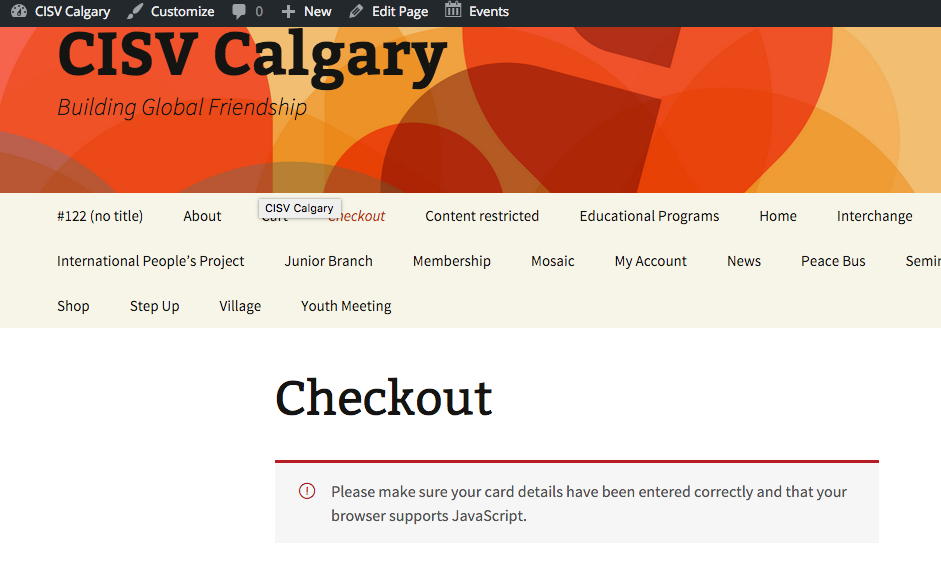
“Please make sure your card details have been entered correctly and that your browser supports JavaScript”. (screenshot: https://cldup.com/OTTsDig-zE.png )
In doing some “google research”, I found this thread on the WooCommerce – https://support.woothemes.com/hc/en-us/articles/203104417-Stripe-Error-Please-make-sure-your-card-details-have-been-entered-correctly-and-that-your-browser-supports-JavaScript-
It seems that the Woo Support folks point at potential theme conflicts.
I have tested as follows:
* Deactivated all plugins (except Woo plugins and Gravity Forms) — the issue still occurs
* Switched between Stripe’s live and test modes — issue occurs on both
* Switch to WP out-of-the-box Twenty Thirteen theme — issue still ocurs (screenshot: https://cldup.com/0Okio18ej2.png )
Your thoughts and ideas will be greatly appreciated…. thank you very much!
Daniel
-
This topic was modified 10 years, 5 months ago by
 daninyyc. Reason: Formatting
Hey markgibbons243!
Thank you for using Enfold.
What are the social icons that you used? Please post the url here. You can find the social colors on css > layout.css:
#top #wrap_all .av-social-link-rss:hover	   	 a{color:#fff; background-color:#ffa133; }
#top #wrap_all .av-social-link-facebook:hover  a{color:#fff; background-color:#37589b; }
#top #wrap_all .av-social-link-twitter:hover   a{color:#fff; background-color:#46d4fe; }
#top #wrap_all .av-social-link-mail:hover      a{color:#fff; background-color:#9fae37; }
#top #wrap_all .av-social-link-dribbble:hover  a{color:#fff; background-color:#e44885; }
#top #wrap_all .av-social-link-linkedin:hover  a{color:#fff; background-color:#419cca; }
#top #wrap_all .av-social-link-search:hover    a{color:#fff; background-color:#222222; }
#top #wrap_all .av-social-link-gplus:hover     a{color:#fff; background-color:#de5a49; }
#top #wrap_all .av-social-link-behance:hover   a{color:#fff; background-color:#008cfa; }
#top #wrap_all .av-social-link-flickr:hover    a{color:#fff; background-color:#ff0086; }
#top #wrap_all .av-social-link-forrst:hover    a{color:#fff; background-color:#234317; }
#top #wrap_all .av-social-link-myspace:hover   a{color:#fff; background-color:#000000; }
#top #wrap_all .av-social-link-tumblr:hover    a{color:#fff; background-color:#345574; }
#top #wrap_all .av-social-link-vimeo:hover     a{color:#fff; background-color:#31baff; }
#top #wrap_all .av-social-link-youtube:hover   a{color:#fff; background-color:#a72b1d; }
#top #wrap_all .av-social-link-pinterest:hover a{color:#fff; background-color:#cb2027; }
#top #wrap_all .av-social-link-skype:hover 	   a{color:#fff; background-color:#12a5f4; }
#top #wrap_all .av-social-link-instagram:hover a{color:#fff; background-color:#a67658; }
#top #wrap_all .av-social-link-five_100_px:hover a{color:#fff; background-color:#222222; }
#top #wrap_all .av-social-link-soundcloud:hover  a{color:#fff; background-color:#F76700; }
#top #wrap_all .av-social-link-xing:hover 	     a{color:#fff; background-color:#006567; }
#top #wrap_all .av-social-link-vk:hover 	   	 a{color:#fff; background-color:#597BA5; }
#top #wrap_all .av-social-link-reddit:hover 	 a{color:#fff; background-color:#FF4500; }
If you want to change the “skype” color for example, just follow the pattern in the previous code then refer to the css above:
#top #wrap_all .av-social-link-skype a {
background-color: #12a5f4 !important;
color: #fff !important;
}
Best regards,
Ismael