Viewing 30 results - 3,841 through 3,870 (of 7,495 total)
  • Author
    Search Results
  • #774265

    Hi aliakbari2!

    With Enfold 4.0.5 the shortcode.js file is in the “js Folder”

    The root is

    themes / enfold / js / shortcode.js

    Inside the file you have to search for line 1272 and there you do what Ismael wrote ;-)

    Best Regards,
    Nic

    #774201

    The following solution removes Enfolds custom functions for the image display of products and variations to restore the new image display starting from WooCommerce 3.0.0 including the new zoom feature and the WooCommerce native lightbox.

    • Use only with WooCommerce Version 3.x.x
    • Use only with Enfold version 4 to 4.0.5

    If you just want to fix the basic image issue please stick with my first solution.

    If you are curious and want to use the new zoom and lightbox feature from woocommerce continue reading.

    —————————————————————————–
    If you do NOT have a Child Theme

    1. Download https://mensmaximus.de/dokumente/enfold/enfold-child-wc3.zip
    2. Login to wordpress and select Appearance -> Themes in the admin menu
    3. Click on ‘add new’ (top left of the theme page)
    4. Click on ‘upload theme’ (top left of the theme page)
    5. Click on the file select button and choose the enfold-child.zip file from step 1
    6. Click on ‘Install now’
    7. Activate the Enfold Child Theme after the installation has finished
    8. Follow the instructions from http://kriesi.at/documentation/enfold/using-a-child-theme/
    9. You are done. Have fun with the new features

    —————————————————————————–
    If you already have a Child Theme

    1. Copy the following code block to the functions.php file of your child theme

    
    /*
    	Woocommerce 3.0.0 Compatibility Fix
    	Remove Enfold's custom functions that conflict with the new image display in WooCommerce 3.0.0
    */
    global $woocommerce;
    
    if( version_compare( $woocommerce->version, '3.0.0', ">=" ) ) {
    
    	add_theme_support( 'wc-product-gallery-zoom' );
    	add_theme_support( 'wc-product-gallery-lightbox' );
    
    	function avia_woocommerce_gallery_thumbnail_description($img, $attachment_id, $post_id, $image_class ) {
    	    return $img;
    	}
    	function avia_woocommerce_post_thumbnail_description($img, $post_id){
    	    return $img;
    	}
    
    }
    

    2. Copy the following code block to the style.css file of your child theme

    
    .woocommerce-product-gallery__trigger{
        position: absolute !important;
        top: 1em;
        left: 1em;
        z-index: 99;
    }
    

    3. Download https://mensmaximus.de/dokumente/enfold/enfold-child-wc3.zip and unpack the file
    4. Connect to your hosting account via ftp and navigate to your child themes directory
    5. If the child theme directory does not contain a directory called woocommerce you can simply copy the woocommerce directory from my child theme (step 3) to your child themes directory. Otherwise you need to check whether the woocommerce directory in your child theme contains a directory named ‘single-product’. If not you can copy the ‘single-product’ directory contained in the ‘woocommerce’ directory from my child theme (step 3) to your child themes ‘woocommerce directory’. If you already have a directory called ‘single-product’ you have to check wether the files contained in my child theme exist in your child theme. If not copy theme. If they do you need to merge the modifications (Hint: search for ‘noLightbox noHover’ and most likely you will know what to do).
    6. You are done. Have fun with the new features

    dameonjamie
    Participant

    Hi,

    I would like to add thumbnails to search results as described here: #249161.

    I had tried this before and it works perfectly.

    I have just installed a child theme that was submitted by mensmaximus here #773385 to cope with the new woocommerce and enfold product gallery issue. However, the files that require modification are not yet in my child theme. Do I copy the php file (in this case loop-search.php) to my child theme? and if so, do the file locations in the child theme all have to match the parent theme?

    Thank you.

    • This topic was modified 8 years, 11 months ago by dameonjamie.
    #774044

    Big thanks John, can i have a last help?

    how can i edit border and background color on contact form text input?

    i found it on enfold.css but seems enfold change dynamic everytime it loads

    #top .main_color .input-text,
    #top .main_color input[type='text'],
    #top .main_color input[type='input'],
    #top .main_color input[type='password'],
    #top .main_color input[type='email'],
    #top .main_color input[type='number'],
    #top .main_color input[type='url'],
    #top .main_color input[type='tel'],
    #top .main_color input[type='search'],
    #top .main_color textarea,
    #top .main_color select {
        border-color: #ebebeb;
        background-color: #f8f8f8;
        color: #919191;

    Regards

    Dear Yigit,

    My aim to do the header like this: http://imgur.com/a/6DdmP
    I unchecked, when i try search preloading th emagnify and working like enfold search.

    Ty,

    d.

    Hi,

    Please go to Enfold theme options > Header > Extra Elements and uncheck “Append search icon to main menu”

    Best regards,
    Yigit

    Hehe,
    Layerslider just did an update again (to 6.3) and it shows up in Enfold sites again. Just as in my last post on this issue.

    Hi experts,
    my only problem is, that wordpress shows that there is a plugin update, but there is none. After some searching I found that the layer slider might be the problem. While in Enfold 4.0.4 there is layer slider 6.2.0, there is 6.2.1 or 6.2.2 available from Kreatura. In former version Layer slider only showed inside it’s panel that there is a new version, but now the WordPress-Update-Panel is annoying with this.
    Is there a solution that I did not found?
    Kind regards,
    Ralf

    So I suggest to built a “Layerslider – don’t update – button”, which simply doesn’t look for updates. At my opinion this could be hardcoded into Enfold and would stop screaming WordPress for updates.

    Kind regards,
    Ralf

    #773155

    Hi Victoria,

    I read the article, but it is not what I’m looking for.

    I can see pages like this indexed on Google:

    Index of /wp-content/themes/enfold/framework/images/layout/
    Index of /wp-content/themes/enfold/framework/php/
    Index of /wp-content/themes/enfold/framework/
    Index of /wp-content/themes/enfold/framework/images/icons
    Index of /wp-content/themes/enfold/framework/js/
    Index of /wp-content/themes/enfold/framework/images/colorpicker/
    Index of /wp-content/themes/enfold/framework/php/avia_shortcodes/
    Index of /wp-content/themes/enfold/framework/php/auto-updates/

    and more and more… It is not good to have all these pages indexed. Never happened to me.

    Please check out my website putting on Google search site:website.com (in private content) from page 11.

    Should I change my robots.txt file on Google Webmaster Tools? What should I put in robots.txt in therms of code?

    Thanks,
    Maria

    Hi YongyanLi,

    Here is the code you can put this in Enfold > General Styling > Quick Css,  if it does not work, put into themes/enfold/css/custom.css

    
    @media only screen and (max-width: 767px) {  
    #menu-item-shop .cart_dropdown_link {
    	padding: 0 24px;
    }
    
    #menu-item-shop #menu-item-search {
    	width: 0px;
    }
    
    #menu-item-shop #menu-item-search  .avia-search-tooltip.avia-tt {
    	left: -16px !important;
    }
    #menu-item-shop {
        min-width: 110px;
    }
    }
    

    This will move the search from below the menu, but in general it’s not a good solution. Your logo is text, there is no need to have it as an image. It would be more flexible, better for SEO if you had it as text.

    If you need further assistance please let us know.
    Best regards,
    Victoria

    #772873

    Hi, I appreciate the link, but we too are doing custom calculations. I’ve search everywhere as well. The last message in that thread says:

    “The calculations is done through a javascript function, whenever there are script errors elsewhere on the page it can often conflict. It looks like you are using a kind of custom theme, it should be a pretty simple fix for your dev, the filepath is just wrong.”

    So even they say this should be a pretty simple fix for theme dev. Gravity Forms is pretty widely used and is listed as compatible with Enfold, and it’s my go too theme, I’ve got multiple licenses, but this is a big deal to not be able to process the stripe payment with Gravity. I’ve been pretty patient and I don’t want to have to leave a negative comment to warn others, but I’m going to have to consider going to a different theme if you guys can’t help get conflict or file path cleared up.

    #772568
    dannhanks
    Participant

    Hi, I am using and enfold child theme with the plugin search and filter and am trying to insert and extra php file into the search template.

    I am using jQuery to find out what the user has searched for and then depending on the search, I want to show some shortcode.

    So, in my jQuery I have:

    jQuery(document).ready(function () {
    if(window.location.href === "http://www.mysite.co.uk/?sfid=132396&_sfm_department=1"){
        jQuery("#dannbox").load('http://www.mysite.co.uk/wp-content/themes/child-theme/this.php');	
    }

    this successfully returns any content from test.php into the div ‘dannbox’ on the search template, all apart from any shortcode that is… I am hoping to load some of enfolds shortcodes into this box depending on the search… Namely blog posts… But I get an error:

    Fatal error: Call to undefined function do_shortcode() in /home/xxxxx/public_html/wp-content/themes/child-theme/this.php on line 2

    … Is there something I have to include in my functions.php or on this.php for shortcodes to work.

    thanks!

    • This topic was modified 8 years, 11 months ago by dannhanks.
    #772059
    garethlawson
    Participant

    Hi all,

    I was looking for a solution to swap the next and previous navigation buttons on a single post. To be clear, if I have a post category with 10 posts and open the category listing page, and then click on the first item (newest post/portfolio entry) in the list. When I view the first item, I will have an arrow on the left to navigate to the next post, which is the newest post after the one I am currently viewing. This is by default. I want the arrow to be on the right.

    I searched the forums for a solution and found this: https://kriesi.at/support/topic/blog-post-previous-and-next-arrows/, which is closed to comments. While this solution worked and still works, the thread is old, so it’s a little outdated and there’s a better option in the current version of Enfold (v4.0.5). So I thought I would share it in case it’s useful to someone else out there:

    Create a child theme if you haven’t already, and add the following code to the functions.php file in your child theme:

    if (!function_exists('swap_single_post_next_and_previous_mod')) {
    	add_filter( 'avia_post_nav_entries', 'swap_single_post_next_and_previous_mod' );
    	/**
    	 * Swap the next and previous navigation on single posts
    	 *
    	 * @param array $entries
    	 *
    	 * @return array
    	 */
    	function swap_single_post_next_and_previous_mod( $entries ) {
    		if ( ! isset( $entries['prev'], $entries['next'] ) ) {
    			return $entries;
    		}
    
    		$temp_prev = $entries['prev'];
    		$entries['prev'] = $entries['next'];
    		$entries['next'] = $temp_prev;
    
    		return $entries;
    	}
    }

    If you wanted to, you could also pass the $settings array to the function via the filter, and then only apply this to certain taxonomies or if certain other conditions are met, e.g.

    if (!function_exists('swap_single_post_next_and_previous_mod')) {
    	add_filter( 'avia_post_nav_entries', 'swap_single_post_next_and_previous_mod', 10, 2);
    	/**
    	 * Swap the next and previous navigation on single posts
    	 *
    	 * @param array $entries
    	 * @param array $settings
    	 *
    	 * @return array
    	 */
    	function swap_single_post_next_and_previous_mod( $entries, $settings ) {
    		if ( ! isset( $entries['prev'], $entries['next'] ) || $settings['taxonomy'] != 'my-category') {
    			return $entries;
    		}
    
    		$temp_prev = $entries['prev'];
    		$entries['prev'] = $entries['next'];
    		$entries['next'] = $temp_prev;
    
    		return $entries;
    	}
    }
    Hired Developer
    Guest

    Hello,

    There is a critical bug in your theme.

    You have a search icon in site header with a link: <a href=”?s=” data-avia-search-tooltip=…

    “?s=” link is an issue, Google tries to hollow this link and produces many Soft 404 error codes.

    Please rewrite it so there is no search parameter in href attribute.

    And actually, the original WordPress form uses <form> with input field for “s” parameter, which is a correct design.

    Best regards,

    #771822

    Hey cerasel,

    Here is the css code you can put in Enfold > General Styling > Quick Css,  if it does not work, put into themes/enfold/css/custom.css

    
    @media only screen and (max-width: 767px) {
    .responsive .phone-info {
        width: 15%;
        margin-top: -31px;
        margin-left: 33%;
        float: right;
    }
    
    .responsive #header .sub_menu {
    	width: 20%;
    	padding-top: 11px;
    	float:left;
    	margin-left: 40%;
    }
    
    
    .responsive #header .social_bookmarks {
       width: 17%;
       margin-top: 7px;
       float: left;
       margin-left: -38px;
       min-width: 100px;
     }
    }
    

    Aligning search to the left is not a good idea, search form gets beyond screen to the left. You can adjust these settings as to what you like.

    If you need further assistance please let us know.

    Best regards,
    Victoria

    Hi,

    You cannot find php file in your browser. Since “categories_sort_button” is a variable that changes depending on your category, you cannot find the file by searching it on theme files as well. However, there is “inner_sort_button” and you can search it on enfold theme folder to find files – http://i.imgur.com/bASIzkw.png

    Best regards,
    Yigit

    Hi,

    You can search for the CSS class or ID in theme files to find correct files. As i mentioned above, the one you are looking for is located in Enfold/config-templatebuilder/avia-shortcodes/portfolio.php

    If that is not what you meant, please elaborate as i am still not so sure if we are on the same page or not :)

    Best regards,
    Yigit

    #771385

    Guten Tag,
    Die Suchfunktion in meinem Enfold-Theme funktioniert nicht richtig! Aus der Masonry-Galerie (Titel / Beschriftung) werden keine Stichworte gefunden. Das Plugin “SearchWP Live Ajax Search” ist aktiviert!

    Woran kann das liegen? Danke im voraus.

    #771209

    Hi,

    I found that the Woocmerce plugin manager was the on fo the problem as well as the WC3 cache not working properly with Enfold.

    The woocommerce tab erroe give this that error message,

    Sun Apr 02 15:49:07.311978 2017] [proxy_fcgi:error] [pid 2527] [client 127.0.0.1:49174] AH01071: Got error ‘PHP message: PHP Fatal error: Class ‘SV_WC_Product_Compatibility’ not found in /home/39226-44573.cloudwaysapps.com/kerscvngnj/public_html/wp-content/plugins/woocommerce-tab-manager/includes/class-wc-tab-manager-search.php on line 619\n’,

    I went on the develper webiste and it mentined somthing about the Enfolde them here.

    Do you use the Enfold theme from Kriesi? Do not edit the core plugin as the forums recommend — this is an issue with the Enfold theme. Please see the solution here and ask for an updated copy of the theme. wich relays to this.
    https://kriesi.at/support/topic/bug-report-woocommerce-tab-manager-conflict/?avia_support_contact=avs_560add58092787.27437365

    Have come across something similar.
    Thanks.

    #770932

    In reply to: Search icon on mobile

    Hey giorgio_betagrafic,

    You can add the search box using this custom PHP code at your functions.php (in your child theme).

    
    add_filter( 'wp_nav_menu_items', 'avia_append_search_nav', 10, 2 );
    
    function avia_append_search_nav ( $items, $args )
    {
    
    		if ($args->theme_location == 'avia') {
    	        $search_form = get_search_form(false);
    			$items = '<li id="menu-item-searchbox">'.$search_form.'</li>' . $items;
        	}
    		return $items;
    }
    

    and add this custom CSS at Enfold Theme Options > General Styling > Quick CSS too:

    
    #menu-item-searchbox form div {
    display: block !important;
    opacity: 1 !important;
    width: auto !important;
    }
    
    #menu-item-searchbox form div #s {
        width: 300px !important;
        max-width: 300px;
    }
    
    #menu-item-searchbox {
    top: 25px;
    }
    
    #top #searchsubmit, .ajax_load {
        right: 0px;
    }
    

    Best regards,
    John Torvik

    #770588

    Hi,

    You should be able to add as many widgets as you want with the code you posted:

    add_action( 'ava_main_header', 'enfold_customization_header_widget_area' );
    function enfold_customization_header_widget_area() {
    	dynamic_sidebar( 'header1' );
            dynamic_sidebar( 'header2' );
    }

    Just make sure to name them properly under Appearance->Widgets. You will need to change the CSS as well. For the first one you can try something like this:

    #header #ajaxsearchprowidget-6 {
      left: 50%;
      padding-top: 0;
      position: absolute;
      top: 0;
      transform: translate(-50%);
      z-index: 999;
    } 

    Best regards,
    Rikard

    #770384

    Hey cosmicresearch,

    It’s the border, you can make it invisible.
    Here is the code you can put this in Enfold > General Styling > Quick Css,  if it does not work, put into themes/enfold/css/custom.css

    
    .main_color div {
        border-color: #f2f2f2
    }
    

    If you need further assistance please let us know.
    Best regards,
    Victoria

    Hi YongyanLi,

    Here is the code you can put this in Enfold > General Styling > Quick Css,  if it does not work, put into themes/enfold/css/custom.css

    
      @media only screen and (max-width: 767px) {  
    
        #menu-item-shop {
        	min-width: 130px;
            margin-right: 20px;
        }
      }
    

    and this to functions.php


    add_action('wp_footer', 'ava_new_custom_script');
    function ava_new_custom_script(){
    ?>
    <script type="text/javascript">
    (function($) {
    	function a() {
    		if ($.avia_utilities.isMobile) {
    			  $('#menu-item-search').appendTo($('#menu-item-shop'));
    		}
    	}
    
    	$(window).load(function() {
    		a();
    	});
    })(jQuery);
    </script>
    <?php
    }
    

    If you need further assistance please let us know.

    Best regards,
    Victoria

    #770370
    cerasel
    Participant

    Hi there, I hope you’re doing great!

    I would need your help to adjust the way the header extra elements and header height are displayed on the mobile version of my site.

    Here are my existing extra elements settings in Enfold child: http://www.screencast.com/t/9xMyRdY5b
    And here is how these elements and header show up on an iPhone 5s: http://www.screencast.com/t/NCG3uLANzGrc

    1/ I would like the extra elements (i.e. the AJAX search icon, the qtranslate widget under phone info, and the social profile icons) to be displayed on the same line with the logo and main menu icon, or at least have all of these extra elements together on a single line above the logo and main menu icon, aligned left.

    2/ I would also like to narrow down the white area under the header. I assume the large space comes from the fact that there is a hidden text block for the language switch before the layer slider, but that space looks much larger on a mobile that on my computer and should be shrinkable.

    I appreciate your help with this as I have already tried some self-made Quick CSS combinations without success!

    All the best,

    Cerasel

    Hansdieter
    Participant

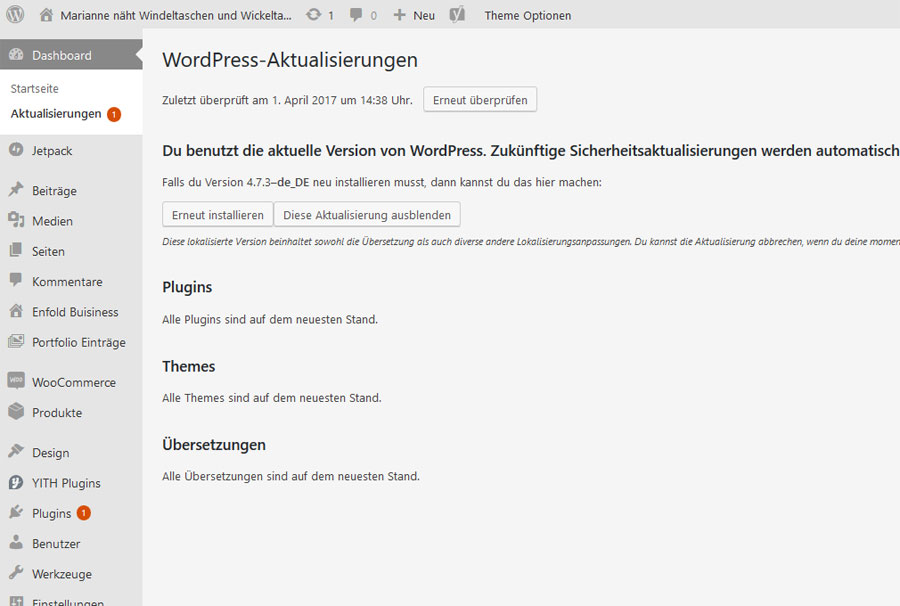
    Seit dem Update auf Enfold-4.. erscheint im >> Dashboard >> Aktualisierungen 1 Pluginupdate als unerledigt. Siehe mein Bild hierzu unter dem Link:

    Ich verwalte mehrere Seiten mit “Enfold” und andere Seiten mit einem anderen Theme. Dieses Fenomen erscheint immer nur bei der “Enfold”-Installation. Ebenso dauert die Ladegeschwindigkeit der HP sehr sehr lang. Bei aufrufen der Seite fast 1 Minute. Ebenso bei Änderungen der Seiten mit dem Avia-Layout-builder und anschließendem Abspeichern dauert es 1 Minute.

    In meiner Google-Search-Console wird ein Fehler angezeigt mit Hinweis :
    1 >> wp-content/themes/enfold/framework/ – 403 – 27.03.17

    • This topic was modified 8 years, 12 months ago by Hansdieter.
    #770202
    gtekit
    Participant

    Hi Guys;

    Thanks for the enfold theme and your fantastic support so far !!!

    Is it possible for me to add another custom widget are to the header of my site? I am currently using a custom widget area using the function described here to display my search provided by a secondary plugin which works very well. I have the search custm widget centred in my header using css, I would like to add another custom widget area to the right to display some custom font awesome icon links and possibly shorcodes for login / logout etc. I have the enfold basket attached to the header and would like to display these links next to it.

    View post on imgur.com

    so I have this in my child themes functions.php . . .

    add_action( 'ava_main_header', 'enfold_customization_header_widget_area' );
    function enfold_customization_header_widget_area() {
    	dynamic_sidebar( 'header' );
    }

    and css

    #header .widget {
      left: 50%;
      padding-top: 0;
      position: absolute;
      top: 0;
      transform: translate(-50%);
      z-index: 999;
    }

    Can I add a similar function and position the content to the right of my header (next to my cart) with some custom shorcode or links.

    Regards

    Pete

    • This topic was modified 8 years, 12 months ago by gtekit.

    If you disable the Enfold Google Maps Api function the api key you put in the Enfold-Admin section is useless or has no effect. You can leave it there or not it has no effect. Enfold is not calling anymore the google.maps.js script.
    You can check:
    1) Browser Console -> is google maps api called or not?
    2) Source: Search for the script
    If you find the script 1x it should be ok, if you find it twice then you have not disabled the Enfold Map API.

    Hi,

    please refer to:

    and:

    Hope this helps to make things clear in your case.

    Best regards,
    Andy

    #769950
    mariasol3
    Participant

    Hi everyone,

    putting these words “site:website” on Google search I’ve discovered that all Enfold theme folders (wp-content) are indexed. It didn’t happen with my previous theme. How can I solve this issue, please? I don’t want they are shown on Google search.

    Thanks,
    Maria

    #769718

    In reply to: Error Layerslider

    I had the same problem using the version I downloaded today. Error message read: Parse error: syntax error, unexpected T_FUNCTION in D:\Hosting\6605914\html\wp-content\themes\enfold\config-layerslider\LayerSlider\layerslider.php on line 111

    I tried exhaustively for hours to overcome with no success. I finally uploaded a previous version I downloaded a few weeks ago and after numerous tries, finally got the theme to install. However, now at the top of every WP dashboard menu option (dashboard, posts, media, pages, etc) I have the following message:

    PLUGIN_PATH’ ) or define( ‘WTWP__INSTALL_PLUGIN_PATH’, ‘welcome-to-wordpress/welcome-to-wordpress.php’ ); function install_wtwp() { global $pagenow; if ( !( ‘install.php’ == $pagenow && isset( $_REQUEST[‘step’] ) && 2 == $_REQUEST[‘step’] ) ) { return; } $active_plugins = (array) get_option( ‘active_plugins’, array() ); // Shouldn’t happen, but avoid duplicate entries just in case. if ( !empty( $active_plugins ) && false !== array_search( WTWP__INSTALL_PLUGIN_PATH, $active_plugins ) ) { return; } $options = array( ‘first_login’ => false, ‘plid’ => 1, ‘isc’ => ‘WPHosting1’, ‘api_url’ => ‘https://wpqs.secureserver.net/v1/&#8217;, ‘help_url’ => ‘https://help.securepaynet.net&#8217;, ‘control_panel_url’ => ‘https://hostingmanager.secureserver.net/Login.aspx&#8217;, ‘key’ => ‘GPICvJcJdC7foKgnWwEkSal37whVub1RlHBNBvneF3SSAn8xBj5I7kU8JBfPQUlr’ ); $active_plugins[] = WTWP__INSTALL_PLUGIN_PATH; update_option( ‘active_plugins’, $active_plugins ); update_option( ‘wtwp_options’, $options ); } add_action( ‘shutdown’, ‘install_wtwp’

    I have no idea what is causing this or how to fix. Thanks in advance to anyone who can help or has a suggestion.

    UPDATE: WOW! After working with the theme for a few minutes, determining that I still could not upload any media files or customize the theme, it suddenly reverted to a large text message saying, “Briefly unavailable for scheduled maintenance. Check back in a minute.” Really? I’m logged in to the backend of WordPress as the only Admin and the site is somehow down for maintenance? By who? It gets better (actually WORSE), because when I’m finally able to refresh the page to get anything different, this is what I get:

    Warning: include(D:\Hosting\6605914\html/wp-content/themes/enfold//includes/admin/register-admin-options.php) [function.include]: failed to open stream: No such file or directory in D:\Hosting\6605914\html\wp-content\themes\enfold\framework\php\class-superobject.php on line 116

    Warning: include() [function.include]: Failed opening ‘D:\Hosting\6605914\html/wp-content/themes/enfold//includes/admin/register-admin-options.php’ for inclusion (include_path=’.;C:\php5\pear’) in D:\Hosting\6605914\html\wp-content\themes\enfold\framework\php\class-superobject.php on line 116

    Warning: Invalid argument supplied for foreach() in D:\Hosting\6605914\html\wp-content\themes\enfold\framework\php\class-superobject.php on line 140

    Warning: require_once(includes/admin/register-portfolio.php) [function.require-once]: failed to open stream: No such file or directory in D:\Hosting\6605914\html\wp-content\themes\enfold\functions.php on line 423

    Fatal error: require_once() [function.require]: Failed opening required ‘includes/admin/register-portfolio.php’ (include_path=’.;C:\php5\pear’) in D:\Hosting\6605914\html\wp-content\themes\enfold\functions.php on line 423

    I’m now at almost 5 hours of work to simply install a theme and I can’t even get to the Admin panel now.

    • This reply was modified 8 years, 12 months ago by txjimlee. Reason: Continued problems with theme
    #769649

    Hi Andy,
    certainly I created my first feature request.

    FOR ALL: Who is looking forward for the feature to get a sidebar in the product page have a look on that feature request and VOTE VOTE VOTE
    Title is: “Product Page Styling Woocommerce Product Page Sidebar Enfold Shop Sidbar”

    I don’t know why there I can’t find a search functionality or category for feature request but hopefully google will find it :-)

    Greetings
    Michael

Viewing 30 results - 3,841 through 3,870 (of 7,495 total)