Viewing 30 results - 1,261 through 1,290 (of 11,204 total)
  • Author
    Search Results
  • #1337540

    In reply to: Popup window

    Hi,
    Thank you for the test page, for two buttons opening two popups on the same page the code block should contain this:

    <script type="text/javascript">
    jQuery(window).load(function(){
    jQuery('.avia-button-wrap.form-popup a.avia-button').addClass('form-popup-link');
      jQuery('.form-popup-link').magnificPopup({
        type:'inline',
        midClick: true
      });
    });
    </script>
    <style>
    .form-popup {
      position: relative;
      background: #FFF;
      padding: 20px;
      width: auto;
      max-width: 500px;
      margin: 20px auto;
    }
    </style>
    
    
    <div id="form-popup-one" class="form-popup mfp-hide">
    form one
    </div>
    
    <div id="form-popup-two" class="form-popup mfp-hide">
    form two
    </div>

    2022-01-27_001.jpg
    The button links should be #form-popup-one & #form-popup-two
    2022-01-27_002.jpg
    and the button custom class should be form-popup
    2022-01-27_003.jpg
    this results like this:
    2022-01-27_004.jpg
    Now to add your forms you will create your forms with the shortcode wand in a Classic Editor post so you can copy the shortcode and paste it in the code block:
    2022-01-27_005.jpg
    like this:
    2022-01-27_006.jpg
    the result:
    2022-01-27_007.jpg
    I made these changes to your page please clear your browser cache and check.


    @mistermagoo8691
    thanks for your feedback, I will check & correct it.

    Best regards,
    Mike

    #1337339
    dianajuhn
    Participant

    Tacksharpusa.com
    – none of the gallery “load more” buttons are working properly.
    We have tried deactivating plug ins to no avail.
    Can you help please?
    Diana
    (Email address hidden if logged out)

    #1337326

    Thank you for your response! The first option worked great.

    The calendar buttons on the single events are also formatted a little strangely with what looks like an extra icon and inconsistent padding. Is this an Enfold conflict, as well?

    An example link is below.

    #1337324

    In reply to: Popup window

    Hi Mike,

    I am really amazed by your support here. :-)
    The trigger would be a button or a link on the page. I want to have a form in the popup. A form created from the Enfolds “form-button”.

    I will have two different forms to choose between and it is not that nice to have both showing there so I want them to have the choice to click on the one that is for them. It would be really nice to have this form showing up in a popup window and after submitting it could be a short text saying thanks and so on…

    I write the rest in the private content box.

    Many Thanks,
    Robert

    • This reply was modified 4 years, 1 month ago by Brolle. Reason: Forgot some information
    #1337292

    In reply to: Popup window

    Hey Brolle,
    Thank you for your question we don’t have a built-in popup element but we do have this solution to create a popup with a code block element. We can help adjust this to show your form, but we will need further information, such as what will trigger the popup a link or button? What kind of form is it, a contact form element or the shortcode from another plugin?
    If you want to use a plugin rather than building this, WP Popups is a free plugin that seems to work well with Enfold.
    If you don’t want to use a plugin, then try creating a test page and include admin login in the Private Content area below so we can help further.

    Best regards,
    Mike

    #1337155
    acscreativenew
    Participant

    Hi, so im running enfold and have run into a couple of issues on my website.

    First when I try to save a page with the “social buttons” element the page will not save.
    Second the search is a little messed up. When i use the search it will drop down the ajax search but when i view all results it throws an error.

    Can you help me take a look at these issues on my website?

    I keep getting these errors within my logs

    [25-Jan-2022 18:02:59 UTC] PHP Fatal error: Allowed memory size of 536870912 bytes exhausted (tried to allocate 16384 bytes) in /home/devcganet/public_html/wp-includes/formatting.php on line 486

    Here are my PHP settings

    display_errors = Off
    max_execution_time = 90
    max_input_time = 90
    max_input_vars = 4000
    memory_limit = 512M
    post_max_size = 256M
    session.gc_maxlifetime = 1440
    session.save_path = “/var/cpanel/php/sessions/ea-php74”
    upload_max_filesize = 60M
    zlib.output_compression = Off

    Thanks
    -Dan

    #1337129

    In reply to: Margin on grid row

    Hi,

    Could you please try adding following code to Quick CSS field in Enfold theme options > General Styling tab and check if that helps?

    
    .aoki-template_image-button .flex_cell {
    padding: 0;
    }
    

    Best regards,
    Yigit

    #1337024

    Hey laptophobo,

    Thank you for the inquiry.

    You can add a widget area inside the header or directly modify the includes > helper-main-menu.php file and manually add the html for the button there. Please check this documentation fo more info if you want to use the widgets.

    // https://kriesi.at/documentation/enfold/header/#adding-a-header-widget-area

    Aside from those two options, you can also use hooks to insert additional content inside the templates. To insert something on the main header for example, you can use the ava_main_header hook.

    add_action("ava_main_header", function() {
       $output = "<button>This is a button</button>";
       echo $output;
    }, 10);
    

    Best regards,
    Ismael

    #1336959

    Hi Murielvillanueva,

    I’m not sure I can see that problem on my end, could you post a screenshot of what you are seeing on your end please?

    If you want to start a new thread, then please use this link, or click this button: https://imgur.com/a/AnoSPNb

    Best regards,
    Rikard

    #1336770
    Tomba111
    Participant

    Hi there,

    having used WP Staging plugin I changed my theme to Enfold (www.tt-bewerbungsservice.de) and published the changes. I really like the theme – great work, however I am simply not able to resolve some issues:

    1. “Erweitertes Styling” does not work. Although it says there were no problems saving the changes, these don’t become visibile on the frontend. The same applies to the footer color. It simply won’t switch to the settings chose. Other desired changes would be i.e. having bold text not change the color and link anchor texts being underlined (and maybe bold). It seems as if all changes made on the backend aren’t accepted, without receiving an error message.

    2. I would like to omit the datum of pages and posts in the search results.

    3. The titles in the blog preview break through the right boundary and interfer with the next title.

    4. Similar to No. 3 on the mobile page the special title “Der TT Bewerbungsservice im Überblick” also breaks through the right screen boundary apparently because the font size ist to large, regardless of the responsiveness.

    5. The alignment of the links in the footer on the mobile version is not correct. Both rows are not aligned: “FAQ” would have to be aligned with “Datenschutzerklärung” and “Kontakt” with “AGB”.

    6. How can I change the style of Block Quotes? I would like to omit the coloured bar and have a text in a different font style ans size, encompassed by quotation marks.

    7. The price table on https://www.tt-bewerbungsservice.de/preisliste-bewerbungsservice.html also has alignment issues. The table boxes are not aligned on the vertical axis. Preisstufe 1, Preisstufe 3 and Preisstufe 4 would have to have the same hight for all boxes, while Preisstufe 2 is highlighted.

    8. There is an issue that Buttons and picture texts almost collide. Under title “Wie nutze ich die Elternzeit für eine zukünftige Bewerbung am effektivsten?” on https://www.tt-bewerbungsservice.de/bewerbung/hinweise-bewerbung/bewerbungssituation/bewerbung-nach-elternzeit.html the button is far too close to the text beneath the picture. The button would have to be placed a little more downward.

    9. Is it possible to increase the distance between icon and text on Buttons a little?

    10. Is it possible to have the same distance above and below a divider element?

    11. Using a 1/2 1/2 divider for content it seems as if the centre is not aligned with the divider? Is the a possibility to enable this or ist the shift intended? Example: https://www.tt-bewerbungsservice.de/tabellarischer-lebenslauf/lebenslauf-vorlage-schueler-kostenlos.html. Cf. dividers and pictures.

    I know this is a larger list, however I’ve tried to solve these issues for quite some time now and don’t know how I could resolve them.

    Thank you for your help!

    Best Regards,
    Till

    #1336762
    Brian
    Guest

    I seem to be unable to post on your forums. I have a fix for this issue:
    https://kriesi.at/support/topic/woocommerce-one-page-checkout-not-working-with-enfold-theme/

    The fix is as follows: in woocommerce-mod.js line 51:

    //newNum = jQuery( jQuery( ‘<div />’ ).append( cloned ).html().replace( ‘number’,’text’ ) ).insertAfter( number );
    newNum = cloned.insertAfter( number );
    newNum.addClass(‘no-spin-num’);

    Then add somewhere in the css:
    .no-spin-num::-webkit-inner-spin-button, .no-spin::-webkit-outer-spin-button {
    -webkit-appearance: none !important;
    margin: 0 !important;
    }
    .no-spin-num {
    -moz-appearance:textfield !important;
    }

    The issue was that while you cloned the quantity field, but by changing its type from number to text you stripped the events (this would only work if you manually copied the events over for the modified elements). So easier to just clone as you have and hide the spinners via css. A more thorough solution would be to keep the change to a text field and then copy over the events, but this was quicker and easier.

    Et voila! Your theme now works with WooCommerce One Page Checkout!

    I also suggest you allow users to post on your forums even if their support is out of date (for cases like this – sales will have no idea what to do with this – send it to the developers).

    Thanks,
    Brian

    #1336733
    Holger Preiß
    Guest

    Hallo,

    Ich kann meinen Themeforest Purchase Code nicht mehr nutzen. Er funktioniert nicht : qwxsb16vcwjgi4v2isxq3txpcng0l21o

    Ich habe Enfold in 2013 gekauft, jetzt lange nicht genutzt und benötige Support oder Update wg. folgender Fehlermeldung:
    Failed to initialize plugin: avia_builder_button

    P.S. Am 27.03.2018, 12:16 habe ich zu dem purchase code bereits einmal eine Antwort von euch erhalten. Vielleicht hilft das.

    Viele Grüße

    Holger Preiß

    auch: http://www.hpfotografie(at)nord-com.net

    #1336660

    In reply to: read more button

    Hey metafora29,
    Thank you for your patience, do you mean that you would like to manually create a hidden text section on your page that will be shown when a button or link is clicked like a toggle or accordion section?
    An example of this would be to use this css:

    .learn-this { 
    	display: none; 
    }
    span.click-learn-more {
    	color: #000;
    	font-weight: bolder;
    }
    span.click-learn-more:hover {
    	cursor: pointer;
    }

    this html in a code block element:

    <span class="click-learn-more">Learn more…</span>
    <span class="learn-this"> your hidden text </span>

    and this script in your child theme functions.php:

    add_action('wp_footer', 'ava_custom_script', 10);
    function ava_custom_script(){
    ?> <script>
        (function($) {
            $('.click-learn-more').on('click', function() {
                $('.learn-this').toggle();
            });
        }(jQuery)); 
        </script>
    <?php
    }  

    If you mean that you would like the “read more” from the blog element to behave like this, then unfortunately we can not do this.
    You could use the masonry element or the ajax portfolio as a solution.

    Best regards,
    Mike

    #1336520
    JantienM
    Participant

    Hi,

    I would like change the way the selection buttons are displayed (using multiple answers) using the contact form of Enfold.

    Now it is displayed as a list and when the user wants to choose multiple options, they have to use the ctrl button. Is there a way to display them as checkboxes?

    I tried using contact form 7 but the checkboxes are displayed next to each other which looks quite disorganised.

    Thanks again!

    #1336463

    Hey inextable,

    Thank you for the inquiry.

    Did you use the WPML Translation Editor to translate the content of the portfolio items? In the “Language” box, make sure that the default translation editor is enabled before clicking the translation (+) button. Please check this documentation for more info.

    // https://wpml.org/documentation/theme-compatibility/enfold/#Translating-custom-post-types-taxonomies

    You may also need to translate the portfolio categories or taxonomies.

    // https://wpml.org/documentation/getting-started-guide/translating-post-categories-and-custom-taxonomies/#translating-taxonomy-terms-as-you-translate-pages-or-posts

    Best regards,
    Ismael

    #1336302

    Hey Max,

    Thank you for the inquiry.

    Do you accept the privacy cookies on every devices or browsers? Please note that the font will not load if the required cookies are not enabled or accepted, same goes with external services such as maps and videos. You have to open the privacy modal window, toggle the buttons for external services including Google fonts and accept the cookies. But if you want them to load automatically without user consent, you have to set the Enfold > Privacy & Cookies > Cookie Handling > Default Cookie Behavior to the first or second option.

    Best regards,
    Ismael

    #1336162

    On Enfold Options: Header > Header Style choose: minimal…
    i have changed the way of your example page a little bit, because i don’t think it makes sense to paint over the stroke with another ( 2nd child) either.
    You can see it here how I implemented it in Enfold. : https://webers-web.info
    Basic idea is that there is an omnipresent svg on the page, and this is used for the menu underscore.
    To have the svg always available on all pages:
    ( to child-theme functions.php ):

    add_action('ava_after_body_opening_tag', function() {
      echo '<svg id="stroke" xmlns="http://www.w3.org/2000/svg" width="0" height="0"><defs><path id="line" d="M2 2c49.7 2.6 100 3.1 150 1.7-46.5 2-93 4.4-139.2 7.3 45.2-1.5 90.6-1.8 135.8-.6" fill="none" stroke-linecap="round" stroke-linejoin="round" vector-effect="non-scaling-stroke"/></defs></svg>';
    });

    and like on the codepen page also in the menu item now set a svg which uses the path of the omnipresent svg:
    ( under the code above in child-theme functions.php ):

    function insert_svg_to_main_navigation() { 
    ?>
    <script>
    (function($){
    	$('#avia-menu li.menu-item-top-level a' ).prepend('<svg class="button-stroke" viewBox="0 0 154 13"><use href="#line"></use></svg>');
    })(jQuery);
    </script>
    <?php
    }
    add_action('wp_footer', 'insert_svg_to_main_navigation');

    the rest is quick css:

    body > #stroke,
    #av-burger-menu-ul svg.button-stroke {
    	display: none;
    }
    
    .button-stroke {
    	display: block;
    	width: calc(100% - 10px);
    	height: 20px;
    	position: absolute;
    	left: 5px;
    	top: calc(50% + 15px);
    	stroke-width: 2;
    	stroke-dasharray: 650;
    	stroke-dashoffset: 650;
    }
    
    #avia-menu li.current-menu-item > a .button-stroke {
    	stroke-dashoffset: 0;
    	stroke: #9b0000;  /*** it is up to you if and what color the active state of the menu-item is set here ***/
    }
    
    #avia-menu li.menu-item-top-level a:hover .button-stroke {
    	stroke: #07a;  /*** the hover color of the stroke ***/
    	-webkit-animation-duration: 2s;
    	animation-duration: 2s;
    	-webkit-animation-fill-mode: forwards;
    	animation-fill-mode: forwards;
    	-webkit-animation-timing-function: linear;
    	animation-timing-function: linear;
    	-webkit-animation-name: draw;
    	animation-name: draw;
    }
    
    @-webkit-keyframes draw {
    	100% {
    	  stroke-dashoffset: 0;
    	}
    }
    
    @keyframes draw {
    	100% {
    	  stroke-dashoffset: 0;
    	}
    }

    you see some parameters you can play with – f.e. stroke width or colors

    ___________

    with this way you should now be able to – animate your own paths as well.
    You need the path

    that part in the first code above
    <path id=”line” d=”M2 2c49.7 2.6 100 3.1 150 1.7-46.5 2-93 4.4-139.2 7.3 45.2-1.5 90.6-1.8 135.8-.6″ fill=”none” stroke-linecap=”round” stroke-linejoin=”round” vector-effect=”non-scaling-stroke”/>

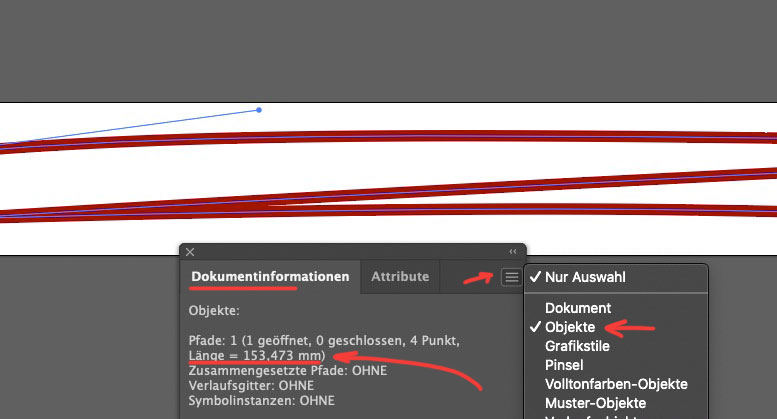
    you can create it f.e. in Illustrator, and the path length for the stroke-dasharray and stroke-dashoffset. By the way, you can determine the path length in Illustrator by selecting the path, then in the menu item Window – Document information – and then in the “hamburger” select objects. ( you need the value in px not in mm )

    Hi Josephine,

    You can open a new thread using this link, or click this button: https://imgur.com/a/AnoSPNb

    I’m not sure I understand the problem you are having with the sup tag, could you post a link to where we can see it please?

    Best regards,
    Rikard

    #1335765

    Hey NIck,
    Thank you for your question, you do not need to buy the pro version, when you click on the WordPress ▸ Layerslider menu item you probably see this screen:
    2022-01-16_005.jpg
    from here click on the “Lets Get Started” button in the center, then you should see this:
    2022-01-16_006.jpg
    here you want to click on the slider image, in this case it’s “Enfold Reimagend”, then you should be taken inside the slider editor and be shown a “Tour” popup that you should review:
    2022-01-16_007.jpg
    Most of these steps are only for your first visit to the Layerslider dashboard.

    Best regards,
    Mike

    #1335325
    crabjack
    Participant

    Hi – It seems almost standard now that there exists a button on web pages that gives visitors the opportunity to login as a user of the website, or create an account if they do not already have one. I have been unable to figure out how to do this on my enfold site. I have been looking on and off for some time. It doesn’t seem that it should be that hard, but I have not been able to figure it out our find documentation to help.

    Please help.

    Thank you,

    John

    Jörg
    Participant

    Hallo,

    ich habe schon die ganze Woche das Problem mit der Seite https://lifefeeling.info/, hoffe Ihr könnt mir weiterhelfen.

    Es kommen beim Bearbeiten der „Start“-Seite immer die gleiche Fehlermeldung, hier mal 3 Beispiele wann die auftreten:

    Füge ein Farbsektion ein mit Layout-Element 1/3 und 2/3, gehe auf „Aktualisieren“, alles noch okay.
    Sobald ich jeweils eine Media-Element „Bild“ einfüge, auf „Aktualisieren“ gehe, kommt die Meldung:
    „Es gab einen kritischen Fehler auf deiner Website. Bitte überprüfe den Posteingang deiner Website-Administrator-E-Mail-Adresse für weitere Anweisungen.“

    Füge in diese Layout-Elemente 1/3 und 2/3 jeweils Inhalts Element “Button über volle Breite” ein, gehe auf Aktualisieren, alles noch okay.
    Verschiebe ich das Layout-Element “Farbsektion” mit Inhalt zwischen andere Layout-Element nach unten, gehe auf Aktualisieren, kommt die Meldung:
    „Es gab einen kritischen Fehler auf deiner Website. Bitte überprüfe den Posteingang deiner Website-Administrator-E-Mail-Adresse für weitere Anweisungen.“

    Beim Erstellen eine Masonry-Galerie füge ich Bilder ein, anschließend gehe ich „Aktualisieren“, es kommt die Meldung:
    „Es gab einen kritischen Fehler auf deiner Website. Bitte überprüfe den Posteingang deiner Website-Administrator-E-Mail-Adresse für weitere Anweisungen.“

    Manchmal, wenn ich nach jeder Aktion „erstellen“ bzw. „einfügen“ direkt aktualisieren klicke, macht WordPress es ohne Fehlermeldung.
    Aber sobald sich mehrere Aktionen direkt nacheinander tätige und auf Aktualisieren gehe, kommt wieder die Fehlermeldung.

    Meine Vermutung, hat dies alles was mit Speicherproblemen zu tun?

    Das verstehe ich nicht, denn:

    WP Memory Limit: 12 of 256MB (5%) | PHP Memory Limit: 12 of 256MB (5%) | PHP: 8.0.13
    Andere:
    • PHP Version: 8.0.13 / 64Bit OS / Max execution time: 30sec
    • Memory limits : WordPress 256MB / PHP 256MB
    • Memory usage : 12MB

    WordPress 5.8.3 verwendet das Theme MyEnfold Child.
    Zustand der Website: GUT (Hervorragende Arbeit! Deine Website besteht derzeit alle Tests zum Website-Zustand.)

    Komisch ist auch, dass ich keine E-Mail mit weiteren Anweisungen bzw. Fehlermeldung erhalte.

    Es wäre schön, von Euch zu hören. Danke

    Gruß Jörg

    #1335249

    Hi Mike,

    Could you please replace /enfold/config-events-calendar/event-mod.css file with this one – https://pastebin.com/WzFx6VJX? Please make sure to clear cache.

    This should display buttons fullwidth starting from 990px.CSS changes will be implemented in upcoming version but we will wait for your confirmation :)

    Best regards,
    Yigit

    #1335108

    Hi Yigit
    With this code, the buttons are not visible anymore on desktop and on mobile it looks not very nice.
    We would like to have the buttons on mobile with 100% width, like it was before ;-)
    Would all this CSS codes be implemented in a later Enfold update?
    Best regards
    Mike

    #1335102

    Hi Yigit
    Thanks for the code. On desktop this seems to work, but on mobile not.
    There we have already the following code, because we already had problems on mobile after earlier “The Events Calendar” updateas:

    @media only screen and (max-width: 767px) {
      #top.tribe-theme-enfold.single-tribe_events .av-single-event-meta-bar-inner {
        display: block; 
      } 
      #top.tribe-theme-enfold.single-tribe_events .secondary .tribe-events-meta-group {
        margin-top: 20px;
      }
      .tribe-events-cal-links .tribe-events-button {
        width: 100%;
        margin-bottom: 10px;
      }
    }
    #1335095

    Hey Mike,

    Thanks for contacting us!

    Please add following code to Quick CSS field in Enfold theme options > General Styling tab

    
    #top #wrap_all .tribe-events-button {
      font-size: 13px;
      margin-right: 5px;
      display: inline; 
    }
    

    Best regards,
    Yigit

    #1334939
    ZlokalizujAuto
    Participant

    Hi there!

    Thanks for the awesome theme!
    Is there any option to create pricing tables with a toggle button (switcher)? I need pricing tables with monthly/yearly toggle switcher, but every toggle plugin i checked is made for gutenberg – not working with Enfold theme. Is there any way to create such functionality?

    #1334872

    Topic: Slider with buttons

    in forum Enfold
    edwindepianist
    Participant

    Hi again!
    How can I add one or two buttons (with links) to a full width slider, like on this Enfold website: (I mean adding buttons to the caption) ?

    Thanks

    Edwin

    mistermagoo8691
    Participant

    Hi folks, I’d like to reproduce the behaviour of the Fullwidth Easy Slider component that you used in the DJ Enfold demo homepage.
    That Fullwidth slider is using two 1030×412 very wide pictures: when you browse that homepage from a mobile phone (in portrait mode, of course), it shows only the central portion of the image, making the image tall enough to show the included headings & the button.

    I’ve tried to do the same, but when I see my Fullwidth Easy Slider on a mobile phone, it is showing me the WHOLE picture, and not only the central part. The result is that the whole image is not tall enough to include the button: the heading is there, but the button cannot be contained in such a small space, and it is not visible.

    I thought it was an issue with my images, therefore I’ve used the same images of the demo, and I’ve got the same result: the images are fully visible.
    in the “Styling” tab of my Fullwidth Easy Slider element I’ve used the same configuration of your demo, i.e. “No scaling (Original Width X Original Height)” & “Yes, stretch the image”.
    Where is my mistake?

    Thanks folks!
    Bye,
    A.-

    #1334678
    thinkjarvis
    Participant

    Hi guys,

    I have a really specific problem here link to test site in private settings

    The Enfold site below is using WPML to translate all pages.
    The news page uses a custom layout and uses the ALB Blog Posts Element to Display the Blog
    The design has been customised. But the pagination shouldnt be affected by this.
    The ALB Blog Posts Element is based on the List Layout – Excerpt (Title, meta information and exerpt only)
    Pagination Yes, 14 Posts Per Page.
    Page 3 pagination button at the bottom of the news feed does not work in the spanish version. All other pagination buttons work and the pages load just fine.

    Any chance you can take a look and see if you can see what has gone wrong?

    #1334626

    In reply to: logo as text

    Hi,

    Thank you for the update.

    Did you add this css code?

    .button {
        background-color: #66bde6 !important;
        -webkit-border-radius: 33px;
        -moz-border-radius: 3px;
        color: #ffffff;
        font-size: smaller;
        padding: 5px 15px;
    }
    

    This rule overrides the default background color of the submit button. If you want to override it, place this css code below.

    input[type="submit"], #submit {
        background: red !important;
        color: white !important;
    }
    

    Please make sure to toggle or temporarily disable the Enfold > Performance > File Compression settings after adjusting the css.

    Best regards,
    Ismael

Viewing 30 results - 1,261 through 1,290 (of 11,204 total)