just put his code name it f.e. prg_patterns.php – therefore you had to start that codesnippet of him by a leading <?php
– and upload it to your child-theme/shortcodes folder.
if you haven’t allready this littel snippet in your child-theme functions.php – insert it :
function avia_include_shortcode_template($paths){
  $template_url = get_stylesheet_directory();
      array_unshift($paths, $template_url.'/shortcodes/');
  return $paths;
}
add_filter('avia_load_shortcodes', 'avia_include_shortcode_template', 15, 1);
see doku to have own alb elements
see example in the footer area with links to impressum and datenschutz
https://enfold.webers-webdesign.de/impressum/#footer
i just edited his code a bit to have on form element classes to style the form output better:
/* form output */
ob_start();
?>
	<?php if( $atts['newtab'] == 'true' ): ?>
	<form class="prg newtab" method="POST" target="_blank">
	<?php else: ?>
	<form class="prg" method="POST">
	<?php endif; ?>
		<button class="noLink" type="submit" name="prgpattern" value="<?php echo $redirect_slug; ?>"><?php echo $atts['title']; ?></button>
	</form>
<?php
return ob_get_clean();
then i can set for those forms:
#top form.prg {
  display: inline-block;
  margin-bottom: 0;
}

#top form.prg .noLink {
  border: none;
  font-size: inherit;
  color: inherit;
  background-color: transparent;
}

#top form.prg .noLink:hover {
  color: gold;
  cursor: pointer;
  transition: all 0.5s ease
}

hm – first of all – as far as i know the bots of the crawlers will not follow submit buttons – thats the trick on prg patterns. So a search form like yours would not be affected by the “linkjuice” issue anyway.
Is that an Enfold Search ALB element you put on the page? Because I don’t get a “link element” there in my DOM anyway:
(click to enlarge the image)
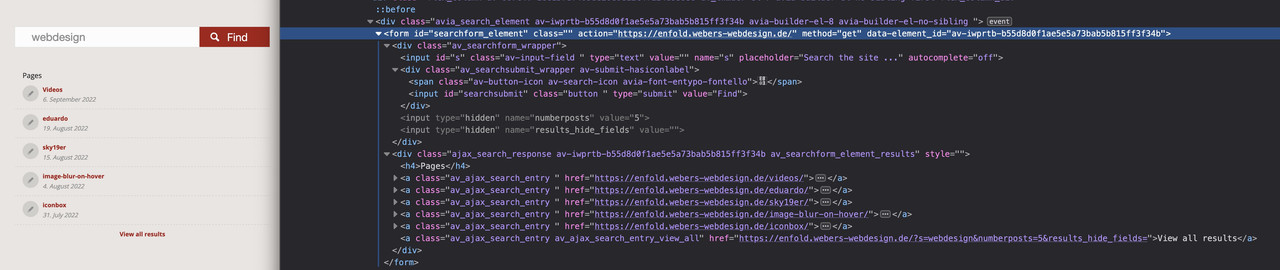
And even the search results beneath that form – do not have a rel : nofollow
So now my question regarding your Enfold version in which this occurs.
Edit: Ok now i see – this is the magnifier glass on top besides the navigation …
It is only that link that opens the search input form – But doesn’t it even make sense to set a nofollow at this anchor for SEO reasons?
Hi,
the Telegram Button (sharebox) is automatically displayed for all my installations. This is very bad, because it violates the DSGVO in Germany. This should please be fixed quickly! Yvonne is right at this thread: https://kriesi.at/support/topic/bug-in-enfold-5-1-2-telgram-button/!
Best regards
Michael
I need to put a button into the logo area.
I saw information on how to do it Here https://kriesi.at/documentation/enfold/add-button-elements-to-your-header/#toggle-id-2
but this tutorial was only if you want the menu below the logo area.
My client has the logo area below the menu, and the logo is justified to the left.
How can I add a button on the right side of the logo area?
Hey dweddell,
Thank you for the inquiry.
You can use the actual shortcode of the custom button and add it manually to the content slider. To see the builder shortcodes, you have to set the builder to debug mode.
// https://kriesi.at/documentation/enfold/intro-to-layout-builder/#debug-mode
After enabling the debug mode, you will see the shortcodes field below the Advance Layout Builder. Just copy the shortcode of the custom button and place it in the slider.
Best regards,
Ismael
 Waltraud Reisinger
Guest
Sehr geehrte Damen und Herren!
Ich ersuche sie höflichst um Hilfe.
Ich habe das enfold theme health coach gekauft und baue gerade folgende HP: http://www.mediation-prammer.at. Leider bin ich bei den Theme Optionen auf den Button alles Styling zurücksetzen angekommen. Und jetzt sieht alles ganz anders aus.
Ich benötige die schöne geschwungene Schrift welche bei den Überschriften verwendet wurde. Im Textblock konnte man die Schrift einfügen.
Vielleicht können sie mir weiterhelfen.
Vielen Dank Reisinger Waltraud
I would like to round the corners of the form fields and the submit button.
I would also like to edit the font size of the form fields, form labels and the submit button.
Can I have the CSS code? Thanks.
-
This topic was modified 3 years, 6 months ago by
 Samuel.
Hi Samuel,
Thanks for contacting us!
1- Please add following code to Quick CSS field in Enfold theme options > General Styling tab
#top .seva-fields input[type="text"] {
  margin-bottom: 0;
}
2- There seems to be an empty field above your submit button. I attached a screenshot in private content field below. Could you please edit your form and delete it?
Best regards,
Yigit
Hey Samuel Ng,
Thank you for the inquiry.
You can extend your support license on Themeforest using the same account used to purchase the theme. Please check the documentation below for more info.
// https://help.market.envato.com/hc/en-us/articles/207886473-Extending-and-Renewing-Item-Support
You can extend the license directly from the Enfold theme page, just click the Renew Support button.
// https://themeforest.net/item/enfold-responsive-multipurpose-theme/4519990/support
Best regards,
Ismael
Hey sky19er,
Thank you for the inquiry.
The load more button worked when we tested it, loaded 3 more items in addition to the initial entries. Please try to purge the cache, and toggle or temporarily disable the Enfold > Performance > File Compression settings. Let us know if the issue persists.
Best regards,
Ismael
Hey 4ndreaux,
Please see our documentation: How to add Custom Social Icons to Enfold options, and look for the Hover Background and Text color css:
#top #wrap_all .av-social-link-ICON_NAME:hover a{
    color:#fff;
    background-color:#9fae37;
}
note that you will need to adjust the ICON_NAME in the above code to your icon name.
For example the css for the Twitter icon is:
#top #wrap_all .av-social-link-twitter:hover a {
    color: #fff;
    background-color: #46d4fe;
}
After applying the css, please clear your browser cache and check.
Best regards,
Mike
 YU-Design
Guest
Hi there,
I’m a customer for many years with several licences. None of them still vaild at the moment, because I don’t need forum support.
But I do need help with what seems to be a bug on my end: According to your Changelog you added: Telegram social share button. Unfortunately you didn’t add an opt-out option in the theme settings. At least I couldn’t find it in my installation. As for GDPR reasons I do not want any social sharing buttons on my page and I would appreciate if you can fix this asap or let me know what I can do about it.
Thanks,
yvonne
Something we have run into links on the translated pages did not get updated properly. If you look at the page linked below the links on the buttons are linking to the page you are on and not the page it should go to (example: “MFSL” should go to https://hetronicinternational.nicomitcms.com/es/transmisores/mfshl/)
https://wpml.org/documentation/support/maintaining-avia-layout-builder-enfold-compatibility-wpml/#page-builder-shortcode-structure-in-the-language-configuration-file
I asked WPML about this. Below is what they said. Is this a known issue? I’m not clear on how we can fix this and we need to translate the website to another language soon, so we really need to have this addressed.
Problem:
I am using Avia Builder from the Enfold theme and I added some buttons to a page. The button opens another page from the website but on the translated page, the buttons point to the pages from the original language.
Solution:
The Avia Builder is using shortcodes for each element and the button is saving the ID of the target pages. What you need to do on the translated page is add the ID of the translated pages. In order to have the IDs available for translation in the translation editor, all you need to do is to follow the steps from the article below and add the XML configuration for the button element.
Hey,
Thanks for contacting us!
Please add following code to Quick CSS field in Enfold theme options > General Styling tab
#top #wrap_all #header.header_color #menu-item-2127.av-menu-button-bordered > a .avia-menu-text {
  border-style: dashed;
}
Best regards,
Yigit
or why don’t you choose on masonry all portfolio terms you have – and just hide those sort-buttons via css.
.av-masonry-sort .animation_sort_button {
  display: none;
}
Then All will show all – only the non wanted Sort Options are not seen ( like the home-sort )
f.e.: on that page here: https://kriesi.at/themes/enfold-2017/elements/masonry/
if you set :
.av-masonry-sort .illustration_sort_button {
  display: none;
}
The All Button will show illustrations too – but the sort option will not be there
Hi Rikard,
if I click the “Prüfe reCAPTCHA API KEYS Version2” Button I get the following error message
“Fehler beim Herstellen einer Verbindung mit Google reCAPTCHA – bitte wiederhole den Vorgang. Der geheime Parameter ist ungültig oder fehlerhaft”
When I refresh the “Google Dienste” site in enfold options there is the following message:
“Als wir das letzte mal überprüften, konnten wir mit deinem API-Schlüsseln eine Verbindung zu Google reCAPTCHA herstellen”
I don´t know why I get the error message in the backend?
I check it tomorrow again.
regards Patrick
Well – i use nearly almost the quick css – the only thing that always bothers me is that the window widths are limited. I’m now working on a high-resolution 4k 32” monitor. So I want to be able to take advantage of that.
I put in my child-theme functions.php file:
function admin_head_mod() {
echo '<style type="text/css">
  #avia_options_page .live_bg_wrap .main_h3 { font-size: 36px !important; }
  #avia_options_page .content_p, #avia_options_page .bg2 { font-size: 24px; }
  #avia_quick_css .avia_description {float: none;margin-bottom: 20px !important;padding-left: 0 !important;width: 98%}
  #avia_quick_css .avia_control {float: left;max-width: 98% !important;width: 98% !important}
  .avia_footer_links li {float: left;padding-right: 20px}
  .avia_footer .avia_footer_save {float: left}
  .avia_reset {display: none !important }
  #avia_options_page { max-width: 3000px!important}
</style>';
}
add_action('admin_head', 'admin_head_mod');
however, the latest enfold versions now have a “Theme Reset All Options” button on the import/export tab – I already include this in the code as seen above.
Hey Vangone,
Thank you for the inquiry.
Yes, this should be possible. You can use the following script in the functions.php file, which should trigger or activate a sort button based on the value of the sort URL parameter.
// activates a sort button based on the sort query parameter
function ava_activate_sort_button()
{
    if (NULL == $_GET["sort"]) {
        return;
    }
    ?>
		<script>
        (function($){
            $(document).ready(function() {
               <?php echo '$(".'. $_GET["sort"] .'_sort_button").trigger("click");'; ?>
            });
        })(jQuery);
        </script>
<?php
}
add_action('wp_head', 'ava_activate_sort_button');
Example of the URL with the sort parameter.
https://kriesi.at/portfolio?sort=enfold
Visiting the above URL will trigger the category sort item named enfold.
Best regards,
Ismael
Hallo
ich habe
1. Ein Header mit Hintergrundbild darauf befindet sich ein Scroll down Link mit animierten Pfeil, den man ja super in Enfold einstellen kann. Aber nach die Breite unter 1024 px breite ist, springt der Pfeil aus dem Bild und geht immer weiter runter, um so kleiner der Bildschirm in der Breite wird. Bekomme es nicht hin das er wieder höher geht, also näher am Bild.
2. Habe ich einen Text und Button im Hintergrundbild, das ich so eingestellt habe das, wenn es unter 673 px ist, ausgeblendet ist und das sich eine neue Section einblendet, wo sich dann Text und Button befindet. Aber auch hier viel zu weiter Abstand nach oben, auch da bekomme ich es nicht mit CSS hin, dass es weiter oben steht.
Kann mir jemand helfen? Ich sitze schon Stunden daran und es klappt einfach nicht.
Hey Ryan,
I went to Enfold theme options > Advanced Styling and edited “Menu Item Button”.
Please review your website :)
Cheers!
Yigit
I’ve tried, they did suggest me added several lines of code into function.php but it didn’t work, I’ll chase again.
I found some more unusual behaviors:
If user hover at the category title, it does not shows the title name but shows strange code
Example page: http://dir81.otherfish.net/directory-dirtest2/categories/restaurant/
screenshot:
http://dir81.otherfish.net/wp-content/uploads/2022/08/dir-hover-category-title.png
and, the title should link to the category page it self, but it actually links to the first list of the category, in the case above: http://dir81.otherfish.net/directory-listing/329/
Also the WordPress default ‘Edit’ is not link to the category, but to the Edit of first list of the category, screenshot to explain: http://dir81.otherfish.net/wp-content/uploads/2022/08/dir-edit-button-category.png
If I switch to any other theme, it works fine, but when I using Enfold, it become conflict somehow….
Regards,
Vincent
Hi,
In Social Buttons element “use defaults” option was chosen so it displays the share buttons enabled in Enfold theme options > Blog Layout. They were not showing up because they were all disabled. I enabled some and that worked.
Please review your website :)
Best regards,
Yigit
Hi,
Thanks for the update. I’m still not sure where exactly you want to place them? You can check the documentation here: https://kriesi.at/documentation/enfold/social-share-buttons/. If you need to customise them more, then you can add them to a new page layout, then copy the shortcodes. You would have to enable debug mode in order to see and copy shortcodes: https://kriesi.at/documentation/enfold/intro-to-advanced-layout-builder/#debug-mode
Best regards,
Rikard
Hi,
Thank you for the update.
We modified the avia_media.js, avia_media_advanced.js, avia_colorpicker.js and avia_advanced_form_elements.js files and replace all instances of the .live function with .on. These changes fixed the issue with the upload button but we cannot guarantee full functionality. Again, we recommend updating to Enfold or any themes with continuing support.
Best regards,
Ismael
Hello. I noticed this morning that the dialogue boxes are not loading when trying to add/change a button or button row or add a button shortcode to a text element. See browser error that kicks up after the dialogue box fails to load. I am running the most recent version of Enfold.
Any ideas?
POST https://sabr.org/wp-admin/admin-ajax.php 500 (Internal Server Error)
send @ load-scripts.php?c=0&load%5Bchunk_0%5D=jquery-core,jquery-migrate,utils,regenerator-runtime,wp-polyfill,wp-hooks&ver=6.0.1:2
ajax @ load-scripts.php?c=0&load%5Bchunk_0%5D=jquery-core,jquery-migrate,utils,regenerator-runtime,wp-polyfill,wp-hooks&ver=6.0.1:2
s.ajax.s.ajax @ load-scripts.php?c=0&load%5Bchunk_0%5D=jquery-core,jquery-migrate,utils,regenerator-runtime,wp-polyfill,wp-hooks&ver=6.0.1:5
fetch_ajax_content @ avia-modal.js?ver=6.0.1-4.8:413
create_html @ avia-modal.js?ver=6.0.1-4.8:224
set_up @ avia-modal.js?ver=6.0.1-4.8:86
$.AviaModal @ avia-modal.js?ver=6.0.1-4.8:65
(anonymous) @ avia-builder.js?ver=6.0.1-4.8:463
dispatch @ load-scripts.php?c=0&load%5Bchunk_0%5D=jquery-core,jquery-migrate,utils,regenerator-runtime,wp-polyfill,wp-hooks&ver=6.0.1:2
v.handle @ load-scripts.php?c=0&load%5Bchunk_0%5D=jquery-core,jquery-migrate,utils,regenerator-runtime,wp-polyfill,wp-hooks&ver=6.0.1:2
Hey Ralf,
Thank you for the inquiry.
Are you referring to the buttons in the consent message bar? You can change the text of the buttons in the Enfold > Privacy & Cookies > Cookie Handling tab, look for the Buttons section. If this is not what you are looking for, please provide a screenshot using imgur, savvyify or dropbox.
Best regards,
Ismael
Hi,
Thanks for your feedback, but the product slider doesn’t show the “Buy Now” or “Show Options” buttons, please see our Shop Demo example.

To add a “Buy Now” button to the product slider you can try adding this code to the end of your functions.php file in Appearance ▸ Editor:
add_action( 'after_setup_theme', function() {
     add_action( 'woocommerce_after_shop_loop_item_title', 'woocommerce_template_loop_add_to_cart', 12 );
}, 999);

Best regards,
Mike
just put in the mainClass the enfold class: avia-popup
( mainClass: 'avia-popup mfp-fade', ) and to better select that popup maybe we put in an additonal class f.e.: people
function button_for_biography(){
?>
<script>
window.addEventListener("DOMContentLoaded", function () {
	(function($) {
		$('#people').each(function(){
		var that = this;
			$('.flex_column', this).each(function(i){
				if($(this).find('.mfp-hide').length){
					$(this).find('.avia-button').attr('href','#bio-'+(i+1)).addClass('no-scroll');
					$(this).find('.avia_image').attr('href','#bio-'+(i+1)).addClass('no-scroll');
					$(this).find('.mfp-hide').attr('id','bio-'+(i+1)).addClass('white-popup');
				}
			});
		});

		$('#people .flex_column').find('.avia-button[href^="#bio-"]').magnificPopup({
			type:'inline',
			midClick: true,
			removalDelay: 500,
			mainClass: 'avia-popup mfp-fade people',
			gallery: {
				enabled:true,
			},
		});

		$('#people .flex_column').find('.avia_image[href^="#bio-"]').magnificPopup({
			type:'inline',
			midClick: true,
			removalDelay: 500,
			mainClass: 'avia-popup mfp-fade people',
			gallery: {
				enabled:true,
			},
		});

	})(jQuery);
});
</script>
<?php
}
add_action( 'wp_footer', 'button_for_biography');
now we can influence that close button “X” only for that popup (people) by:
div.avia-popup.people .mfp-close {
  right: -5px;
  top: -45px;
  color: #fff;
}



